Skip to content
DevMeme
2446 of 7435
For Developers, The Real Superhero is a Good API Client
API Post #2719, on Feb 3, 2021 in TG

For Developers, The Real Superhero is a Good API Client

Why is this API meme funny?

Level 1: Tools Over Capes

Imagine you have a big problem, like your favorite toy broke. You might think of calling a superhero like Superman or Batman to help, because they’re super famous for saving the day in stories. But in real life, Superman isn’t actually going to show up to fix your toy. Who or what will save the day? Probably a simple tool like glue or tape (and a helpful grown-up). The glue that fixes your toy becomes the real hero for you, because it solved your problem and made you happy again. This meme is joking in the same way: instead of a developer (a person who builds computer programs) relying on a famous comic-book hero to solve a coding problem, they rely on a handy tool called Postman. Postman is like the glue that helps fix issues with computer programs talking to each other. It may not be flashy or wear a cape, but it’s the thing that actually helps when it matters. That’s why, in the picture, the guy is rejecting the fancy superheroes and smiling at the tool – just like you’d push aside a comic book hero and cheer for the glue that fixed your toy. The idea is that sometimes the ordinary helpful thing is a true hero in our everyday life.

Level 2: Postman to the Rescue

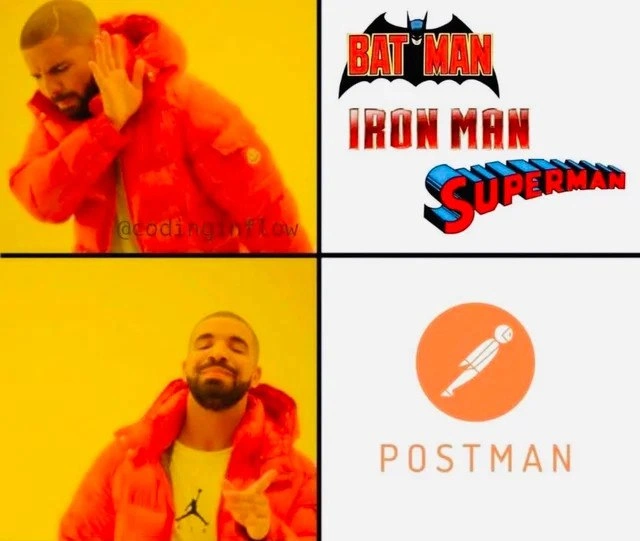
Let’s break down what’s happening here for someone newer to the world of coding and APIs. The meme is using a popular format (the Drake 4-panel meme) to make a funny point about developer life. In the top part, Drake is seen turning away in disapproval from the words “BATMAN,” “IRON MAN,” and “SUPERMAN.” Those are the names (and iconic logos) of three famous superheroes from comic books and movies. Typically, people think of superheroes as the ultimate problem-solvers – they save the world from bad guys. But Drake’s face there says “Nope, not interested.” In the bottom part, Drake is smiling and pointing happily at the Postman logo, indicating a big “Yes, this one!” Postman isn’t a superhero from comics; it’s actually the name of a very popular software tool used by developers. The joke is comparing fictional superheroes with a real-life “hero” tool that developers rely on every day for working with APIs. In other words, for a developer who is building or testing something, Postman feels as heroic as Superman would feel to someone in danger. It’s a fun exaggeration that plays on the idea that “not all heroes wear capes” – some come in the form of useful apps!

Now, what exactly is Postman? Postman is an application (originally a browser extension, now a standalone program) that helps developers test and interact with APIs. API stands for Application Programming Interface – which in simple terms is a way for different software systems to talk to each other. When you use an app on your phone or visit a website, behind the scenes there are probably API calls happening: your app is asking a server for data or sending data to a server. These API calls are usually done via web requests (HTTP requests like GET or POST). For example, an API endpoint might be a URL like https://api.weather.com/current?city=London that returns the current weather in London. If you’re a developer making such an API, you need to test if it’s working correctly. Postman lets you do that easily without having to write the client code or use a web browser. You can think of Postman as a universal remote control for APIs – it provides a nice interface where you can enter the URL (endpoint), choose the method (GET, POST, etc.), add any necessary headers or body data, and then send the request to see what comes back. The response might be data in formats like JSON (JavaScript Object Notation, which is a common text format for data) and Postman will display that for you in a readable way.

Why do developers love this tool so much that they joke about it being a superhero? Because it saves them a ton of time and headache when working on APIs. Here are some key reasons Postman is like the superhero of a developer’s workflow, especially in API development and web services:

  • Easy API Testing: If you’re new to building APIs, you might not have a user interface yet for your app. For instance, say you just made a /login endpoint on your server – how do you check if it actually works? Instead of immediately writing a whole frontend or a bunch of code to test it, you can open Postman, fill in the endpoint URL and credentials, and hit Send. Postman will show you the response from the server (maybe a success message or an error), so you know whether your API is doing the right thing. This quick feedback is extremely helpful when you’re developing and debugging. Think of it as practice for your API before it faces real users or a real app.

  • Debugging & Inspecting Responses: When your application isn’t working as expected, an API could be the culprit. Perhaps your app isn’t showing data because the server is giving an error. With Postman, you can isolate the problem: you directly ask the server “Hey, give me this data.” If Postman shows that the server responded incorrectly (like an error status code or wrong data), you’ve confirmed the issue is on the back-end. If the server responds correctly in Postman but your app still fails, the issue might be on the front-end side. Postman thus acts like a detective’s magnifying glass, allowing you to inspect the evidence (the API responses) closely. It even highlights things like HTTP status codes (e.g., 404 Not Found, 500 Server Error) and can pretty-print JSON, making it easier to read.

  • Postman Collections (Organizing & Sharing): A great feature for teamwork and documentation is Postman Collections. As a beginner, imagine you have several API endpoints to test – maybe one for users, one for posts, one for comments, etc. You can save each request in a collection (basically a folder or list within Postman). Give them names, set them up with sample parameters, and even include descriptions. Now you have a neat package of all your API calls. If you join a new team or class project, a senior dev might hand you a Postman collection and say “Here, import this – it has all our API endpoints setup for you.” With a click, you import it into your Postman, and voila – you can now run any of the API calls without manually configuring them. This is super helpful because it also serves as up-to-date documentation. Instead of reading a bulky manual, you get a ready-to-run set of examples. It improves the Developer Experience (DX) by making knowledge shareable and the workflow reproducible. In essence, Collections let Postman act as a team player: the knowledge of how to use the API is saved and can be passed on, almost like a superhero passing on a guide or toolkit to others.

  • Mocking and Environment Variables: Postman also allows more advanced (but very handy) tricks. For example, you can create a Mock Server in Postman. This means if your real API isn’t finished or is temporarily down, Postman can pretend to be the server and return sample responses. This helps front-end developers continue their work without stalling – it’s like having a stand-in actor for an unfinished part. Another trick is using environment variables. Let’s say you have a development server and a production server; instead of manually changing the URL every time, you set up variables (like {{base_url}}) for different environments. With one click, you switch the environment and all your requests now hit the new URL. This is powerful for testing because real-world APIs often have multiple environments (dev, QA, prod). It’s as if Postman can quickly change costumes to operate in a different city, just like a hero adapting to a new mission. While you might not use these features on day one as a newbie, as you progress you’ll see how they can save the day in more complex workflows.

  • Documentation and Collaboration: Postman can automatically generate API documentation from your saved requests. For someone starting out, documentation might sound boring, but it’s crucial when others will use your API. Postman makes it easier by turning your collection into a nice webpage that shows each endpoint, what inputs it expects, and what output it gives. This means you don’t have to write all that from scratch – the tool does it for you. Also, teams can collaborate by sharing these collections or even working within Postman together if you have accounts linked. It’s like writing the superhero handbook as you go, so everyone knows how to save the day using the API.

All these reasons explain why developers affectionately call Postman the “real superhero” of their API workflow. It’s reliable, it’s always there when you need it, and it dramatically simplifies tasks that otherwise would be tedious or confusing. A junior developer might first encounter Postman in a tutorial or a bootcamp when learning how to connect a front-end to a back-end. It quickly becomes clear why it’s so popular: the moment you use it, you get immediate clarity on what your code is doing. Instead of guessing “Is my server broken or is my React app not sending the request right?”, you can independently test just the server with Postman. It’s a bit like test-driving a car engine without the car – you can rev the engine and see how it runs without all the other parts. That ability to isolate and verify each part of your system is key in development.

The visual joke here leverages that classic Drake meme format to communicate this message in a split-second: We see Drake rejecting something (famous superheroes: Batman, Iron Man, Superman) — which represents things that are impressive but not actually useful for coding issues — and then happily preferring something more plain (the Postman logo) — which represents the tool that actually helps us get work done. The Postman logo itself is shown as an orange circle with a white rocket-shaped courier figure. Fun fact: the rocket in the logo aligns with the idea of fast delivery (rockets are fast, and Postman delivers your requests quickly). The word “POSTMAN” is written below it. It’s quite a well-known logo among developers; when it pops up on your screen, you know you’re in the API testing mode. For someone new, it might just look like a neat symbol, but to us in the coding community, it’s as recognizable as the Batman bat-symbol is to Gotham City. The meme’s caption even explicitly says “Postman is the real superhero of your API workflow.” “Workflow” here means the steps and tools you use while working on APIs. So they’re outright calling Postman the hero in the process of developing and testing APIs.

So, to summarize the humor: It’s funny because it’s true! 🦸‍♂️👨‍💻 Regular superheroes fight monsters and save cities in movies, but they can’t do anything about a broken login API or a misformatted JSON response. Postman, though not glamorous or fictional, actually saves the day for developers by helping them fix those problems. It’s a down-to-earth hero we rely on. If you’ve just started in software development, keep an eye out – you’ll likely use Postman or a similar API testing tool soon, and you might then create your own inside joke that “this thing is my superhero.” After all, when your code finally works because you found the bug with Postman’s help, you might feel a surge of gratitude towards this orange little app. That’s the feeling this meme is capturing and exaggerating in a lighthearted way.

Level 3: Not All Heroes Wear Capes

In this meme, Drake is symbolically snubbing the flashy comic book superheroes (the logos of Batman, Iron Man, and Superman in the top panels) and instead embracing an everyday developer tool (the Postman logo in the bottom-right panel). It humorously suggests that for developers, an API testing tool can be more of a real-life savior than any fictional caped crusader. Why would a coder favor Postman over Batman? Because when your API is misbehaving, no amount of super strength or high-tech armor can help you debug that failing endpoint – but Postman can! This is a playful way to say “not all heroes wear capes; some come as orange icons on our desktop.” In the world of software development (especially API development and web services), Postman truly feels like a hero because it swoops in to solve very specific problems that even a superhero can’t touch: sending test requests, inspecting responses, and tracking down bugs in our web APIs.

For seasoned developers, the joke hits home due to shared experience. We’ve all had those late-night coding sessions where an API call returns an enigmatic error or the front-end isn’t getting data from the back-end. In those moments, Postman swoops in like a vigilante of the night, letting us manually send a request to see what’s going on. It’s the first tool we reach for when an endpoint is acting up. With a couple of clicks, you can set the URL, method (GET, POST, etc.), headers, and body, then hit “Send” and immediately see the result. Did you get a 200 OK with a JSON body, or a 500 Internal Server Error with a cryptic message? Postman displays it all clearly. It’s like having X-ray vision for your HTTP calls – you see through the network and peek directly at the request-response cycle. That power helps us debug faster. Batman might have the Bat-Signal to call for help, but for a developer, the orange Postman icon on our toolbar is just as much a beacon of hope. When we launch Postman and watch it effortlessly handle a tricky API call, it genuinely feels like a superhero just saved the day.

There’s also an element of “superhero team-up” in modern development: Postman works alongside your other tools (like your code editor, your server, your database) as part of your heroic squad to get the job done. The meme specifically elevates Postman above legendary heroes, which is hyperbole for comedic effect, but there’s truth behind it. In terms of Developer Experience (DX), Postman has dramatically improved how we work with APIs. Tasks that used to require writing ad-hoc scripts or fiddling with command-line curl commands are now done in a convenient GUI. For example, instead of typing out:

curl -X GET "https://api.example.com/mission?hero=Batman" -H "Authorization: Bearer <token>"

and trying to parse the output in a terminal, Postman gives us a nice interface to set those options with dropdowns and text fields, then pretty-prints the JSON response. It even highlights syntax and spots errors (like a missing comma in JSON) faster than a speeding bullet. This ease-of-use means fewer mistakes and faster turnaround when developing. In a sense, Postman fights the “villains” of API development – things like mysterious bugs, poorly documented endpoints, or integration snafus – much like a superhero fights crime. It helps us mock requests (simulate server responses for testing), manage authentication tokens, and automate test suites for APIs. These features are the equivalents of a utility belt full of gadgets, allowing a developer to handle almost any API scenario. A senior dev knows that a tool like Postman can single-handedly prevent disasters by catching issues early. Have a flaky third-party service? Postman can continuously hit its endpoints and ensure they behave, almost like a watchful guardian. Need to share how your API works with the team? You can store all your calls in a Postman Collection and share that – it’s essentially your mission dossier, making onboarding new developers to the project so much smoother. This collaborative aspect (documenting and sharing API calls) has saved countless hours in meetings and explanations – the kind of mundane heroism that often goes unsung but is deeply appreciated by teams.

Long-time developers might chuckle extra at this meme because we remember the “dark ages” before Postman was around. Back then, testing an API meant either writing a quick and dirty test script in Python/JavaScript or using clunky tools. Some veterans used telnet or browser extensions to manually craft HTTP requests – it felt like trying to communicate with aliens using raw text protocols. It was slow, error-prone, and certainly not fun. Postman emerged as a simple Chrome plugin and then evolved into a powerful standalone app, revolutionizing how we handle APIs. Suddenly, we had a superhero sidekick specifically for APIs: intuitive interface, ability to save requests, environment variables for different setups (dev/staging/prod), and even automated testing capabilities. It quickly became indispensable. So when we say Postman is the “real superhero of your API workflow,” there’s a layer of grateful sincerity beneath the joke. It has rescued our projects and sanity so often that we do kind of idolize it. It’s the hero we developers deserved and the one we needed. 😄

To put it in perspective, here’s a tongue-in-cheek comparison of comic-book heroes versus our beloved dev hero:

Comic Superhero 🦸‍♂️ Postman (Dev Hero) 🚀
Battles evil villains Battles buggy APIs and 404 errors
Wears a cape or high-tech suit Wears an orange rocket logo (no cape needed)
Flies or drives the Batmobile Launches HTTP requests (rockets through endpoints)
Saves cities and people Saves projects and developers’ sanity

As you can see, Postman checks all the “hero” boxes for an API developer. The meme cleverly uses the Drake meme format (Drake saying “no” then “yes”) to convey this comparison succinctly. Drake refuses the trio of famous hero names – implying “I don’t need these guys” – but he’s all smiles and pointing when Postman appears, meaning “This is the hero I’m talking about!” It’s an exaggeration, of course – we don’t literally think a software tool is cooler than Superman 😜 – but it highlights just how vital Postman is in our day-to-day programming lives. In a job where mysterious API issues can feel as dire as a city in peril, having a reliable tool to turn to feels heroic. The punchline lands because anyone who’s wrestled with APIs knows that sometimes an effective debugging tool truly feels like a savior. The next time an API returns nonsense and Postman helps you crack the case, you might just imagine it wearing a cape in your mind’s eye.

Description

The image utilizes the popular two-panel 'Drake Hotline Bling' meme format to contrast traditional superheroes with a vital developer tool. In the top panel, the rapper Drake, wearing a bright orange puffer jacket, looks displeased and holds up a hand in a gesture of rejection towards the iconic logos of superheroes Batman, Iron Man, and Superman. A faint watermark for '@codinginflow' is visible. In the bottom panel, Drake has a pleased, approving expression, pointing towards the logo for Postman, the API platform, which features a stylized white figure inside an orange circle above the word 'POSTMAN'. The humor is rooted in the daily realities of software development. For engineers, especially those working on backend and frontend systems, debugging and testing APIs is a constant and often challenging task. The meme humorously asserts that a reliable tool like Postman, which simplifies API requests, testing, and documentation, is more of a 'hero' in their professional lives than the fictional superheroes they grew up with. It's a relatable sentiment for any experienced developer who has been saved from hours of frustration by a good API client


Comments

10
Anonymous ★ Top Pick Some heroes wear capes. Mine just has a 'Send' button and neatly formats the JSON response so I can prove the bug is in the frontend
  1. Anonymous ★ Top Pick

    Some heroes wear capes. Mine just has a 'Send' button and neatly formats the JSON response so I can prove the bug is in the frontend

  2. Anonymous

    Batman has gadgets, Iron Man has the suit, Superman has heat vision - yet the only hero who can chain a pre-request script, auto-refresh OAuth, and mock a 200 five minutes before the CEO’s demo is Postman

  3. Anonymous

    After 15 years of building distributed systems, you realize the real superpower isn't flying or super strength - it's having a properly configured Postman collection with environment variables that actually work across your entire team without someone accidentally hitting production

  4. Anonymous

    After years of debugging production APIs at 3 AM, senior engineers know the real superhero isn't the one who can fly - it's the one who can reliably test your OAuth2 flows, handle environment variables across 47 microservices, and generate documentation that doesn't immediately become stale. Postman doesn't wear a cape, but it's saved more backends than Batman ever saved Gotham. Plus, unlike Iron Man's suit, it actually works on Windows

  5. Anonymous

    Batman fights crime with gadgets, Iron Man iterates arc reactors - but Postman mocks your entire API suite flawlessly, no origin story required

  6. Anonymous

    Keep your caped crusaders - when prod melts, the only hero that can replay a five-hop OAuth dance, mint a JWT, and expose contract drift is Postman with a pre-request script

  7. Anonymous

    The only hero I trust is the one that parameterizes environments, runs Newman in CI, and won’t accidentally reuse the prod token

  8. Alexey 5y

    >windows

    1. @nenten 5y

      ?

  9. @UQuark 5y

    Insomnia > Postman

Use J and K for navigation