The Developer's Ultimate Headache: Native Binaries
Why is this Dependencies meme funny?
Level 1: The Big Ouch
Imagine you have LEGO blocks and Mega Bloks (a different brand of building blocks). You’re excited to build a cool structure, but when you try to stick a Mega Blok onto a LEGO piece, it just doesn’t fit right. The pieces keep falling apart or won’t connect at all. Frustrating, isn’t it? You thought you could mix and match any blocks, but because they were made by different companies (and to slightly different sizes), building something suddenly becomes really hard.
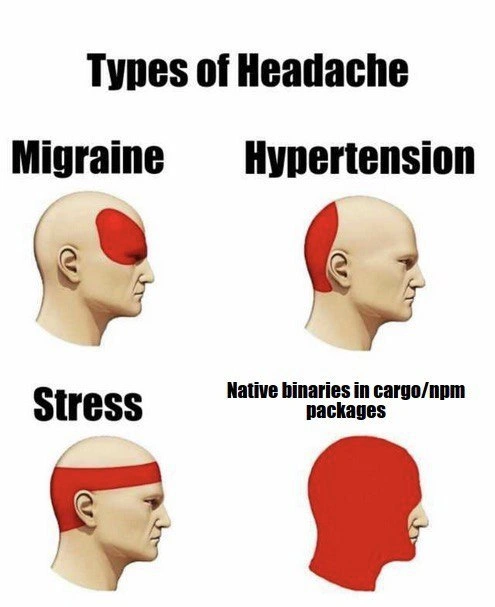
In this meme, a developer’s “headache” from native binaries is like that frustration. The developer tried to use a new software piece (a package) expecting it to just click into their project. But because that piece was made in a different way (for a specific kind of computer or system), it’s as if it doesn’t fit with the rest. They have to find special tools or versions just to make it work, kind of like needing a special adapter for a toy from another country. The picture’s last panel shows a head completely red to joke that this situation is the biggest headache of all. It’s saying “out of all the little problems that give you a headache, this one is so bad it makes your whole head hurt!”
So even if the technical details are messy, the feeling is simple: it’s the big ouch you get when something that should be easy turns into a complicated mess. The meme is funny because anyone who’s had this kind of trouble instantly recognizes that “ugh, not again!” feeling. It’s a way of laughing at our own frustration. Just like you might laugh later about how you tried to force those mismatched blocks together, developers share this meme to laugh (and cry a little) about the times a small add-on broke everything and gave them a giant headache.
Level 2: Why Dependencies Hurt
For a newer developer, let’s break down why "native binaries" in packages cause so much pain. Node.js uses a package manager called npm to install libraries (JavaScript packages). Rust has a similar system with cargo, which pulls in reusable code units called crates. Normally, packages are just code in a high-level language (JavaScript or Rust) that your machine can run or compile easily. But sometimes a package isn’t purely high-level code — it includes some native code. “Native” here means it’s written in a low-level language like C or C++ and needs to be compiled (turned into machine-specific instructions). These are usually called native addons or binary dependencies.
Think of it this way: if a package is pure JS or pure Rust, it’s like getting a recipe and the ingredients to cook on your own stove. It should work the same in any kitchen. A package with a native binary, though, is like getting a pre-cooked dish that was prepared in someone else’s kitchen — it might not suit your oven or might require special equipment to reheat. In practice, when you install a package with a native component, one of two things happens, both of which can trigger headaches:
Pre-built Binaries: The package may include a pre-compiled binary (say a
.nodefile for Node.js). This is like the dish already cooked. If that binary was built for a specific OS or CPU (for example, 64-bit Windows), it simply won’t work on a different system (like a Mac or Linux machine). You might get errors during installation or when trying to run the code, because your computer can’t understand that foreign binary format. It’s as if the instructions are in a foreign language your system doesn’t speak.On-the-fly Compilation: If no suitable pre-built binary is provided for your platform, the package will try to compile the native code on your machine during installation. Suddenly your simple
npm installorcargo buildtriggers a full C/C++ compilation process. If you’ve never set up a compiler before, this is daunting. You need the right compiler toolchain (e.g., on Windows you might need Visual Studio or on Mac, Xcode command-line tools). Without these, the build fails. You might see errors like “node-gyp not found” or “make: command not found”, which basically say "I don’t have the tools to build this native code." It turns a quick package install into a hunt for missing build tools.
New developers often encounter this when a seemingly simple library has hidden complexity. For example, many Node.js projects use a library called fsevents for file watching on macOS. If you happen to install a project on Linux that indirectly depends on fsevents, you’ll get an error because fsevents is an optional Mac-only binary that can’t compile on Linux. It’s a classic “why is this my problem?” moment for someone just trying to run an example project. In Rust, you might use a crate for handling images or cryptography that relies on native C libraries. If your system doesn’t have those libraries (or the development headers needed to compile against them), cargo will throw a fit with linker errors or tell you it “failed to run custom build command”.
These issues are what we affectionately call Dependency Headaches. Managing dependencies (Dependency Management) is hard enough, but when those dependencies need special treatment for different environments, it becomes a mini-sysadmin job. You have to worry about versions of external libraries (e.g., OpenSSL 1.1 vs 3.0), about whether you even have a compiler installed, and even about security (is that pre-built binary safe and up-to-date?).
From a junior perspective, it’s a lesson that not all code is equal. Some libraries carry along little passengers (native binaries) that make your life more complicated. This meme labels “Native binaries in cargo/npm packages” as the ultimate headache to say: if you can avoid it, avoid it! Pure JS or Rust implementations might be slower, but they won’t fail because you didn’t install Visual Studio or some dev package on your machine. And if you do need that speed from native code, be prepared to do a bit of extra setup. The humor here is in exaggeration — obviously it’s not literally the worst medical headache, but every new dev who’s spent an afternoon puzzling over a bizarre compile error feels personally attacked by that solid-red head image. It’s funny because it’s true enough: these kinds of install problems can make you want to pull your hair out.
In summary, native binaries in packages turn a quick and easy setup into a potential puzzle of compatibility issues. It’s a crash course in how different operating systems and languages can conflict. When everything finally works, you’re relieved — but you might also have a newfound respect for maintainers who deal with this complexity so you don’t have to (most of the time). As a junior dev, encountering this pain for the first time is almost a rite of passage in learning about Dependency Hell in real-world software projects.
Level 3: Cross-Platform Quagmire
On the surface, npm (Node.js’s package manager) and cargo (Rust’s build/package tool) promise easy code reuse, but the moment a package drags in a native binary dependency, all bets are off. Seasoned developers swap war stories of an npm install failing spectacularly because a sub-dependency needed to compile a C++ addon. The meme’s final panel – the entire head colored red – perfectly captures that all-consuming agony when a build breaks on your machine due to some platform-specific quirk. It’s a satirical exaggeration, but not by much: dealing with cross-compilation issues and binary addons can genuinely spike a dev’s blood pressure to hypertensive levels.
Why so painful? Native binaries are pieces of code compiled for a specific OS or CPU architecture (like a .dll for Windows, or a .so for Linux). Unlike pure JS or pure Rust crates that compile from source seamlessly, these pre-compiled bits are not one-size-fits-all. If the package maintainer didn’t provide a binary for your platform, your package manager will bravely attempt to compile it on the fly. Cue the chaos: suddenly you need the right version of a C/C++ compiler, proper header files, maybe an entire build toolchain configured just so. Dependency Hell becomes very real when a simple npm install pulls in a tangled mess of native build requirements.
Consider a Node.js example: installing a popular library like bcrypt on Windows. Under the hood, it runs node-gyp to compile a native bcrypt implementation. If your environment lacks Visual Studio Build Tools (pretty common on a fresh Windows dev machine), the install fails with a cryptic error. Meanwhile on Linux, you might need Python 2.x specifically because node-gyp historically demanded it. “Works on My Machine”™ becomes a cruel joke when one team member can install fine (they unknowingly had the right tools), but another is stuck watching a cascade of red error messages.
Rust developers aren’t completely safe either. Cargo loves compiling from source (Rust crates are source-based), but many Rust crates wrap C libraries for performance or legacy reasons. For example, the openssl crate will attempt to link against the system’s OpenSSL library. If you don’t have the OpenSSL dev libraries installed (e.g., libssl-dev on Linux, or the proper binaries on Windows), you’ll see a fiery build failure. Each OS has its own library locations and quirks, so a crate needing system libraries can turn into a platform-specific scavenger hunt. The meme’s entire head red resonates with any Rustacean who’s wrestled with openssl-sys errors at 2 AM, wondering why a simple HTTPS feature means delving into linker errors and pkg-config.
There’s also a supply chain risk aspect hidden in that red-head pain. Pre-compiled binaries in packages can’t be easily inspected. A malicious or outdated binary could slip into an npm module; since it isn’t source code, it might evade casual code review. Security-conscious teams then face a headache doing extra security reviews or forcing a from-source rebuild to ensure nothing nefarious lurks inside. The meme humorously amplifies this worry: “Native binaries in cargo/npm packages” is listed not just as a headache, but the ultimate headache. It’s hyperbole born of truth — maintaining a secure, portable application becomes exponentially harder when your dependencies drag along opaque, platform-specific baggage.
In short, the meme strikes a chord with any senior developer who’s chased down weird build errors or done impromptu DevOps just to satisfy a stubborn dependency. It’s the wild west of Package Management: a simple library import opens Pandora’s box of compilers, system libraries, and trust issues. Migraine? Stress? Hypertension? Those are everyday nuisances. Native binary dependencies are the king-size headache that unites Rustaceans and Node.js veterans in suffering. As one battle-hardened engineer might quip: “Oh, you have a headache? Try debugging a failed node-gyp build on Windows — now that’s a headache.” The meme’s dark humor lies in how painfully accurate it is: the entire development headspace in throbbing, fiery pain thanks to one small binary blob in the dependency tree.
# Example of the chaos: trying to install an npm package with a native addon
$ npm install fsevents # a package with native binary dependencies (commonly fails on Linux)
> [email protected] install /app/node_modules/fsevents
> node-gyp rebuild
gyp ERR! build error
gyp ERR! stack Error: `make` failed with exit code: 2
gyp ERR! stack at ChildProcess.onExit (/usr/lib/node_modules/npm/node_modules/node-gyp/lib/build.js:194:23)
...
gyp ERR! System Linux 5.4.0-42-generic
gyp ERR! command "/usr/bin/node" "/usr/lib/node_modules/npm/node_modules/node-gyp/bin/node-gyp.js" "rebuild"
gyp ERR! errno 1
(Above, a typical node-gyp failure spews out scary errors — a sight that causes instant headache for developers.)
Description
A four-panel meme titled 'Types of Headache' that uses anatomical diagrams to illustrate different kinds of pain. The first three panels depict standard medical headache types: 'Migraine' shows a localized red area on the forehead, 'Hypertension' shows a red area at the back of the head, and 'Stress' is represented by a red band across the forehead. The fourth panel provides the punchline for a technical audience. It's labeled 'Native binaries in cargo/npm packages,' and the corresponding diagram shows the entire head colored in solid red, signifying an extreme, all-encompassing pain. This meme humorously expresses the immense frustration developers experience when dealing with pre-compiled native code within package managers like npm (for JavaScript/Node.js) and cargo (for Rust). These binaries often lead to severe build failures, cross-platform compatibility nightmares (e.g., x86 vs. ARM on Apple M1), and security vulnerabilities, making them a notorious source of developer anguish

Comments
7Comment deleted
I love the thrill of `npm install`. It's like a surprise party where the surprise is that a random dependency is trying to compile a C++ library from 2007 on your M1 Mac
Nothing says “full-stack” like an npm postinstall that compiles a Rust addon needing MSVC on Windows, Xcode on macOS, and the exact glibc Alpine doesn’t ship - my head’s now more cross-platform than the binary
After 15 years in the industry, I've learned that 'it works on my machine' is actually a threat when the package has native bindings - because now you have to figure out which exact combination of Python version, node-gyp, Visual Studio build tools, and ancient C++ redistributables made it compile on that one blessed developer's laptop
The progression from migraine to native binaries perfectly captures the developer experience: a migraine is localized pain you can treat, hypertension is manageable with lifestyle changes, stress can be reduced with meditation - but native binaries in cargo/npm? That's a full-brain, existential crisis involving missing Python 2.7, incompatible Visual Studio versions, mysterious linker errors, and the realization that 'it works on my machine' has never been more painfully literal. It's not just a headache; it's a cross-platform compatibility nightmare that makes you question every life choice that led to running 'npm install' on a package with native dependencies
Native binaries in npm/cargo: “install” becomes node-gyp, cross-toolchains, glibc vs musl, and a CI matrix explosion - because a transitive dep wanted to resize a PNG
Write once, run anywhere - until npm install drags in a Rust crate; then it’s node‑gyp, N‑API, glibc‑vs‑musl, and your CI’s weekend
Native binaries in Cargo/NPM: the headache that forces your CI to rebuild the universe on every arch switch