Client Misinterprets App 'Size' as Screen Dimensions
Why is this Stakeholders Clients meme funny?
Level 1: It's What's Inside That Counts
Imagine you’re going to help a friend build a really cool treehouse. You ask your friend, “How big should the treehouse be?” What you really mean is: How many rooms will it have? Will it have lots of cool features like a slide or a window or a trap door? These details tell you how much work it will be to build. But instead, your friend answers, “Oh, just the size of a normal tree trunk.” That answer is about the outside size (the tree trunk) and doesn’t tell you anything about what’s inside or what the treehouse should include. It would probably make you scratch your head and laugh a little, because it’s not really answering your question at all. You still don’t know if the treehouse is simple or super fancy – only that it should fit on a tree trunk (which most treehouses do anyway!).
This meme is funny for the same reason. The developer asks the client how big the app should be (they want to know what the app should do, like a list of features). But the client answers with something silly: basically, “It should be about the size of a phone screen.” That’s like answering the treehouse question with “the size of a tree trunk.” It doesn’t help describe what’s inside the app. It’s a goofy mix-up! The reason people who make apps find this hilarious is because it happens in real life: sometimes people who aren’t tech-savvy don’t know how to describe what they want, so they give an answer that doesn’t really fit the question. It’s like asking for the story of a book and someone just tells you the size of the book’s cover – you’d giggle because they totally missed the point. In the end, the lesson is simple: when you’re making something (an app, a treehouse, anything), what really counts is what’s inside and what it does, not just how big it looks from the outside. And that’s why we can all smile at this little chat in the meme – the two people are clearly not talking about the same kind of “big,” and that mix-up is both funny and very relatable to anyone who’s tried to build something for someone else!
Level 2: Features, Not Screen Size
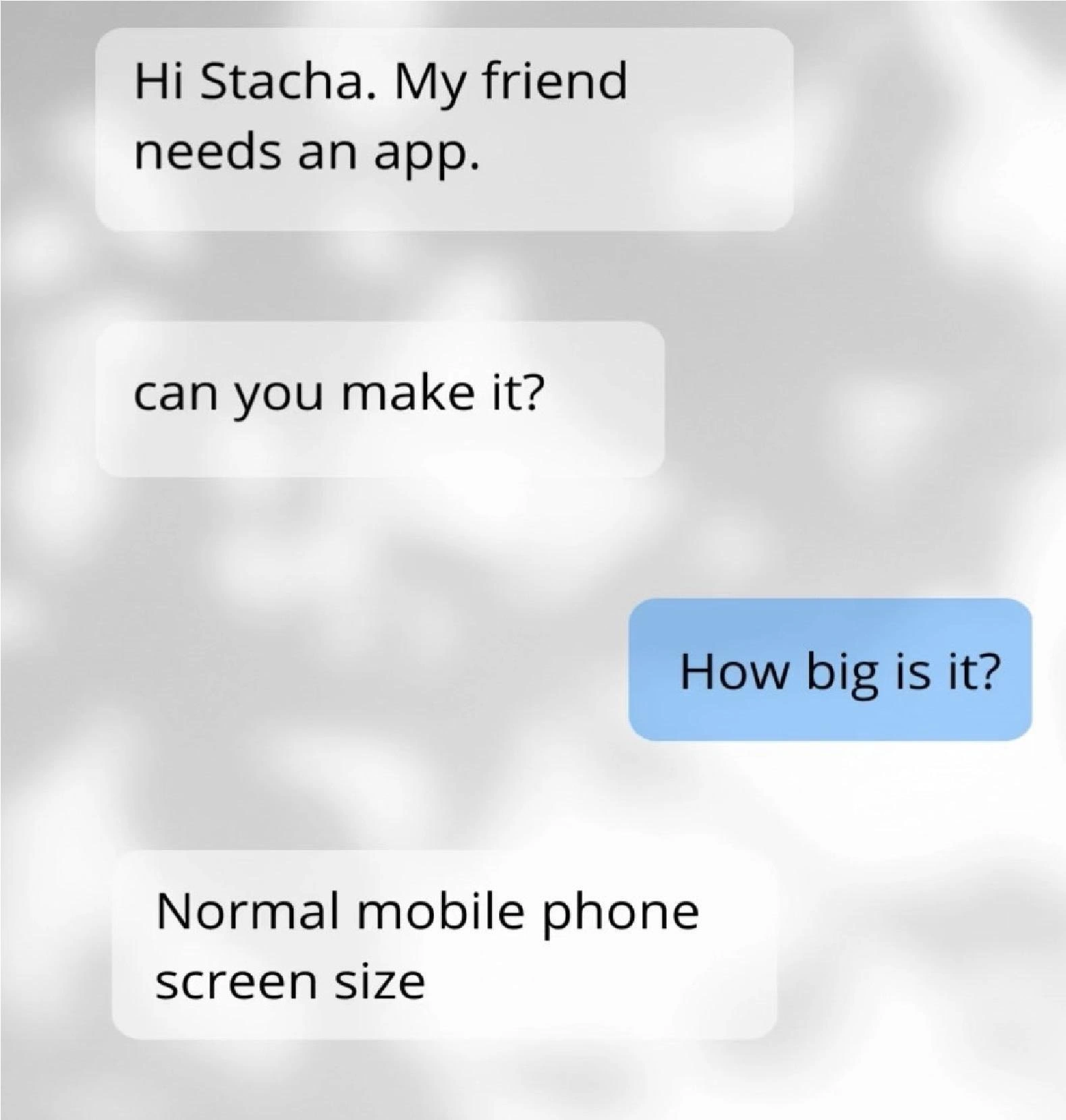
This meme highlights a very common misunderstanding between developers and clients. The conversation in the image goes like this: someone asks a developer “My friend needs an app... can you make it?” and the developer replies “How big is it?” meaning “How big is the project?” or “How much work will it be?” Instead of describing what the app should do, the client answers, “Normal mobile phone screen size.” This answer is funny because it’s totally the wrong kind of information. The developer wanted to know the scope of the app – basically what features or functions the app needs to have – but the client responded with the physical size of a phone’s screen. It’s a perfect example of Miscommunication in software development.
Let’s unpack some terms and why this is an issue. In project planning, scope means the overall size and boundaries of the work. If you’re building an app, scope is defined by things like how many features it will have, how many different screens or user interactions, what problems it solves, and how complex those are. Developers often ask about scope by asking for requirements: details or user stories describing what the app should do. A user story is a simple description of a feature from the end-user’s perspective (for example: “As a user, I want to sign up with my email so I can access the app”). User stories help everyone understand the specific things the app needs to include. They are much more useful than knowing the screen size, because they tell the developer what to build.
On the other side, the client in this meme answered with “Normal mobile phone screen size,” which shows they misunderstood the question. They thought “How big is the app?” was literally about screen dimensions or something physical. In reality, almost every mobile app is designed for a “normal phone screen size” these days – that’s not something that defines the project’s effort at all! The stakeholder (client) here is likely not familiar with how developers plan work. They probably think if it fits on a phone, it’s a small app. It’s a naive assumption (stakeholder_scope_naivety): they are measuring the app by the wrong yardstick.
This misunderstanding can lead to problems. If a developer doesn’t get real requirements upfront, they might start the project with almost no idea what to actually build. That’s a recipe for scope creep – which is when new details and features keep being added later because they weren’t specified early on. For example, the friend might later say, “Oh, the app also needs a login page, and a chat feature, and an online store…” If none of that was discussed, the project will grow way beyond what the developer initially thought. Scope creep often makes projects late or over budget, so developers try to avoid it by clearly defining the scope from the start. That’s why they ask clarifying questions like “What do you need the app to do?” or “How big is it?” expecting an answer about features or number of user stories.
The humor here is very relatable for developers, especially those who have dealt with freelance clients or stakeholders who don’t know much about software. It’s common to have a client say something like, “It’s just a simple app, nothing huge, you know, just phone-sized,” without giving any real details. Developers have to then gently explain that the “size” that matters is the feature list or functionality, not the screen size. In other words, we need to know what’s inside the app, not how big the screen is. Effective Communication is key. Project managers and developers often have to translate what clients say into technical terms. When a client answers a scope question with something like screen dimensions, the dev knows they need to ask the questions differently: “Okay, what will the app allow users to do? Can you list some things the app should have or any specific requirements?” This meme is basically poking fun at that initial moment of confusion, which many of us have experienced early in our careers.
So, in simpler terms: the developer was looking for functional requirements (the tasks and features of the app), but the client gave a non-functional detail (just the device screen size). It’s a mix-up. The takeaway is that clear communication with clients is super important. If you’re a newer developer encountering this scenario, don’t worry – it’s normal. You just have to guide the conversation toward the actual requirements. This might mean explaining to the client what kind of information you need (like what the app should do, who will use it, what problem it solves) rather than something like the phone’s screen size. Once the client starts talking in terms of user needs or feature lists, you can actually figure out how big (in workload) the app really is. Until then, as this meme shows, you might get some amusing but unhelpful answers!
Level 3: Screen Inches vs Story Points
At the senior developer level, this meme hits home as a textbook case of requirements ambiguity and misaligned expectations. It’s basically a mini horror story from the world of ProjectManagement and Stakeholders_Clients communication, wrapped in a joke. Here, the developer’s simple question “How big is it?” was intended to gauge the scope of the app — in other words, how complex it would be, how many features or user stories it involves, maybe an estimate in story points (an Agile measure for effort). But the non-technical client completely misses that context and responds with “Normal mobile phone screen size.” The result is that classic facepalm moment every experienced dev or project manager knows too well.
Why is this funny (and slightly painful)? It’s highlighting a physical_vs_functional_requirements_misunderstanding. The developer was asking for functional requirements (what the app should do, what problems it solves), while the stakeholder answered with a non-functional detail (the screen dimensions). It’s as if the client thinks app development effort is measured with a ruler! This scenario is a relatable dev experience because so many of us have had a client or manager who gives requirements that are either vague or completely off-target. It’s a perfect illustration of a communication breakdown in software projects: one side talks in terms of technical scope and user stories, the other side talks in literal physical terms.
Let’s break down the two perspectives in this exchange for clarity:
- Developer’s perspective: Asking “How big is the app?” is about scope size. They’re probing for the feature list, the number of screens or use-cases, the overall complexity. In agile terms, maybe how many story points or user stories this project might entail. Essentially, the dev wants to estimate effort: Is this a tiny 2-week project or a 6-month build?
- Client’s perspective: They interpret “How big?” as literally about size dimensions. The friend confidently replies, “Normal mobile phone screen size,” as if the dev was asking about the display or the device. The client is focusing on the physical size of the app’s UI (maybe thinking about a typical phone’s inches or resolution), not its functionality. It shows a bit of stakeholder scope naivety — they don’t know how to describe the app beyond saying “it should fit on a phone screen.”
This mismatch is where the humor comes from: the two people are having totally different conversations without realizing it. The engineer is trying to perform early scope estimation, while the client is literally describing the screen’s size. It’s a classic “talking past each other” moment. Those of us who have worked on requirements gathering recognize this pattern: if you don’t ask extremely specific questions, you might get answers that sound absurd from a technical standpoint. In an experienced dev’s head, hearing “Normal mobile phone screen size” as the answer to a scope question sets off alarm bells. It implies requirements ambiguity so severe that if you started the project like this, you’d be headed straight for scope creep and failure.
Scope creep is the bane of software projects: it happens when new features and requirements keep popping up because the initial scope was unclear. And you can almost smell the scope creep in this conversation. The client hasn’t described any features at all – no user login, no database, nothing about what the app should actually do – which means once development starts, they’re going to come back with “Oh, can it also do X? Actually, it needs to do Y too,” because none of that was defined upfront. The developer tried to avoid that by asking about size early on, but got an unhelpful answer. This is requirements gathering 101: if a client gives an answer that doesn’t actually define the project, you have to go back to asking clearer questions. The meme humorously captures that initial futile attempt to pin down the scope.
From a senior dev angle, there’s also some dark humor in how common this scenario is. Everyone on a dev team, from the project manager to the QA tester, has experienced a meeting where a stakeholder gives requirements that make you scratch your head. It might not always be screen size confusion, but the theme is the same: StakeholderExpectations completely misaligned with reality. This particular meme is a modern twist on an old classic joke in software development: we often quip that non-technical folks measure project “bigness” in the most superficial way. (Old-timers might recall similar tales, like a client asking for a “simple program, just 2 pages long” as if counting the UI pages equals effort.) This new take with the chat bubbles and the subtle wording change is delightfully concise. The small tweak—having the developer ask “How big is it?” and getting the literal screen_inches_vs_story_points answer—breathes new life into that timeless joke. It’s funny and frighteningly relatable because if you’ve been in this industry long enough, you know this isn’t even really exaggerated. Somewhere out there, a freelancer just got a request exactly like this in real life.
Ultimately, for the seasoned folks, this meme underscores why communication skills are as important as coding skills in our field. We chuckle, but we also nod knowingly. It reminds us of the importance of clarifying assumptions: when a client says they need an app “about the size of a phone screen,” we (after suppressing laughter or tears) have to gently steer the conversation toward user stories, business goals, and actual requirements. The meme is a lighthearted take on what could otherwise become a serious project disaster if not corrected early. In short, it’s funny because it’s true: in software development, Miscommunication like this happens all the time, and every experienced dev has learned to parse these kinds of answers or risk building the wrong thing. As the saying goes in dev circles, “Well, that’s one way to keep the project scope small – just constrain it to a 6-inch screen!” 😜 (If only it were that simple… we wish!)
Description
A screenshot of a text message exchange that humorously captures a common communication breakdown between technical and non-technical people. In the conversation, someone asks a developer named Stacha if they can build an app for a friend. When the developer asks, "How big is it?", inquiring about the project's scope and complexity, the client hilariously misunderstands the question. They reply, "Normal mobile phone screen size," interpreting the question literally in terms of physical dimensions rather than effort or features. This meme resonates with developers, freelancers, and anyone who has had to translate vague client requests into concrete technical requirements, highlighting the vast difference in perspective and vocabulary
Comments
15Comment deleted
That's the best kind of project scope. It fits perfectly on any device, as long as you don't add any features
Sure, I’ll ship it right after I convert those ‘normal phone inches’ into story points and AWS credits
After 20 years in tech, I've learned that 'How big is it?' is actually the wrong first question. The right one is 'How much equity are you offering?' followed closely by 'Have you already promised a launch date to investors?'
Ah yes, the eternal question: 'How big is your app?' - where the client thinks in pixels and the developer thinks in person-years. This is the software equivalent of asking an architect 'how big is the building?' and getting '20 feet tall' as the complete specification. Spoiler alert: after six months of scope creep, that 'normal mobile phone screen size' app will somehow need to support tablets, web, desktop, smartwatches, and probably a Tesla dashboard - all while the budget remains firmly anchored at 'exposure and equity.'
I asked for scope and got a diagonal measurement - classic sign the PRD will be a JPEG and the SOW a WhatsApp thread
App size: phone screen. Actual scope: microservices empire masquerading as a CRUD app
I asked for story points; they returned pixels - classic path from “simple app” to a quarter-long program with auth, sync, and billing
Which generation? For example my previous phone was 5,5", while my current is 6,7"🗿 Stupid customers as usual can't specify their needs 🙊 Comment deleted
Size don't matter. As far as my wife is concerned that's 100% true, please don't tell her any different. Comment deleted
What color do you want your app to be? Comment deleted
Can we make it like a mirror background? Comment deleted
Lmao Comment deleted
Really small, it's a watch app Comment deleted
🤔 Comment deleted
sus Comment deleted