AWS Security's Ultimate Attention Check
Why is this AWS meme funny?
Level 1: Just Pretending to Read
Imagine your teacher gives you a long list of classroom rules and asks you to check a box next to each rule to show that you read it. You’re supposed to read every rule carefully, then put a checkmark. But let’s be honest – maybe you’re tired or in a hurry, so you start just checking the boxes without really reading the rules. Now, picture that one of the rules in the middle secretly says, “Don’t check this box if you’re actually reading these rules.” 😮 If you are actually reading, you’d see that and stop – you’re not supposed to check it! But if you were not reading and just blindly checking every box, you’d accidentally check the forbidden box anyway. Oops! The teacher would instantly know you weren’t really reading at all. This is exactly the joke in the picture. The AWS computer screen is like the teacher, and the checkboxes are the rules you’re supposed to read. The funny line “I shouldn’t check this checkbox because I’m actually reading these” is a trick, just like the teacher’s trick rule. It makes us laugh because it shows how people often pretend to read important information. We just tick the “yes, yes, I did it” boxes to get it over with. It’s a silly reminder that sometimes grown-ups using computers behave just like kids who fib about doing their reading – and even the computer knows it!
Level 2: Don’t Check This Box
Let’s break down what’s happening in this AWS meme, step by step. AWS (Amazon Web Services) is a giant cloud platform where companies host their applications and data. When you manage things in AWS, you often use the AWS web console – basically a big website with forms, buttons, and dialogs to control your cloud resources. In the meme image, we see one of these AWS-style pop-up windows titled “Confirm Baseline Operations.” This appears when an admin is about to perform a baselining operation on 2 user accounts. But what is baselining in this context? In security terms, establishing a security baseline means making sure those user accounts meet some minimum security requirements or settings. For example, an admin might be about to reset those users’ settings to company defaults: ensuring they have strong passwords, enabling multi-factor authentication, or attaching standard security policies. It’s basically aligning users with the baseline security policy so the overall security posture (the overall security strength of the system) stays solid.
Because changing user security settings can be a big deal, AWS isn’t going to do it without a clear warning. That’s why this confirmation dialog popped up. It’s telling the admin: “Hey, you’re about to baseline (update) 2 users. This is important for security. Please read these points before you proceed.” Under “Safety Acknowledgements,” there’s a list of checkboxes the admin is supposed to check off one by one. Each checkbox is basically a statement the admin should read and agree to before continuing. This design is meant to ensure the person pauses and understands the consequences or requirements of what they’re doing. You might have seen similar things when you try to do something potentially dangerous in software. For instance, if you go to delete a database in AWS, it will make you type the word delete or check a box saying “I understand this cannot be undone.” It’s a way to make sure you’re not clicking a destructive action by accident.
Now, in this meme’s screenshot, most of those acknowledgement statements are blurred out (maybe to hide company-specific details or just because they’re not the funny part). But one statement is left visible – and it’s actually a joke. The checkbox label says: “I shouldn’t check this checkbox because I’m actually reading these.” At first glance, that looks really odd. It’s the kind of thing you’d never expect in a serious AWS interface. Essentially, this one checkbox is sarcasm baked into the UI. It’s poking fun at the fact that, often, users don’t actually read these warnings – they just mechanically tick all the boxes so that the grayed-out “Apply Baselining” button becomes enabled. The presence of this line implies whoever designed or wrote this dialog knows users tend to skip reading and just perform checkbox click-click-click to get it over with. It’s like the interface itself is saying, “We know you’re probably not reading any of this.”
Think about it: if you’re genuinely reading every acknowledgement carefully (like the dialog instructs), you’ll reach the one that says “I shouldn’t check this checkbox because I’m actually reading these.” That would probably make you pause and chuckle. It’s basically telling you not to tick it if you are reading the text. But here’s the funny catch – usually these dialogs force you to tick all the checkboxes to proceed. So the user is put in a confusing situation: “I have to tick this box to continue, but the box says I shouldn’t tick it if I’m reading it… but I am reading it. So what do I do?” 😅 It’s a playful paradox. If you obey the text literally (and don’t check it), you might not be allowed to proceed with the baselining action. The only way forward is to knowingly do the wrong thing that the checkbox says you shouldn’t do – which proves the point that people will ignore the content just to move on. In short, the UI is having a laugh at the user’s expense (in a friendly way).
For a junior developer or someone new to AWS, the humor here also highlights a common reality: a lot of security or compliance steps in tech tools become formalities. “Formalities” means they’re done just because the rules say you have to, not because the person doing it truly engages with it. In web apps, how often do we actually read the entire Terms and Conditions before clicking “I agree”? Almost never. Similarly, cloud platforms often make you tick “I read the docs” or “I understand the consequences” boxes. It’s intended to make you stop and think, but human nature is to treat it as just another hurdle to click through, especially if you’re in a hurry. This meme exaggerates that by including a silly checkbox that basically admits it’s all a bit of a farce (a farce is something that’s ridiculous or a joke). The tag SecurityTheater actually refers to this concept: actions that give the feeling or appearance of improving security, but don’t actually do that much. Requiring someone to tick a box saying “I promise I read this” is kind of security theater – it might satisfy a compliance rule or transfer responsibility (“we warned you!”), but it doesn’t guarantee the person really internalized any information.
The categories UX/UI are relevant here too. UX stands for User Experience, and UI stands for User Interface. A good UX means the design actually helps users and considers their behavior. In this case, the design is arguably a UX failure if the goal was truly to educate the user – because it’s so easy to game the system (just check everything) that the educational part is lost. However, by inserting that jokey checkbox, the designers might be intentionally acknowledging the poor UX in a humorous way. It’s almost an Easter egg (a hidden little joke or feature) inserted by the UI team. It certainly got a laugh from users who discovered it, as the meme caption says: “AWS security baseline user interface made me laugh today!” – not something you usually say about cloud compliance dialogs! Developers and IT folks started sharing this because it’s a ComplianceHumor gem: it perfectly captures the disconnect between checkbox compliance and actual understanding. Even the phrase “I shouldn’t check this box because I’m actually reading these” is so blunt and sarcastic that it catches you off guard in a professional tool. It’s like if a seatbelt reminder in a car suddenly joked, “If you’re really paying attention, you wouldn’t need this reminder, would you?” – you just don’t expect the system to sass you.
So, stepping back: the meme uses an AWS security UI screenshot to make a point that many in tech relate to. It’s showing how user experience design for safety can sometimes become a mere formality – we go through the motions, tick all required check marks, and move on, often without absorbing the warnings. And here the interface itself cracks a joke about that fact. For a newcomer, the takeaway is both a chuckle and a lesson: just because a box is checked doesn’t mean the content was read! And if you ever design a system that needs user confirmations, remember this example – if you get it wrong, users will treat your carefully written warnings like a task list to speed-run. In AWS’s case, at least they had a sense of humor about it, which momentarily turns a tedious compliance step into something memorable.
Level 3: Checkbox Compliance Conundrum
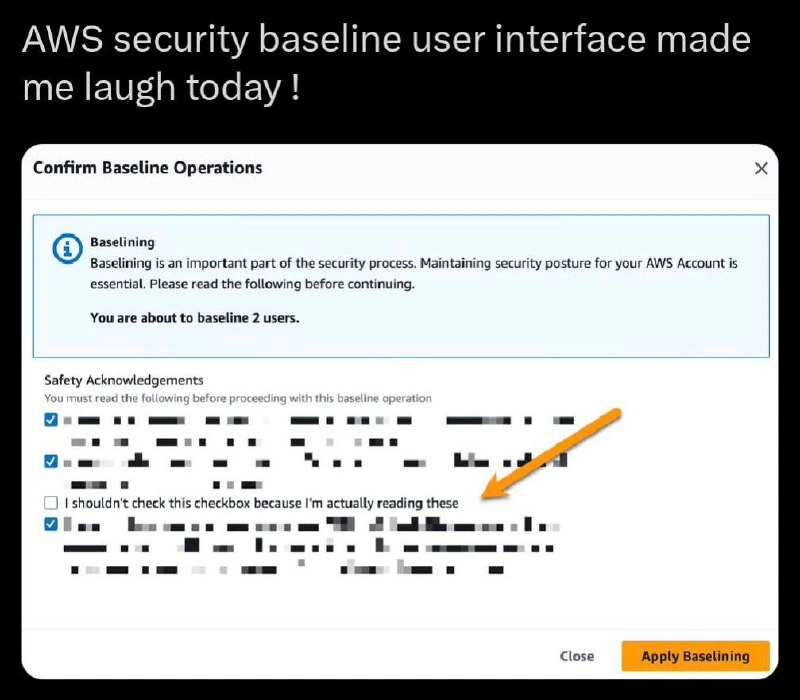
This AWS security baseline confirmation dialog is a brilliant little piece of security theater. It’s an official-looking AWS Console UI modal titled "Confirm Baseline Operations," warning the admin: "Baselining is an important part of the security process... You are about to baseline 2 users!" The interface then lists several Safety Acknowledgements with checkboxes that the user must tick off before proceeding. Most of these acknowledgements are blurred out (likely things like “I understand this action cannot be undone” or “I have informed the users” – the usual serious stuff). But one line is left crystal clear, flagged with a big orange arrow for emphasis. It reads: “I shouldn’t check this checkbox because I’m actually reading these.” This single checkbox turns the whole serious compliance exercise into a tongue-in-cheek joke. It’s as if the AWS UI itself got cynical and decided to troll the user.
Seasoned engineers immediately recognize the humor here. In countless enterprise tools and cloud consoles, we face these ritual checkboxes intended to enforce careful behavior. You know the drill: "Type DELETE to confirm you want to nuke this database," or “I acknowledge that I have taken a backup.” It’s all meant to prevent mistakes, or at least cover the company’s behind – a box-ticking ceremony to say “the user was warned.” But in reality, after the first few times, people just mechanically tick every box to get on with it. Checkbox compliance is the joke name we give to this: fulfilling security or compliance requirements by literally checking boxes, often without truly following through on the spirit of those requirements. It’s compliance on paper more than in practice. Experienced devs have been through audit-driven development, where success is measured by forms filled and boxes checked rather than actual security improvements. This meme nails that absurdity.
Here, AWS (or whoever designed this dialog) is basically calling out the charade. The checkbox label “I shouldn’t check this checkbox because I’m actually reading these” creates a hilarious paradox: if you are diligently reading each acknowledgement (as policy intends), then this one instructs you not to tick it. But to proceed with the baselining operation, you presumably have to tick all the boxes… including that one. So the UI sets you up in a catch-22: either you admit you’re not really reading the fine print (by checking it anyway), or you get stuck because you followed instructions and left it unchecked. It’s a self-defeating checkbox – the UI design is practically winking and saying, “We know you’re just gonna check everything and move on.” This is classic SecurityTheater meets dark humor. A truly careful admin might actually hesitate here, momentarily bewildered: “Wait, what do I do with this? Should I skip it? But then I can’t continue…” Meanwhile, the jaded sysadmin at 3 AM just laughs, checks the box with zero remorse, and clicks Apply Baselining because production is on fire and nobody has time for this. The contrast is comedic gold.
Why is this so relatable to experienced devs? Because it’s a shared open secret in tech: UserExperienceDesign for security often falls back on these naive checklists. We’ve all clicked “I agree to the terms and conditions” without reading a single word. We’ve all checked “Yes, I read the documentation” when we absolutely did not (looking at you, internal wiki). Internally we justify it – “I already know this” or “I just need to get this done.” It’s a bit of innocent dishonesty encouraged by the system’s design. This meme’s dialog calls that out with a smirk. It resonates with any engineer who’s been through corporate compliance training or change-management forms that feel like pointless formalities. The sarcastic checkbox is basically the UI designer’s way of saying, “We both know nobody reads these things.” It’s rare to see such open sarcasm in an official AWS interface, which is why this screenshot spread through developer circles quickly. It confirms what we suspect: even the folks making the tools are in on the joke.
From a senior perspective, there’s also an underlying commentary about real security vs. checkbox security. Baselining users is supposed to improve your security posture – e.g., ensuring every user account meets certain standards (like enabling MFA, using strong passwords, having least-privilege access, etc.). It’s a serious task in cloud security: aligning with frameworks, maybe complying with CIS benchmarks or company policy for new accounts. But how do they implement it? By making admins go through a checklist UX that’s so tedious or routine that no one actually engages with it meaningfully. This undermines the whole point. The dialog has effectively become a UI façde – the UXFailures here is that the interface encourages a behavior (mindless clicking) that runs opposite to the stated goal (careful review). Senior devs have seen this pattern in many guises. It’s like those safety briefings where everyone zones out until the “just sign here” at the end. In theory, these checks and warnings protect us from mistakes; in practice, they often just protect the vendor from blame. The meme’s humor is a bit dark, because it highlights a truth: sometimes our high-tech cloud security boils down to going through the motions. The orange arrow in the image literally points at the farce: even AWS could be acknowledging the internal joke of checkbox compliance. It’s both funny and a little sad – we laugh, then sigh, knowing that real security is a lot more than ticking boxes, but here we are anyway.
Description
The image is a screenshot of a tweet or social media post with the caption, 'AWS security baseline user interface made me laugh today!'. The main content is a dialog box from the AWS console titled 'Confirm Baseline Operations'. Inside, under a section called 'Safety Acknowledgements', there's a list of checkboxes with most of the text pixelated for privacy. However, one line is left visible, pointed out by an orange arrow. This line, next to an unchecked box, reads: 'I shouldn't check this checkbox because I'm actually reading these'. This is a classic attention check or 'canary trap' designed to ensure users are carefully reading the terms before applying potentially significant security changes. The humor lies in the self-aware and informal tone of this instruction, which is unexpected in the typically dry and formal environment of an enterprise cloud platform like AWS. It's a clever nod from the AWS UX designers to the common developer habit of skipping lengthy acknowledgements
Comments
11Comment deleted
This is AWS's version of a CAPTCHA, but instead of identifying traffic lights, it identifies the one engineer in the entire organization who actually reads the security warnings before clicking 'Apply'
When compliance turns into Schrödinger’s checkbox: you must NOT tick it to prove you actually read it - yet production won’t deploy until you do
After 20 years of clicking through compliance checkboxes, AWS finally implemented the one security control that actually works: admitting nobody reads them anyway. Next sprint: auto-check with a 30-second timer and call it 'thoughtful consideration mode'
This is the enterprise security equivalent of a CAPTCHA that asks 'Are you a robot?' followed by 'Check this box if you're lying.' AWS has achieved peak meta-UX: a security baseline dialog that simultaneously requires you to acknowledge reading safety information while providing a checkbox that explicitly tests whether you're actually reading. It's the perfect encapsulation of compliance theater - where the real security vulnerability isn't the infrastructure, it's the human who's checked 47 identical boxes today and has developed complete checkbox blindness. The truly secure move would be to check that third box and watch the entire AWS organization spiral into an existential crisis about whether their compliance framework is built on a foundation of lies
AWS finally productized checkbox‑driven compliance: a control that depends on the user not toggling a boolean, great for CloudTrail evidence and terrible for threat modeling
AWS's genius CAPTCHA: check the box admitting you're illiterate, or prove compliance by staying stuck in config purgatory
Nothing says “security posture” like a self‑negating checkbox that produces SOX evidence while optimizing for click‑through latency - AWS delivering strong eventual compliance
The sad thing is if someone clicks all of them there's a high probability only this one will get marked as invalid Comment deleted
stackoverflow ahh survey Comment deleted
lol, I think I got a new Idea Comment deleted
https://youtu.be/o379hjUhW0A?feature=shared Comment deleted