When you skip the README and invent your own API semantics
Why is this Documentation meme funny?
Level 1: Use the Tool Right
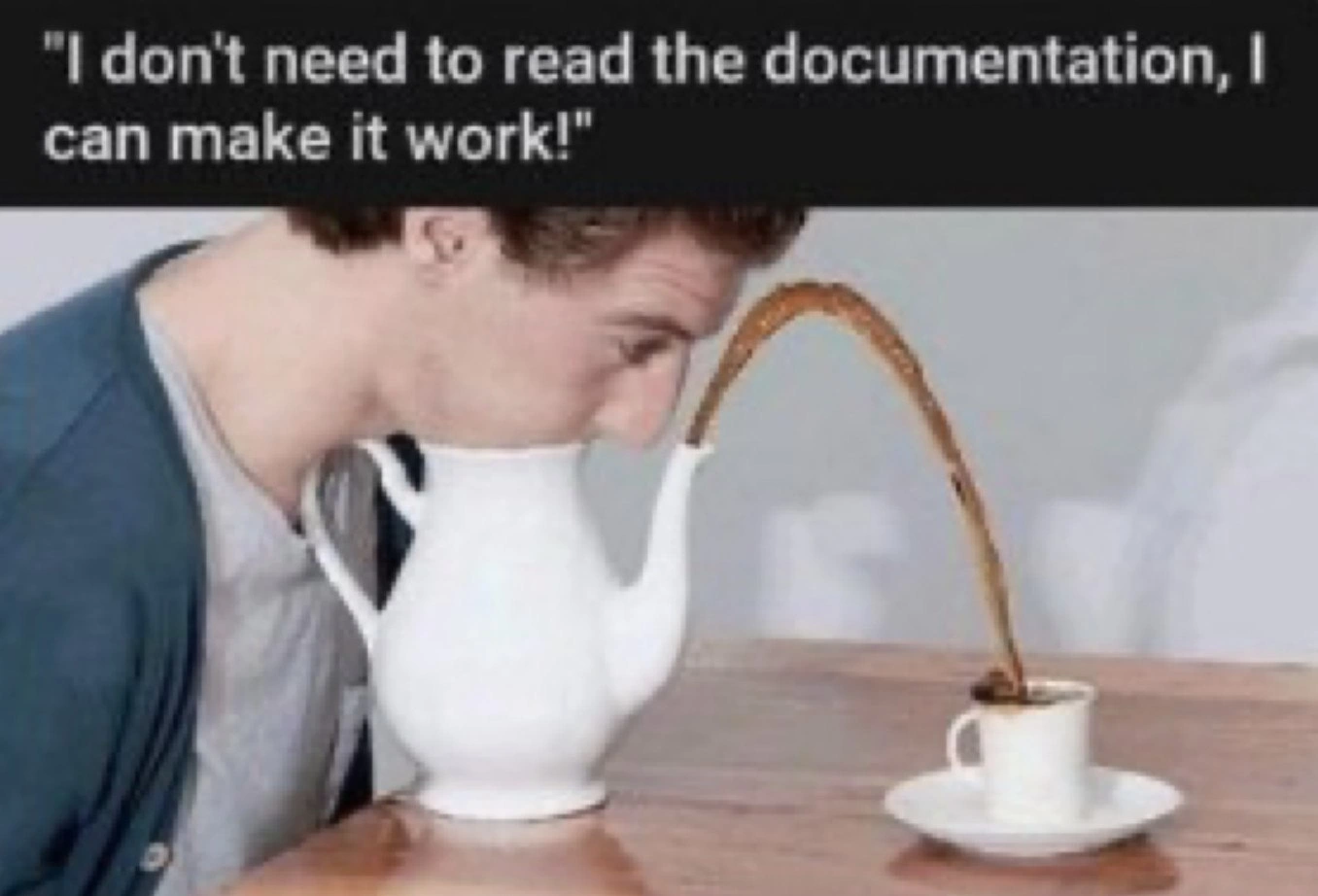
Imagine you have a sippy cup with a little spout on it, but instead of drinking from the spout, you try to drink by sucking on the side of the cup. What happens? Juice squirts out of the spout and makes a big mess on the table! This meme is joking about the same kind of silly mistake, but with a teapot and a programmer. The person in the picture didn’t follow the instructions (he didn’t use the teapot’s spout the way it was meant to be used), so he ended up with tea everywhere. It’s funny because it’s obvious – if you use something the wrong way, of course it won’t work right.
The lesson is super simple: if you’re not sure how to use something (like a teapot or a piece of software), it’s a good idea to read the little guide or ask for help. The guy thought, “I don’t need help, I can do it myself!” – and then he got a lap full of tea. 😅 In everyday words: when we don’t follow directions, we often get into trouble. The meme makes us laugh because we’ve all seen someone (or ourselves!) do something the wrong way and then go “oops.” It’s a goofy reminder: take a second to learn the right way, and you won’t have to mop up a big spill afterward.
Level 2: Trial and Overflow
Let’s break this down in simpler terms. The meme jokes about a developer who doesn’t read the documentation (like skipping the README file of a project) and instead tries to use a tool or library by pure instinct. In the picture, the person has a teapot full of tea but ignores the obvious spout that’s meant for pouring. Instead, he presses his mouth to the side of the teapot to drink, which of course causes the tea to shoot out of the spout and spill everywhere. This is a silly, exaggerated analogy for what happens when a programmer ignores instructions and uses something the wrong way.
In software, documentation (like a README or API docs) is essentially the instruction manual or guide for how to use a piece of code, library, or service. If you neglect the README, you might miss crucial details about how to initialize a library, what functions to call, or the correct order of operations. The meme’s phrase “invent your own API semantics” means the developer is just guessing or making up how they think the API should work, rather than learning how it actually works. API semantics refers to the meaning and expected usage of the functions or endpoints an API provides. Inventing your own semantics is like assuming a teapot works like a water fountain just because both involve water – a completely wrong assumption!
Some key terms and concepts here:
- RTFM culture – This stands for *“Read The *Manual”. It’s a blunt way experienced devs tell others to read the documentation first before asking questions or hacking away. In a friendly way, it means “the answer is in the docs, go read them.” The meme is poking at those who have that documentation available but confidently say “I don’t need it, I’ll figure it out myself.”
- Cargo cult programming – This is when someone uses code or patterns without understanding why, often by imitation. For example, a developer might copy-paste some configuration from Stack Overflow and hope it works, without truly understanding it. In our analogy, it’s like the person saw someone somewhere drink from a jug and assumed any part of the jug would work – obviously a faulty conclusion.
- Configuration by trial – Instead of reading how to configure a tool properly, a person just keeps tweaking settings or calling functions in different ways (trial-and-error) until something sorta works. It’s like pushing, pulling, or tilting the teapot in random ways to get tea out, rather than simply reading an instruction that says “pour from the spout into a cup.” This often leads to messy, half-working setups (much like a messy table full of spilled tea).
The tags also mention http_418_im_a_teapot. This is a fun Easter egg from web development: HTTP 418 is an actual (joke) status code meaning “I’m a teapot”. It was originally a joke about a teapot refusing to brew coffee. In plain terms, it’s the computer protocol’s way of saying “You asked me to do something I literally can’t do.” If a web server were a teapot and you tried to brew coffee with it, it would reply 418 I’m a teapot. This meme’s scenario is exactly that vibe – using something wrong and expecting it to work. So experienced devs see the teapot image and immediately think of that inside joke.
From a Developer Experience standpoint, not reading docs often leads to frustration. Imagine writing code and it just doesn’t work, because you unknowingly used the tool incorrectly. Bugs pop up, nothing makes sense, and you’re pulling your hair out. This is a common DeveloperPainPoint early in the LearningCurve: you skip the manual, hit a wall, then finally sigh and go read the instructions. Once you read them, you smack your forehead like, “Oh, that’s how I was supposed to do it!” – just like our teapot guy would feel if someone told him, “Buddy, use the spout and you won’t get drenched.”
In terms of CodeQuality, code written without understanding the proper API usage can be problematic. It might work in one lucky scenario but fail in others, or maybe it sort of works but with terrible performance (like a teapot kind of giving you a sip while most of the tea is wasted on the table). Clean, quality code usually follows documented best practices. That’s why Documentation is so important: it’s part of what ensures everyone uses tools correctly and writes code that doesn’t “spill” errors everywhere.
In short, Level 2 explains that the meme is a funny warning: always read the docs. The teapot fiasco is a visual gag showing the cost of documentation aversion. If you use a device or library blindly, you’ll likely mess up and create extra work for yourself cleaning up the mess. The image is hilarious to developers precisely because we’ve all been that person at some point – confidently trying to make something work our own way, and then watching it spectacularly fail. Lesson learned: take a moment to read the instructions before you take a swig from the side of a teapot.
Level 3: Reinventing the Spout
At the highest level, this meme skewers a classic developer anti-pattern: skipping the docs and winging it. The image literally shows someone pressing their face to the side of a teapot instead of using the spout, resulting in a caffeine overflow catastrophe. This perfectly parallels a coder who ignores the README.md and tries to use an API or tool based on gut feeling. In the software world, that usually ends with production leaks all over the place (much like that brown liquid arcing over the table). Seasoned engineers recognize this as painfully relatable humor: we've all seen code where the author clearly didn't RTFM (Read The Fine Manual) and then acted surprised when things broke. The meme’s caption, "I don't need to read the documentation, I can make it work!", is basically the battle cry of overconfident juniors (and the occasional stubborn senior) invoking the dreaded spirit of "trial-and-error-driven development."
This scenario highlights how inventing your own API semantics — i.e., using a library or tool in a way it wasn’t designed for — ends in tears (or spilled tea). In real projects, that might look like calling functions with the wrong assumptions about their behavior, much like drinking from the wrong end of a teapot. For example, consider a dev who finds a Teapot class and decides:
Teapot pot = new Teapot();
// The dev assumes how the API *should* work without reading docs:
pot.openLid();
pot.sipFromBody(); // This method doesn't exist - they're inventing it!
Obviously, no sane library provides sipFromBody() – the correct usage per docs would be something like:
pot.fillWith(hotWater);
pot.pourInto(cup); // Use the spout as intended
cup.drink();
By skipping documentation, our imaginative developer wrote code as absurd as sucking directly on porcelain. The humor here stems from just how avoidable the mess is. The teapot’s design already provided a perfectly good spout (akin to a well-documented API method), but our hero ignored it entirely. This is a nod to the principle of "use the intended interface" – a core tenet of good CodeQuality and sound architecture. When devs bypass official APIs or misuse functions because they "think they know better", they often introduce bugs, security holes, or performance issues that senior engineers end up mopping up at 3 AM. (Ever seen a database connection pool misused so badly that it “spouted” hundreds of open connections? Not pretty.)
The context tags hint at deeper in-jokes too. Notably, http_418_im_a_teapot refers to an infamous HTTP status code defined as 418 I'm a Teapot. This was a tongue-in-cheek error code from an April Fools’ RFC, originally meaning “I’m a teapot, I refuse to brew coffee.” It’s an Easter egg in web development culture – and it fits our meme perfectly: a protocol-level way of saying “You used the wrong tool for the job.” The teapot literally cannot act like a coffee maker, just like an API won’t magically do what you wish it did. When a developer ignores official semantics and tries to force their own, the system might as well respond with 418 – “I'm a teapot, stop asking me to do coffee things.” This is DocumentationHumor at its finest, mixing a real (if comedic) tech reference with the visual gag.
Another tag, cargo_cult_programming, further frames the joke. That term describes copying code patterns or using tools without understanding them – like members of a cargo cult mimicking airplane runways in hopes cargo will land. Our teapot-drinker is essentially doing cargo-cult API usage: they saw liquids come out of containers before, so they just improvise and hope for the best. No reading, just monkey see, monkey do (or in this case, monkey don’t read manual). Similarly, configuration_by_trial is exactly what it sounds like: fiddling with settings or calls blindly until “something works.” It’s the opposite of following BestPractices, and it tends to produce solutions as elegant as a table full of spilled tea. Senior developers have learned the hard way that this approach leads to fragile hacks and DeveloperPainPoints down the line.
Crucially, this meme isn’t just mocking newbies – it’s a cautionary tale baked into humor. The tags like docs_are_not_comments and readme_neglect emphasize that proper documentation is there for a reason. Code comments or guessing method names aren’t a substitute for reading the actual documentation or README that explains how to use a library. Ignoring the docs is like ignoring a “This side up” label on a box and then wondering why everything fell out. The result? You end up implementing some bizarre workaround, bragging “I can make it work!” while everyone else cringes as your solution overflows. It’s a hit to both DeveloperExperience_DX (frustration, wasted time) and CodeQuality (since code born from misunderstanding is usually a ticking time bomb).
In summary, Level 3 reveals the rich irony: a developer skipping the README is as comically doomed as a person misusing a teapot. The experienced folks see a metaphor for misuse_of_apis and RTFM culture – a culture where the first response to avoidable errors is “Did you even read the docs?” This humor lands because it’s grounded in truth: whether it’s misusing a teapot or an API, when you don’t bother to learn the intended usage, you’re gonna get scalded. 🔥🫖
Description
The meme has a single frame with a black caption bar at the top that says: "I don't need to read the documentation, I can make it work!" Beneath the text, a person (face blurred) has jammed their mouth against the *side* of a white ceramic teapot, treating the vessel itself like a drinking fountain. Meanwhile, brown liquid shoots gracefully from the actual spout, arcing across the wooden table into a tiny cup where it overflows messily. The visual gag illustrates using a tool in the most counter-intuitive way possible and suffering the predictable spill. For seasoned engineers, it’s an instant metaphor for developers who skip API docs, misuse abstractions, and then act surprised when production leaks all over the place
Comments
6Comment deleted
Skipping the docs is basically sending a POST to /teapot and expecting a 200 - don’t be shocked when prod replies 418 and sprays hot coffee everywhere
Senior dev spending 3 hours reverse-engineering an undocumented API endpoint, only to discover it was deprecated 2 years ago and the migration guide was on page 1 of the docs
This is the software equivalent of trying to implement OAuth2 from scratch because 'the library documentation looks too long' - sure, you might eventually get liquid into your system, but you'll make an absolute mess in the process, waste hours debugging why your implementation doesn't handle edge cases, and end up reading that documentation anyway at 2 AM when production is down. Senior engineers know that reading the docs first isn't admitting defeat; it's respecting the collective wisdom of everyone who already made these mistakes so you don't have to
“It works” without docs is just undefined behavior with a demo - enjoy maintaining your mouth‑driven backpressure adapter in prod
How most production regexes are born: skip the docs, bend the input until it matches - until the next edge case breaks it at 3AM
RTFM isn’t about ego; it’s about knowing which end is the API - otherwise you ship a demo that passes UAT by accident and becomes a sev‑2 at the first minor version bump