
Skip to content
DevMeme
1836 of 7435
The bug is coming from inside the house
Debugging Troubleshooting Post #2044, on Sep 13, 2020 in TG

The bug is coming from inside the house

Why is this Debugging Troubleshooting meme funny?

Level 1: Fixing What Isn’t Broken

Imagine you put a fake "OUT OF ORDER" sign on your toy or device as a joke, and then later you forget you did that. When you see the sign, you panic and spend a long time trying to fix the toy, thinking it's broken. You take it apart, check the batteries, and get all upset because nothing seems to make it work. After a while, you suddenly remember: that "OUT OF ORDER" sign was just something you stuck on as a prank! The toy was fine all along. You were trying to fix something that wasn’t actually broken.

That’s exactly what happened in this meme. The developer thought the computer system was showing an error by mistake, and he worked hard to find the problem. But the whole time, the "error page" he was seeing was just a picture of an error that he himself had uploaded. There was nothing wrong with the system at all! He basically tricked himself and then spent hours chasing a problem that wasn’t real. It’s funny and a bit like chasing your own tail. In the end, he learned to double-check the obvious things first – kind of like making sure the "OUT OF ORDER" sign isn’t just a joke you forgot about. The humor comes from realizing the big fuss was over nothing, and we can all laugh because everyone makes silly mistakes like that sometimes.

Level 2: Check Your Inputs

Let’s break down what happened in simpler terms. DevOps Dan (the meme’s fictional developer) was testing an image upload feature — a common task in web development and DevOps workflows. He performed a test upload of an image to see if his system would handle it correctly. After uploading, he tried to view the image through the application, but instead of seeing the picture he uploaded, he kept getting an error page. An "error page" is what a website shows when something goes wrong, like a 404 Not Found or 500 Internal Server Error message. It's the kind of page that usually says something like "Oops, something broke!"

Seeing this, Dan assumed that something was wrong with his code or the server configuration. Debugging means investigating and fixing problems, so he started debugging. For two hours, he checked everything he could think of:

  • He verified the image was actually uploaded to the server (perhaps checking the file was in the correct folder or in the cloud storage).
  • He checked the code that serves images to see if it was mistakenly redirecting him to an error page. (A redirect is when your browser is automatically sent to a different URL – in this case, presumably to a generic error page if the image couldn’t be found or loaded.)
  • He might have examined logs (records of what the application is doing) for any error messages. Nothing obvious showed up, adding to his confusion.
  • He likely tested the process on different browsers or cleared caches, thinking maybe an old broken image was being shown. Still no luck.

Despite all this troubleshooting, every time he tried to view the uploaded image, he saw the same error page. This is where the frustration kicks in: he’s doing everything right, yet it looks like the system is broken. This kind of situation is prime DevOpsHumor fodder because it often turns out the issue isn’t with the system at all.

Finally, Dan discovers the truth: the image he uploaded was literally a screenshot of an error page. In other words, the test image he chose was a picture of an error message. So when he "viewed" that image, his browser was displaying… exactly what the image contained — an error page picture! There was no actual error or redirect happening; it just looked like an error because that was the content of the image. Essentially, he tricked himself. This was a screen_capture_mistake that led to a wild goose chase.

In hindsight, the bug was “user error.” Developers jokingly call this a PEBKAC issue – "Problem Exists Between Keyboard And Chair" – meaning the mistake was on the user’s side (in this case, the user being the developer himself!). It’s a classic self-inflicted bug. Dan spent hours trying to fix a problem in the code, when in reality nothing was wrong with the code or server. The only mistake was uploading the wrong image. Once he realized that, you can imagine the mix of relief and embarrassment he felt. On the bright side, it’s a story many in tech can relate to – we’ve all had moments where a simple oversight led us on a wild debugging journey. The key takeaway for a junior developer here is: always check your assumptions and inputs first. If something goes wrong, make sure the test data or the steps you followed are actually what you think they are. Sometimes, what looks like a complex system error might just be a simple mix-up like using the wrong file or configuration. Debugging is as much about ruling out these simple mistakes as it is about fixing real bugs. And hey, if you ever catch yourself in a similar situation, don’t feel too bad – even experienced DevOps engineers have these facepalm moments, as this meme humorously shows!

Level 3: Phantom Error Page

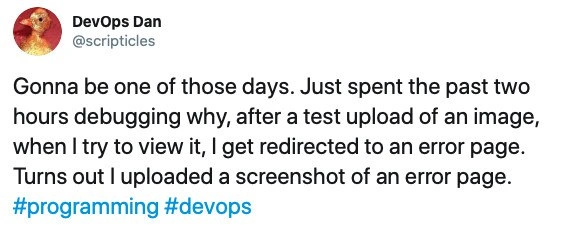
At first glance, this scenario reads like a DevOps horror story with a hilarious twist. A seasoned engineer in a Debugging_Troubleshooting marathon chases a non-existent bug for hours. The tweet format meme shows "DevOps Dan" lamenting how he uploaded an image for testing, then every time he tried to view it, he got an error page. Cue two hours of intense debugging, scouring logs, and questioning the entire image upload pipeline. In true DevOps/SRE fashion, Dan likely checked everything: file storage paths, web server configs, redirect rules, even potential Nginx misrouting. Was it a permission issue? A caching glitch? Did the CDN serve a stale 404 image? The situation oozes classic DebuggingFrustration because nothing made sense — until the facepalm moment. The punchline: he had uploaded a screenshot of an error page itself. In other words, the "error page" wasn’t coming from the server at all; it was literally the content of the image he was viewing. This is the ultimate false error signal and a self-inflicted trap. The humor lands because every experienced dev has a war story of chasing ghost bugs born from simple oversights. It’s a perfect storm of DeveloperHumor and OpsHumor: the system was fine, but the operator (Dan) accidentally pranked himself. Ironically, this bug never lived in the codebase – it lived rent-free in the developer’s head. The combination of a self_inflicted_bug and a misleading visual had him doubting the whole stack. In a blameless postmortem, there's no one to blame here but a moment of human error. Lesson learned: always double-check your test inputs before assuming your infrastructure is on fire. Even the best of us can end up debugging a phantom error page that we ourselves unwittingly put there. Note to self: next time, don’t use an actual error screenshot as your test image! 😅

Description

This image is a screenshot of a tweet from a user named 'DevOps Dan' (@scripticles), who has a profile picture of a golden rubber duck. The tweet reads: 'Gonna be one of those days. Just spent the past two hours debugging why, after a test upload of an image, when I try to view it, I get redirected to an error page. Turns out I uploaded a screenshot of an error page.' The tweet is appended with the hashtags #programming and #devops. The humor lies in the deeply relatable 'facepalm' moment experienced by the developer. They embarked on a lengthy debugging session, likely exploring complex causes like server misconfigurations, broken application logic, or database errors. The punchline reveals the problem wasn't a technical bug at all, but a simple, self-inflicted user error. For experienced engineers, this is a humorous reminder that sometimes the most time-consuming problems are caused by overlooking the most basic assumptions, and that the first thing to debug is often your own input

Comments

7
Anonymous ★ Top Pick A classic PEBKAC error, except this time the 'P' stands for 'Programmer'
  1. Anonymous ★ Top Pick

    A classic PEBKAC error, except this time the 'P' stands for 'Programmer'

  2. Anonymous

    After 30 minutes in the war room correlating Grafana, Jaeger, and NGINX logs, we finally found the root cause of the persistent 500s: I’d deployed a PNG of the error page - turns out Layer 8 failures don’t show up in distributed traces

  3. Anonymous

    The most expensive debugging sessions are when you realize the bug was actually a feature of your test data - like when your error monitoring is so good it catches errors that don't exist yet because you're literally uploading them as JPEGs

  4. Anonymous

    A masterclass in root cause analysis: spent two hours debugging a redirect loop, only to discover the bug was between the keyboard and chair. The system was working perfectly - it correctly displayed an error page when you uploaded... an error page. Sometimes the most elegant solution is realizing you're the edge case. This is the infrastructure equivalent of 'works on my machine' meeting 'garbage in, garbage out,' with a side of 'have you tried turning yourself off and on again?' At least the error handling was robust enough to consistently fail in exactly the way it should

  5. Anonymous

    Turns out if your test asset is a screenshot of the 500 page, the image viewer dutifully redirects to /error. Strong consistency - just for failure

  6. Anonymous

    Two hours chasing a phantom 302; RCA: 200 OK on error.png - no amount of tracing helps when the 5xx is drawn, not thrown

  7. Anonymous

    When your minimal repro is the error page itself - now that's a bug eating its own tail

Use J and K for navigation
