Skip to content
DevMeme
579 of 7435
The Classic 'Fix' for Compiler Warnings
CodeQuality Post #663, on Sep 14, 2019 in TG

The Classic 'Fix' for Compiler Warnings

Why is this CodeQuality meme funny?

Level 1: Hiding the Problem

Imagine you have a big homework project due tomorrow. You spread out all your papers and realize there are lots of messy mistakes scribbled everywhere in pencil. You should erase them and fix everything, but it’s almost midnight and you’re out of time. Instead, you stack a clean sheet of paper on top of the messy parts so it looks neat at first glance. You haven’t actually fixed any mistakes – you’ve just covered them up so nobody sees them immediately. It’s like when a car’s dashboard shows a warning light, and rather than checking the engine, someone just puts a sticker over the blinking light. In the meme, the senior dinosaur does exactly that with the computer screen: he puts a little flower pot in front of the warning sign. Now he doesn’t have to look at the scary warning number anymore. It’s a funny and silly way to show how people sometimes pretend a problem isn’t there instead of fixing it, especially when they’re in a rush or feeling pressure. The junior dino is freaking out because he sees trouble, but the senior dino’s “solution” is basically saying, “If I can’t see the warning, then it’s not bothering me.” This makes us laugh because we all know hiding a problem doesn’t solve it – the warnings (or mistakes) are still there behind the flower, just like your messy homework is still messy under the clean sheet. It captures that feeling of being tempted to do a quick cover-up instead of a real fix, which is both relatable and amusing.

Level 2: Warnings vs. Errors

Let’s break down what’s happening in simpler terms. When programmers write code and hit “compile” or run tests in a CI/CD pipeline (Continuous Integration/Continuous Deployment system), the system often reports issues at two levels: errors and warnings. Compiler errors (the red ❌ on the screen) are show-stoppers – they mean something is so wrong that the code won’t even build or run. Think of an error like a missing semicolon ; in C++ or a syntax mistake; the compiler or build tool halts and says “I can’t proceed until you fix this.” No product release can happen if there’s a red error still unresolved, because it means the program isn’t in a runnable state.

Compiler warnings (the yellow ⚠️ triangle with a number like 43) are different. They’re more like the compiler or linter saying, “Hmm, this looks suspicious or non-optimal, but I’ll let it slide and produce an output anyway.” For example, if you declared a variable and never used it, that’s probably a mistake or leftover code – the compiler will warn you, but it won’t stop the build. Other common warnings include using a deprecated function (one that’s outdated and slated for removal), possible type mismatches that could truncate data, or not handling a returned value. They’re called warnings because they warn the developer: “This might be a problem or a CodeSmell, but it’s not fatal... yet.” In many build systems and IDEs (Integrated Development Environments), you’ll see an icon with a count of warnings. In the meme’s monitor, the yellow triangle and “43” indicates 43 warnings were generated during the build. That is quite a lot! A clean, high-quality build ideally has 0 warnings. 43 warnings mean lots of little issues in the code.

Now, the junior developer (the yellow dinosaur) is alarmed because generally, we’re taught that warnings are important. They could be signs of Bugs waiting to happen. Seeing dozens of warnings usually triggers developer anxiety for someone with less experience: “Did I do something wrong? Will these 43 warnings make our app crash or misbehave?” The junior is likely thinking that before releasing the software, they should fix those issues. This is a commendable instinct – fewer warnings usually mean cleaner, safer code.

The senior developer (the green dino with the tie) appears far less concerned. His response, “What can I do?”, suggests a shrugging acceptance: there’s a deadline (“release freeze” means no more changes can be made after a certain hour/day), and fixing 43 warnings one by one would be a big effort. Maybe those warnings have been around for a while. Maybe they come from legacy code or third-party libraries. The senior dev might have seen these exact warnings for weeks or months and knows they didn’t stop the program from working. This is where warning fatigue comes in: after seeing a warning message repeat over and over without causing a visible problem, a developer can start to tune it out, treating it like background noise. The senior likely expects that nothing terrible will happen immediately if they ignore the warnings this time.

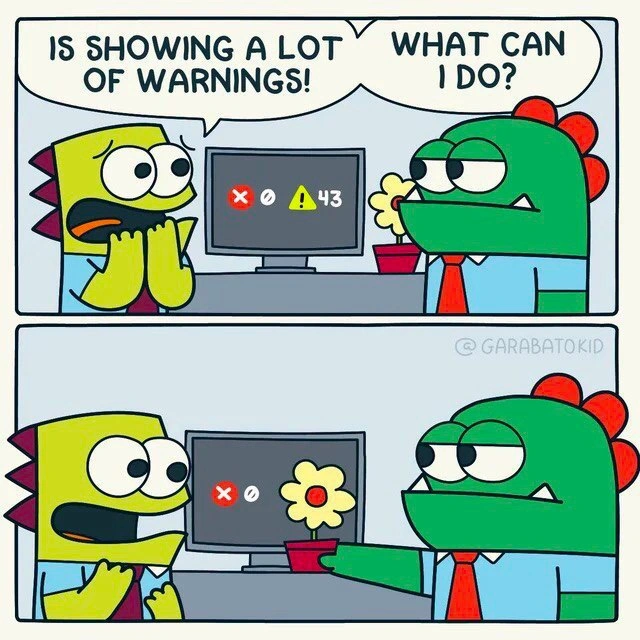
So what solution does the senior offer? Instead of actually fixing the warnings (which would involve modifying code, testing changes, possibly risking new errors), he simply hides the warning indicator. In the cartoon, he uses a potted flower placed in front of the part of the screen that shows the yellow triangle and “43”. Suddenly, from their point of view, the monitor only shows a red ❌ – presumably indicating just the error status (or maybe no errors at all if the ❌ is just an icon with no count). By covering the warnings, it looks like there are no warnings. This is a humorous literal depiction of what developers sometimes do in software: hide or suppress the warnings instead of fixing them. On a computer, that could mean changing a setting so the warnings don’t display, or using special comments/annotations in code called lint suppression to tell the build tool “don’t show this particular warning.” For instance, in many languages you can add something like @SuppressWarnings("warning-name") above a function, or in a Python linter you might put # noqa at the end of a line, which tells the checker to hush about a certain issue. The end result is similar to putting a flower pot in front of the screen: the warnings are still technically there, but nobody sees them in the report.

Let’s also clarify release freeze. This term is used in software teams to mark the point in time after which no new changes can be made for the upcoming release except possibly critical bug fixes. It’s like saying “Pens down!” before an exam ends. The idea is to stabilize the code: by freezing it, you ensure no last-minute modifications introduce new bugs. In big projects, a release freeze might happen a day or two (or even weeks) before the actual release. Only urgent fixes are allowed; everything else is postponed. In our meme scenario, the release freeze is imminent or already in effect, so the team is not supposed to make any significant code changes like refactoring or cleaning up warnings. The junior dev sees all these warnings and feels they’re important to solve for code quality. The senior dev basically implies “We can’t touch that now. It’s too late to refactor or clean up — that would break our freeze rules.” It might also hint that time is up, and even if they wanted to, fixing 43 warnings would delay the release. That’s why, with a hint of resigned humor, the senior’s “solution” is just to cover it up so nobody gets stressed by seeing the warning count.

From a CodeQuality standpoint, this quick fix is obviously not ideal. It doesn’t solve any of the underlying issues. But from a practical deadline-driven standpoint, sometimes developers prioritize the immediate goal (get the build to pass and deliver the product on time) over the ideal goal (zero warnings, clean codebase). The meme is poking fun at this trade-off. It’s common in developer humor to joke about such shortcuts – they relieve tension, even if everyone knows it’s a bit of a coding mistake. Most experienced devs have at one point told the build to ignore certain warnings, especially if they believe those warnings are harmless or if a specific tool is overly picky. For example, if a linter complains about a minor stylistic issue and time is short, a dev might disable that linter rule temporarily, akin to placing our flower pot.

In summary, for a newcomer: the image shows a worried junior dev pointing out lots of warnings in the code build, and the senior dev effectively saying “Don’t worry about it right now” by hiding the warnings. They’re not truly fixing anything; they’re just making the problem less visible. It’s funny because it’s a light-hearted take on a real situation where people sometimes ignore problems when under pressure, even though they know the proper action would be to resolve them.

Level 3: Console Camouflage

This meme nails a painfully familiar build process scenario. A frantic junior engineer sees the CI/CD pipeline screen blaring 43 compile-time warnings (that ominous yellow ⚠️ plus number). They’re wide-eyed with DeveloperAnxiety: “So many warnings! The build is tainted!” Meanwhile, the senior dev — sporting the seen-it-all expression of a battle-hardened coder — reacts with apathetic calm: “What can I do?” In other words, “We’re at release freeze, kid, it’s too late to actually fix 43 warnings.” The punchline? He literally hides the warning count behind a potted flower. This absurd visual gag represents a very real temptation in software teams: suppress the warnings and ship the product. Why wrestle with dozens of code quality issues under a deadline when you can just cover up the evidence? It’s a cynical quick fix, a UI-level smoke-and-mirrors trick to make the build monitor look “cleaner” than it really is. Everyone in the room knows those warnings (code smells like unused variables, deprecated calls, maybe some null safety flags) should be addressed. But with a release freeze looming and pressure mounting, the senior chooses the classic “out of sight, out of mind” strategy.

From a seasoned developer’s perspective, this scenario satirizes the real-world tech debt bandaids we apply under duress. The categories here are CodeQuality and BuildSystems_CICD for good reason: we have a continuous integration build throwing warnings, and instead of improving code quality by fixing them, the team prioritizes the release schedule. It’s essentially a code smell cover-up. The humor bites because it’s too real — every dev has seen warnings pile up and heard someone say “we’ll fix them later”. By physically placing a flower pot to camouflage the warning icon, the senior dev is portraying what “hiding warnings” looks like IRL: maybe tweaking build settings to ignore non-fatal warnings, or using a linter suppression comment to quiet the noise. In extreme cases, teams literally alter the build configuration to not show the warning count on dashboards sent to management, ensuring only the ❌ critical errors (if any) are visible. The meme exaggerates it with a literal flower, but how different is that from adding -w to your compile flags to hide all warnings? Not much:

# Quick and dirty: compile without showing warnings 
gcc -w app.c -o app  # '-w' disables all compiler warnings (not recommended!)

This one-liner above is the command-line equivalent of the flower pot: it compiles the code while silencing warnings. The build will pass with a green checkbox (no red ❌ errors) even though 43 potential issues lurk beneath. The senior dev’s deadpan face says it all: they’ve likely seen far worse and know these warnings won’t block the release. There’s a whiff of tragic comedy in that attitude. Seasoned teams often suffer from “warning fatigue” – when your compiler or linter yells about hundreds of minor issues for months, eventually people stop paying attention. The warnings become like background music: always playing, rarely listened to. This is how BuildProcess inertia sets in: if warnings never fail the build (i.e., they’re not treated as BuildFailures), they accumulate like dirt under a rug. By release time, you’ve practically got a landfill of warnings, but nobody wants to dig through it under a deadline. The CodingMistakes that triggered those warnings are small individually (a comparison between signed/unsigned types here, an unused import there), but together they indicate CodeQuality erosion. Still, pragmatism (and a dash of panic) wins: better to have a build that superficially looks OK than risk delaying the release.

Let’s talk release freeze: this is the pre-launch lockdown where only critical fixes can be made — a line in the sand many companies draw. Right before a freeze, teams rush to tie up loose ends, but 43 warnings? That’s not a quick loose end, that’s a whole ball of yarn. The senior dev knows that diving in to fix dozens of warnings last-minute could be risky. Changing code to clean warnings might introduce real Bugs or require re-testing, which there’s no time for. So in a darkly funny twist, he chooses to ignore the “CodeSmells” and push the product out. “Did our app compile? Great. Ship it!” becomes the mantra. It’s the same energy as slapping duct-tape on a leaky pipe and hoping it holds until after the party. The DeveloperHumor here comes from recognizing this trade-off: we laugh because we’ve felt that tension between doing things right and meeting a deadline. The junior’s alarm (“Look at all the warnings!”) versus the senior’s cynicism (“Meh, what can we do?”) is a classic rite-of-passage moment. Seasoned devs have learned that, sadly, many teams do live with a forest of warnings. They might even joke, “If the build has fewer than 50 warnings, something’s wrong!” That doesn’t make it good practice, of course — it’s a tongue-in-cheek acknowledgment of how technical debt accumulates.

Of course, burying warnings has consequences. The CodeQuality category reminds us: those warnings often hint at future bugs. Silence them now, pay for it later. The senior dev’s flower trick might trick the project manager in the room, but it won’t trick the code. Unaddressed warnings (like a suspicious NullPointerException risk or an unchecked type cast) can bite in production. It’s as if the senior is thinking, “We’ll deal with it in version 2.0… if ever.” The cynical reality: such “later” rarely comes until something breaks. There’s a famous metaphor in tech: “If it ain’t broke, don’t fix it.” Here, the senior dev is abusing that phrase – pretending nothing’s broken because, technically, the program compiled and runs. But all those ⚠️ markers are yellow flags, caution signs that something might break. Choosing to ignore them is a calculated risk. We laugh at the absurd literalism of covering the screen, but it’s a nervous laugh of recognition. The meme holds up a mirror to our industry’s habit of focusing on ship dates over quality. When time is nearly up, even a responsible engineer might half-joke, “Time to pull out the flower pot,” meaning let’s hide or mute all those non-critical warnings so we can get a clean go-live signal. This mix of relief (hitting the deadline) and dread (what corners did we cut?) defines the bittersweet humor of the situation. After all, nothing haunts a dev more than the warnings they ignored bugs they spawn.

To put it bluntly, we’ve all been that senior dino at some point: knowing full well a CompilerWarning is there for a reason, yet opting to shove it aside under release pressure. It’s a console camouflage maneuver born out of desperation and hard-earned cynicism. The meme’s genius is distilling that complex reality—technical debt, time pressure, and a dash of denial—into two cartoon panels anyone in software can chuckle (or cringe) at.

Real Fix (Address warnings) Quick Fix (Hide warnings)
Refactor code to eliminate warnings Add @SuppressWarnings or -w flag
Possibly delay release to do it right Release on time with “clean” output
Higher long-term stability, fewer bugs Riskier code, potential hidden bugs
Boss might question delay now Boss happy now, maybe angry later

In short, the senior’s flowery fix is a tongue-in-cheek example of choosing short-term gain (meeting the release deadline) over long-term CodeQuality. It’s a dev confession wrapped in humor: sometimes we care more about making the build monitor show a green checkmark than what’s actually lurking behind it. The meme gets a knowing laugh, because the choice to “just hide the warnings” is both ridiculous and relatably real.

Description

A two-panel comic strip by artist @GARABATOKID features two cartoon dinosaurs in an office setting. In the first panel, a distressed yellow-green dinosaur character panics, exclaiming, 'IS SHOWING A LOT OF WARNINGS!'. Their coworker, a calm, green dinosaur in a shirt and tie, asks, 'WHAT CAN I DO?'. On the computer monitor between them, we see a red 'X' icon, a circle, and a yellow warning triangle icon with the number '43' next to it. In the second panel, the green dinosaur has 'solved' the problem by placing a small potted flower directly in front of the monitor, perfectly obscuring the warning icon. The yellow-green dinosaur now looks on with a blank, accepting expression. This meme humorously critiques the common developer practice of ignoring compiler or linter warnings instead of addressing the underlying code quality issues. It's a classic example of accumulating technical debt by choosing a superficial fix over a real solution
Comments

7
Anonymous ★ Top Pick Treating warnings as errors is a sign of a good CI pipeline. Treating them as a home for a potted plant is a sign of a senior engineer with priority tickets
  1. Anonymous ★ Top Pick

    Treating warnings as errors is a sign of a good CI pipeline. Treating them as a home for a potted plant is a sign of a senior engineer with priority tickets

  2. Anonymous

    Nothing boosts the ‘green build’ KPI like a strategically placed UI overlay - true full-stack suppression from desk ornament to production

  3. Anonymous

    Just shipped to prod with 43 warnings suppressed. The junior dev who inherits this codebase in 2 years will think I'm either a genius who transcended type safety or a war criminal. Both are technically correct

  4. Anonymous

    When your monitoring dashboard shows 43 warnings but stakeholders are asking for a demo in 10 minutes, sometimes the most pragmatic architectural decision is strategic opacity. It's not technical debt if nobody can see it - it's Schrödinger's code quality: simultaneously pristine and catastrophic until someone actually looks at the logs

  5. Anonymous

    We implemented warnings_as_errors in CI; management countered with warnings_as_ficus - risk accepted, pipeline still green

  6. Anonymous

    Floral Facade pattern: hides 43 warnings behind a singleton bloom - no refactoring, infinite bloom time

  7. Anonymous

    0 errors, 43 warnings - the enterprise-approved fix is botanical suppression: slide a plant over the triangle and declare the quality gate green

Use J and K for navigation