Sad Wojak Characters Representing the Backend Team When the Frontend Is Praised
Why is this Backend meme funny?
Level 1: Smashing the Sandcastle
Imagine two kids working on a sandcastle together at the beach. They start from the same sandcastle base (like a shared project). One kid adds a door on one side while, at the same time, the other kid adds a window on the same side. Now the castle has a funny-looking section where the door and window overlap – that’s like a disagreement or a conflict in their work. Normally, the kids would talk it out and carefully reshape the sand so the castle has both a door and a window that fit nicely (that’s like working together to solve the conflict). But instead, one kid suddenly decides, “Forget this,” and knocks down that part of the sandcastle entirely, rebuilding it alone the way they want it. The first kid basically erased what the second kid did and replaced it with their own idea. The problem looks “fixed” because now there’s no disagreement on the castle – but only because one child’s work was completely wiped away. The other child is left confused or upset because their contribution is just gone.
In this story, the kid smashing and rebuilding the castle is doing the same thing as using git push --force to “solve” a merge conflict. It’s an easy way out for the smasher, but it’s not a fair or kind way to work together. It might stop the argument in the moment, but it ignores what the other friend wanted, and that’s why it’s a risky, rather naughty solution. The meme is funny because it’s showing a situation like this – someone essentially saying, “I fixed the problem by doing it all my way!” Everyone who has tried to work together on something knows that feeling: one person taking the shortcut by just overriding everyone else. It’s a laugh of recognition, because we know that’s not how we’re supposed to solve things, right?
Level 2: Quick and Dirty Fix
Let’s break down what’s happening here in simpler terms. Git is a popular tool that software developers use for version control – basically tracking changes in code over time and allowing many people to work together. You can imagine it like a big collaborative project where everyone has a copy of the work. Developers make changes and then use commands to share those changes with others. One key command is git push, which takes the changes on your computer (your local repository) and sends them to a shared space on a server (the remote repository, e.g. on GitHub).
Now, what’s a merge conflict? Suppose you and a friend both downloaded the same file to edit (maybe a code file called app.js). You both work on different parts of it. If you edited totally different sections, Git will happily merge your contributions together with no issue. But if you by chance edited the exact same lines or overlapping sections, Git gets confused because it doesn’t know whose change to keep – that’s a merge conflict. It’s basically Git saying, “These changes don’t automatically fit together, I need a human to decide what the file should finally look like.” The standard fix is to open the file, look at both versions of the conflicting code (Git actually inserts markers in the file showing your version and the other version), and then manually edit it to make a coherent final version. After that, you mark the conflict as resolved and continue with your normal workflow (commit the resolution, then push). This ensures both you and your friend’s contributions are accounted for in the history.
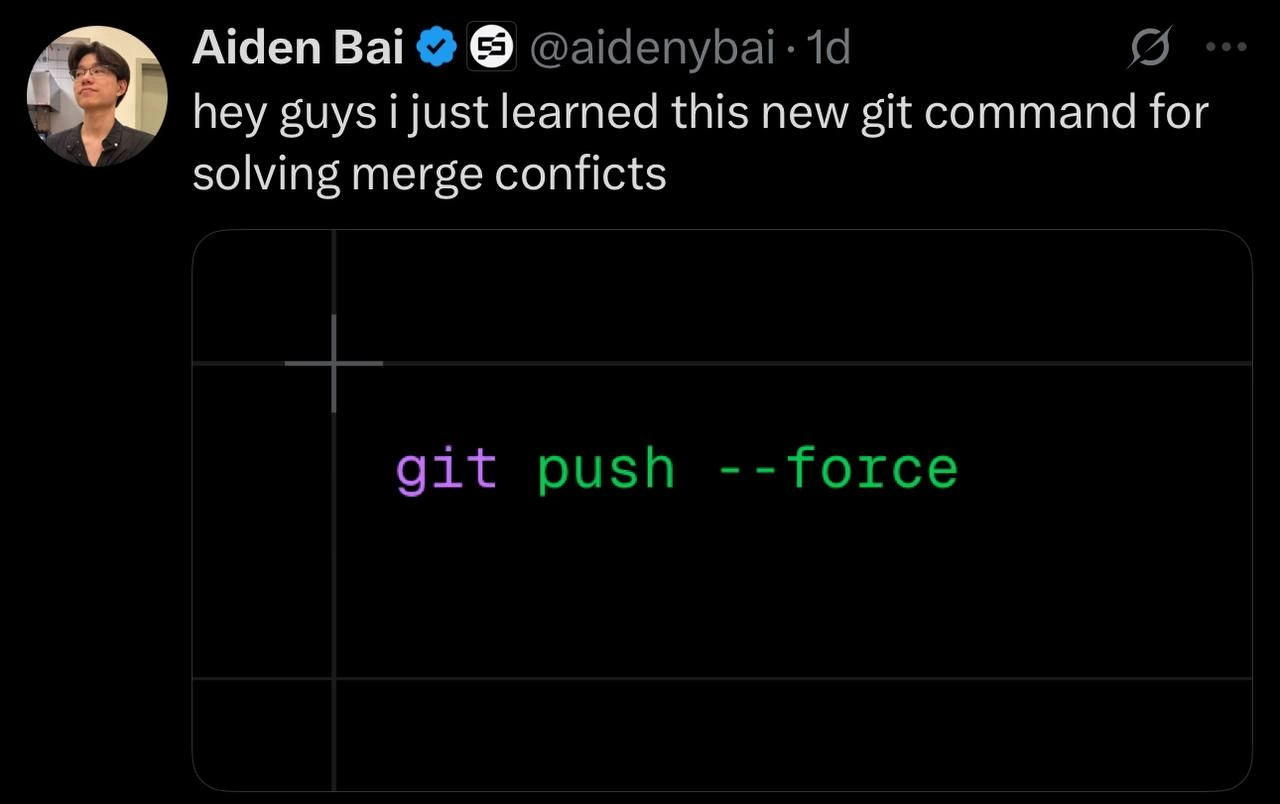
The meme joke is about someone who decides not to go through those proper steps and instead uses a shortcut: git push --force. Normally, if you try to push and your copy is missing some changes that are already on the remote (like in a conflict situation, the remote has stuff you didn’t merge yet), Git will reject your push. It will say something like “failed to push – remote contains work that you do not have,” essentially telling you, “Hey, you’re not up-to-date, please pull the latest changes and merge them first.” This safety check prevents you from accidentally overwriting other people’s work. The --force flag, however, overrides this safety. By running git push --force, you’re saying, “I know I don’t have those other changes, but push my version anyway, wipe out whatever is there if needed.” It’s a forceful overwrite. Think of it as shoving your update to the server without listening to any complaints. The command is addressed humorously in the context tags as git_push_force, and indeed it’s often described as a nuclear_option because it’s so powerful it can destroy things in the wrong context.
Why would someone do this? Possibly they just learned about it and thought, “Oh cool, I can get rid of that annoying error message by forcing the push!” From a newer developer’s point of view, it might seem like an easy merge_conflict_resolution: one command and your work is up on the server, conflict solved… sort of. The tweet format “hey guys i just learned this new git command” perfectly captures that newbie excitement of discovering a quick fix. But what they might not realize is what gets lost by doing that. If the remote repository had changes from others (the source of the conflict), those are effectively erased on the remote by your force push. It’s like you’re saying your code is the only code that matters now. This can lead to some serious confusion for your collaborators. Imagine your friend tries to update their local project: they do git pull, and suddenly Git tells them their commits have been removed or that the history has changed unexpectedly. Their copy of the project might not cleanly update because the timeline of commits has been rewritten. They’ll have to figure out how to reconcile their work with this new reality (often by manually reapplying their changes onto this forced update). It’s a headache most would rather avoid.
In simpler terms, git push --force is the “I win, you lose” shortcut of merge conflicts. It doesn’t truly “solve” the conflict; it just decides the conflict isn’t worth resolving properly and throws out one side’s work. In a solo project, forcing a push isn’t dangerous – you’re only overwriting your own history. But in a team, it’s considered a reckless move because it can undo others’ contributions. That’s why senior developers always warn against casually using --force on shared branches. There’s even a safer variant called git push --force-with-lease which at least checks that nobody else added new commits upstream since you last pulled, making sure you don’t unknowingly delete someone’s fresh work. (Even that is used with caution.) The meme exaggerates the scenario for comedic effect: the idea of a person proudly announcing this GitCommand as if it were a clever hack, while every experienced person in earshot probably spits out their coffee. It’s classic developer humor because it highlights a common rookie mistake. Those who have been through it laugh (perhaps a bit nervously) because they remember being in those shoes, or cleaning up after someone who was.
So, in summary at this level: The tweet picture shows git push --force as the “solution” to a merge conflict. This is funny to developers because it’s the opposite of best practices. It’s a quick and dirty fix – quick because it immediately bypasses the complex merge, dirty because it can mess up the shared project history. The humor comes from the brazen attitude of using a brute-force tool where a surgical solution is needed, and every developer who’s learned about Git the hard way can relate to that scenario.
Level 3: The Nuclear Option
In the world of version control with distributed systems like Git, git push --force is colloquially known as the nuclear option for dealing with repository issues. This meme highlights a scenario every senior developer fears: instead of carefully resolving a merge conflict by integrating changes, someone obliterates it by force-pushing their version. In Git's model, each developer has a full copy of the repository history. A merge conflict arises when two people make incompatible changes on the same part of the code – Git can’t automatically figure out whose change to keep, so it asks for human intervention. The sensible approach is to manually reconcile the differences (maybe through a proper merge or rebase), preserving both contributors’ work in history. But here comes the rogue command: git push --force. This tells Git, “Ignore the usual safety checks and make the remote repository exactly match my local repository, discarding anything else.” It’s like telling everyone else on the team, “Nope, my commits are the new reality now.” The humor (and horror) in the tweet stems from proposing this Git command as a “new way” to solve conflicts – it’s VersionControlHumor rooted in an anti-pattern that makes experienced devs cringe.
From a seasoned engineer’s perspective, this is the ultimate nuclear_option. Why? Because it rewrites history on the remote repository. Literally. Git normally prevents you from overwriting shared history; it expects your push to be a fast-forward – meaning your work builds on top of what’s already there. A force-push bypasses that. It changes the branch pointer on the server to point to your new commits, orphaning any commits that were previously there but aren’t in your copy. If a teammate had commits on that branch, those commits vanish from the main timeline as if they never happened (they're still lurking in someone’s clone or the reflog, but effectively “gone” from the shared perspective). Seasoned devs often compare this to rewriting the project’s past without telling the others – a big no-no in collaborative environments. It’s the riskiest Git command in everyday use, sometimes jokingly referred to as “the most reckless Git command imaginable” (just as the title says). The cultural tension here is real: junior developers or panicked coders might reach for this big red button to quickly “fix” a problem, while architects and leads are constantly policing against it, knowing the chaos it can unleash on team DeveloperExperience_DX.
This meme lands so well with experienced folks because it satirizes a painful lesson many have learned the hard way. Perhaps someone on your team actually did this under pressure – “there was a merge conflict, so I figured I’d just force push and be done with it.” Cue the fallout: colleagues pulling the updated branch only to encounter perplexing errors, or worse, discovering their work has disappeared. It’s DeveloperHumor with a dose of trauma: everyone remembers their first time inadvertently blowing away a coworker’s commits or having to recover from someone else doing it. The history_rewrite_risks are not just theoretical – real incidents have caused lost work, angry Slack messages, emergency meetings, and policies like protected branches (to technically prevent force pushes on critical parts of the repo). In fact, many teams disable --force on main branches precisely because of this scenario. The tweet’s joke format – “hey guys i just learned this new git command for solving merge conflicts” – mimics an excited newbie broadcasting a discovery, oblivious to the danger. It’s funny because we’ve all seen that enthusiasm meet the brick wall of reality: a senior dev leaps in with a dismayed, “Noooo, don’t do that!”
At a deeper level, this touches on the trade-off between quick fixes and safe workflows. Merging code is sometimes tricky and time-consuming; the temptation is there to choose a shortcut that appears to “make the problem go away.” The merge_conflict_resolution process can be tedious, especially when you’re in a rush. Force pushing feels like a magic wand – one command and poof! the merge conflict banner is gone, your local build is now the source of truth. But that “magic” is more like dark magic: it comes with a price. Senior engineers often say that just because Git allows something doesn’t mean it’s a good idea. Git, being a distributed system, empowers each user to rewrite history in their own repo – an otherwise useful feature for cleaning up commit series (via interactive rebase or squashing) before sharing. *However, when applied to a shared branch without coordination, it’s like unilaterally editing a shared Google Doc and erasing everyone else’s paragraphs. In an enterprise context, pushing with --force is akin to breaking the social contract of collaboration. Experienced devs know the value of guarding the integrity of the main branch’s history – it’s the source from which all team members work and deploy. So they’ve developed cultural rules and technical safeguards to discourage the nuclear option. This meme humorously exaggerates the blissful ignorance of someone skipping those rules. It’s a form of insider satire: people who use Git daily immediately recognize git push --force as the “forbidden spell” that junior wizards should not cast without very good reason (and preferably adult supervision!).
Even the visual presentation – the tweet in dark mode and the git push --force in a code-styled panel – evokes the way tips and tricks are often shared on Twitter or StackOverflow. We frequently see genuine posts like “hey I found this neat command!” but here it’s subverting that trope. The punchline is that the “neat trick” is actually an infamous footgun. In other words, the meme points out an ironic truth: sometimes the simplest solution (in terms of keystrokes) is the worst solution (in terms of consequences). Seasoned devs are laughing (or groaning) because they’ve been on both sides of this – the desperate coder hitting ForcePush out of frustration, and the weary teammate doing damage control afterward. It’s an everlasting tug-of-war in software teams between nuclear shortcuts and careful collaboration. The meme crystallizes that tension in one bold command on a dark background, practically glowing bright green like radioactive material – a tongue-in-cheek representation of how volatile --force can be.
Description
The image is a two-panel meme. The top panel features a group of five cheerful, celebrating 'Wojak' characters (also known as 'Feels Guy'), representing the frontend team. The bottom panel shows a contrasting scene with a group of five sad, depressed, and crying Wojak characters, representing the backend team. The central joke is the lack of recognition for backend developers. While the frontend team receives praise for the visually appealing and interactive user interface that everyone sees, the backend team, which builds the foundational logic, APIs, and infrastructure that make the frontend possible, often goes unnoticed and unappreciated. This is a classic trope in the developer community that highlights the visibility gap between frontend and backend work, resonating with any engineer who has felt their behind-the-scenes contributions were overlooked
Comments
14Comment deleted
The frontend is the sizzle, the backend is the steak. But in this case, the stakeholders are all vegans who only care about the presentation
Nothing like a good ‘git push --force’ to turn a 3-way merge conflict into a 30-person incident review
The real merge conflict resolution is convincing your team that the git reflog was just a collective hallucination and those commits never existed in the first place - it's not rewriting history if nobody can prove it happened
Ah yes, the nuclear option for merge conflicts - because nothing says 'team player' quite like unilaterally rewriting shared history and forcing your colleagues to re-clone the entire repository. It's the distributed version control equivalent of 'works on my machine' taken to its logical extreme: if everyone else's work doesn't exist anymore, there can't be any conflicts. Bonus points if you do this on main at 5 PM on a Friday
Treating merge conflicts with git push --force is the team’s last-write-wins consensus - eventually consistent, instantly unpopular
Calling git push --force a merge-conflict fix is swapping your org’s consensus algorithm for last-writer-wins - fast until the pre-receive hook and auditor disagree
Force push: because nothing bonds a team like collective amnesia about who broke the main branch last
Always these artificial limitations... who needs them, am I right? Comment deleted
bro forgot about the code curruptions Comment deleted
Is that a problem for you, lol? Comment deleted
Hi there! Please, follow rules of community and keep all communications in English 🙏 Comment deleted
oh sorry my bad🥲 Comment deleted
No worries and know that you’re very welcome 🥰 Comment deleted
Bro's about to get fired Comment deleted