A Developer's Gentle Inquiry to Their Non-Cooperative Code
Why is this Bugs meme funny?
Level 1: Hide and Seek
Imagine you have a toy that sometimes stops working. Maybe it’s an electric toy car that one day just won’t run. You’re upset and take it to your parent, saying “It’s broken!” But as soon as your parent looks at it, the toy car suddenly starts working just fine. 🤨 You put it back on the ground and try again later – and it stops working again! It feels like the toy is playing a game of hide-and-seek with you. One moment it’s broken, the next moment (especially when someone’s watching) it’s perfectly okay. You’d probably be confused and a little angry at the toy, right? You might even shout, “Come on, just work properly!”
That’s exactly how a programmer feels in this meme. The “code” they wrote is like that tricky toy. Sometimes it runs and gives the right answer, and other times it acts up and crashes or does something weird. When the programmer tries to show the problem to a smart friend or uses a special tool to see what’s wrong, suddenly the code behaves and doesn’t show the problem – as if it’s pretending everything is okay. It’s really frustrating, just like the toy that makes you look silly by working only when others are watching. The meme is showing a person (the programmer) pointing at a butterfly (their code) and basically asking, “Is this thing actually fixed or is it fooling me?” It’s funny because anyone who’s had an unreliable toy or gadget can relate – you end up half-complaining, half-laughing at how ridiculous it is. The poor programmer just wants their code to work correctly, and when it finally seems to, they’re not even sure if they can trust it. It’s like when you finally get your toy car to run, you’re happy but also thinking, “Is it really fine now, or will it stop again the minute I try to show my friend?” The meme takes that feeling and makes it a little cartoon joke, so we can laugh at the situation and feel better knowing we’re not the only ones whose “toys” sometimes act alive.
Level 2: Why Won’t It Work?
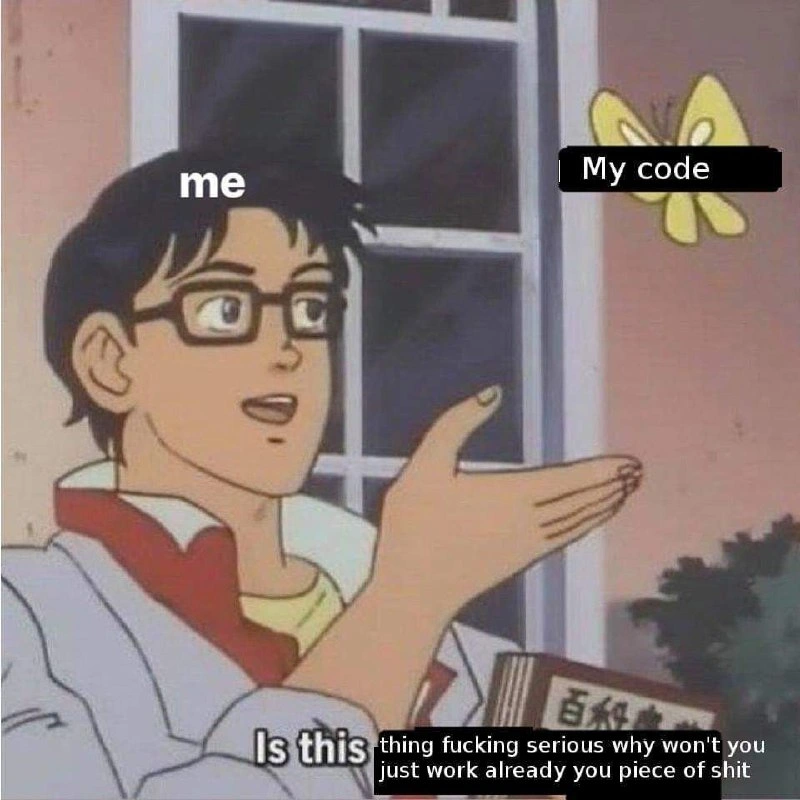
So what’s happening in this meme? Let’s break it down in simpler terms. We have a popular anime meme format (often called the "Is this a pigeon?" meme) where a character is pointing at a butterfly in confusion. In the original cartoon, he mistakes the butterfly for something it’s not, which has become an Internet joke about misidentification or perplexity. In our developer version, the character represents “me” (the developer), and the butterfly is labeled “My code”. The developer is essentially asking, “Is this my code actually working, or is it just another bug?” – he’s confused that the program seems to be doing something, but he’s not sure if it’s correct behavior or a glitch.
In software terms, a bug is any mistake or problem in the code that makes the program act in ways it shouldn’t. Debugging is the process of finding and fixing those bugs. Now, usually when you fix a bug, your code should start working correctly – that’s the goal! But in this scenario, the coder is suspicious. It feels like when you tape together a broken toy: sure, it’s not falling apart right now, but you’re not convinced the fix will hold once you let go. The meme captures that doubtful moment perfectly. The text at the bottom – albeit with some spicy language born from frustration – basically has the developer yelling at their code, “Are you seriously working now? Why won’t you just work properly, you piece of junk?!” This is developer frustration in a nutshell: when you’ve tried everything, and the code still misbehaves, you nearly start arguing with the computer.
Why would someone question if their “working” code is really working? Often, it’s because of flaky behavior. Maybe the program was crashing or giving wrong results, and after a small change, suddenly it seems fine... but only some of the time or under very specific conditions. For a less experienced programmer, the first instinct is relief: “Yay, it runs now!” 🥳. But anyone who’s been through a few troubleshooting battles knows to be a bit wary: “Wait, did I truly fix it, or did the bug just go into hiding?” Sometimes, when you run code in a different way, the bug doesn’t show up. For example, you might run your app with a debugger (a tool that lets you step through code slowly) and the bug doesn’t happen – this could be due to timing changes. Or you add an extra console.log("here") to see what’s going on, and weirdly the problem goes away – which makes no sense, right? That kind of bug that disappears when you try to observe it is exactly what developers jokingly call a heisenbug (named after a physics principle as mentioned: observing something can change it). It’s rare in simple programs, but as soon as you have things like multiple threads, network calls, or complex state, these “now you see me, now you don’t” bugs can appear.
The meme is funny to developers because it exaggerates a real feeling. Debugging can sometimes feel like chasing a ghost. One minute the error is there, you rerun the program with an extra log or in “safe mode”, and poof, it disappears. It’s maddening! You start second-guessing yourself, much like the guy in the meme questioning the nature of the butterfly. The categories listed (Bugs, Debugging_Troubleshooting, DeveloperExperience_DX) and tags like DebuggingFrustration and RelatableDeveloperExperience all point to this being a joke about very common developer experiences. Even if you’re a junior developer or just starting out, you’ve likely encountered something not working, then after tinkering, it suddenly works and you’re not entirely sure why. It’s equal parts exciting and scary – exciting that it’s working, scary that you don’t know what fixed it or if it will break again. This meme just puts a humorous lens on that scenario: the dev is so perplexed that he’s literally asking his code out loud if it’s for real this time. And given the language used, he’s extremely frustrated but also kind of joking – which is how a lot of us cope with pesky bugs. In short, “Is this my code working or just another elusive bug?” is the programmer’s way of side-eyeing their own program, not fully trusting it, much like you wouldn’t trust a sneaky cat that’s been guilty of mischief before.
Level 3: In Code We Distrust
Every experienced developer has faced that sinking feeling when a bug mysteriously “fixes itself” while you’re investigating it. This meme nails that senior-dev paranoia. The classic anime panel (“Is this a pigeon?”) is re-captioned with “me” pointing at “My code” (the butterfly), and asking “Is this thing fucking serious why won’t you just work already you piece of shit.” 😅 The dev in the meme is effectively saying: “Is my code actually working now, or is this just another fluke?” That’s a sentiment every jaded programmer recognizes.
Why is this so relatable? Because we’ve all been burned by phantom fixes. Picture a grizzled senior engineer at 3 AM, eyes bloodshot from staring at logs. They’ve changed nothing significant, yet suddenly the error stops. Is it actually resolved or merely hiding? Trust issues with code set in hard. You begin to question reality: Did that last semicolon really fix it, or did the bug just decide to take a coffee break? 😤 In an ideal world, if code “works” that should be the end of the story. But in real dev life, “it works on my machine” can be the scariest phrase ever. A green passing test suite might actually be a red flag 🚩 if the fix came too easily. Seasoned devs know better than to pop the champagne on the first green build after a long bug hunt — that bug might just be playing dead.
The humor also comes from the absurd disconnect between expectation and reality. We write code thinking it’s logically sound, yet it behaves like an unpredictable creature. The meme’s butterfly is a perfect metaphor: our code is a delicate thing fluttering about. We reach out to grab the bug (like trying to net a butterfly), and the very act of reaching spooks it away. It’s a heisenbug scenario captured in one image — the code appears to work only when you’re watching it closely, and you’re left bewildered: “Is this a deliverable build or an alien life-form?”
There’s a layer of cynical humor in the profanity-laced subtitle. It’s funny because it’s true: that is exactly what many of us mutter under our breath (or scream in our heads) during a debugging meltdown. The meme exaggerates the polite confusion of the original anime scene into a full-on senior_dev_rage moment. In those moments when the code defies all logic, you do feel like yelling at the machine: “Why won’t you just work already, you piece of 💩!” – and indeed people have yelled exactly that in the solitude of a late-night coding session. This shared trauma is what makes the meme highly relatable developer humor.
It also touches on that weekend_fix_paranoia every seasoned dev knows. For example, suppose you finally get the code to stop erroring at 5 PM on a Friday. A junior might celebrate and head home, but an older, battle-scarred engineer will squint at the screen and think, “It’s a trap… There’s no way it was that easy.” They know there’s a good chance come Monday, in production or under a slight workload change, the bug will flutter back into view. Bugs in software have a habit of resurfacing when you least expect it. This is why debugging teaches humility: you learn to distrust “miracle” fixes and double-check that your code isn’t just accidentally working. Maybe you added a quick patch that makes the error go away, but did it truly address the root cause or just mask the symptom? Seasoned devs will relentlessly test and peer-review, knowing that if you don’t completely understand why the code started working, it’s probably not really fixed. The meme perfectly encapsulates this developer frustration: that mix of anger, skepticism, and dark humor when dealing with bugs in software that seem to defy logic. It’s a little PTSD flashback for any developer who’s had code behave like a prankster.
Level 4: Catching the Heisenbug
At the most fundamental level, this meme touches on a concept akin to the quantum mechanics of software bugs. In computing folklore, an "heisenbug" is a bug that seems to vanish or alter its behavior when you try to observe or debug it. The term is a geeky homage to Heisenberg’s Uncertainty Principle in physics – where measuring a system disturbs it. Here, our innocent-looking code (the butterfly) turns into an elusive quantum particle: as soon as we attach a debugger or add logging to inspect what’s wrong, the problem conveniently disappears or changes its nature. It’s as if the act of reaching out to catch the bug causes it to flutter away. This isn’t sci-fi; it’s a real phenomenon in complex systems.
Consider a multi-threaded program with a subtle race condition. The threads’ execution order is unpredictable – a classic source of nondeterministic behavior. If you add a simple print statement or run the program under a slower interpreter, the timing changes just enough to avoid the race condition. The bug doesn’t occur, and you get a false impression that everything is fine. This is the observer effect in action: the tools we use to examine the system (debuggers, logging, even compiler flags) inadvertently change the system’s state or timing. A Heisenbug might be caused by:
- Race conditions: Two threads rushing through code; add a debug log, and one thread pauses just enough to prevent the collision, hiding the bug.
- Memory initialization quirks: In a debug build, memory might be preset to safe values, masking an undefined behavior that would crash in an optimised release build. One run you get correct results by sheer luck; another run (or machine) and it’s segmentation fault city.
- Optimization differences: The compiler’s aggressive optimizations in production builds can reorder instructions or omit sanity checks. A bug might not show in a slow interpreted mode or non-optimized mode, but then hits like a truck when you compile with
-O3.
In essence, the meme humorously highlights a truth: some bugs live in a Schrödinger-like state, seemingly both there and not there until observed. The butterfly imagery even evokes the butterfly effect – a nod to chaos theory where a tiny change (like one line of code) can lead to wildly different outcomes. Seasoned engineers know that a system as intricate as modern software can exhibit chaotic, nearly non-deterministic behavior. A minor tweak or an environmental difference (different OS, slight network latency changes, one more log line) can be the flap of the butterfly’s wings that completely changes whether the code works or crashes. The surreal part is that, from a purely logical perspective, code is supposed to be deterministic – given the same input, it should produce the same output. But real-world computers are immensely complex: caches, threads, and timing interactions introduce a kind of computational uncertainty. The meme gets its dark humor from the fact that even though we write “correct” code, the underlying realities of hardware and software stacks mean we can never be 100% sure if it’s actually correct… or if we’re just not looking hard enough to see it break.
Description
This meme uses the 'Is this a pigeon?' format, which originates from a scene in the anime 'The Brave Fighter of Sun Fighbird'. An anime character with glasses, representing the developer, is labeled 'me'. He is gesturing towards a yellow butterfly, which is labeled 'My code'. The original text of the meme, 'Is this a pigeon?', has been altered. The first two words, 'Is this', are visible, but the rest of the question is covered by a black box containing a profanity-laced, frustrated rant: 'thing fucking serious why won't you just work already you piece of shit'. The humor comes from subverting the original meme's theme of naive misidentification and replacing it with the raw, visceral anger every developer feels when their own code, something they created and should understand, inexplicably fails to work. It's a universally relatable moment of exasperation in the debugging process
Comments
11Comment deleted
The five stages of debugging: Denial, Bargaining, Anger (pictured), Depression, and finally, Acceptance that you forgot a semicolon
Some days the butterfly effect isn’t a chaos-theory metaphor - it’s literally that one-line change in prod flapping around and taking the whole cluster with it
After 20 years in this industry, I've learned that code doesn't respond to threats, bribes, or emotional pleas - it only respects the ancient ritual of adding random console.logs until you accidentally fix it while trying to debug something else
The butterfly meme perfectly captures that moment when you're staring at code that *should* work according to every principle you know, yet it refuses to cooperate - like asking 'Is this a working implementation?' when it's clearly just a collection of syntax that compiles but doesn't execute your intent. It's the programming equivalent of philosophical doubt: you know what a butterfly is, you know what working code is, but somehow in this moment, the distinction has become impossibly blurred by three hours of debugging and the creeping realization that the bug might be in your mental model, not the code
My code isn’t broken - it’s demonstrating eventual consistency between my laptop and prod; success hits 100% right after a cache purge and a credible rollback threat
My code is a butterfly: add one println, timing shifts, and suddenly it’s works‑on‑my‑machine‑as‑a‑service - pure config entropy disguised as a Heisenbug
Ah, the Heisenbug butterfly: observe it in the debugger, and it flutters off into non-reproducible oblivion, forcing another prod deploy to chase it down
😲 Brave Fighter Of Sun Fighbird Comment deleted
My goal is to build a robot that protects the Earth Comment deleted
gundam? Comment deleted
Its a anime that was popular in Korea as a child. The school transforms into a robot. https://youtu.be/PghiIF2G3wE?si=SMApyFXyK-xypk2I Comment deleted