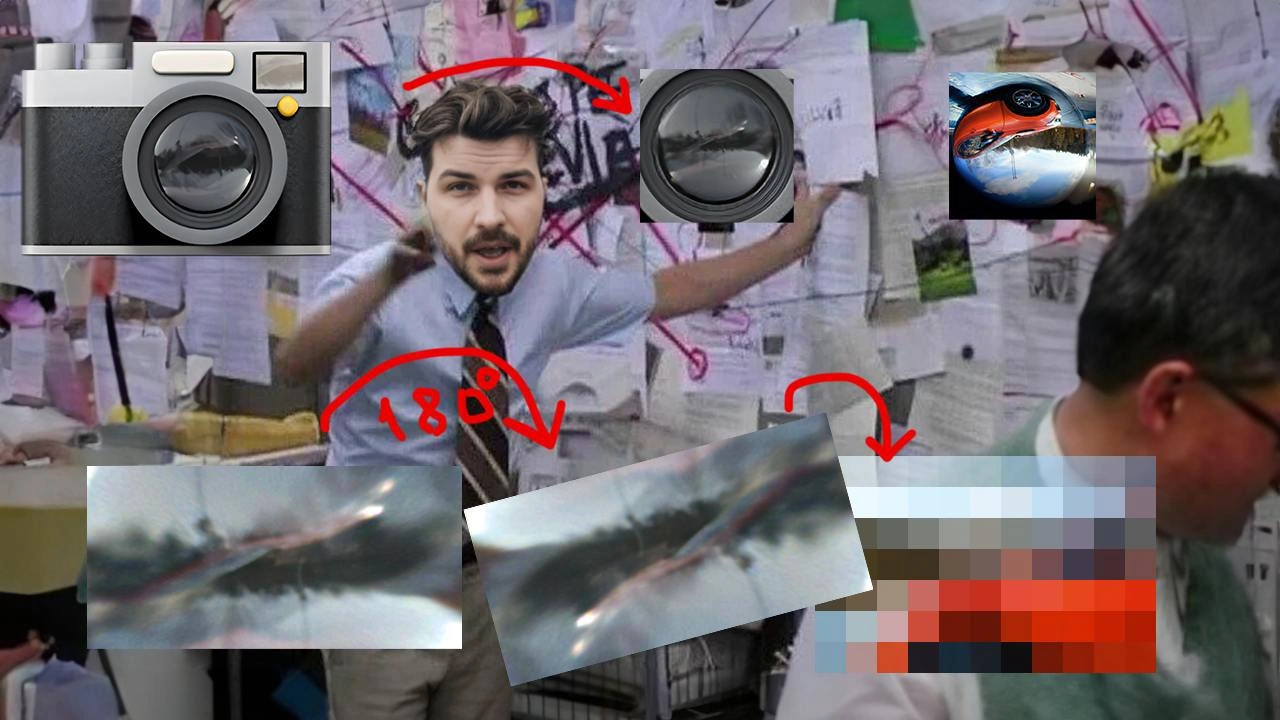
When the 180-degree fisheye image bug turns into a conspiracy wall investigation
Why is this Debugging Troubleshooting meme funny?
Level 1: Connect the Dots
Imagine you took a picture with a super crazy funhouse mirror camera – the kind that makes everything look bent and upside down – and then the photo came out flipped around on top of that. The picture looks so weird and messed up that you can’t even tell what’s what! Now you feel like a detective trying to solve a mystery. You print out the strange photos, tape them to your wall, and draw red lines between them like you’re solving a big crime case. Maybe you even have a picture of the camera and the funny lens up there, and a shiny metal ball because the photo looks like it was taken in a reflection. It’s a silly scene: you’re pointing at the wall, arms flailing, saying “Aha! The camera did this, then the lens did that, and flip it 180 degrees… and THAT’s why our picture is all crazy!”
In simple terms, this meme is funny because the developer is treating a picture bug like it’s some giant conspiracy he has to crack. It’s like if your jigsaw puzzle picture looked wrong and you ended up covering your room in puzzle pieces trying to figure it out. We all know that feeling when something small goes wrong and we obsess over it. Here, the poor guy’s photo turned out upside-down and warped, and he’s gone full-on detective mode to connect the dots and fix it. To anyone else, he looks a bit wild – red strings everywhere and big gestures – but in his mind, he’s close to discovering the “secret” of the messed-up picture. The humor comes from recognizing that sometimes solving even a tiny problem can make us act like we’re unravelling a big mystery. It’s a playful way to show how debugging a tricky problem can feel: a bit confusing, a bit dramatic, but ultimately very satisfying when you finally figure out the last piece of the puzzle and everything clicks into place.
Level 2: Fisheye Fiasco
Alright, let’s step back and explain the pieces of this puzzle in plain terms. The meme is about a developer debugging a weird image bug. Specifically, the bug involves a 180° fisheye image. What does that mean?
Fisheye lens distortion: Imagine a GoPro camera or a peephole in a door – that super wide, bubble-like view. A fisheye lens is a special camera lens that can see extremely wide angles (up to 180 degrees, which is like seeing everything in front of you, left to right). The trade-off is that it distorts the image: straight lines appear curved, and the whole picture can look like it’s been bent into a circular shape. It’s called “barrel distortion” because it looks like the image was mapped around a barrel. This distortion can make photos look funky if you’re not expecting it.
180° rotation / EXIF orientation bug: Now, 180° rotation in an image means the picture is turned upside down. Many devices don’t actually save the picture data upside down; instead, they save a note (metadata) with the image saying “this photo should be shown rotated 180 degrees”. That note is part of something called EXIF data (Exchangeable Image File Format), which includes information like which way the camera was held, the date, camera settings, etc. An EXIF orientation bug happens when software doesn’t handle that note correctly. For example, have you ever loaded a photo into an app and it came out sideways or upside down? That’s likely because the program ignored or misinterpreted the EXIF orientation flag. In our meme’s story, it sounds like the image might have been rotated when it shouldn’t have (or vice versa), causing it to flip.
Conspiracy wall meme: The image in the meme shows a guy in an office frantically gesturing at a wall covered in papers and connected by red string. This is a popular meme format used to joke about someone going overboard investigating a mystery or problem. It’s often used in tech humor to represent debugging or solving a complex problem where you have to link many clues. Here, the developer has printed out pieces of the image and literally connected them with red arrows like he’s solving a crime. It’s a silly exaggeration (most of us don’t actually tape images to the wall), but it visually represents how a developer might feel when debugging: like a detective piecing together a bunch of clues.
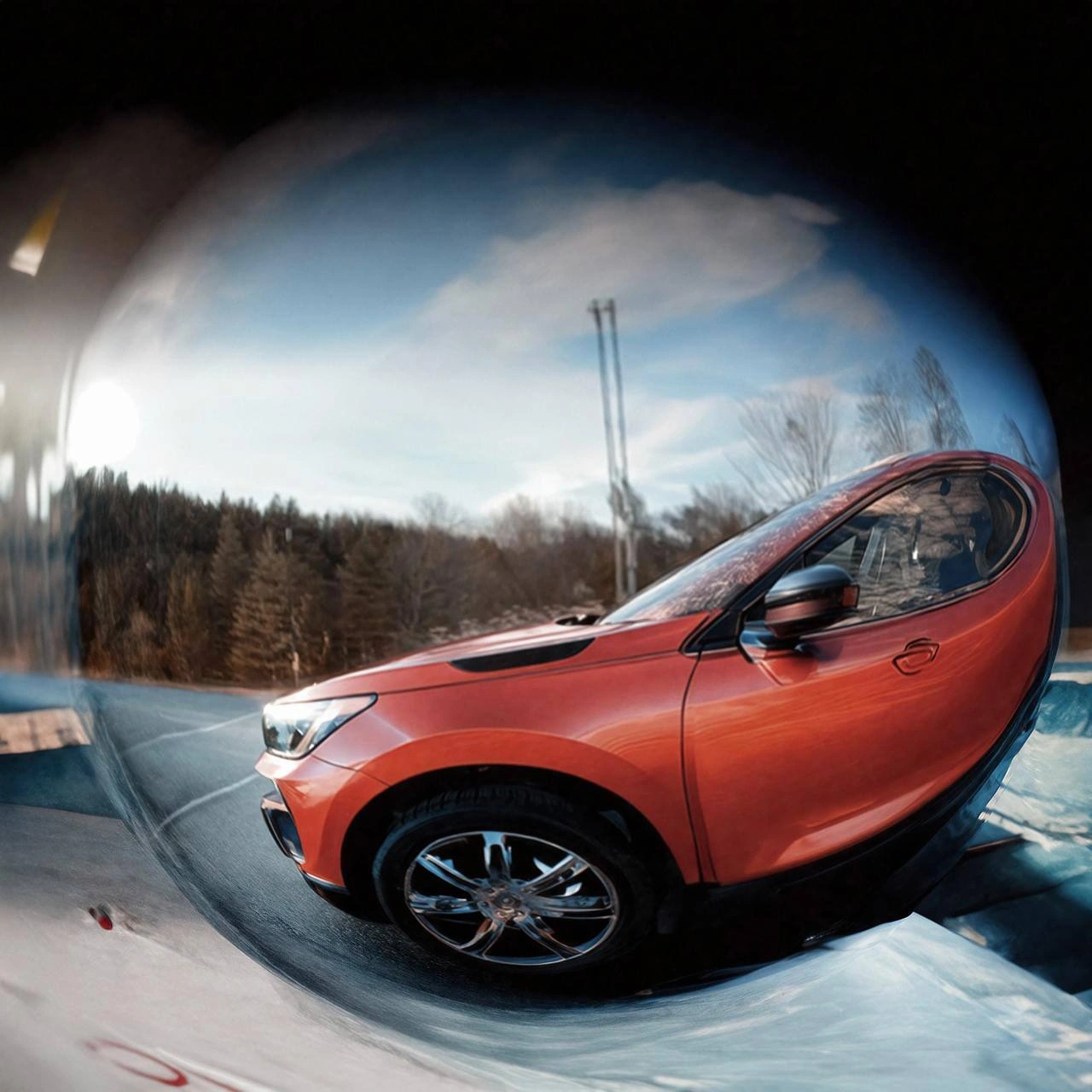
Now, what are those floating icons and images? On the top left, there’s a camera icon, indicating the starting point: the camera that took the photo. Next, above the person’s head, there’s a picture of a camera lens (specifically a big black fisheye lens). This suggests the type of lens used – the culprit for distortion. On the top right, there’s that chrome ball with a car’s reflection. This strange image is an example of what a super wide-angle or fisheye view can look like – everything reflected in a shiny ball, kind of upside down and warped. They’ve included it to show the extreme result of distortion (and also as a funny over-the-top clue, since it looks so conspiratorial).
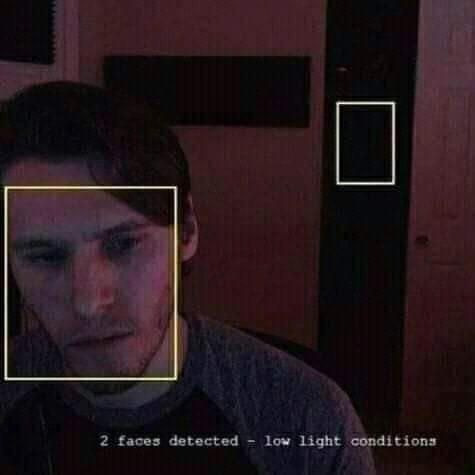
Along the bottom, we have three images of the bug itself. They look like blurred, streaky photos of something (maybe a car?) that are rotated and hard to recognize. The middle one has "180°" written with a red curved arrow, indicating that image was rotated 180 degrees from the left one. Then an arrow points to a very pixelated thumbnail on the right – that could be the final tiny image as seen in the app (perhaps a little preview image that ended up super distorted). So, the developer likely took the bugged image at various stages and is examining each stage. It’s like:
- This is what we expected or started with (maybe the left image).
- This is what happens after applying a 180° rotation (the middle image, flipped upside down or such).
- This is the final result we saw (the tiny pixelated right image).
By laying them out, he’s trying to see where things went wrong. The red arrows are literally connecting the cause and effect: from the camera to the lens distortion to the rotated image to the final weird outcome.
For a junior developer (or anyone new to image processing), the key takeaway is: image bugs can have multiple layers. One layer here is the optical distortion from the lens (the fish-eye effect). Another layer is the orientation metadata (the 180° rotation info). Yet another might be the scaling down to a thumbnail (which can introduce blur/pixelation). If each of these isn’t handled right in code, you don’t just get a small issue – you get a completely crazy-looking image, like a funhouse mirror result. Debugging such an issue means understanding each part: how the lens warps the image (and maybe requires an algorithm to fix it), how the orientation flag should be applied, and how the image is being resized or used. The meme humorously shows the developer treating this like solving a grand mystery, which, in a sense, it is. Debugging is often about being a detective: gathering evidence (logs, screenshots), forming theories, and testing them. And sometimes you do feel a bit crazy when the bug is elusive.
In simpler terms, this level is explaining that the meme is about untangling a complicated image problem. The developer is facing a fisheye fiasco: a picture from a wide-angle lens that got flipped upside down somehow, yielding a very strange result. He’s gone to the lengths of printing everything out and drawing connections to figure it out, which is an exaggerated way to illustrate how involved troubleshooting can get. It highlights common things new devs learn: what lens distortion is, what EXIF orientation is (often a “gotcha” the first time you deal with user-uploaded photos), and how those can interact in unexpected ways. And it does so in a funny, visual way – because sometimes the only thing you can do is laugh when a bug drives you up the wall (literally, in his case, with papers on the wall!).
Level 3: The EXIF Files
In this scene, our hapless developer has become a full-on debugging detective, standing before a “conspiracy wall” of printed images, red arrows, and string. It’s a hilarious exaggeration of a very real developer experience: those late-stage bug hunting sessions where a simple glitch snowballs into an obsessive investigation. The meme draws from the famous TV trope of a crazed investigator connecting clues on a wall, and any senior dev who’s chased a heisenbug or graphics glitch at 3 AM is nodding knowingly (and maybe a little triggered).
Let’s break down the clues on that wall. The bottom row shows three instances of the same streaky image artifact – likely the weird output the app produced. They’re cropped, rotated, and highlighted with a big red “180°” label, signaling that a 180-degree rotation is at the heart of this mystery. To the left, we see a camera icon and a camera lens graphic, and on the right, a shiny orange car reflected in a chrome ball. The red arrows connect these seemingly disparate elements. This is exactly how a graphics pipeline bug can feel: you’ve got the camera input on one end, the bizarre output on the other, and a bunch of transformations in between that turn the former into the latter. Our developer is literally connecting the dots (or rather, the pixels): Camera → Lens → 180° rotation → distorted reflection → tiny glitched thumbnail.
Why is this funny? Because we’ve all been that person on occasion. The meme is poking fun at the intensity of debugging certain bugs, especially in complex domains like image processing. A fish-eye lens capturing an image might produce an image that looks bizarre to begin with (super wide-angle, curved lines). Add an EXIF orientation bug on top – perhaps the camera was mounted upside down, so it tagged the photo as needing a 180° flip. If the software handling the image doesn’t account for that properly, you end up with an image that’s double-rotated or not rotated at all when it should be. The middle blurred photo with "180°" might be the image after one rotation fix was applied. The final pixelated thumbnail on the right could be how the bug manifests to users – maybe a tiny preview image that for some reason is upside-down and curiously warped. It’s the kind of bug that QA reports with "image looks weird", and the developer initially can’t even reproduce it until they realize it only happens with a specific camera, at a specific orientation, with a specific lens setting… Cue the conspiracy music.
From a senior dev perspective, what’s being satirized is the forensic process of debugging. Notice the developer’s wild-eyed gesture – we’ve been there during debugging frustration, explaining to teammates: “Look, at first I thought it was just an EXIF orientation issue – you know, the classic image rotation issue where portrait photos show up sideways. But then I noticed this weird curved streak here. That’s not just rotation – that’s the fisheye lens distortion from the camera! See this shiny reflection of the car? That suggests the image might’ve been processed like an environment map. Why on earth…? Unless… oh no, what if the lens correction algorithm and the orientation got applied in the wrong order?!” Suddenly you have a theory involving multiple subsystems (the camera hardware, the EXIF metadata, the image processing library, the thumbnail generator), all interacting in an unexpected way. It’s a BugHunting saga where each clue leads to another layer of “WTF”.
The humor also comes from how overboard the whole scene is. Most bugs don’t require plastering your office wall with printouts and yarn (we hope!), but it captures the vibe. Sometimes you indeed scatter screenshots across your monitors, or scribble a flowchart on a whiteboard mapping out how data moves from module A to module B, just to see where things go sideways. If you’ve ever dealt with a persistent graphics/rendering bug, you might even log intermediate images to files – essentially the digital equivalent of pinning them up – to trace where the image first looks wrong. Each of those bottom images could be a step in the pipeline: maybe the raw sensor capture (blurry but correctly oriented), then the image after a naive rotation (now upside down because it was rotated an extra 180° it didn’t need), and then the thumbnail (pixelated and upside down). The developer is trying to triangulate the culprit by comparing these outputs.
And of course, the inclusion of the conspiracy_wall_meme format (with the red strings and frantic pose) exaggerates the mental state. In reality, a senior dev might be calmly digging through logs or code diffs. But internally? We sometimes feel as crazed as the meme guy, especially when a bug’s cause eludes us. The meme is a form of Tech Humor therapy: “Yes, this is exactly how debugging this felt!” It shines a light on the absurd lengths developers go to when troubleshooting Graphics issues that nobody else might even understand. Code comments might start reflecting this desperation too – there are legendary comments jokingly referencing “black magic” or “I have no idea why this works”. This meme says: behind every silly bug, there might as well be a red-yarn conspiracy theory explaining it. And hilariously, sometimes that theory is true! In production systems, a tiny glitchy image can indeed be the result of five different things going wrong in perfect unison – a fisheye lens, an orientation flag, maybe a mirrored rendering context, plus a resizing algorithm – all culminating in one cursed picture.
So, why do smart people keep making these image bugs? Because the real world is messy: cameras have weird lenses, hardware gives you metadata you didn’t know you had to handle, libraries have defaults that assume one orientation, and developers are often dealing with images from many sources. The meme highlights that gap between “should be simple” and “inexplicably complicated”. Any senior dev knows that feeling when a one-line bug fix turns into a days-long investigation with dozens of tabs of documentation and forums (the proverbial pinned papers on the wall). It’s both painful and perversely satisfying – just like finally connecting all the red strings and solving a mystery. In summary, this is the EXIF-Files episode of software development: the truth is out there, hiding in the pixels, and we’ll become diagram-drawing sleuths to find it.
Level 4: Projection Paradox
Under the hood of this meme lies some seriously head-spinning image geometry. A 180° fisheye lens captures an entire hemisphere of the scene, which means it’s projecting a spherical view onto a flat image sensor. In mathematical terms, every real-world ray of light at some angle Θ from the lens’s center gets mapped to a pixel via a projection formula – often something non-linear like r = f * tan(Θ) or a more complex equisolid-angle mapping. The result? Barrel distortion: straight lines bulge outward, and the periphery of the image is wildly warped. This distortion is so extreme that a horizon might curve into a U-shape, and objects at the edges stretch funhouse-mirror style. Normally, graphics engineers correct this by undistorting the image with inverse transforms, but if that step goes wrong, reality itself looks bent.
Now toss in an EXIF orientation quirk – that little metadata tag that says “rotate this image 90°” or “flip it upside-down” so it displays correctly. Digital cameras (especially phones) often don’t physically rotate pixels; they just set a flag (like Orientation=3 for 180°) in the image’s EXIF metadata. Display software is supposed to read that and rotate the image at view time. But if some part of the pipeline ignores or misapplies this, the pixels might already be rotated and then get rotated again. A 180° rotation is mathematically a reversal of both axes (like multiplying the image coordinate by -1 on X and Y). Do it twice and you’re back where you started, but do it at the wrong stage and you’ll have an image literally upside down at one step, then incorrectly flipped back later. Combine that with the fisheye’s curved lines and you might see something truly paradoxical: the sky where the ground should be, or a car’s reflection appearing above it – reality rotated and warped.
The meme’s top-right chrome-sphere image is no random choice – it nods to a classic graphics trick. In computer graphics, capturing a panoramic environment often involved photographing a shiny chrome ball to get a 360° reflection of the world. A fisheye lens can achieve a similar hemispherical capture in one shot. If an image meant for one interpretation (say, a normal panorama) is mistakenly treated like another (a reflection map), the result looks like a conspiracy of optics. Essentially, the developer’s bug causes the photo to resemble an environment map: the sports car looks like it’s reflected in a curved mirror, an absurd artifact emerging from misapplied projection math. This is hardcore Graphics and Multimedia Processing gone awry – a collision of coordinate systems and metadata. And beneath the humor, it highlights a truth: image processing algorithms operate on precise assumptions about geometry. If those assumptions get crossed (a lens distortion algorithm not knowing the image was rotated 180°, for instance), you produce visual gibberish that only a dev-turned-detective with a deep grasp of image processing theory can untangle. It’s a lens law conspiracy in action, where fisheye lens distortion, rotation matrices, and metadata misalignment all play a role in the mystery.
Description
Meme-style scene: a blurred-out office worker stands in front of a wall covered in pinned print-outs joined by red string, frantically gesturing with both arms. Large emoji-style overlays float around: a camera icon at top left, a black camera lens above the person, and a shiny chrome-ball reflection of a sports car at top right, all connected by drawn red arrows. Across the bottom, three cropped and rotated blurry photos of the same streaky image are shown, the middle one labeled with a red curved arrow and the text "180°", while another arrow points toward a heavily pixelated thumbnail on the right. The collage humorously illustrates a developer obsessively tracing how a fisheye lens, EXIF rotation, and bizarre reflections combine to produce a mysterious image artifact, echoing the intensity of debugging graphics pipeline bugs
Comments
6Comment deleted
The camera writes EXIF Rotate 180°, the upload service “normalises” it, the CDN “auto-orients” it, the shader flips the UVs - four proud teams, one upside-down sports car, and a debug wall that now looks exactly like our microservice diagram
The image is upside down in portrait but the EXIF says landscape, iOS thinks it's rotated 90 degrees, Android renders it sideways, and somehow CSS transform-origin made it work perfectly in Safari but nowhere else
Ah yes, the EXIF orientation flag - that delightful piece of metadata that transforms 'upload a photo' into a game of Russian roulette across browsers. iOS captures it rotated, stores orientation in metadata, and suddenly your perfectly upright selfie is doing a handstand in Safari but looks fine in Chrome. The real kicker? The image data is actually rotated 180°, but the EXIF flag says 'display me upside-down' - so stripping metadata for privacy means your users are now staring at the ceiling. It's 2024 and we still can't agree whether to trust the pixels or the metadata. At least it keeps the 'why is my profile picture upside-down' tickets flowing
Redaction isn’t a security control - it’s a rendering hint; give a senior dev a fisheye model and cv2.remap and they’ll unwarp your selfie into a floor plan before standup
Finally repro the prod Heisenbug locally, screenshot it blurry, watch it vanish forever
Debugging the photo pipeline: EXIF says 180°, the lens adds fisheye, the transform service strips metadata, the frontend rotates again, and the CDN caches both - now the car is upside down, the blur is “GDPR compliant,” and our architecture diagram has more red string than traces