Skip to content
DevMeme
4491 of 7435
From homemade functions to npm install everything: dependency culture shift
Dependencies Post #4929, on Oct 12, 2022 in TG

From homemade functions to npm install everything: dependency culture shift

Why is this Dependencies meme funny?

Level 1: Homemade vs Store-Bought

Imagine you’re building with LEGO blocks. Now, a long time ago, there were very few blocks around and getting special pieces was really expensive. If a kid (like your grandpa when he was young) wanted a new toy or a specific LEGO piece, he might have to make it himself from scratch because buying it was just too costly or hard. Maybe he would carve a wheel out of wood if he needed a wheel for a toy car – doing it the hard way, all by himself, because that was the only option.

Today, things are totally different. It’s like you have a giant box with millions of free LEGO pieces of every shape and kind, delivered right to your room whenever you want. Need a wheel? There’s a free wheel piece right there. Need a tiny decorative flag or a little door? Boom, just pull it out of the box. You don’t have to create the pieces yourself; you can just grab whatever you need. In fact, you have so many free pieces that you might even take a pre-made piece for something super simple, like a 1x2 brick, instead of cutting one out of cardboard. Why not? It’s easy and it’s there.

The meme is joking about this kind of change among programmers. Before, programmers were like that grandpa carving his own toy parts – if they needed something, they built it with their own hands (or code). Now, programmers are like a kid with an endless LEGO supply – if they need something, they’ll just download (“grab”) a ready-made piece from the internet. Even if they need a tiny thing, like a piece that just adds a single dot to a picture, they’ll still go and get it from the big box of free pieces (because it’s so easy and quick).

It’s funny because the difference is so extreme. It’s like hearing someone say:

  • “In my day, I baked bread from scratch because we couldn’t afford store bread.” (old developer)
  • versus
  • “Ha ha, no need to bake anything, I have every kind of bread delivered to me instantly for free!” (modern developer).

One isn’t necessarily better than the other in every way – they’re just very different mindsets. The old way took a lot of effort but gave you full control over what you made. The new way is super convenient but means you’re relying on those free pieces being good and always available.

So the reason this meme makes developers chuckle is because it captures that huge shift in how we think. It’s showing a serious, frugal voice from “back then” and a casual, cheeky voice from “today” side by side. Picture a grandparent and a teenager talking about solving the same problem, with totally different approaches – that contrast is both funny and a little true. It’s like realizing your grandpa built an entire cabinet by hand, whereas you’re assembling an IKEA shelf with pre-made parts and an instruction booklet. You might laugh, but also appreciate how times have changed.

Level 2: Node Modules Everywhere

Let’s break down the meme’s scenario in more straightforward terms. It’s talking about dependencies – which are external libraries or modules that your project uses. In programming, a library is basically a collection of pre-written code that solves common problems so you don’t have to write that code yourself.

  • “Developers back then: ‘Let’s implement everything ourselves.’” – This refers to an older time (say, the 1990s or early 2000s) when programmers often chose to write code on their own rather than rely on outside code. One big reason was cost and availability. Before the era of massive open-source repositories, if you needed a library (for example, a graphics engine or a set of UI controls), you might have had to buy it. Yes, actually pay money for code! Companies sold software components. If you needed several of those, the costs would add up (that’s why the tweet jokes about “pay 100k for all the libraries we need”). It’s an exaggeration, but it gets the point across that using third-party code had a literal price tag. Because of this, and also sometimes due to pride or a desire for control, developers would say “you know what, we’ll just code it ourselves.” It was the norm to solve problems in-house. This also meant that software teams maintained a lot of custom code.

  • “Developers today: ‘LOL. npm install left-pad reverse-string … dancing-cat’.” – Now it jumps to the present, highlighting how attitudes have flipped. NPM is the Node Package Manager, and npm install ___ is the command to download and add a library (package) to your project in the JavaScript/Node.js world. Modern developers (especially in JavaScript, but also in many other languages via similar package managers like pip for Python or Maven for Java) are used to having a vast collection of free libraries at their fingertips. Instead of writing code from scratch, you can often find a package that does what you need and pull it in within seconds. The tweet shows a present-day dev jokingly installing a bunch of packages with silly names, implying that today’s dev will npm install anything and everything, even for the simplest tasks or for fun. It literally lists:

    • npm install left-pad – Left-pad is a real package that became famous. What does it do? It adds padding to the left side of a string. For example, making "Hello" into " Hello" if you wanted it 3 characters longer. It’s actually very simple to implement yourself (a few lines of code), but many people used this pre-made package. It became a meme in the programming world because it was a tiny function that everyone pulled in as a dependency.

    • npm install reverse-string – This suggests installing a package to reverse a string (like turning "JavaScript" into "tpircSavaJ"). Reversing a string in JavaScript can be done with one-liner code using built-in functions. For example:

      const str = "JavaScript";
      const reversed = str.split('').reverse().join('');
      console.log(reversed); // "tpircSavaJ"
      

      You likely don’t need a library for that. But the joke here is that a modern dev might still grab a package to do it. (There might indeed be a package named something like reverse-string on NPM – there are many very simple packages out there!). It’s poking fun at how even the easiest tasks have been turned into installable packages.

    • npm install print-doggo-terminal – This one sounds humorous and might be made-up. It implies a package that perhaps prints a “doggo” (slang for a cute dog image or ASCII art) in the terminal. There are actually packages that do whimsical things like this (for instance, cowsay prints a cow with a speech bubble in terminal). The meme is using a goofy name to illustrate that nowadays developers even install packages for decorating their terminals or adding fun Easter eggs, not just serious functionality.

    • npm install send-nudez – This is definitely a joke name (playing on an internet meme phrase “send nudes”). There’s no widely known legitimate package by that name; it’s there to be absurd. It underscores the idea that people will npm install anything, even something with a ridiculous or suspicious name, just because it exists. The “LOL” at the start of the list really applies here – it’s laughing at how carefree this is.

    • npm install dancing-cat – Another silly, possibly fictitious package name. Similar to the doggo one, it suggests a package that might show a dancing cat animation. Whether or not that exact package exists, it feels plausible because the NPM ecosystem has tons of novelty packages. The point is to showcase how far the culture goes: not only do we import necessary libraries, we even import goofy, tiny things for fun or ultra-specific tasks.

So, what’s the underlying message? It’s highlighting a culture shift in dependency management. In the past, adding a dependency (using someone else’s code) was rare and done with caution. Today, adding dependencies is the norm – it’s done casually, even excessively.

This is made possible by platforms like NPM, which hosts over a million packages. For context, NPM is a public registry where developers around the world publish their Node.js packages (which can also be used in web frontend via bundlers). Installing a package from NPM is incredibly easy and free, which is wonderful for developers because if you need a solution, chances are someone has already shared one. This practice drastically improves developer productivity: why spend an hour coding a function when you can npm install a tested version in 5 seconds? That’s the core of modern DeveloperExperience (DX) improvements – things just plug in and work (most of the time).

However, there’s a flip side, often referred to as “dependency hell.” This term is used when managing those dependencies becomes troublesome. For example: you include 10 libraries in your project. Those 10 bring along 50 of their own dependencies. Now you have 60 packages in your project that you didn’t write. If one of them has a bug or a security flaw, it can affect you. If one of them releases an update that breaks compatibility, you have to deal with it. If one gets removed or unpublished (like what happened with left-pad), your project might suddenly break through no fault of your own. It can be a headache to debug issues that originate in someone else’s code. This is the cost of the convenience.

A real-world example to make this clearer: the left-pad incident. What happened was the developer of left-pad decided to remove his package from the NPM registry (he had a dispute regarding another package and, in protest, took down all his code). Many projects were depending on left-pad’s code. On one fateful day, anyone who did a fresh install (or CI build) of those projects discovered that the build failed – NPM couldn’t find left-pad (it was gone)! It was such a small thing, but so widely used, that it broke a lot of builds and tools globally. The fix was relatively straightforward (left-pad’s code was so simple that people just re-implemented it or NPM restored a copy), but it was a wake-up call: relying on lots of little packages means you rely on their maintainers and the hosting service. If either goes away or goes bad, you’re in trouble. Nowadays, NPM has safeguards (like not allowing sudden removal of popular packages) to prevent a repeat of that scenario.

Another aspect is security. When you run npm install, you’re executing code from the internet on your machine. It’s usually fine (open source communities are quick to flag malicious code), but there have been cases where a package was hacked or a fake package with a similar name to a popular one tricked people. Managing dozens of dependencies means you have to keep them updated too, because vulnerabilities are discovered regularly. This has led to tools that scan your dependencies for known vulnerabilities (like npm audit). So, modern devs have to be somewhat vigilant – a far cry from writing everything yourself but dealing with different issues now.

For a newer developer, all this might sound daunting, but it’s actually manageable with good practices (pinning versions, reading documentation, etc.). And importantly, the advantages of using packages usually outweigh the downsides, which is why the practice is so widespread. The meme is not saying “this is bad,” but rather “isn’t it funny how much things changed?”.

To sum it up in plain terms:

  • In the old days, programmers acted like craftsmen who built every little component of their product because they couldn’t easily get those components elsewhere (or it was too costly).
  • Today, programmers act more like assemblers or integrators – they take many premade components (libraries) and put them together to make an application. The “premade components” are the NPM packages which are one command away and typically free.

The tweet’s humorous package list is exaggerating to make us laugh, but it underscores a real trend in how software is developed now. If you’re a junior developer reading this, the takeaways are:

  • NPM and packages are central to modern JavaScript development. Embrace them, but know what you’re pulling in.
  • Dependency management is a skill: you’ll learn to choose good, reliable packages and keep an eye on their updates.
  • Don’t be afraid to implement simple things yourself for learning or if adding a dependency feels like overkill. Sometimes writing a quick function is better than adding a new library – it’s a judgment call.
  • Understand that every generation of devs has its context. Neither the old “do it all yourself” nor the new “import everything” is absolutely right or wrong. They each arose from the circumstances of the time.

And yes, there really is a lot of humor in seeing someone run npm install dancing-cat. Part of being in the developer community is enjoying these inside jokes about our tools and habits. 😄

Level 3: Micro-Dependencies, Macro Problems

This meme humorously contrasts two generations of developers and their attitudes toward code libraries. “Developers back then” were cautious about dependencies: they often wrote functionality themselves rather than relying on external libraries. Why? Decades ago, many libraries were either unavailable or came with hefty price tags. If a team needed, say, a graphing library or a UI component suite, they might have had to pay licensing fees (thus the joke about “cannot afford to pay 100k for all the libraries we need”). In many cases, it wasn’t even about money alone – it was also about trust and practicality. Without today’s internet infrastructure, finding and integrating third-party code was a hassle. And once found, that code might be closed-source or not quite fit your needs, so rolling your own solution was often the pragmatic choice. This bred a culture of self-reliance (and perhaps a bit of pride in crafting everything by hand). Seasoned developers reminisce about implementing data structures, math routines, even entire frameworks from scratch because they had to.

“Developers today,” on the other hand, are depicted as having the opposite reflex: “LOL. npm install … everything.” The modern JavaScript/Node.js community embraces a philosophy of “there’s a package for that.” Need a feature? There’s likely an open-source library published on NPM that you can pull in with one command. The tweet’s list of packages is a playful exaggeration, but each one references something real in developer culture:

  • left-pad – This is a real (and notorious) NPM package that simply pads a string with spaces or characters on the left side. It’s literally a function you could write in a few minutes (about a dozen lines of JavaScript), yet thousands of projects depended on it rather than writing their own. The meme brings this up because it became a symbol of modern dependency overuse when the package’s removal broke big parts of the JavaScript ecosystem. Mentioning left-pad is an immediate wink to developers: “remember when a tiny package caused a huge mess?” It’s the poster child of dependency hell in Node land.

  • reverse-string – Likely referencing that even something as basic as reversing a string (which can be done with built-in JavaScript methods like split('').reverse().join('')) might be downloaded as a separate package. There probably exists an npm module for this (there are indeed packages for trivial tasks like checking if a number is even). It highlights the somewhat absurd extent of npm-install culture, where even one-liners become separate dependencies.

  • print-doggo-terminal – This sounds like a whimsical library that might print a dog (perhaps “doge” or dog picture) in the terminal. While this particular name might be invented for humor, it’s totally plausible in the Node ecosystem. There are numerous fun packages (like the famous cowsay that prints an ASCII cow saying things, or libraries to show cat facts, etc.). This name suggests how devs today even use packages for fun or novelty in command-line output. It mocks our tendency to import packages not just for serious functionality but also for cute, non-essential features.

  • send-nudez – A cheeky, tongue-in-cheek package name. This likely isn’t a real library (one would hope!), but it parodies the existence of oddly-named packages on npm. It’s making fun of how there’s an npm package for practically anything, even things that sound inappropriate or absurd. The inclusion of this name in the list is pure humor, showing the “LOL” attitude – as if a modern dev will even npm install a module jokingly named like an internet meme.

  • dancing-cat – Another presumably fictional (or real?) novelty package name. It evokes the image of maybe an ASCII art dancing cat or some kind of animation in the terminal. Again, it underlines how JavaScript developers have access to packages for any whimsical idea. The humor is in the contrast: older devs would never have imagined downloading a “dancing cat” library; new devs might do it just for a laugh.

The crux of the joke is this generational dev shift: originally, developers were frugal and selective about external code (if you used any, it had to be worth its cost in money or complexity). Nowadays developers have an overabundance of free libraries and tend to be almost careless about adding them. The meme exaggerates reality for effect: not every modern developer will npm install a trivial function – many developers still weigh dependencies carefully – but there’s a kernel of truth that resonates. Who hasn’t been in a JavaScript project and seen a huge list of dependencies, some of which are ridiculously small or oddly named? It’s a shared experience that’s both funny and a bit alarming.

Dependency hell is the phrase often used to describe the pitfalls of this situation. Imagine a project that pulls in 50 npm packages; each of those might depend on 20 other packages, and so on. Very quickly, you get a package bloat situation with hundreds of modules in your node_modules folder. Managing all these can become nightmarish: you might encounter version conflicts (Package A needs version 1.x of something, Package B needs 2.x of the same thing), or you update one library and it silently breaks something two layers deep in the dependency graph. There’s also the scenario of bloated installs – developers joke about the absurd sizes of node_modules (megabytes of files) even for a simple app. It’s funny until you have to debug an issue in a library four dependencies down that you didn’t even know you had! Seasoned devs nod knowingly at this – we’ve all chased a bug into the depths of node_modules or struggled with a broken build because a maintainer unpublished a package.

From a Developer Experience (DX) standpoint, this shift has pros and cons. The positive: modern package management means you can be incredibly productive. You don’t waste time coding something that’s already solved – just pull the solution off the shelf. This has fueled rapid development and innovation; startups and big projects alike stand on the shoulders of open-source contributors. The NodeJS community ethos is very much “don’t reinvent the wheel” and “share your code”, which is a beautiful thing. The meme’s “LOL. npm install …” captures that almost care-free plug-and-play coding style that defines today’s developer experience.

But the negative side is the over-reliance and lack of oversight. When you npm install an unknown package, you’re implicitly trusting someone else’s code. If that code is buggy or malicious, it can harm your project. There have been real incidents: apart from left-pad’s disruption, there have been cases of malware in npm packages (typosquatting attacks where a package name is a common misspelling of a popular one, containing malicious code) and even protest-ware (like when the maintainer of the colors library intentionally broke it to make a point, causing lots of dependent projects to malfunction). So “npm install send-nudez” might make us laugh, but a wild package could, in theory, do something as crazy as try to actually send sensitive data out – that’s the security paranoia always lurking beneath the surface.

The meme taps into the shared humor of developers who have seen both worlds or at least heard the lore. Older devs might roll their eyes at youngsters pulling in a dozen packages for simple tasks; younger devs might poke fun at the old-timers for overengineering everything from scratch. In reality, there’s a balance: Build vs Buy (or implement vs import) is an ongoing decision in software. The tweet simply highlights the extremes in a funny way. It resonates because it’s relatable: we’ve all had that moment in modern development, scrolling through our package.json file and thinking, “Wow, I have a dependency called is-positive that just checks if a number is positive… How did we get here?” 😂

In summary, the humor comes from contrast and a bit of truth. It’s the absurdity of how far the pendulum has swung. Once we were penny-pinching code artisans; now we’re kids in a candy store of free packages. The result is both empowering (we can do so much so fast!) and a little scary (we sometimes don’t fully understand or control what we’ve pulled into our projects). The meme captures that duality with a simple “then vs now” format, and every developer reading it likely chuckles and then immediately thinks of their own project’s dependency list with a mix of pride and fear.

Level 4: From NIH to NPM

In the early eras of software, Not Invented Here (NIH) syndrome was almost standard – companies preferred to write code in-house rather than rely on external libraries. Third-party libraries were often proprietary and expensive (the meme’s hyperbolic “100k” cost isn’t far-fetched; enterprise licenses could cost tens of thousands of dollars). This meant developers “back then” grew up implementing everything from scratch. If you needed a sorting algorithm or a UI widget, you cracked open Knuth or wrote it yourself, because downloading a free library wasn’t an option.

Fast forward to today’s Node.js and JavaScript ecosystem: we’ve swung to the opposite extreme. Thanks to open source and package managers like NPM (Node Package Manager), there’s a nearly limitless supply of free code for every purpose imaginable. Need a function to pad a string? There’s left-pad. Want to reverse text or print a dancing ASCII cat? Just npm install a package for it. Modern developers operate in a vast dependency graph of micro-packages, where even a trivial task likely has a dedicated module. This is a monumental shift in package management philosophy – from scarcity to abundance.

However, this abundance introduces its own complexity. Each npm install pulls in not just that package but often its transitive dependencies (dependencies of dependencies), creating a huge web of interconnected code. The entire Node_modules directory of a project forms a dependency tree (technically a Directed Acyclic Graph) that can have hundreds or thousands of nodes. Managing this graph is non-trivial: ensuring compatibility (satisfying semver ranges), avoiding conflicts, and dealing with updates is a complex problem. In fact, resolving package versions in a large project is akin to solving a constraints puzzle – dependency resolution algorithms must account for version ranges and sub-dependencies, which can become NP-hard in theory (though package managers use heuristics to handle it in practice).

A poignant illustration of the fragility of this global code network was the infamous left-pad incident (2016). Left-pad – a tiny 11-line function – was removed from the NPM registry by its author, and like a row of dominos, thousands of projects worldwide suddenly failed to build. This happened because many libraries (including popular ones like Babel) depended on left-pad, demonstrating an architectural domino effect: one small node removed, and the whole graph trembles. It revealed a fundamental paradox of the npm install culture: we’ve traded the upfront cost of code for a supply chain risk. The left-pad fiasco prompted NPM to modify policies (they disallowed removal of public packages with many dependents) and made developers reckon with the reality that our applications rely on a vast community-maintained web of code. In academic terms, it was a case study in systemic risk in software supply chains – akin to how a tiny component failure can collapse a complex system.

Beyond breaks and outages, there’s the issue of trust and security. With tens of thousands of packages at our fingertips, how do we trust all this code? This question has spurred research into supply-chain security: techniques like package signing, checksums, and dependency lockdown (lockfiles) attempt to ensure that the code you npm install hasn’t been tampered with. Yet, incidents like the event-stream malware (where a malicious contributor added a crypto-stealing payload to a popular npm package) highlight that an open ecosystem can be a double-edged sword. The cost of using free packages is accepting a broad attack surface – any widely used micro-package could become a vulnerability if mismanaged. It’s a fascinating interplay of technology, economics, and trust: we moved from paying steep fees for code to getting code free but paying in maintenance and risk.

So the meme’s tongue-in-cheek comparison actually hints at deep software engineering concepts. It’s pointing out how our industry’s approach to dependencies has evolved due to shifting constraints. Yesterday’s “implement everything ourselves” was about financial and technical limitations; today’s “npm install everything” is enabled by community-driven open source and DevOps automation. We’ve arrived at a world where developer productivity and Developer Experience (DX) are supercharged by easy reuse – but where the Dependency Hell of juggling countless packages can be the new nightmare. Think of it as the grand historical arc from a DIY software era to a mass-import era, with all the pros and cons that entails.

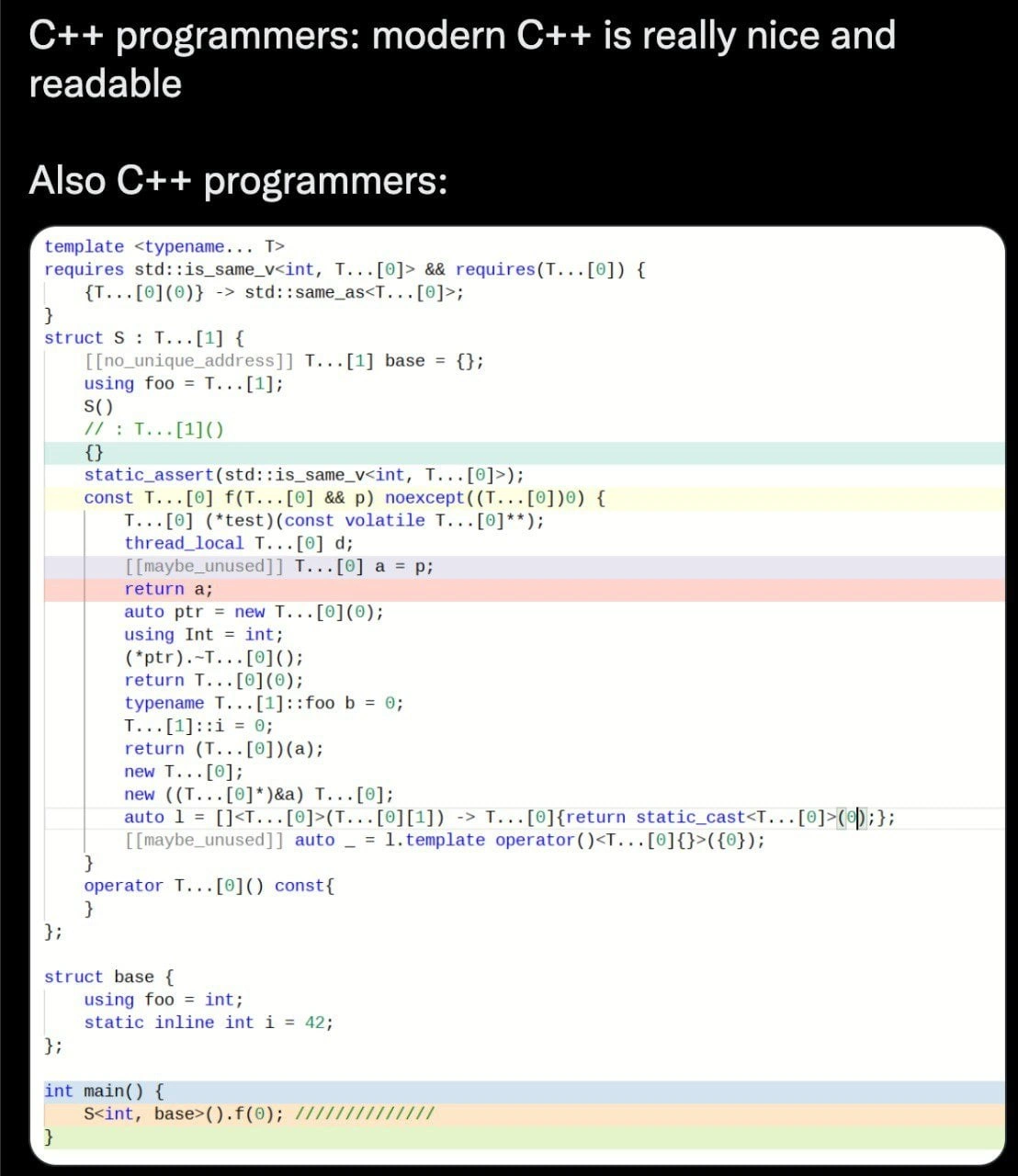
Description

Screenshot of a dark-mode tweet UI. A small profile avatar (face blurred) and the handle are shown at the top. Tweet text reads: “Developers back then: ‘Let's implement everything ourselves. We cannot afford to pay 100k for all the libraries we need.’ Developers today: ‘LOL. npm install left-pad reverse-string print-doggo-terminal send-nudez dancing-cat’”. The timestamp “16:24 · 03 Oct 22 · FeedHive.io” appears in blue at the bottom. The meme contrasts earlier frugality and self-written code with modern JavaScript culture that pulls numerous micro-packages via npm, parodying notorious modules like left-pad. Technically it highlights dependency proliferation, package management convenience, and the risks of over-reliance on tiny third-party libraries
Comments

6
Anonymous ★ Top Pick Writing left-pad ourselves: 30 seconds. Auditing the 1,600 transitive copies we already ship: two sprints, three lawyers, and a “high-severity” in Jira that never closes
  1. Anonymous ★ Top Pick

    Writing left-pad ourselves: 30 seconds. Auditing the 1,600 transitive copies we already ship: two sprints, three lawyers, and a “high-severity” in Jira that never closes

  2. Anonymous

    We went from "Not Invented Here" to "Not Invented Here... yet, but give me 5 minutes to publish is-even to npm and collect my 10 million weekly downloads."

  3. Anonymous

    Ah yes, the pendulum swing from 'Not Invented Here' syndrome to 'Definitely Not Implementing Here' syndrome. We went from paying enterprise licensing fees that could fund a small country to depending on 47 packages maintained by a single developer who hasn't committed since 2019. At least when left-pad broke the internet, we learned that our entire CI/CD pipeline's stability rests on someone's weekend hobby project. Modern architecture: it's turtles all the way down, except the turtles are unmaintained npm packages with 3 weekly downloads

  4. Anonymous

    We traded a $100k vendor invoice for 1,372 transitive maintainers and a 300MB node_modules - CFO happy, SRE on-call forever

  5. Anonymous

    Old trade-off: build vs buy; new one: build vs npm install and a 1,500-entry SBOM, hoping left-pad doesn’t unpublish at 3am

  6. Anonymous

    Left-pad proved that in npm land, your monolith's single point of failure is a 5-line util some rando maintains

Use J and K for navigation