Skip to content
DevMeme
1758 of 7435
Desktop Monolith vs. The Web's Traveling Circus
WebDev Post #1964, on Aug 25, 2020 in TG

Desktop Monolith vs. The Web's Traveling Circus

Why is this WebDev meme funny?

Level 1: Too Many Languages

Imagine you’re doing a school project, and your teacher says: for this project, each section must be written in a different language. 😵 So your introduction must be in English, the next part in Spanish, then one in French, then German, and so on. You’d have to learn bits of five different languages just to finish one assignment! Pretty overwhelming, right? Now imagine another project where the teacher says: you can write the whole thing in just English. That would feel a lot easier to manage.

This meme is funny because it’s showing a similar kind of comparison, but with computer languages. Building a desktop app is like that easy scenario: you typically only need one programming language to do the whole job. But building a web app is like the hard scenario: you end up needing to use many different languages and tools together to get one website or web application working. The left side of the picture says "pick 1 – it’s all you need," and that feels simple. The right side says "pick 5 (and maybe 3 frameworks on top of that!)", which looks comically complicated.

The humor or the feeling behind it is the slight frustration and absurdity of having to juggle so many things at once. It’s like if you wanted to cook dinner and the recipe said: you must use five different cookbooks in five different languages to make this one meal. At some point you’d step back and chuckle, thinking "This is ridiculous!" For web developers, that’s a bit how it feels: making a website that does cool things isn’t as straightforward as just learning one simple tool — you have to combine a bunch of different technologies.

So in very plain terms: the meme makes us laugh by showing the stark difference between two situations. One is straightforward (one language, like one tool) and the other is overly complex (many languages and tools all needed together). Anyone who’s ever felt overwhelmed by a task that has too many parts can relate. Web developers joke about this because it’s true – their job often requires wearing many hats – and seeing it summed up in a silly "pick one vs pick five" format is both relatable and amusing.

Level 2: Many Parts, One App

This meme is comparing desktop programming with web programming, and it might seem a bit confusing if you’re new to these terms. Let’s break it down in simpler terms by explaining the pieces shown.

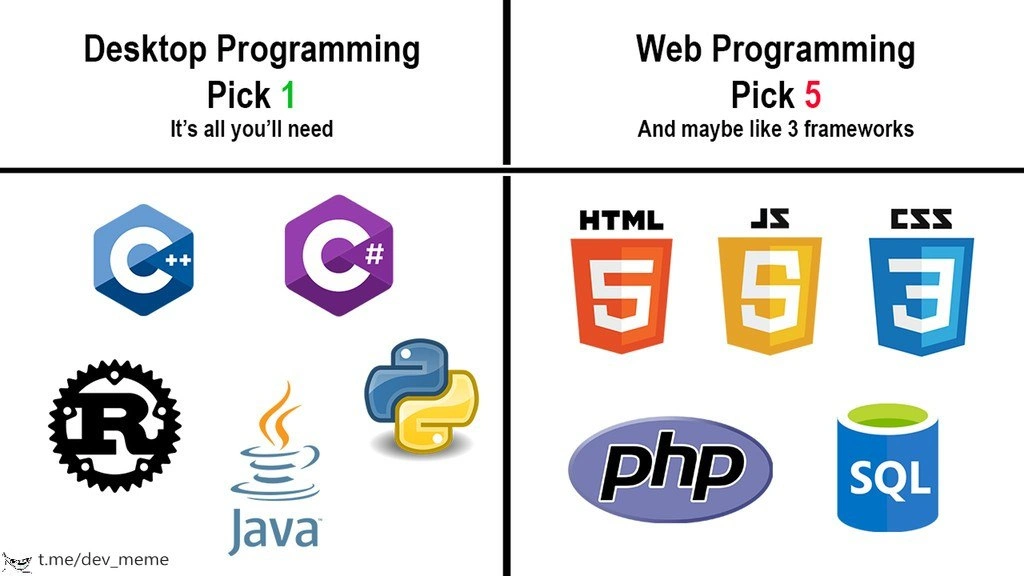
Desktop programming refers to making software that runs on your personal computer’s operating system (like a Windows app, a Mac application, or a Linux program). Typically, when building a desktop app, a developer can choose one programming language they’re comfortable with and use that for the entire project. The meme’s top-left says "Desktop Programming — Pick 1 (It’s all you’ll need)" and shows five logos: C++, C#, Rust, Java, Python. Those are five different programming languages, but the point is you would choose one of them to work with, not all of them. In other words, a desktop developer usually picks a single language (out of many possibilities) and uses it to write the whole application.

For example:

  • If someone is making a game or a high-performance application for Windows, they might pick C++ and do everything in C++ (graphics, logic, etc. using C++ libraries).
  • If they are building a business application with a user interface on Windows, they might choose C# and the .NET framework, writing all the code in C#.
  • If they prefer something cross-platform, they might use Java (with Java's GUI libraries) so the app can run on any OS with Java installed.
  • Python could be used for a desktop utility or tool (there are GUI toolkits for Python like Tkinter or PyQt), again all code in Python.
  • Rust is a newer system-level language that can also build desktop apps (though it’s more common for systems programming, some people use it with GUI libraries too).

The key idea is that for a desktop application, one general-purpose language is often enough to handle everything: creating windows and buttons (UI), performing calculations or game logic, reading/writing files, etc., because that language has libraries or frameworks to do all those tasks in one ecosystem. You usually compile or package your program into a single executable that the user runs, and that one language covers the whole program’s codebase.

Web programming is a bit more involved because a web application is split into different parts (and environments). The meme’s top-right says "Web Programming — Pick 5 (And maybe like 3 frameworks)", and shows five logos: an HTML5 badge, a JS (JavaScript) badge, a CSS3 badge, a PHP logo, and an SQL database icon. These represent the mix of technologies commonly used together to build a web application:

  • HTML5 (the orange shield icon labeled "HTML") – This is HTML, which stands for HyperText Markup Language. HTML is not a programming language in the traditional sense; it's a markup language. That means it's used to structure content on the web. You write HTML to put text, images, links, buttons, etc., on a webpage. Think of HTML as the skeleton or the building blocks of a page.
  • CSS3 (the blue shield icon labeled "CSS") – This is CSS, which stands for Cascading Style Sheets. CSS is used to style the HTML content. If HTML makes the skeleton of the page, CSS is like the skin, clothing, and design that make the page look nice and formatted. With CSS you define things like colors, layouts, fonts, sizes, spacing, and even animations. For example, you can use CSS to say "make all <h1> headings blue" or "lay out these sections in three columns."
  • JS (the yellow badge icon with "JS") – This stands for JavaScript. JavaScript is a programming language (unlike HTML and CSS). It runs in the web browser and lets the page be interactive and dynamic. For instance, if you want a button to do something when clicked (like show an alert message, or update part of the page without reloading), you write that in JavaScript. JavaScript can change the HTML and CSS on the fly after a page has loaded, respond to user actions, fetch data from servers, and much more. It's essentially what makes a webpage behave like an application rather than just a static document.
  • PHP (the purple oval logo) – This is the logo for PHP, which is a programming language that runs on the server. In web development, not everything can be done in the browser; often you have a server (a computer in some datacenter) that holds the master copy of the data, performs heavy computations, and decides what to send to each user’s browser. PHP is one of the earlier and most widely-used languages for writing that server-side logic. When you hear about things like "writing server scripts" or "back-end code," that's what PHP (or similar languages like Python, Ruby, Java, or Node.js which is JavaScript on the server) is used for. For example, when you submit a form on a website, the form data might be sent to a PHP script on the server which then processes it and maybe updates a database.
  • SQL (the blue cylinder icon) – This represents SQL, which stands for Structured Query Language. The cylinder icon is a generic symbol for a database. SQL is a language used to communicate with databases. On a website, if you need to save or retrieve information (user profiles, posts, transactions, etc.), that data is often stored in a relational database. You use SQL queries to get the data you need or to update data (for example, "get all products that cost less than $20" or "add this new user to the users table"). SQL is different from the other languages here because it's solely about data and databases; you wouldn't use SQL to make a button click or design a page, but you might use it inside your server-side code (like PHP) to fetch or store information.

So, those five things (HTML, CSS, JavaScript, a server language like PHP, and SQL for the database) are all commonly involved in delivering a full web application. If you imagine a simple scenario: say you want to create a website where users can log in and see a personal greeting. You might:

  • Write an HTML page for the login form and the greeting layout.
  • Style it with CSS so it looks nice.
  • Use JavaScript maybe for some form validation in the browser (like checking password strength without reloading the page).
  • Use a server-side script (in PHP or Python or another language) to actually verify the user's login info against a database and decide what greeting to show.
  • Store the user information in a database and use SQL to check the username/password and to retrieve the user's name to include in the greeting.

Already, that involves all five components working together. It’s not that you necessarily want to use so many different languages, but each one has a job it's really good at in the web environment. The browser will only understand HTML, CSS, and JavaScript, so if you want something to appear or happen in a user's browser, you have to express it in those terms. The server can be more flexible (it could be written in many possible languages, PHP is just one), and databases pretty much all understand SQL (or a variant of it, unless it's a non-SQL database).

Now, about the "maybe like 3 frameworks": Frameworks are like pre-built software structures or templates that developers use so they don't have to write everything from scratch. A framework gives you a foundation and tools to build an application faster and in a more organized way. In web development, because there are so many moving parts, frameworks are very common. For instance:

  • On the front-end (browser side), a JavaScript framework or library like React, Angular, or Vue can help manage complex user interface logic and state. Instead of manipulating the raw HTML and DOM with vanilla JavaScript, these frameworks provide a component model where the UI is broken into pieces, and they handle updates efficiently. This can make life easier when your web app gets very complex. But it's another thing to learn.
  • There are also CSS frameworks like Bootstrap or Tailwind CSS that come with predefined styles and layout components. If you use Bootstrap, for example, you can get a professional-looking, responsive design quickly by applying Bootstrap's CSS classes to your HTML, instead of writing all CSS yourself. Tailwind provides utility classes so you can build custom designs faster without writing a lot of CSS from scratch.
  • On the back-end (server side), frameworks like Django (for Python), Laravel (for PHP), Rails (for Ruby), or Express (for Node.js/JavaScript) provide a structured way to build the server logic. They often handle a lot of the basic stuff (like routing URLs to the right code, handling database connections, managing user sessions, etc.) so the developer can focus on the unique parts of their application. For example, with a framework, you might write only the specific code for "when the user clicks 'save', save this data," and the framework takes care of the surrounding details like how data is sent, how templates are rendered, etc.

The meme says "maybe like 3 frameworks" to humorously suggest that in addition to those 5 core languages, a web dev often ends up using multiple frameworks at once. A pretty true-to-life example: You decide to build a web app using React for the front-end, and Node.js + Express for the back-end, and you use Bootstrap for quick UI styling. That's three frameworks/libraries (React, Express, Bootstrap) right there. And if you count something like a state management library (Redux for React, for instance) or a build tool (Webpack) as part of the "framework" count, it can even be more. Each framework has its own documentation and patterns, which is why developers sometimes jest that setting up the project is almost more work than the project itself!

To visualize how all these parts come together, here’s an example of a very simple web page that uses HTML, CSS, and JavaScript (the front-end trio) together. This snippet would run entirely in the browser:

<!DOCTYPE html>
<html>
<head>
  <title>My Web Page</title>
  <style>
    /* CSS styles for the page */
    body { background-color: #f0f0f0; font-family: sans-serif; }
    h1 { color: blue; }
    button { padding: 8px 12px; font-size: 16px; }
  </style>
</head>
<body>
  <!-- HTML content of the page -->
  <h1>Hello from HTML</h1>
  <button onclick="alert('Hello from JavaScript!')">
    Click Me
  </button>

  <script>
    // JavaScript for interactivity
    console.log("JavaScript is running in the browser!");
    // This will print a message to the browser's console when the page loads.
  </script>
</body>
</html>

In this code:

  • The HTML defines a title, a heading, and a button.
  • The CSS (inside the <style> tag) gives the page a grey background, makes the font a sans-serif type, colors the <h1> text blue, and styles the button padding and size.
  • The JavaScript (inside the <script> tag) is adding behavior: here it simply shows an alert when the button is clicked, and logs a message to the console.

You can see how even a basic HTML file might contain three different "languages" intermingled: the HTML, the CSS, and the JavaScript. In a real web app, typically the CSS might be in a separate .css file and the JS in a .js file, but the idea is the same – the browser is dealing with all three at once to display a functioning page.

Now, if this were part of a full web application, there would also be a back-end component. For example, if the page needed to display personalized data (like "Hello, username"), the browser might send a request to a server. The server (running PHP, Python, Node, etc.) would get that request, maybe check a database (using SQL) for the username, then respond with an HTML page or a bit of JSON data. The browser then takes that and updates what you see. It’s a bit like a dance where multiple dancers (languages) each have their own moves, but together they make the whole performance.

By contrast, consider a desktop application doing something similar (say a program that just greets the user). If it’s a simple desktop program, you could write it entirely in one language (like C++ or Python), compile or run it, and it shows a window with the greeting. All the logic, UI code, and data handling would be in that one language's code. You wouldn't need HTML or CSS, because the UI might be built using that language's native GUI library (for example, if using Python, you could use Tkinter to create a window and label in Python code). You wouldn't need JavaScript, because the interactions (like a button click) would be handled by a function in your Python or C++ code. And you might not need SQL if it's a very simple app that just greets the user without storing data persistently (or if it does store data, maybe it uses a file or some built-in database and you use libraries in your one language to interact with that).

So why do web developers "pick 5 and 3 frameworks" while desktop developers "pick 1"? It's largely because a web application is really a combination of different layers (browser/client, server, database), each with its own language optimized for that layer. We sometimes call web developers full-stack developers when they handle both the front-end and back-end, meaning they work with the whole stack of technologies from the user interface to the database. A front-end developer might focus just on HTML/CSS/JS, and a back-end developer might focus on server-side language and database, but a full-stack dev tries to do it all, hence needing to know the whole gamut.

The phrase "modern dev dilemma" suggests that today’s developers, especially in web, have to decide what combination of technologies to use, and it can feel like a dilemma because there are so many choices and pieces to juggle. There's a bit of playful exaggeration in the meme (you might not always need five different languages — for example, you might build a very simple site with just HTML, CSS, and a bit of JS, no database). But for any sizable web app, you'll likely end up with something close to that full set.

For a newcomer, this might all sound overwhelming – and that’s exactly why the meme is both funny and true to developers. It's highlighting that web development tends to have a higher language stack complexity. You have to learn and remember different syntax and rules for each of these languages. You might be writing some style rules in CSS one minute, then writing a database query in SQL the next, then debugging a JavaScript function after that. Each of those feels a bit like shifting gears in your brain. In contrast, if you're working in just one language all day (say, just Java for a desktop app), you stay in that one set of syntax and paradigms, which is a different kind of challenge (you might go deeper into things like memory management or multi-threading in that one context, but you won't be swapping languages).

To summarize in simple terms: the meme is saying if you do desktop programming, you can get by with one language; if you do web programming, you're going to end up using a bunch of languages and tools. This is a common experience in the developer world. It doesn’t mean one is objectively harder than the other in every way, but it’s poking fun at how complicated the web stack has become. The humor comes from seeing that contrast spelled out plainly. If you're just starting out, don't worry – you usually learn these web technologies one at a time (maybe you start with just HTML/CSS for making basic pages, then add JavaScript for interactivity, then learn a bit of back-end etc.), and each piece has its own logic to it. Over time, developers become comfortable weaving them together. The meme gets a laugh because it reminds those of us in the field of when we first realized, "wow, I really need to use all these just to make a web app – that's kind of crazy!" It's a playful take on the reality of WebDev in the modern era versus the more straightforward path of sticking to one language for other kinds of software development.

Level 3: Jack of All Stacks

For any developer who’s dabbled in both desktop and web, this meme hits close to home. It highlights a truth seasoned engineers often joke about: desktop development usually requires mastery of one primary language and ecosystem, whereas web development demands you to be a jack-of-all-trades (hence "Jack of All Stacks"). The left side of the meme lists popular compiled languages — C++, C#, Rust, Java, Python — any one of which (pick 1, as the meme says) could be sufficient to build a full desktop application. For example, if you're writing a Windows desktop app, you might do everything in C# on .NET, or build a game engine entirely in C++. The idea is that one language (along with its standard libraries and frameworks) typically covers the UI, the logic, and any file or database operations in a desktop context. You might use some supporting libraries or frameworks (like .NET’s Windows Forms/WPF for UI in C#, or Qt for C++), but those are all within the same language environment.

Now look at the right side: Web Programming – Pick 5 (and maybe like 3 frameworks). This is a slightly exaggerated yet painfully familiar scenario for full-stack web developers. To create even a moderately complex web application, you often end up using at least five different languages/technologies:

  • First, the big three of the front-end: HTML for the page structure, CSS for styling, and JavaScript for interactivity in the browser.
  • Next, a server-side language like PHP (as shown in the meme) or perhaps Node.js (JavaScript on the server), Python (with frameworks like Django/Flask), Ruby (Rails), Java (Spring), C# (ASP.NET), etc., to handle the back-end logic and generate content or APIs.
  • And of course, a database and its query language, often SQL, to manage data storage and retrieval.

So that's easily five different syntaxes or languages in one project – and we haven’t even gotten to the "maybe like 3 frameworks" part! Modern web apps lean heavily on frameworks and libraries on top of those base languages. On the front-end, you might use a JavaScript framework like React, Angular, or Vue to structure your UI and state management. There are also CSS frameworks (like Bootstrap or Tailwind CSS) so you’re not hand-coding all the styles from scratch, and build tools or module bundlers (such as Webpack, or newer ones like Parcel and Vite) to manage and optimize the delivery of your JS/CSS assets. On the back-end, you might use a framework like Express (for Node.js), Django (for Python), Laravel (for PHP), or Spring (for Java) to handle routing, database interactions, and other server-side concerns. Even the database layer might use an ORM (Object-Relational Mapper) like SQLAlchemy or Entity Framework, which is effectively another layer of abstraction. It’s frameworks on top of frameworks, and each comes with its own conventions and learning curve. No wonder the meme quips that a web developer's toolkit is “pick 5 languages and maybe 3 frameworks” – it's poking fun at this very framework overload and the sprawling complexity of a typical web tech stack.

This resonates as humor because it's true enough to be recognizable, yet absurd when you step back and look at it. The ever-growing web tech stack can feel like a running joke among developers. There's even a term "JavaScript fatigue" that made the rounds a few years ago, referring to the exhaustion of keeping up with the rapid pace of new front-end frameworks and build tools. One year everyone’s excited about AngularJS, the next year it’s React, then Vue, then maybe Svelte or some new flavor – the landscape changes quickly. Experienced engineers often swap war stories about this churn:

"Remember when we built that app with Backbone.js and jQuery? Now they're practically legacy!"

The FrameworkChurn is real – today’s hot new library can become yesterday’s news in a hurry. The meme captures that sentiment by showing the web side as a pile of different logos and implying even that might not be all (hence the extra frameworks). It's the classic "how it started vs how it's going" joke applied to tech stacks.

Another aspect that makes this meme funny to insiders is the "pick one vs pick five" contrast as a commentary on full-stack developer expectations. Job postings for web developers often read like a shopping list: "Must know HTML, CSS, JavaScript (ES6+), TypeScript, a front-end framework (React/Angular/Vue), Node.js, SQL, and cloud deployment (AWS/Azure)". It's as if being a web dev means being conversant in a whole ensemble of technologies. In contrast, a desktop dev job description might be shorter: "Proficient in C++ and experience with Qt," focusing on depth in one technology. This difference can be mind-boggling to someone new. In fact, the usual LanguageWars (those debates over which single programming language is "best") become a bit moot in web development – there's no real way to be a purist about one language when the environment forces you to use a mix. A front-end dev can’t decide to use only Python or only C++ for a web app, for example, because the browser won't understand those – you must use JavaScript (or something that compiles to it). You have some choice for the back-end language, but whatever you choose, it's going to live alongside HTML, CSS, and JavaScript in the overall system. In other words, web dev doesn’t let you put all your eggs in one language basket. This polyglot reality is part of the joke.

Historically, the reason for this multi-language web stew is simply how the web evolved. In the early days, a website might have been just HTML with a little inline CSS, and maybe no JavaScript at all. As needs grew, we added more: CSS got more features, JS became more powerful (and necessary for interactivity), and then we started doing more logic on the server to deliver personalized pages (enter languages like PHP, and later application servers in Java, etc.). Databases became essential as sites became data-driven, so SQL entered the picture. Instead of one program doing everything, we got a distributed system: part of the code runs in your browser (HTML/CSS/JS), part runs on a server somewhere (PHP/Python/Node/etc.), and another part runs inside the database engine (SQL queries). Each part is quite different. Seasoned devs know the pain (and fun, to be fair) of this context-switching. You might spend your morning debugging why a CSS layout is broken (is a CSS rule not specific enough? is a Flexbox property misused?), then your afternoon figuring out a server-side issue (why is my Python API returning the wrong data?), and later writing an SQL migration script for the database. It exercises different areas of expertise. Some people love the variety, but it can certainly be overwhelming.

Frameworks, ironically, are supposed to make life easier by handling common tasks, but using them means you must learn the framework’s way of doing things on top of the language itself. An experienced web dev might joke about how a "simple" static website nowadays often involves a full build pipeline with dozens of Node modules, just to compile and minify the assets – a far cry from the old "just open Notepad and write HTML" days. Meanwhile, their friend working on a desktop utility might still be happily compiling a single-language program with minimal external dependencies. Neither approach is inherently better; it’s just that the web approach trades simplicity of stack for versatility and reach. The browser sandbox and the stateless nature of HTTP (web requests) also enforced that separation of technologies, which then snowballed with frameworks trying to patch the gaps between them.

The meme’s punchline lands best with those who've felt full-stack fatigue. You might have heard an exasperated developer say something like:

"Why do I need 12 JavaScript bundles and 5 transpilers just to display 'Hello, World' in the browser?!"

(half-joking, half genuinely frustrated). It's that feeling when a quick demo involves setting up webpack, Babel, a dev server, and writing in JSX – and you think to yourself, "wasn't printing text on screen supposed to be easier?" The meme exaggerates this contrast by showing how, in one domain (desktop), you can be productive with a single language and maybe a couple of libraries, while in the web domain, you often end up with a cornucopia of languages and frameworks for even a basic app.

The "modern dev dilemma" phrasing is apt: many of us have wondered, why can’t web development be as straightforward as desktop, or conversely, why can’t desktop development be as flexible as web? The truth is each has its trade-offs. We laugh at the meme because it’s a lighthearted acknowledgement that, yes, being a web developer in 2020 (and still today) often means wrangling a much broader tech stack than our desktop-focused counterparts. It’s a shared comedic catharsis for developers: we recognize the scenario, we’ve lived it, and seeing it summed up so simply – "Pick 1 vs Pick 5 (plus frameworks)" – is both funny and a little too real. We laugh, and then we go back to updating our NPM packages for the next project. 😉

Level 4: Domain-Specific Babel

In the web's layered architecture, polyglot programming isn't just common – it's by design. Each technology in the web development stack is a specialized language meant for a specific domain of the application. This follows a classical software engineering principle: separation of concerns. For instance, HTML (HyperText Markup Language) is a declarative language crafted to describe the structure and content of a page; it is essentially a domain-specific language for document markup. CSS (Cascading Style Sheets) is another domain-specific specification focused purely on presentation and visual styling (colors, layout, fonts). Neither HTML nor CSS are general-purpose computing languages – they're more like structured descriptors. For actual computation and interactive behavior, the web relies on JavaScript, a fully-fledged Turing-complete programming language that can respond to user events and manipulate the page (the Document Object Model). This trifecta on the front-end (HTML/CSS/JS) embodies the Principle of Least Power: use the least powerful language suitable for each task (HTML for structure, CSS for style, only use full programming power via JavaScript when necessary). This principle encourages simplicity and reuse – a browser can, for example, render HTML without executing code until needed – but it means the web front-end is inherently polyglot.

Now, beyond the browser, a complete modern web application often involves at least two more specialized languages: one for server-side logic and another for database queries. The meme's example lists PHP (a popular server scripting language, especially for rendering HTML on the server) and SQL (Structured Query Language, used to query and manipulate relational databases). These, again, serve distinct purposes: PHP (or Python, Ruby, Java, etc. on the server) handles business logic and communicates between the database and the front-end, while SQL interacts with data storage. Each of these languages (frontend and backend) operates in different runtimes and contexts – the browser, the web server, the database engine – each environment has optimized its language choices for its own constraints (e.g., SQL is declarative to let the database optimize queries, JavaScript is event-driven to handle user interactions smoothly in the browser).

This multi-language approach can be viewed through the lens of the "Tower of Babel" metaphor: as in the biblical story where a single language fractured into many, web development requires developers to be conversant in a veritable babble of syntaxes. Notably, modern tools even acknowledge this fragmentation: there's a popular JavaScript compiler named Babel (nod to that very story) which translates next-gen JS syntax down for older browsers. The existence of Babel (the tool) underscores how web developers often act as translators between languages and layers – converting one dialect of code to another to ensure all parts of the system can communicate.

From a language theory perspective, each of these technologies can be placed in a hierarchy of formal language types and execution models:

  • HTML and CSS are declarative and not universally Turing-complete (they're for describing content and style rather than performing arbitrary computation; CSS has surprisingly complex capabilities but on its own it can't do loops/logic like a full programming language).
  • JavaScript, in contrast, is a dynamically-typed, prototype-based scripting language capable of loops, conditionals, and data structures – it can express any computable logic (and indeed can even generate or manipulate HTML/CSS on the fly).
  • SQL is a declarative query language – you describe what data you want from a dataset (e.g., "all users who signed up this week") without specifying exactly how to get it. The database engine figures out the best way to retrieve that data. SQL is powerful in its domain (set operations, joins, aggregations) but not designed for general application logic or UI.
  • Meanwhile, general-purpose languages like C++, Java, C#, Python, Rust (commonly used for desktop apps or server-side code) come with their own execution models (compiled vs interpreted, manual memory management vs garbage collection, etc.) and can manage an entire program's logic, UI, and data handling in one cohesive environment. In a desktop scenario, one such language, combined with libraries, can often do everything needed within a single process.

Because the web evolved from a document-sharing platform into an application platform, its languages accreted rather than being unified from day one. In a desktop environment, one company’s ecosystem might provide a unified language and framework (e.g., Microsoft letting you do everything in C# on .NET, or back in the day doing everything in C++ with Win32 APIs). But on the web, standards and openness were paramount – HTML and CSS standards come from the W3C consortium, JavaScript was created separately (then standardized via ECMAScript), SQL came from the database world. No single language could be imposed to handle all aspects of web apps, both by design (each language was specialized for its role) and by the organic growth of the internet. The result is a polyglot platform where each layer's specialization ideally leads to efficiency within that layer, at the cost of higher mental overhead for developers who must bridge them all.

Computer science theory also shines light on attempts to reduce the N-languages problem. The concept of a universal runtime (like the JVM for Java or CLR for .NET) allows multiple languages to target one platform. For instance, .NET languages (C#, F#, VB.NET) all compile down to a common intermediate bytecode and run on the same runtime, which means a developer can stick to one of those languages for an entire application stack (front-end desktop GUI, server logic, etc., if all within the .NET ecosystem). The web, however, historically lacked such a unified runtime across client and server. The closest the browser came to a "universal runtime" is arguably JavaScript itself – and indeed we’ve seen shifts like Node.js which uses JavaScript on the server so that one language can be used end-to-end (JavaScript for both browser and server). Yet even in a Node/JS world, you can't escape HTML and CSS for the user interface, nor SQL (or some data querying language) for persistent data. And using one language everywhere often invites frameworks written in that same language to substitute what might otherwise be separate tech (for example, using Node with Express to serve HTML instead of using PHP, or using JS-based templating in lieu of server-side rendering in another language).

In recent years, technologies like WebAssembly (WASM) are enabling traditional desktop languages like C++ or Rust to run inside the browser at near-native speed. This closes some gap by allowing developers to reuse code or skills across domains (for example, you could write performance-critical code in Rust and compile it to WebAssembly for the web, and also use Rust on the server side). But even WebAssembly doesn’t replace the need for HTML/CSS/JS for the overall page structure and presentation; it just shows how the industry is constantly exploring ways to make the web stack more unified or to allow more choice of programming language on the web. The enduring truth – and the comedic punch of this meme – is that web development remains a polyglot juggling act by its very nature. There is an inherent paradox here: the web’s strength is its mix of specialized languages (each optimized for a facet of the user experience), and yet that very mix is what makes a web developer’s life so complicated. The meme exaggerates this "modern dev dilemma" in a humorous way: on one side, a simpler world of one-language-to-do-it-all; on the other side, the Babel of the web, where one is never enough.

Description

A two-panel meme comparing 'Desktop Programming' and 'Web Programming'. The left panel, titled 'Desktop Programming', has the text 'Pick 1' and 'It's all you'll need'. Below this, it displays the logos for several programming languages: C++, C#, Rust, Java, and Python. The right panel, titled 'Web Programming', has the text 'Pick 5' and 'And maybe like 3 frameworks'. Below this, it shows the logos for HTML5, JS (JavaScript), CSS3, PHP, and SQL. A watermark for 't.me/dev_meme' is visible in the bottom-left corner. The meme humorously contrasts two major software development paradigms. It portrays desktop development as a choice of a single, powerful, and often sufficient programming language. In stark contrast, web development is depicted as an ecosystem requiring a multitude of technologies (for structure, style, client-side logic, server-side logic, and database management) even for a basic setup, not to mention the additional layer of complexity introduced by various frameworks
Comments

7
Anonymous ★ Top Pick A desktop developer chooses a weapon. A web developer has to assemble a small army, and then convince them to work together without a civil war breaking out over state management
  1. Anonymous ★ Top Pick

    A desktop developer chooses a weapon. A web developer has to assemble a small army, and then convince them to work together without a civil war breaking out over state management

  2. Anonymous

    Desktop: pick C++, wrestle the linker once. Web: pick HTML, CSS, JS, SQL, PHP - then chain TypeScript → Babel → Webpack → Vite so your CSS-in-JS-in-HTML can finally render “Hello World”. Progress

  3. Anonymous

    The real joke is that your 'Pick 1' desktop app will still need Electron, which means you're back to HTML, CSS, and JavaScript anyway - plus now you're shipping Chromium with every 'Hello World' application

  4. Anonymous

    The real joke is that 'Pick 5' is the optimistic estimate - by the time you've mastered HTML, CSS, JS, PHP, and SQL, the frontend framework you chose has been deprecated, replaced by three competing successors, and the community has moved on to a new meta-framework that requires learning TypeScript, a build tool written in Rust, and a state management library that reimagines reactive programming. Meanwhile, the desktop developer is still shipping production code in the same language they started with, blissfully unaware of the npm install taking place across the hall

  5. Anonymous

    Desktop: pick a language; Web: pick HTML, CSS, JS, a backend and SQL - then hire Webpack/Vite/Babel to negotiate a cease‑fire while your hello world hydrates

  6. Anonymous

    Desktop devs master one language over decades; web devs master the funeral rites for three frameworks per quarter

  7. Anonymous

    Desktop: pick one language; Web: pick five and three frameworks - so every boundary can convert your int to a string and back, except the one that doesn’t

Use J and K for navigation