Ignoring MDN's Warnings About Deprecated HTML
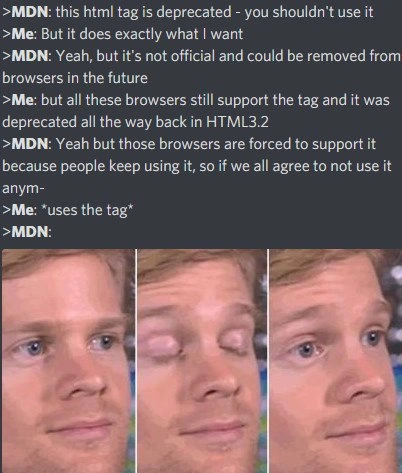
Why is this WebDev meme funny?
Level 1: It Still Works
Imagine a teacher telling a kid not to use an old, worn-out crayon because it’s almost finished and might break. The teacher says, “We have a new crayon that’s much better, use that one.” But the kid likes the old crayon because it’s the exact color they want and it still draws just fine. The teacher warns, “Okay, but that crayon was retired for a reason – it could snap or suddenly stop working, and we don’t even make that kind anymore.” The kid looks at all the drawings on the wall made with that color and says, “Well, everyone’s been using it and it’s worked so far!” Before the teacher can finish explaining, the kid happily starts coloring with the old crayon. The teacher just sighs and stands there blinking, a little surprised and not sure what to say, because the kid did the one thing they were advised not to do – simply because, for now, it still works.
Level 2: Deprecated Means Outdated
Let’s break down what’s happening in this meme in simpler terms. It’s a conversation between MDN and a developer. MDN stands for Mozilla Developer Network, which is a very popular website where developers find documentation about web technologies (like HTML, CSS, and JavaScript). MDN is known for providing advice, examples, and warnings about web development best practices. So when the meme shows “> MDN: this html tag is deprecated – you shouldn’t use it,” it’s basically referencing what you might read on an MDN page for that HTML tag. If a tag is labeled “deprecated”, it means it’s an old feature that is no longer recommended. The tag might still work in browsers, but developers are advised to stop using it because it’s been replaced with something better or might be removed in the future.
Now, the developer (the “Me” in the meme) is pushing back, saying: “But it does exactly what I want.” This is a common situation! The developer has found that this old HTML tag still achieves the exact effect they need on their webpage, and they see that all the major browsers (Chrome, Firefox, Safari, etc.) still support it. For them, it’s like, “If it works, why not use it?”
MDN counters with: “Yeah, but it’s not official and could be removed from browsers in the future.” Here, “not official” means the tag isn’t part of the current official HTML standard (for example, the latest standard is HTML5). It might have been part of older HTML versions, but modern standards consider it obsolete. MDN is warning that although browsers currently support the tag, there’s no guarantee they will do so forever. If all browser makers decided to drop support for that tag in their next updates, any website using it could break (stop working as intended). That’s the risk MDN is highlighting: using deprecated code is like using a product that’s out of manufacture – if it breaks or gets discontinued, you’re out of luck.
The developer isn’t convinced yet. They say: “...it was deprecated all the way back in HTML3.2 and all these browsers still support the tag.” HTML 3.2 is a very old version of HTML from the 90s (for context, HTML3.2 was released in 1997!). So the developer is basically saying, “This tag was marked as outdated decades ago, but look, even after ~20 years, every browser I use still understands it and displays it correctly. So isn’t the deprecation warning a bit over-cautious? Clearly, browsers haven’t removed it despite it being so long.” It’s true that many deprecated tags remain supported for a very long time – often because browsers value backward compatibility (ensuring old websites still work).
Then MDN tries to explain why the browsers still support it: “those browsers are forced to support it because people keep using it, so if we all agree to not use it anym—” The idea here is that it’s a vicious cycle. Developers keep using the deprecated tag because browsers support it, and browsers keep supporting it because developers (and old websites) are still using it. MDN is suggesting a kind of collective effort: “if we all stop using this old tag, browsers could finally drop support and we’d clean up the web standards.” It’s like telling everyone, “Let’s all stop doing this bad habit so it goes away.”
But before MDN can even finish that argument, the developer does exactly what MDN is pleading against: “uses the tag”. In the meme’s format, writing uses the tag in asterisks describes an action (like a stage direction). It means the developer actually goes ahead and writes that deprecated HTML tag into their code, intentionally. This is the comedic climax: the developer knowingly ignores the best-practice advice and just does it anyway.
So what tag are we talking about? The meme doesn’t name it explicitly, but it hints at some infamous deprecated HTML tags that developers used to use for styling and effects, which have since been replaced by CSS or removed. Some examples of deprecated tags include:
<blink>– This tag would make text blink on and off, like a flashing neon sign. It was popular in the early web (think of very old GeoCities or MySpace pages with flashing text). It’s not supported in modern HTML5, and browsers eventually stopped making text blink because it was considered distracting. MDN would tell you this tag is obsolete.<center>– This tag centers content horizontally. For example,<center>Welcome</center>would center the word “Welcome” on the page. It’s deprecated because nowadays you’re supposed to use CSS (likestyle="text-align: center;"on a container or use a CSS class) to center things. Browsers still honor<center>for backward compatibility, but it’s not part of the official standard anymore.<font>– This tag was used to change the appearance of text, such as color, size, or font type. For instance,<font color="red" size="4">Hello</font>would make the text “Hello” red and of size 4. This too has been deprecated since HTML4, because CSS can style text in much more flexible ways. MDN would say not to use<font>; instead, use CSS styles or classes.<marquee>– This would make text scroll across the screen like a marquee banner (from right to left, or up and down). It was a proprietary tag introduced by Internet Explorer and later picked up by other browsers because people used it. It’s also not standard in HTML5, and CSS animations or JavaScript are the recommended way to create a similar effect (though that kind of effect itself is often seen as dated design).
These are the kind of tags the meme is hinting at. The developer might be using one of them and saying “hey it does what I need,” while MDN has pages for each of those tags with big warnings like “Deprecated” or “Obsolete” in red. In fact, if you visit an MDN page for <blink> or <marquee>, you’ll see a warning that it’s not part of the modern web standards. The conversation in the meme is essentially bringing that documentation warning to life as if MDN were a person chatting with the dev.
Now, why is this a problem if it still works? Because relying on deprecated features is often referred to as accumulating technical debt. It’s like knowingly using something that could cause trouble later. Today it works, but maybe in a few years a new browser version or a new device might not support that tag, and then someone (maybe a future developer, maybe you in the future) will have to rush in and fix or rewrite that part of the code. It’s usually easier and safer in the long run to use the modern, supported approach (like using CSS for styling, or proper JavaScript APIs, etc.). MDN’s advice isn’t just about following rules for the sake of rules – it’s about future-proofing your work and also making sure you’re not the person keeping an outdated practice alive unnecessarily.
However, there’s also developer psychology at play: if something solves your problem immediately and you see no instant negative consequences, it’s hard to resist using it. Especially for newer developers, you might not immediately understand why it was deprecated. It might feel like “Why are they telling me not to use this perfectly good tool?” This meme dramatizes that feeling. The developer’s replies are almost childlike in reasoning: “It does exactly what I want, so why not? Everyone still supports it, so it can’t be that bad!” Meanwhile, the experienced voice (MDN) is trying to impart some wisdom: “It’s about the long term and the bigger picture.”
To illustrate with a quick example of code, consider the task of centering a heading on a webpage. Here’s the old way versus the modern way:
<!-- Outdated approach (deprecated <center> tag) -->
<center><h1>Welcome to My Site</h1></center>
<!-- Modern approach (using CSS) -->
<h1 style="text-align: center;">Welcome to My Site</h1>
In the first snippet, the <center> tag will center the heading. It works in browsers, even today, but it’s not valid in modern HTML and MDN would advise against it. In the second snippet, we achieve the same visual result (centered text) by using a CSS style (text-align: center;) on the <h1> element. This is the recommended approach. It’s better because it separates content (the HTML structure) from presentation (the CSS styling), and it will continue to work as long as CSS is supported (which is basically forever in web terms).
So what’s the humor here? It’s the absurdity of the conversation. MDN (the authority) is giving very reasonable, almost pleading advice to stop using something. And the developer just blatantly ignores it, even acknowledging “yeah I know it’s been ‘bad’ for ages, but I’m gonna do it anyway.” The final blank response from MDN is like a stunned silence — as if MDN threw its hands up and gave a blank stare, which is exactly what the meme’s bottom images (the guy blinking) convey. It’s funny because it personifies a documentation page getting frustrated with a stubborn human, which is a bit of a role reversal (usually it’s us frustrated with stubborn code!).
In the world of web development, this is a relatable scenario. Documentation and best practices can advise us all day, but ultimately each developer decides what to write in their code. And sometimes, out of convenience or familiarity, we stick with old methods longer than we should. This meme is a lighthearted poke at that tendency. It’s filed under WebDev/Frontend humor because every front-end coder has seen old HTML lying around or maybe written something non-standard “just because it worked.” It also touches on Documentation because MDN’s guidance is a big part of modern coding – many of us have MDN open in a tab while we code, acting like a guide or even a strict friend saying “don’t do that.” Here, that friend was ignored in a comically brazen way.
In short, the meme uses a chat format to show a battle between standards vs. convenience. MDN represents up-to-date, clean coding standards (and maybe the broader developer community’s collective agreement), and “Me” represents the lone coder in a hurry who says “y’know what, I’ll be fine; I’m just gonna use this old thing.” It’s funny because we know the lone coder’s habit is exactly why the old thing still exists in the browser at all! The standoff continues: MDN can warn, but it can’t physically stop you from writing <blink> in your file. And if it works, you’ll be tempted to do it. The meme captures that little mischievous moment that happens more often than we might admit.
Level 3: Works on My Browser
For experienced developers, this meme hits close to home. It’s depicting that all-too-familiar scenario where documentation best practices collide with the reality of legacy code and tight deadlines. The conversation is basically every senior developer’s internal dialogue when dealing with old HTML:
MDN (Mozilla’s Developer Network), which we treat as the authoritative guide for web development, says in its polite but firm tone: “This tag is deprecated; you shouldn’t use it.” In other words, “Hey, that’s an old, officially retired way of doing things. There’s a better modern approach now.” MDN is essentially the voice of reason, standards, and long-term sanity.
The developer (Me) responds, “But it does exactly what I want.” This is the voice of practicality (or impatience): I have a specific task, and this one old tag instantly achieves the desired effect. Every seasoned dev can recall a moment like this – knowing something is considered bad practice, but also knowing that it’ll solve the problem right now. It’s the “if it ain’t broke, don’t fix it” instinct. Why spend an hour refactoring code or introducing new CSS rules when a single tried-and-true
<center>tag centers the content perfectly in all major browsers? Especially when you’re under pressure to get a feature working by EOD, it’s tempting to choose the quick hack.
The humor here is amplified by how the developer justifies it: “It was deprecated all the way back in HTML3.2, yet all these browsers still support the tag.” This is a cheeky way of saying: Look, this thing was declared dead in the 90s and it’s still kicking! An experienced dev reading that will likely smirk, because we’ve seen exactly this – outdated code still working flawlessly decades later. It’s a bit of a jab at the web development world: even when we know better, the ghosts of old technology hang around. Why? Because so many sites and applications kept using it that browsers had no choice but to accommodate. Like a feature frozen in time, the deprecated tag has essentially become frozen in amber within browsers.
MDN’s next plea – “those browsers are forced to support it because people keep using it, so if we all agree to not use it anym—” – is where the seasoned folks really chuckle. MDN sounds almost exasperated, as if begging: “Guys, please, can we all just stop using this thing? That’s the only way we can move on!” This line underscores a real-world standards compliance debate: how do you get thousands of independent developers to collectively abandon something that still works? It’s like trying to get everyone to drive on the right side of the road if they’ve been driving on the left – it only works if everyone does it. MDN is essentially proposing a treaty: “let’s all agree to drop this tag.”
And then the punchline:
Me: uses the tag
The developer literally does the very thing MDN was cautioning against in mid-sentence. That action embodies pure developer stubbornness and a bit of mischievous rebellion. It’s the equivalent of making direct eye contact with the teacher while deliberately doing the forbidden thing. Every senior dev has witnessed this kind of stubborn use of outdated tech, whether it’s using a deprecated tag, a deprecated API, or an ancient library version, just because it’s familiar or immediately effective. Maybe we’ve even been that stubborn dev at times, especially when trying to quickly patch a problem. The humor is that the developer isn’t even arguing anymore – they just do it, proving that MDN’s rational appeals lost to the dev’s “works in all browsers, so why not?” logic.
So MDN is left speechless – represented by the blurred empty chat rectangle in the meme, and humorously by the three-panel blinking guy reaction image. That image of the blinking, disbelieving man is a popular meme for saying “Did you seriously just do that? I can’t believe it.” Here it’s as if MDN (the collective voice of web standards folks) is doing the blinking guy face, utterly flabbergasted that after all those warnings, the dev still went ahead and used the forbidden tag. It’s a perfect visual punchline: MDN doesn’t even have words anymore, just a stunned blink.
In real development life, this scenario plays out when teams maintain old websites or applications. Imagine inheriting a legacy codebase full of <font> tags and <center> layouts. The documentation and modern best practices scream “Refactor this to CSS! This is 2020, not 1996!” But the site works, customers aren’t complaining, and rewriting it could introduce bugs or take time the team doesn’t have. So, what happens? Developers often take the pragmatic route: leave the old tags in place (or even add one more <font> for that quick fix) and move on. It’s a technical debt trade-off we’re all familiar with. You know you’re piling up potential trouble for the future, but today’s problem gets solved. The meme’s chat format nails this dynamic – MDN acting like the conscience on your shoulder, and “Me” representing the devil-may-care quick fix.
Additionally, front-end veterans recall specific deprecated tags as running gags in the community. The <blink> tag, for example, which literally made text blink like a neon sign, is legendary. It was so obnoxious and widely abused in 90s webpages that it became a symbol of outdated web design. Browsers eventually stopped honoring <blink> (Firefox and Chrome won’t actually blink the text anymore), but the tag still exists in old HTML out there – and MDN’s docs for it basically say “don’t use this, please.” The <marquee> tag (scrolling text across the screen) is another one – also deprecated, yet some browsers kept it working for a long time due to popular demand (Internet Explorer introduced it, and others supported it later begrudgingly). And <font> and <center> were so convenient for so long that many developers continued using them well into the 2000s, even as CSS was available as the proper solution. Each of these tags carries a whiff of FrontendHumor and nostalgia. The meme is funny to developers because it’s a scenario we’ve either been part of or had heated discussions about: “Should I rip out this old tag or just leave it since it still works?” Often the answer, especially in a pinch, was “Eh, it works on all browsers, ship it.”
Let’s not forget the human side: there’s a bit of schadenfreude (humorous pleasure in someone else’s minor misfortune) for the reader, watching MDN struggle to convince the unconvinceable. We imagine the MDN documentation anthropomorphized, getting increasingly desperate as the dev shrugs off the warnings. It’s funny because we’ve seen the dynamic of a know-it-all guide vs. a headstrong developer play out in code reviews or team debates. “Officially, we shouldn’t do this.” — “Official schmofficial, it works!” In the end, the guide (like MDN) can only throw up its hands in silent defeat when the coder copies that Stack Overflow snippet with a deprecated tag anyway.
In summary, for a seasoned dev this meme mixes laughter with a knowing groan. It highlights the perpetual tug-of-war between doing things the right way (standards-compliant, future-proof) and doing things that work immediately (even if they’re hacks from the Jurassic era of WebDev). It pokes fun at our industry’s inability to fully let go of the past, largely because there’s always someone who says “but it works, so I’m using it.” And as long as that someone exists (which is to say, forever), MDN will continue to issue warnings, and browsers will grudgingly keep the old stuff working – a never-ending standoff indeed.
Level 4: Tragedy of the Deprecated Commons
At the deepest level, this meme highlights a fundamental paradox of web standards: once a feature (like an HTML tag) is introduced and widely used, it becomes virtually immortal. In theory, a deprecated tag is supposed to fade away – declared obsolete by standards bodies and discouraged in documentation like MDN. But in practice, browsers continue to support it indefinitely because of a principle akin to “Don’t break the web.” This is a classic case of Hyrum’s Law in action: any observable behavior of a system will eventually be depended on by somebody. If a certain HTML tag worked in 1996, you can bet some website (or thousands) still rely on it today. Removing that feature would break those sites, so browser makers are stuck supporting even ancient quirks.
From a theoretical perspective, this is similar to the tragedy of the commons but for backward compatibility. Each individual developer who continues to use a deprecated tag is benefiting in the short term (“it does exactly what I want!”) while collectively these choices burden the entire web ecosystem. Every time someone deploys an old <font> or <center> tag, it reinforces the need for browsers to keep that code path alive. It’s a coordination problem: if we all agreed to stop using it, browsers could finally drop it. But since we don’t (and likely never will unanimously), the cycle continues. Deprecated features thus live on in a kind of zombie state – officially dead, yet shambling along inside every browser engine to maintain legacy compatibility.
Under the hood, modern HTML parsers still recognize many of these legacy tags, either mapping them to equivalent modern behaviors or at least ensuring they don’t crash the page. For example, a <center> tag might be internally translated to a CSS style (text-align: center) by the browser’s layout engine, even though <center> hasn’t been part of any “living” standard for ages. In some cases, the HTML5 standard itself concedes with a note like “certain elements (e.g. <marquee>, <blink>) are obsolete and must not be used, but user agents may continue to implement them for backward compatibility.” The result is a kind of stalemate: the standards documentation (MDN, W3C specs, etc.) wag a disapproving finger, but the HTML runtime environment quietly keeps the old behavior working to avoid breaking old sites. This tension is baked into the evolution of the web.
Historically, we can trace this pattern back through the versions of HTML. The meme mentions HTML 3.2 – way back in the mid-1990s. Elements like <font> (for coloring text) and <center> (for centering content) were popular then. By HTML4 (1997), they were deprecated in favor of CSS, and by HTML5 (2014’s “Living Standard”), they were completely removed from the official vocabulary. Yet here we are decades later, and browsers still accommodate them. In fact, browser developers often joke that once something is on the web, it’s there forever. Legacy code isn’t just in your company’s codebase – it’s in the very fabric of the web platform.
So, this seemingly simple chat exchange is poking fun at a deep truth: web standards vs. real-world usage can be a never-ending standoff. The “MDN” voice represents the idealistic, standards-compliant viewpoint – trying to guide developers toward newer, better practices. The “Me” (developer) voice represents pragmatic expediency and a bit of stubbornness – using what works right now, even if it’s officially frowned upon. The humor (especially for seasoned devs) comes from recognizing this as an endless cycle. We’ve seen technologies come and go, but also come back to haunt us because someone, somewhere refused to let them die. The blink tag might be long gone from the spec, but blink-and-you’ll-see it still lurking in codebases and old webpages, keeping the spirit of 1990s webdev alive. This is the curse of backward compatibility: our browsers carry the accumulated baggage of every deprecated <blink> and <marquee> in history because pulling the plug would break too much. And as this meme jokes, developers themselves perpetuate that by insisting “but it does exactly what I want” – a phrase that could be the epitaph on many pieces of Technical Debt. In the end, MDN (and the standards community) can only blink in dismay, stunned into silence, as yet another dev knowingly uses an obsolete tag and thus resets the clock on its retirement yet again.
Description
A two-part meme combining a fictional dialogue with the 'Blinking White Guy' reaction image. The top section displays a Discord-style chat conversation between 'MDN' (Mozilla Developer Network) and 'Me'. MDN advises against using a deprecated HTML tag. 'Me' argues that it works and is still supported by browsers. MDN explains that browser support is only maintained due to continued use and that developers should collectively stop using it. 'Me' responds by simply writing '*uses the tag*'. The bottom section of the meme shows the 'Blinking White Guy' GIF, a popular reaction image of a man blinking in disbelief and mild annoyance. This perfectly captures MDN's exasperation. The humor resonates with experienced developers who understand the tension between following best practices (avoiding deprecated features) and the pragmatic reality of using what works, especially when browser support remains widespread. It's a classic case of 'do as I say, not as I do' in the world of web development
Comments
7Comment deleted
Using a deprecated tag is like casting a pointer to void*. It solves your immediate problem, but now you have to pray the runtime doesn't decide to segfault your entire career
When MDN begs us to drop <marquee>, I just rename it to .component-live-stream-v2 and the architecture board congratulates me on “leveraging proven code” - apparently deprecation is just a namespace problem
Twenty years from now, we'll still be supporting that deprecated tag because removing it would break half the internet, including three government websites, a Fortune 500's main portal, and that one internal tool everyone's afraid to touch because the original developer left in 2003
This perfectly captures the web platform's greatest feature and biggest curse: nothing ever truly dies. We're all collectively maintaining a museum where the exhibits still run in production, and every 'deprecated' sign is really just a suggestion that everyone - including browser vendors - politely ignores. It's the only industry where 'this will be removed in the future' has meant 'this will be supported forever' for the past 25 years. The real kicker? Those deprecated tags often have better cross-browser support than the modern replacements we're supposed to use instead
Deprecated HTML tags: browsers keep them alive longer than our best refactoring intentions
MDN: “deprecated.” Me: “deadline.” Web‑compat: “guess it’s immortal.” Deprecation on the web isn’t a lifecycle, it’s a pension plan for quirks mode
The web's deprecation policy is a garbage collector with no sweep - everything survives under web-compat