Bugs During the Client Demo
Why is this Bugs meme funny?
Level 1: The Trick That Misbehaved
Imagine you have a cool toy robot that you’ve been practicing with at home. Every time you press the button, the robot does a nice little trick – maybe a spin or a jump – perfectly when you’re alone. You’re excited to show your friend this awesome trick. But the moment you press the button in front of your friend, the robot goes completely crazy: it starts hopping and twitching in a totally weird way, nothing like the trick it was supposed to do. You feel surprised and a bit embarrassed, right? It’s like the toy was playing a joke on you, choosing the worst time to act up. That’s essentially what’s happening in this meme: the programmer’s project behaved nicely when alone, but the second it’s shown to an important audience, it “breaks” and acts silly (like the dancing people). It’s funny in a frustrating way – kind of like how you might nervously laugh if your magic trick falls apart on stage – because sometimes things just don’t cooperate when we most want them to.
Level 2: Demo Dances & Debugging
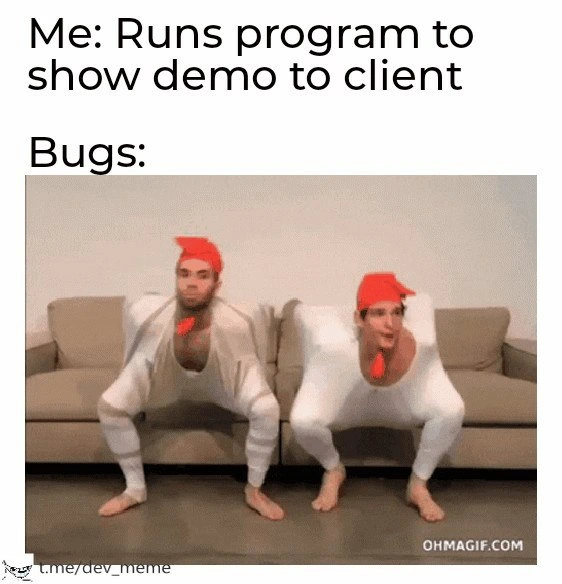
Let’s break this down in simpler terms. This meme shows a situation every programmer fears: you’re about to show your project to a client or boss (basically someone who isn’t a developer but cares about the software working). The top caption says “Me: Runs program to show demo to client”. That’s the developer starting the app to demonstrate its features, expecting everything to go well. The next line just says “Bugs:” and below it is a GIF of two people in silly white suits and red hats wildly dancing in a goofy, chaotic way. Those dancers represent the bugs (the mistakes or errors in the software) suddenly making a scene. In other words, as soon as the developer tries to present the program, the hidden problems in the code pop up and start “dancing” – meaning the software begins acting crazy and unpredictable right in front of everyone. It’s a funny exaggeration of something that feels all too real when you’re the one presenting.
In software, a bug is simply a flaw or error that makes a program do something wrong or unexpected. It could be a crash, a button that doesn’t work, a calculation that’s off – anything that’s not behaving as intended. Usually, developers test their code many times to catch and fix bugs. And indeed, before a demo, you’d normally run your app multiple times to be sure everything is solid. That’s why this scenario is so relatable: often the program works on my machine (a classic developer phrase meaning “I tested it and it seemed fine on my computer”), but in the demo or on someone else’s computer, something goes wrong. It’s almost like the software senses the pressure and says, “Nope, I’m going to embarrass you now.”
Why do these demo failures happen? For a newcomer to coding, it might be surprising, but there are a few common reasons:
- Different environment or setup: The demo might be running on a different computer or server than your own. Maybe that computer is missing a file, has a slightly different software version, or isn’t connected to the internet the same way. These differences can cause a bug to appear. For example, if your program needs a certain library or a setting that you had on your PC but the client’s PC doesn’t, it could crash or behave oddly.
- Untested scenario: Perhaps the client did something or had data you never tried during your own testing. Let’s say your app has a text field and the client types an emoji or an accent character you didn’t anticipate – boom, the program might get confused and error out. That bug was “hidden” because you never encountered that input before. In the meme, the bugs “breakdancing” is like those weird, untested scenarios suddenly popping up.
- Timing and performance issues: When you’re demonstrating, you might click things faster or slower, or multiple people might be using a system at once during the demo. These changes in timing can reveal bugs, especially in bigger applications. For instance, a button might work when you click it slowly, but if you double-click really fast (maybe because you’re nervous in the demo), you discover a glitch that was never caught during normal testing.
For a junior developer or someone just starting out, experiencing this can be quite stressful. Imagine proudly showing your app to your team or a client and then an error message shows up or the screen freezes! It feels terrible in the moment – like the rug has been pulled out from under you. This meme is basically every developer’s nightmare (presented in a humorous way): the software decides to have a mind of its own right when it matters most. The reason other developers find it funny is because they’ve all been there. It’s a form of coding humor where we laugh at our own past pain. Seeing those two costumed people spazzing out is like watching our carefully written code go haywire, and we laugh because it’s easier than crying about it.
Now, what’s the lesson or takeaway here (wrapped in the joke)? It shows why things like regression testing and thorough preparation are so important. Regression testing means testing old features again after you make changes, to ensure you didn’t accidentally introduce new bugs or re-introduce old ones. Developers do this to catch issues before the big demo. Similarly, many teams use a staging or demo environment, which is basically a test run of the software in a setting identical to the real thing, just to see if anything weird happens when they deploy it outside their personal laptops. And if something does go wrong, a well-built application will have graceful failure handling – this is a fancy way of saying the app will handle errors nicely (for example, show a friendly “Oops, something went wrong” message and maybe log the error) instead of, say, freezing or spewing gibberish. In the dancing bugs scenario, graceful handling would be like calmly sitting the dancers down – but since they’re breakdancing wildly, we see the opposite of graceful failure here!
For someone new to this field, the meme is a lighthearted reminder: always test your code in as many ways as you can, especially before showing it to users or clients. And even then, don’t be too shocked (or harsh on yourself) if a bug slips through at the worst time. It happens to everyone. The best you can do is prepare, perhaps practice the demo beforehand, and have a backup plan. (Many experienced devs will have a plan B, like screenshots or a demo video ready, in case the live demo goes south.) It’s all part of the developer life – you learn to expect the unexpected. And later, you’ll share your own war stories and laugh about the time “the bugs did a dance” in your big meeting.
Level 3: Showstopper Shuffle
It’s a truth universally acknowledged in programming that the moment you start a client demo, any dormant glitch might explode into a full-blown spectacle. The meme text sets the scene: “Me: Runs program to show demo to client” followed by “Bugs:” – and then we see two performers in absurd outfits frantically breakdancing. This absurd visual perfectly represents those hidden software bugs springing to life at the worst possible time. Seasoned developers chuckle (albeit painfully) at this because it epitomizes Murphy’s Law in tech: if something can go wrong, it will go wrong especially when the stakeholders are watching. It’s as if the code knows it has an audience and decides to put on a chaotic show.
In real projects, these surprise failures are often called Heisenbugs (by analogy to the Heisenberg uncertainty principle) or just plain bad luck. You might have run the program 100 times internally without a hitch, but on the 101st run – the one live demo in front of your client – the app misbehaves in a way you’ve never seen. It’s like the software has a hidden snippet of code deliberately sabotaging you:
if (client.isWatching()) {
// Activate hidden dance mode
bug.startBreakdancing();
}
Of course, no program actually has an explicit bug.startBreakdancing() function, but it feels that way. The moment a stakeholder is in the room, some untested edge-case or unexpected behavior during presentation rears its head. Maybe an error that’s been lurking deep in the legacy codebase suddenly surfaces, or a UI element flickers and goes out of whack as if it were possessed. The two dancers flailing around in the GIF are a spot-on metaphor: the bugs are effectively dancing all over your carefully planned demo, drawing attention to everything that’s going wrong. The developer is left watching in horror as their supposedly polished feature goes off-script in a comically disastrous way.
Why does this happen? Part of it is that demo environments or presentation setups often differ from your development setup in subtle but important ways. You might be running the app on a different machine, with a different configuration, or using data that has unseen edge cases. Here are a few all-too-familiar scenarios every senior dev will recognize:
- Environment differences: The demo laptop or server might be missing a config value or has a different library version. That one environment variable you forgot to set? Naturally, it’s the one that prevents a crucial module from loading, causing the app to freak out.
- Timing and race conditions: Live demos introduce unusual usage patterns – maybe you clicked a button faster than usual or the network is slower. These conditions can reveal a race condition or timing bug that never showed up during casual testing. It’s the classic Heisenbug moment: the act of running it in “special” conditions makes the bug appear.
- Last-minute changes (regressions): Perhaps you patched something at 2 AM or merged a pull request right before the meeting. In rushing, you fixed one thing and broke another. This is how regression bugs sneak in – old features that worked before suddenly fail due to new code changes. And Murphy’s Law dictates the regression will announce itself during the demo, not a minute sooner.
Each of these factors can turn a smooth private test run into a public debacle. The humor of the meme comes from just how common and predictable this feels despite being ridiculous. It highlights the shared trauma among developers: you’re confidently narrating “Here we have feature X working perfectly…” and then feature X does something insane on screen, as if on cue. Cue the nervous laughter, the rapid Alt+F4 to hide the chaos, or the classic “Hmm, that’s never happened before” line as your credibility melts.
For seasoned engineers, this meme hits a nerve because it underscores why we put so much emphasis on preparation and fail-safes for demos. We write regression tests to catch those zombie bugs that rise from the grave after code changes. We set up staging or demo environments that mirror production as closely as possible, so there are no nasty configuration surprises. We build in graceful error handling – meaning if something does go wrong, the app shows a polite error message or defaults to a safe state instead of doing, well, whatever that breakdance represents. Some folks even have a backup plan like a pre-recorded demo video or a second laptop, having learned the hard way that live demos are high-wire acts.
Still, no matter how battle-hardened you are, a part of you always expects that demo gremlin to strike. The visual of bugs breakdancing is a tongue-in-cheek way to say “the bugs aren’t just showing up, they’re throwing a party.” It’s an exaggeration of the embarrassment and panic a developer feels when an application fails spectacularly in front of an audience. Everyone in the room sees the software wobbling out of control—just like those dancers with their arms tucked in, wobbling on the sofa—and you, the developer, can only force a smile while sweating internally. In short, developer humor often shines a light on these painfully relatable moments. We laugh at the meme because if we didn’t, we might cry remembering our own demo disasters. The “breakdancing bugs” have become an inside joke for that special kind of stakeholder demo fiasco that every coder dreads yet inevitably experiences.
Description
A reaction meme format with text followed by a GIF. The top text reads, 'Me: Runs program to show demo to client', followed by 'Bugs:'. The visual is an animated GIF of two men in bizarre, square, white bodysuits with red hats and red pom-poms on their chests. They are performing a strange, jerky, and synchronized dance while squatting on a beige couch. The meme humorously personifies bugs as these chaotic, unexpected entities that suddenly appear and perform erratically the moment a developer tries to demonstrate software to a client. This is a classic, universally relatable developer experience known as the 'demo effect' or 'demoware,' where code that worked perfectly in development mysteriously fails during a high-stakes presentation. The absurdity of the dancing figures perfectly captures the feeling of helplessness and surreal horror as the program crashes in front of the very people it's meant to impress

Comments
7Comment deleted
The only thing that ships faster than the feature itself are the bugs that have been patiently waiting for the client demo to make their grand entrance
Our system’s taken the Observer pattern a bit literally - everything’s stable until the client subscribes, then every latent Heisenbug fires a spontaneous breakdance() event
After 20 years in this industry, I've learned that bugs have their own Slack channel where they coordinate their appearances for maximum impact - and they always schedule their standup meetings during client demos
The 'demo effect' is a well-documented phenomenon where the probability of encountering critical bugs approaches 1.0 as the importance of the stakeholder increases - a corollary to Murphy's Law specifically calibrated for software demonstrations. Senior engineers know to always have a pre-recorded backup demo, not because they don't trust their code, but because they've learned that production environments have an uncanny ability to detect the presence of executives and respond with maximum entropy
Heisenbugs: Invisible in QA isolation, but throw a full chicken rave under client gaze - proving observation breaks more than quantum particles
Every client demo is a distributed system: the moment a stakeholder joins, the race condition achieves quorum and starts interpretive dance
Demo mode: Heisenbugs get a stage, the read‑replica lags, and your race conditions finally coordinate choreography