Skip to content
DevMeme
2690 of 7435
The Archival Anxiety of Deleting Screenshots
Documentation Post #2971, on Apr 15, 2021 in TG

The Archival Anxiety of Deleting Screenshots

Why is this Documentation meme funny?

Level 1: Better Safe Than Sorry

Imagine you’re solving a little mystery or puzzle. You find a clue – say, a picture of something strange that happened – and you keep it, thinking it might help you figure things out later. Now, picture cleaning up your room and throwing that clue away. The next day, the problem comes back, and uh-oh, you realize you really wish you still had that picture! You’d feel pretty upset, right? You might even think, “Why did I throw away something that could prove what happened?”

This meme is joking that developers feel the same way about deleting screenshots (which are basically pictures of their computer or phone screen). Those screenshots often show errors or weird things that happened in a program. Deleting them can make a developer feel nervous, almost like tearing up a important photograph that might be needed as evidence later. It’s a funny exaggeration: of course a lot of those old screenshots are useless, but we still worry, “What if I need that one image to solve a bug or show my boss what went wrong?” In simple terms, the joke is that programmers don’t want to throw away their “picture notes” because it always seems like the moment they do, it will turn out they needed them. It’s a bit like refusing to throw away an old umbrella because the day you do, it might rain. In other words, better safe than sorry – keep the picture, just in case!

Level 2: Picture-Perfect Proof

For a less seasoned developer or someone new to the quirkier side of coding, let’s break down why this meme is so relatable. In software development, screenshots are often treated like quick evidence. A screenshot is just a picture of whatever is on your screen at that moment. If an app shows an error message or something weird happens on your computer, grabbing a screenshot is a fast way to capture that exact situation. It’s visual proof of “Here’s what I saw.” Developers use these images when debugging (finding and fixing bugs) or writing bug reports. Attaching a screenshot to a bug report is like saying, “See this crazy error dialog? It really popped up!” – it’s bug_report_proof that the problem was real. Even in casual communication, a dev might screenshot a failing test or a mis-rendered webpage and share it with teammates on Slack. It’s often easier than explaining in words, and it’s pretty convincing. After all, “picture or it didn’t happen” is a joking way to demand evidence, and devs take it semi-seriously. We trust what we can see on the screen.

Now, over time these screenshots pile up. If you’re testing software or working through problems, you might have dozens of PNGs and JPEGs sitting in your “Screenshots” folder or phone gallery. They act like a diary of past glitches and system states. You can scroll back and literally see last month’s database error or that UI bug from two weeks ago. This informal archive becomes a comfort. It’s essentially your personal documentation (albeit messy and unorganized). So when it comes time to do some mobile_screenshot_cleanup — say your phone is low on storage or you’re tidying up your PC — you hesitate. Deleting those images feels like throwing away your troubleshooting notes. What if one of those screenshots holds the clue to a bug that resurfaces? What if your manager or a teammate asks, “Did anyone ever see this error before?” and you realize you did, but dumped the only visual proof? That worry is what the meme is joking about.

This is a classic case of “better safe than sorry,” but in a developer context. It’s common for programmers (especially early in their career) to compensate for not knowing if something will be important by saving everything. Screenshots are an easy thing to save: they don’t require copying logs or writing detailed notes, just a quick button press and click, you’ve captured the moment. In our heads, we turn these images into a safety net. For example, imagine you’re a junior dev testing an app and you hit an error page with a big red message. You might screenshot it to include in an email or a report later so the senior devs believe you (and more importantly, so you remember exactly what it said). If you later wipe that image, you might feel you’ve lost a clue. It’s the same feeling a student gets about throwing away old homework: “Could this have helped me study later?”

Let’s clarify some terms the meme touches on:

  • Debugging: The process of investigating and fixing why something in the code or system is broken. Think of a detective solving a mystery, but the mystery is a software bug. In debugging, clues are things like error messages, log files, and steps to reproduce the issue.
  • Evidence: In this context, evidence means any record that helps prove what happened. A screenshot of an error is evidence of that error. It’s like a photo of a crime scene – useful for figuring out what went wrong.
  • Documentation: This means recording information so it can be referred to later. Good documentation for a bug might be a written report or ticket that describes the problem and how to fix it, often including pictures or logs. A screenshot alone isn’t full documentation, but it’s a piece of it. It’s documenting the symptom of an issue in a visual way.
  • Data retention: This term usually refers to policies about keeping data (like logs or backups) around for a certain period in case they’re needed. Think of it as “don’t throw away data too soon.” In a professional setting, this might mean keeping a year’s worth of server logs. On a personal level, saving screenshots “just in case” is a form of tiny-scale data retention – you’re afraid to toss potential evidence prematurely.

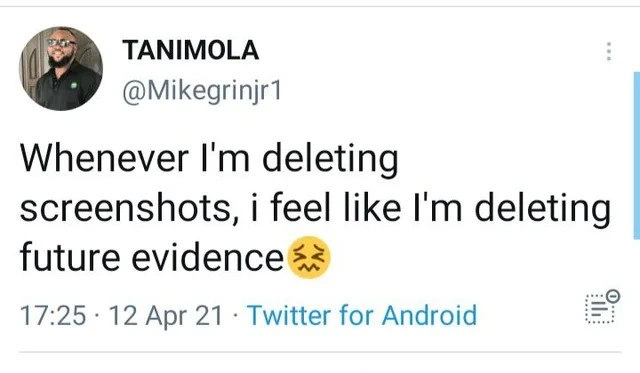
The tweet uses a woozy-face emoji (🥴) which perfectly captures the “uneasy” or slightly nauseous feeling of doing something that might be a bad idea. Deleting those screenshots makes the author feel uncomfortable, as if they’re betraying their future self who might scream, “Why did you delete that? We needed it!” It’s a bit of dramatic flair, common in DeveloperHumor, to describe an everyday habit in exaggerated terms. We’ve all had that split-second decision where we hover over the delete button and second-guess ourselves.

Finally, consider the format of the meme: it’s presented as a tweet (with the Twitter UI around it). Developer memes often use tweets like this because tweets are short, punchy, and shareable. The meme creator likely saw this funny, honest thought on Twitter (“Whenever I’m deleting screenshots, I feel like I’m deleting future evidence”) and realized a ton of other devs would nod in agreement. By screenshotting the tweet, they turned it into a meme image that can be shared on other platforms (like an image post on Reddit or in a group chat) without relying on Twitter’s algorithm. There’s irony here too: the meme maker saved this tweet as an image – literally preserving evidence of someone’s relatable joke about saving evidence! In a way, the act of making the meme proves the point of the meme.

In summary, for a junior dev or anyone new: the joke is that developers take so many screenshots of errors or weird behaviors “just in case,” and when cleaning them up, we get a ridiculous feeling of dread that we’re erasing something important. It’s funny because it’s both true and a little absurd. The meme pokes light fun at our tendency to hoard information when we’re not sure what will matter later. And the reason it resonates is because so many of us have felt that exact twinge of panic emptying out our screenshots folder. It’s a friendly reminder that you’re not alone in having a Downloads folder or phone gallery full of odd screenshots you can’t quite throw away!

Level 3: Murphy’s Screenshot Law

Ever notice how a discarded screenshot practically guarantees a crisis the next day? This meme hits on a core developer superstition: the moment you delete an image that captured a weird bug or error message, you’ll inevitably need it later. It’s a tongue-in-cheek application of Murphy’s Law to debugging. The tweet’s author admits that emptying their phone’s screenshot gallery triggers a panic: “Am I erasing crucial future evidence?” Complete with a woozy-face emoji (🥴) to emphasize that sickly uh-oh feeling. We laugh because it’s DebuggingFrustration distilled into one relatable line. Every seasoned engineer has learned the hard way that ephemeral debugging artifacts often become vital the second they’re gone. The humor lies in treating innocuous image files like forensic gold—because in our experience, they basically are.

On the surface, it’s just a throwaway tweet in a mobile app UI. But the meme’s format itself is meta-ironic: it’s literally a tweet_format screenshot about the fear of deleting screenshots. In preserving this joke, we’re following our own advice – storing this screenshot as a permanent record on the internet. The content resonates with any developer who’s done troubleshooting or written up a bug report. We habitually snap pictures of error dialogs, terminal outputs, stack traces, weird UI glitches, and the notorious “Works on my machine” proof. Why? Because we’ve been burned by fleeting evidence before. The next time a bug_report_proof is needed or a stakeholder claims “that issue never happened,” having that PNG or JPEG on hand is our ace. It’s screenshot_evidence of reality, a lifeline when someone inevitably asks “Got any proof?” In a culture where “pics or it didn’t happen” is half-joke, half-policy, developers instinctively gather their “receipts.” This tweet-turned-meme playfully exposes that paranoid little voice in the back of our heads whispering, “Better keep this, you might need to show the team later.”

A Habit Born of Hard Lessons

The deeper truth is that this meme speaks to how we cope with elusive bugs and inconsistent environments. In an ideal world, all important information would be in logs, metrics, and documentation. But in real life Debugging_Troubleshooting, the quickest way to capture a system’s odd behavior is often hitting Print Screen. That cryptic error message your service threw at 3 AM might never appear again once you rerun it for logs. So you take a screenshot—click!—and stash it away. Over time, this becomes a kind of insurance policy, a personal archive of weird incidents. We end up with cluttered photo rolls full of error42_screenshot.png, weird_ui_bug.png, and stacktrace_july.png because each image represents a just-in-case lifeline. It’s a bit like a detective pinning clues on a board. And when you finally muster the courage to purge that clutter, you feel like a cop burning case files before the case is truly closed. DataRetention anxiety kicks in: what if I need that exact evidence to debug a future incident or to convince my team I’m not crazy?

Part of the joke is how disproportionate this anxiety is. Rationally, if a screenshot was truly crucial, we’d file it in the ticketing system or write proper documentation. But developers know how often “proper” process falls short. Maybe you didn’t attach that image to a Jira ticket because the bug seemed intermittent or low-priority. Maybe the screenshot was just a quick sanity check you texted a coworker (“See, the app did throw a 502 error yesterday!”) and never officially logged. These ad-hoc images become the shadow documentation in our camera roll. There’s a dark humor here about our DocumentationHumor habits: we joke that the real project wiki is our collection of screenshots. The meme nails this irony—cleaning up your phone feels like shredding your project’s “real” user manual.

Why We Can’t Let Go (Advanced Debugging Realities)

From a senior engineer’s perspective, this behavior is both absurd and oddly pragmatic. On one hand, relying on unindexed PNGs for system knowledge is laughable. On the other, when an on-call war room is raging at 2 AM, those screenshots can save precious time. They’re quick data points to prove “It’s not just me—look, here’s the error.” There’s an unwritten Murphy-esque law in IT: if you throw away a piece of evidence, that’s precisely when the post-mortem will demand it. The meme is funny because it’s true: we’ve all emptied the Recycle Bin only to think “I just know that screenshot of the outage error would bail me out right now.” It’s a shared, almost superstitious experience—RelatableDeveloperExperience at its finest. The laugh comes with a wince, recalling times we purged our clutter and got bit for it.

There’s also a subtle commentary on organizational culture here. In healthy teams, important bug evidence goes into issue trackers, knowledge bases, and long-term logs. In more chaotic environments, devs learn to cover themselves. They keep screenshots as a personal paper trail, because blame can roll downhill in a hurry. The meme’s “future evidence” phrasing hints at this cover-your-bases mindset. A cynical veteran dev hears “evidence” and imagines the future meeting where someone demands proof: “Show us where it says the app crashed” – and our hero triumphantly produces a months-old screenshot like an insurance policy. It’s a humorous exaggeration of reality, yet not far from the truth in some post-incident finger-pointing sessions. Essentially, we become digital hoarders out of self-defense.

Now, consider system logs and monitoring – the professional counterparts to our screenshots. In production, we implement log retention and centralized monitoring precisely so we don’t lose critical data for debugging. We know purging logs too soon can doom a root-cause analysis. The screenshot habit is the personal-scale version of that same wisdom (or paranoia). It’s fascinating: engineers trust distributed databases and backups with petabytes of data, but also trust a scrappy folder of PNGs on their phone as the source of truth for a pesky bug. The meme tickles us because it exposes this contradiction. We preach clean code and clean desks, yet our devices overflow with unsorted images named Screenshot_20210412-172527.png—all because it might be important someday.

Let’s not ignore the Documentation angle either. Good documentation would include the steps to reproduce a bug and references to logs or screenshots in a formal report. But producing good docs is time-consuming, and when you’re in the thick of debugging, nobody stops to write a polished report. The screenshot is the lazy documentation: quick, context-rich, but ultimately messy. We laugh in recognition that our screenshot folder is essentially our “README” for all the odd issues we encountered. It’s not searchable, it’s not shareable (until someone makes a meme of it), yet we cling to it as a knowledge base. The meme’s popularity in dev circles suggests a collective self-awareness: we know this isn’t ideal, but hey, it’s how things get done. We choose humor to cope with the slight absurdity of our DebuggingFrustration rituals.

To sum up the high-level insight: this meme wryly comments on the insurance policy mentality in software development. After enough late-night troubleshooting sessions, you develop a healthy paranoia about losing data. That could be logs, stack traces, or even seemingly trivial screenshots. The act of deletion feels like tempting fate. It’s funny because it’s an exaggeration of a real coping mechanism. We personify screenshots as “evidence” in a future trial (maybe the next outage or the next did-you-actually-test-that meeting). And in a final stroke of irony, the meme about preserving evidence is itself preserved as an image for our enjoyment. (Time to delete all those images back them up in triplicate, just in case.)

Description

A screenshot of a tweet from user Tanimola (@Mikegrinjr1), posted on April 12, 2021. The tweet reads, 'Whenever I'm deleting screenshots, i feel like I'm deleting future evidence', followed by a flushed/anxious face emoji. This sentiment is highly relatable in a professional tech context. Developers, SREs, and project managers constantly take screenshots of error messages, monitoring dashboards, Slack conversations with conflicting requirements, and buggy behavior that is hard to reproduce. These images serve as crucial evidence for bug reports, post-mortems, performance reviews, and defending technical decisions. The anxiety comes from the fear of deleting a seemingly random screenshot that could later become the key piece of evidence needed to win an argument, prove a point, or diagnose a critical production issue. It speaks to a culture of necessary digital hoarding driven by CYA (Cover Your... Assets) instincts in complex, often blame-oriented, corporate environments


Comments

16
Anonymous ★ Top Pick My screenshots folder is my most valuable asset. It's not a 'photos' directory; it's a version-controlled, indexed archive of every time someone said 'it works on my machine'
  1. Anonymous ★ Top Pick

    My screenshots folder is my most valuable asset. It's not a 'photos' directory; it's a version-controlled, indexed archive of every time someone said 'it works on my machine'

  2. Anonymous

    Screenshots are the poor-man’s distributed trace - every time I empty that folder I’m basically turning our next RCA into historical fiction

  3. Anonymous

    The screenshot folder is basically a distributed version control system where every commit message is 'might need this later' and the garbage collector runs on a 'surely this bug won't resurface after 6 months' schedule

  4. Anonymous

    Every senior engineer knows that screenshot from 2 AM three years ago showing that cryptic error message will somehow become the smoking gun in next quarter's root cause analysis. It's not hoarding if it's forensic evidence for future you to prove 'I told you this would break in production.'

  5. Anonymous

    Purging my screenshots folder is me truncating the append-only audit log - then writing the postmortem: “cannot reproduce; evidence garbage-collected.”

  6. Anonymous

    Deleting screenshots is like rm -rf on your git logs: pure bliss until the postmortem finger-pointing starts

  7. Anonymous

    My camera roll is our unofficial audit log - Slack approvals, Grafana spikes, and “LGTM” drive-bys - deleting screenshots feels like dropping the last replica in a poorly configured quorum

  8. @feskow 5y

    Feels as bad as deleting that commented code that can be useful sometime later

    1. @ivan_kostrubin 5y

      True

    2. @deerspangle 5y

      Git history will always have it

      1. @TERASKULL 5y

        what's git? My coworker will just email me a previous copy in a zipfile, that he hopefully didn't delete yet.

        1. @deerspangle 5y

          Yeah, we just call that guy the "git" in our office

  9. @the_cash_network 5y

    Same as some pictures... Some things should never be on your phone... Especially when you cross certain borders where they want to check your phone's content 😇😇

    1. dev_meme 5y

      what kinda borders are you crossing? U living in korea or something?

      1. @the_cash_network 5y

        Europe/Belarus/Ukraine

        1. dev_meme 5y

          aight idk how the situation there is, but if it's true what you're saying, then F for you, comrade.

Use J and K for navigation