Skip to content
DevMeme
1961 of 7435
The Infuriatingly Vague Bug Report
Debugging Troubleshooting Post #2182, on Oct 21, 2020 in TG

The Infuriatingly Vague Bug Report

Why is this Debugging Troubleshooting meme funny?

Level 1: Yes Is Not a Flavor

Imagine you’re at an ice cream shop with your friend. Your friend asks, “Which flavor do you want – chocolate or vanilla?” But instead of telling them a flavor, you just confidently answer, “Yes.” 🤔 What does that even mean? You didn’t actually give them a flavor, right? Your friend would be completely confused! They asked you to pick one of the options, but you replied with “Yes,” which isn’t a flavor at all. It doesn’t tell them anything useful about what you want. They’d probably stand there waiting for you to actually choose chocolate or vanilla.

This is exactly why the meme is funny. The developer is like the friend asking a specific question, and the customer is the one answering “Yes” when that answer doesn’t fit the question. It’s silly and a bit frustrating. Just like you won’t get any ice cream if you don’t say which flavor you want, the developer won’t know how to fix the problem if the customer doesn’t say what they did to cause it. The humor comes from that obvious mix-up – someone gave an answer that doesn’t answer the question at all, and everyone is left confused.

Level 2: Cannot Reproduce

Let’s break down the scenario in simpler terms. When a software developer or support engineer is trying to fix a bug, they need to know how to make that bug happen again. This is known as the “steps to reproduce” the problem. Essentially, the developer is asking the user: “What exactly were you doing when the error occurred? List the actions step by step so I can do the same thing on my side.” Providing clear reproduction steps is a crucial part of debugging because it allows the engineer to see the bug in action and understand what’s causing it.

Now, in this meme, the conversation goes:

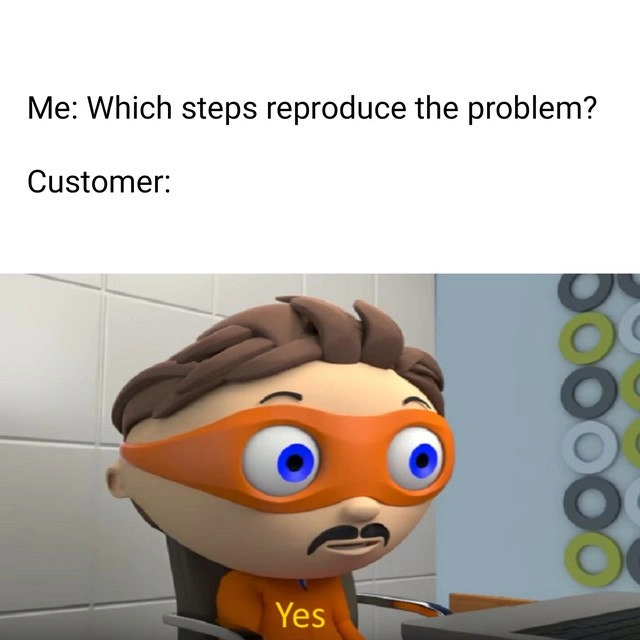
Developer: “Which steps reproduce the problem?”
Customer: “Yes.”

The developer asked which steps (meaning what actions) lead to the bug. It’s not a yes-or-no question at all – it’s asking for a list of actions or a sequence of events. But the customer’s response of “Yes” is meaningless in this context. It doesn’t describe any action or detail; it’s like answering a multiple-choice question with just “Yes.” The humor here comes from how the customer’s confident one-word reply completely fails to answer the question. It highlights a clear communication gap between the user and the developer. The developer is expecting a description of the problem scenario, but the customer either misunderstood the question or didn’t know how to respond, and simply said “Yes.”

In real software support tickets or bug reports, there’s usually a section for Reproduction Steps where the user should list something like:

  1. Step 1: Open the app and log in.
  2. Step 2: Go to the Settings page.
  3. Step 3: Click the “Save” button.
  4. Step 4: Observe that the app crashes with Error Code 500.

This is an example of useful reproduction steps. It tells the developer exactly what was done and what happened. With that information, the developer can follow the same steps and likely see the bug (the crash) occur on their own machine. Once they can reproduce the bug, they have a much better chance of identifying the cause and fixing it.

But in our meme’s case, the customer provided none of that information. Their answer “Yes” does not tell the developer which actions lead to the error. It’s as if the developer asked, “What did you do to make the program crash?” and the user just responded, “Yes, it crashes.” That doesn’t help narrow anything down. The developer is left scratching their head, thinking “Yes… yes what? What did you do?” There’s a famous phrase in tech support and QA (quality assurance) circles: “Cannot Reproduce.” This is often used when a reported bug can’t be made to happen again because the information given was insufficient or the tester’s environment is different. In this scenario, because the developer got such a vague answer, they might label the issue as “Cannot Reproduce” in the bug tracker. That’s basically saying, “We tried to follow what you said, but since you didn’t tell us anything useful, we couldn’t find the problem.”

The meme’s situation is a perfect example of Debugging Frustration. The developer wants to help the user and solve the problem, but the client’s expectations (“I reported the issue, so it should get fixed”) aren’t being met because the client hasn’t provided the needed details. It also reflects a bit of a stakeholder management lesson: dealing with non-technical clients or customers often means guiding them on how to give the information you need. Many users don’t know what reproduction steps are or why they matter. They might think it’s enough to say “the program is broken” or just confirm that there is a problem (hence answering “Yes”). Part of being a developer or a support engineer, especially as a junior learning the ropes, is understanding that sometimes you have to gently ask the right questions multiple times or in different ways to get the details you need. You also learn to use whatever clues you can get. If a user gives an ambiguous answer like this, a developer might check logs (records of what the program was doing) or try common actions that could trigger issues. It’s a bit like solving a mystery with very few clues.

In summary, this meme is funny (and a little painful) to developers because it shows a support scenario where the communication went terribly wrong. The developer asked for specifics to troubleshoot a bug, and the customer’s reply provided no new information at all. It’s a reminder of how important clear communication is in tech. For a new developer, the takeaway is: always gather as much detail as you can when debugging, and be prepared that sometimes users will give answers that don’t immediately make sense. You might even have to explain to them what information you need and why you need it. That’s all part of real-world debugging and helping customers solve their issues.

Level 3: Yes-Driven Debugging

Me: "Which steps reproduce the problem?"
Customer: "Yes."

This exchange is a debugging & troubleshooting nightmare that every seasoned developer has encountered (often around 3 AM). The developer politely asks for reproduction steps – a detailed sequence of actions to consistently trigger the bug. In return, the customer provides a one-word answer: "Yes." 😑 This is the ultimate unhelpful customer response. It’s like asking "Which file is corrupted?" and hearing "Yes." The question wasn’t a yes/no query, but the user confidently replies as if confirmation alone is what we needed. The result? A total information black hole and a communication gap wide enough to swallow the entire project.

From a senior engineer’s perspective, the humor (and horror) comes from how painfully real this scenario is. In bug tracking systems and support tickets, we always request the exact steps to reproduce an issue. These steps are the bread-and-butter of effective bug fixing. Without them, you’re stuck playing software detective with no clues. An answer like "Yes" provides zero actionable detail. It doesn’t tell us if the user clicked a button, uploaded a file, or performed some arcane ritual to summon the bug. All we know is that the customer experienced a problem and (apparently) feels very sure about it. The developer is left thinking, "Yes… what?". It’s a prime example of ambiguity in requirements – or more accurately, ambiguity in bug reports. We have a bug existing in the wild, but no idea how to reproduce it in a test environment. The code might be fine under normal conditions, so on the developer’s machine everything "works on my machine" by default. Without the magic incantation (the missing steps), the bug might as well be invisible. This is the classic can’t reproduce scenario waiting to happen.

The veteran dev in me can’t help but smirk and cringe at this. Imagine logging into the support system and seeing a support ticket that reads:

  • Issue: "Application crashes when I try to do the thing."
  • Steps to Reproduce: "Yes."

At this point, every engineer’s soul leaves their body for a moment. 😬 We’ve officially entered stakeholder management hell. The client expectations are clear: "I told you there’s a bug, now you figure it out." But the developer’s reality is, "I need more info, or I’ll be guessing in the dark." This mismatch creates debugging frustration on a cosmic level. It’s funny in hindsight because it’s true: many of us have wasted hours due to such vague reports. In stand-ups or post-mortems, these stories become legendary. (“Remember that user who answered ‘yes’ to every field on the form? Classic.”)

The meme nails the absurdity: the customer’s confidence in replying with just "Yes" is inversely proportional to the answer’s usefulness. It highlights how non-technical stakeholders sometimes misinterpret what we need. Maybe the customer thought the question was, "Can you reproduce the problem?", to which "Yes" would be a reasonable answer. Or maybe they didn’t read the question at all and just wanted to affirm that, yes, there is a problem. Either way, the developer is stuck deciphering the support ticket like it’s an ancient riddle. Is “Yes” perhaps step 1 of some undisclosed sequence? (Step 1: Yes. Step 2: ??? 🤷) Spoiler: it’s not.

In the end, this meme is a comically exaggerated slice of real life in software support. It underscores the gulf between developer and customer communication. The stakeholder (client) knows something’s wrong but fails to convey how or when it happens. The dev ends up with a bug report that might as well say “the thing is broken” with no further hints. Seasoned engineers have learned to treat such situations with dark humor and a deep sigh. They’ll either bounce it back with a polite request for more details (resisting the urge to facepalm), or roll up their sleeves and start troubleshooting blind. Sometimes, that means combing through logs, adding extra debug output, or asking the customer step-by-step questions like you’re tech support on a help line: “Okay... let’s try this again. What exactly did you do right before it broke?” Other times, if nothing can be gleaned, the issue gets tagged as CNR (Cannot Reproduce) and shelved until the user provides more info. Neither outcome is ideal, but it’s the reality when you get a response as nebulous as "Yes."

For veteran developers, the humor here is equal parts laughter and PTSD. We’ve been in that hot seat, stuck between a bug we can’t see and a customer support nightmare we can’t escape. The meme perfectly captures that moment of stunned silence when you realize the customer’s response isn’t going to help at all. You can practically hear every engineer who reads this meme mutter under their breath: “Well, thanks a lot... that was very helpful.” The situation is absurd, yet completely relatable – and that’s why it’s funny. It’s a tribute to all the bug reports with missing details, all the late-night support calls where the client says “it just doesn’t work” and nothing more. In short, it’s the everyday comedy of errors that is life in tech support and debugging.

Description

A two-part meme that captures a common frustration in tech support and development. The top text displays a dialogue: 'Me: Which steps reproduce the problem?' followed by 'Customer:'. The bottom image features a wide-eyed cartoon character in an orange superhero mask and a shirt with 'Yes' written on it, staring blankly. The character is from the infamous 'Protegent' antivirus software ad. The humor lies in the customer's nonsensical answer to a specific 'which' question, perfectly encapsulating the experience of receiving unhelpful, vague, or illogical bug reports. For developers and QA professionals, this is a deeply relatable scenario that highlights the communication gap with non-technical users and the challenge of debugging issues without clear reproduction steps
Comments

10
Anonymous ★ Top Pick This is the point where you close the ticket with the resolution: 'Yes, it is a problem. Case closed.'
  1. Anonymous ★ Top Pick

    This is the point where you close the ticket with the resolution: 'Yes, it is a problem. Case closed.'

  2. Anonymous

    Customer’s repro steps: “Yes.” Translation: deploy to prod, crank trace sampling to 100%, and hope the Heisenbug collapses before finance notices Datadog just doubled

  3. Anonymous

    The same customer who insists their issue is "critical" and "blocking production" but can't remember if they clicked the button once or twice, yet somehow has perfect recall of exactly how the system worked "before you changed it" three years ago

  4. Anonymous

    Every senior engineer knows the pain: you craft a carefully worded question asking for specific reproduction steps - environment details, input data, exact sequence of actions - and the customer responds with 'Yes' or 'It's broken.' It's the technical equivalent of asking 'What's the stack trace?' and getting back 'Error.' After 15+ years, you learn that 'steps to reproduce' is really just wishful thinking; the actual debugging process involves archaeological excavation of production logs, psychic interpretation of vague descriptions, and eventually just reproducing every possible user action until something breaks. The real skill isn't writing code - it's translating 'it doesn't work' into actionable debugging information while maintaining professional composure

  5. Anonymous

    “Yes” is customer for “Heisenbug”: deterministic in prod, probabilistic in staging, and vanishes as soon as you turn on tracing because the extra I/O reorders the race

  6. Anonymous

    When a ticket answers ‘Which steps reproduce?’ with ‘Yes’, you know you’re about to implement distributed tracing and session replay just to reverse‑engineer one click

  7. Anonymous

    Customer's repro steps: 'Yes.' That's the most consistent trigger for a support engineer's Heisenbug hunt

  8. @Lord_Evil 5y

    жиза

  9. @daemon4647 5y

    кастомер? у меня такая QA была! :(

  10. @Bender666 5y

    http://www.youtube.com/watch?v=8wVRlL7QaQM

Use J and K for navigation