CS Degree Knowledge vs. The Reality of Centering a Div
Why is this Frontend meme funny?
Level 1: Big Brain, Little Task
Imagine a scientist who can build a rocket that goes to the moon, but then they come home and spend hours trying to open a stuck pickle jar. It’s funny because you’d expect someone so smart and skilled to handle the easy thing without a problem, right? But sometimes even very smart people get stumped by simple everyday tasks. That’s exactly what this meme is showing: a person who’s great at really hard computer stuff, but then has a hard time doing a tiny, “easy” thing like moving a button to the center of the screen. The surprise of seeing the big expert struggle with a little task makes us laugh, and it also kind of reminds us that everyone has those moments, no matter how smart they are.
Level 2: Not in the Curriculum
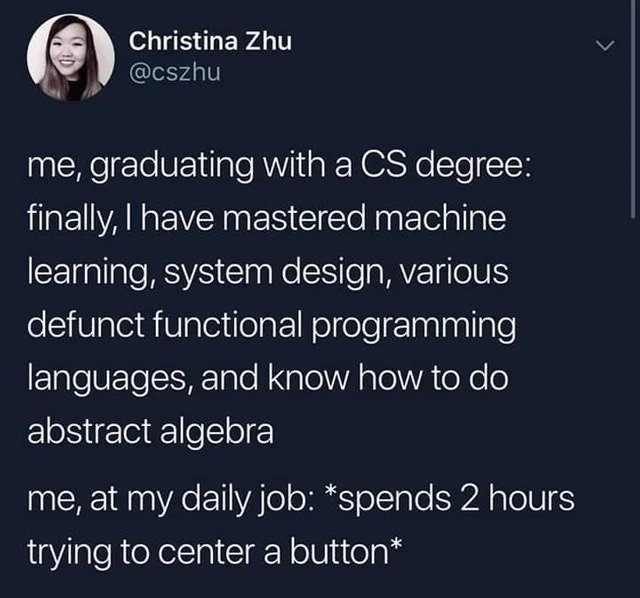
This meme shows a recent computer science graduate comparing what they learned in school to what they do at work. It’s presented as a tweet (a short message on Twitter) by someone named Christina Zhu. Memes often use tweets like this because they’re a quick, familiar way to deliver a joke or relatable moment.
In the first part of the tweet, the person basically says: “Me, graduating with a CS degree: I’ve mastered machine learning, system design, some outdated functional programming languages, and even abstract algebra.” That’s a lot of high-level stuff! Then the second part says: “Me, at my daily job: spends 2 hours trying to center a button.” The star (*) around the phrase is a way to indicate an action or an emphasis in casual writing (Twitter doesn’t format text, but people use like this to signify a sort of stage direction or internal monologue). So it’s like the person is narrating their day at work in a funny, self-deprecating way.
Let’s break down those terms from the first part, since they’re big topics:
- Machine learning: This is a field of computer science where programmers create algorithms that can learn from and make predictions on data. For example, machine learning is behind things like recommendation systems (ever wonder how Netflix suggests movies you might like?) or image recognition (like teaching a computer to identify a cat in a photo). It’s considered one of the harder, more math-heavy topics in CS education.
- System design: This deals with how to plan and structure complex computer systems. Think of websites like Amazon or Facebook – system design is about figuring out how all the parts (servers, databases, APIs, etc.) fit together so that the system works well, can handle lots of users, and doesn’t crash. It’s more of an architecture and planning skill, combining knowledge of software and hardware.
- Functional programming languages: These are programming languages that follow a particular style of coding. In functional programming, you mostly build programs using functions (and you avoid changing variables or states). It’s a very math-like way to program. Examples include Haskell, Erlang, and Scheme. Universities often teach one of these languages to broaden students’ horizons beyond the typical languages like Java or Python. When the meme says “various defunct functional programming languages,” it’s being humorous – implying that the person learned some languages that are considered outdated or not widely used in everyday jobs. (They might not actually be completely defunct, but to a new grad who doesn’t see them in job postings, it can feel like “Why did I learn that?”).
- Abstract algebra: This is a branch of advanced mathematics. It’s not about the kind of algebra you do in high school with x’s and y’s; it’s about very theoretical constructs like groups, rings, and fields. If you take an abstract algebra course, you prove a lot of theorems and deal with symbols and logic. It’s the kind of math that is beautiful in theory but doesn’t come up when you’re, say, writing a typical app or building a website. Mentioning it in the tweet is a way to emphasize just how deep into theory the person went in school.
Now, the punchline: despite all that education, the thing giving them trouble at work is centering a button using CSS.
What is CSS? It stands for Cascading Style Sheets, and it’s the technology used to style and lay out web pages. If you’ve ever changed the font color on a blog or seen a webpage with columns and a navigation bar, that’s CSS in action. CSS is all about the look and formatting of a website – things like colors, spacing, and positioning of elements.
“Centering a button” means making a button appear in the center of some area on the page (for example, the middle of the screen or the middle of a form). It sounds super simple: you just want it in the middle. But in CSS, achieving that can be tricky if you don’t know the right technique. There isn’t a single obvious “center this” button you can press. Instead, you have to use combinations of CSS rules, and those rules depend on the context:
- Are you centering horizontally (left-right), vertically (top-bottom), or both?
- Is the button inline (like text) or is it a block element?
- What is the container around the button? (A parent
<div>or the whole page body?)
Depending on answers to those, the solution differs. Many beginners try something like text-align: center; hoping that will center the button. But text-align: center only centers inline content inside an element – meaning it will center text within the button, but not move the button itself. Another thing might be margin: auto;. If you set margin: 0 auto; on a block-level element (like a button that’s been made display: block), it will center it horizontally within its container — provided the container is wide enough and the element isn’t already full width. But that won’t handle vertical centering.
For vertical centering, before a certain point in time, there was no easy one-liner. People used hacky solutions because CSS didn’t have a straightforward property for it in older specifications. One famous method was to use a wrapper with display: table-cell; vertical-align: middle; (to mimic how text gets centered in a table cell). Another method used absolute positioning: for example, set the button to position: absolute; top: 50%; left: 50%; and then nudge it back by its own width/height by using transform: translate(-50%, -50%);. If this sounds a bit like magic, that’s because it was a bit of a magical workaround – not very intuitive for newcomers!
The meme’s tags mention CSSFlexbox, which gives a clue about what the solution could be. CSS Flexbox (short for Flexible Box Layout) is a modern CSS layout system that greatly simplifies tasks like centering. If you make a container a flex container (display: flex) and then use justify-content: center (to align items horizontally) and align-items: center (to align items vertically), any item inside that container (like our button) will neatly center itself both ways. Flexbox is something that might not be taught in a CS degree at all – it’s more of a practical tool you pick up when you actually need to do web development.
So, the poor grad in the meme likely spent two hours not because they’re not smart, but because they had never learned the specific trick to center a button with CSS. They were probably trying all the things they could think of, hitting refresh, and nothing was working until they finally stumbled on the right method (or a helpful coworker pointed it out).
Now let’s tie this back to the categories given: Frontend and UX/UI are categories here because this problem (centering a button) is a front-end web development issue and it’s related to user interface design (a centered button might be part of a nice, user-friendly layout). The Learning category is also relevant because the meme is about the learning process – it highlights the gap between academic learning and practical learning. In school, you learn big concepts; on the job, you often learn these little practical things that might not have been covered in class.
The mix of tags like DeveloperHumor, CodingHumor, and LearningToCodeJourney tells us this meme is shared among programmers to poke fun at the journey of becoming a developer. It’s saying, “No matter what you learned, there will be something simple you feel dumb about — and that’s part of the journey!” It’s a funny reminder that everyone has to Google things sometimes, even things that seem like they should be easy.
In simple terms, the meme is pointing out: book smart doesn’t automatically mean practically prepared. You can ace your exams and know complex algorithms, but you might still struggle with a basic web design task if you’ve never done it before. And that’s okay – it’s why on-the-job learning (and a sense of humor) is so important in tech. After all, the field is so broad no one knows everything. So we share little jokes like this to stay humble and remember that even experts are always learning the “simple” stuff, too.
Level 3: Grand Theories, Tiny Button
me, graduating with a CS degree: finally, I have mastered machine learning, system design, various defunct functional programming languages, and know how to do abstract algebra
me, at my daily job: spends 2 hours trying to center a button
The meme’s Twitter-style dialogue sets up a contrast that every developer finds hilarious and painfully relatable. The first line reads like an academic’s victory lap—machine learning, system design, even those esoteric functional languages and abstract algebra are all under this graduate’s belt. In contrast, the second line is the crash back to reality: all that grand knowledge, yet here they are Googling how to align a simple button on a webpage with CSS.
Why does this scenario make experienced devs laugh? Because it’s so true. It captures the absurdity of the gap between academia and industry in a single, relatable anecdote. You can design a fault-tolerant distributed system or implement a convolutional neural network, but then your boss asks you to fix a basic UI issue and you’re suddenly stumped. It’s a textbook case of the real world vs. education mismatch: high-level theory meets nitty-gritty reality. This is the classic tale of a big fish in a small pond — except the “small pond” (centering something with CSS) turns out to have unexpected depth (or maybe hidden quicksand!). In fact, it's a slice of everyday developer reality: no matter how deep your expertise, a seemingly trivial issue can grind your progress to a halt.
This scenario is a staple of programming jokes – a piece of coding humor every programmer can appreciate. It's especially popular in front-end circles (think FrontendHumor threads) as well as general developer meme pages, where engineers commiserate over how something as seemingly simple as centering a button can drive a person up the wall. We laugh at the hyperbole of "spends 2 hours trying to center a button" because so many of us have literally been there, tweaking CSS rules for far too long. The tweet uses exaggerated contrast (mastering lofty subjects vs. struggling with a tiny task) to highlight the irony, and that contrast is comedy gold in the developer community.
From a senior developer’s perspective, this tweet-format meme rings true on multiple levels. First, it highlights how front-end tasks are often underestimated. Making a user interface look just right can be deceptively challenging. What looks like a “trivial” change (moving a button to the center) can hide a tangle of unexpected issues. We know there’s an old joke: “As a software engineer, there are two hard things – cache invalidation, naming things, and off-by-one errors.” Modern developers might add: “and centering a div.” That’s tongue-in-cheek, but it speaks to this exact situation. Even though centering isn’t algorithmically complex, the CSS layout system has its own rules and gotchas. A senior developer will have learned (often the hard way) that a one-line fix can sometimes take hours of debugging due to things like a forgotten parent element rule or a subtle inheritance issue.
Second, the meme underscores how formal education doesn’t cover many real-world skills. A computer science degree might cover operating system design or advanced algorithms, but it typically doesn’t teach you how to use CSS Flexbox or troubleshoot browser quirks. So our newly graduated friend might have aced all their theoretical classes yet never encountered the practical problem of CSS alignment until their job. This is a common industry scenario: no matter how well you did in school, the first time you deploy a web app or manage a production server, you realize there’s a whole new set of skills to learn. The meme playfully exposes that academic vs. industry gap. It’s essentially saying, “Here’s someone incredibly smart in theory, discovering that in practice there are basic things they didn’t know.” Experienced developers find that funny because we’ve all been that person at some point. It reminds us of our own early career facepalm moments.
There’s also a shared comfort in this humor: it fights impostor syndrome. When you’re alone struggling to center a button, you might feel embarrassed — “Shouldn’t I know how to do this already? Am I a bad programmer?” But then you see a meme like this, with thousands of likes and retweets, and you realize, everyone has been through this! It’s not just you. Even the people who can implement complex algorithms sometimes have to look up basic CSS. That realization is both funny and reassuring. By laughing at this scenario, developers collectively acknowledge that it’s okay not to know everything. The meme turns a potentially frustrating personal moment into a communal joke.
Historically, there’s truth behind the laughter. In the early days of web design, centering elements, especially vertically, was notoriously fiddly. There was no single obvious CSS rule for it. Developers had entire cheat sheets for centering techniques depending on the situation. For example, making an element horizontally centered was easy with text-align: center (for inline elements) or margin: 0 auto (for block elements, given some conditions). But vertical centering? That might involve CSS hacks or even using <table> layouts or JavaScript calculations. It wasn’t until CSS3 introduced Flexbox and CSS Grid that truly convenient centering became standard. So, a developer from the 2000s reading this meme might chuckle and think, “Kid, you have it easy now with Flexbox – in my day we had to nest three containers and pray to the browser gods to center something!” The meme doesn’t delve into those details, but that context is there for those who know the history.
Another layer to this is how it spotlights front-end development as a respectable challenge. Sometimes, hardcore back-end or systems programmers tease front-end work as “just making things pretty.” But ask any seasoned web developer: making things pixel-perfect and cross-browser compatible can be as frustrating as chasing a memory leak in C. The shared joke here elevates that understanding. It says, effectively, “Don’t underestimate CSS; it can tie in knots even the smarties.” That wink of respect is hidden in the humor.
Finally, let’s talk about that “2 hours” of trying. Two hours is both an exaggeration and, in many cases, a very real figure. We’ve all sunk what felt like an eternity into a bug or layout issue that, in hindsight, had a one-line fix. While you’re in it, though, time flies by as you test different fixes. The emotional progression is practically universal: confusion (“Why didn’t that work?!”), stubborn determination (“Okay, maybe if I try this…?”), and a mix of annoyance and amusement at yourself by the end of it. Developers often cope by joking about these struggles. You might find posts online with dramatic titles like “CSS drove me to the brink” or memes saying “I have 99 problems and 97 of them are CSS.” These are of course exaggerations for comedic effect, but they stem from genuine frustration. The meme we’re analyzing taps exactly into that vein of humor. It uses the tweet’s format to succinctly capture the experience: Big brain in theory, baffled by a basic task in practice.
In essence, this meme is a light-hearted way of saying welcome to the real world for new graduates. It’s a form of communal developer humor that cuts across specialties: whether you’re a machine learning guru, a backend expert, or a newbie web dev, at some point you’ll struggle with something basic and feel a bit foolish. And that’s okay — if anything, it’s a rite of passage in this field. We’ve all been there, and now we can all laugh about it together.
Level 4: Monads vs Margins
This meme highlights a classic disconnect between academic computer science and practical front-end development. On one side, the persona boasts mastering advanced topics like machine learning, system design, "various defunct functional programming languages," and even abstract algebra. These areas are lofty and theoretical:
- Machine learning involves complex mathematics (think linear algebra, calculus, probability) to train models and optimize a high-dimensional loss function. A student might adjust hundreds of parameters with gradient descent to improve a neural network’s accuracy by fractions of a percent.
- System design demands understanding distributed systems, concurrency, and networking. It’s about architecting scalable, fault-tolerant software: considering database sharding, load balancing, caching layers, and the dreaded CAP theorem. A CS graduate might have done projects designing a mini-Google or an e-commerce backend in theory.
- Functional programming languages (especially the “defunct” ones often used in academia) immerse students in a math-y style of coding. In Haskell or Scheme, one learns about pure functions and monads (from category theory) to handle side effects. They prove properties about programs and manipulate recursion and lambda calculus with elegant compositional techniques.
- Abstract algebra is pure mathematics: the study of algebraic structures such as groups, rings, and fields. A student here might solve proofs about group homomorphisms or calculate the center of a group (ironically, “center” in algebra refers to elements that commute with all others, which has nothing to do with centering an element on a webpage).
All of that knowledge is highly intellectual and generalized. However, none of it directly teaches you the quirks of CSS (Cascading Style Sheets), especially something seemingly simple like centering a button on a web page.
The humor arises from this gulf: after tackling monadic transformations and proving ring theorems, our freshly minted CS graduate is foiled by the CSS box model and alignment rules. The very skill set that conquered abstract math isn't immediately helpful for CSS layout mechanics. In theoretical terms, the graduate is experiencing a dramatic context switch—from solving well-defined computational problems to wrestling with the more constraint-based, browser-dependent problem of layout.
Centering an element in CSS can unexpectedly feel like solving a puzzle. Why? Under the hood, the browser’s layout engine computes positions of elements according to cascading rules, default styles, and the document flow. To center a simple <button>, you must understand how its parent container is rendered and which CSS properties affect horizontal and vertical alignment:
- Horizontally centering a block-level element might involve setting
margin: 0 auto;, which relies on the browser to automatically equalize the left and right margins. This trick works only under specific conditions (the element needs a defined width or not be full-width by default). - Vertically centering was historically even trickier. Before modern CSS, developers resorted to hacky methods: wrapping content in a container with
display: table-cell; vertical-align: middle;(mimicking old table layouts), or absolutely positioning the element 50% from the top and then translating it upward by 50% of its height. These workarounds were essentially manual solutions to the browser’s lack of a straightforward vertical centering mechanism in early CSS.
Today, we have more elegant tools. CSS Flexbox (the Flexible Box Layout module) provides a formal algorithm to distribute space and align items in a container. If our intrepid developer knew Flexbox, they’d realize they could center the button in a couple of lines:
.container {
display: flex;
align-items: center; /* center items vertically */
justify-content: center; /* center items horizontally */
}
Here, the browser is instructed to mathematically calculate the centering: justify-content: center divides any extra horizontal space evenly on both sides of the item, and align-items: center does the same vertically. Flexbox effectively handles the alignment logic that used to require tedious hacks.
However, knowing about Flexbox (or any CSS technique) requires domain-specific knowledge. A classical CS curriculum seldom delves into front-end layout techniques or the intricacies of the CSS formatting context. It's as if our hero studied quantum mechanics and cryptography but never learned how to assemble a basic piece of furniture. The gap between academia and industry here is almost absurd: the problems tackled in school have provable algorithms and clear abstractions, whereas figuring out why margin: 0 auto isn’t centering your <button> is an exercise in reading documentation, understanding browser behavior, and trial-and-error.
The meme’s exaggeration works because many developers have lived this story. Mastering distributed algorithms or monoids doesn’t translate into understanding the nuances of CSS display modes. All the abstract algebra in the world won’t debug the fact that maybe you forgot to set your element to block level, or that your parent container’s properties are preventing the centering. These are completely different knowledge spheres.
At this deep technical level, the meme underscores that different domains of computing require entirely different skill sets and mental models. Our CS graduate has moved from a world of formal proofs and algorithmic elegance to the seemingly simpler domain of UI layout, only to discover a hidden complexity there as well. It’s a perfect illustration of the real-world vs. education paradox: no amount of graduate-level machine learning theory prepares you for the reality that aligning UI elements can become its own mini research project. This fundamental mismatch—monads vs. margins, if you will—creates the kind of irony that draws a knowing, sympathetic laugh from anyone who’s straddled both worlds.
Description
A screenshot of a tweet from user Christina Zhu (@cszhu). The tweet is a two-part text meme written in white text on a dark blue background. The first part reads: 'me, graduating with a CS degree: finally, I have mastered machine learning, system design, various defunct functional programming languages, and know how to do abstract algebra'. The second part contrasts this with: 'me, at my daily job: *spends 2 hours trying to center a button*'. This meme humorously highlights the significant gap between the theoretical, high-level concepts taught in a computer science curriculum and the practical, often frustratingly mundane, challenges faced in a typical software development job, especially in frontend web development. The joke resonates with developers of all levels who have experienced the disproportionate difficulty of seemingly simple tasks like CSS layout compared to complex algorithmic problems

Comments
7Comment deleted
Your CS degree teaches you how to design a distributed system that can handle a million concurrent requests, but it doesn't teach you that the real final boss is a button that needs to be perfectly centered both vertically and horizontally on a responsive webpage
I can make Raft reach consensus across five datacenters in 300 ms, but getting Safari and Chrome to agree on where the “Submit” button sits still ends in a two-hour split-brain
After 20 years in tech, I've realized CSS isn't a styling language - it's a distributed consensus problem where every browser is a Byzantine general with its own interpretation of "center."
After four years mastering Haskell monads, category theory, and distributed consensus algorithms, you'd think CSS's box model would be trivial - yet here we are, toggling between flexbox, grid, absolute positioning, and margin: 0 auto while muttering 'it worked in dev' as the button stubbornly refuses to center across browsers. The real O(n²) complexity isn't in your algorithms; it's in the number of Stack Overflow tabs open for 'css center div 2024'
I can implement Paxos, but convincing Flexbox, Grid, and Safari to agree on what “center” means is still the hardest consensus problem in the stack
We can prove consensus with Raft, but the real liveness bug is getting a button to achieve quorum across nested flex parents - no amount of abstract algebra fixes align-items on the wrong container
Mastered monads in Haskell, but production button centering demands a four-layer specificity override and a prayer to browser gods