
Making Unix Polite, One Alias at a Time
Why is this CLI meme funny?
Level 1: Ask Nicely
Think of it like asking a grown-up for permission to do something special. Normally, you might just say “I want to do this now,” but here you decide to add a “please”. In our computer world, sudo is like a magic key that lets you do things only adults (administrators) are allowed to do. By changing the command to “please”, it feels as if you’re politely saying to the computer, “Could you do this with your special powers, please?” Just like how saying “please” to your parents might make a request sound nicer (even though they’ll decide the same way), saying “please” to the computer doesn’t actually change the rules – but it makes the whole experience friendlier. It’s funny because computers aren’t people, but we’re pretending the computer cares about good manners. In the end, you still get to do the powerful stuff, but you asked nicely, and that just makes everyone – even the person typing – smile a bit.
Level 2: Commanding with Courtesy
Let’s break down what’s happening for those newer to the command line. In Unix-like systems (Linux, macOS’s Terminal, etc.), CLI stands for Command-Line Interface – a text-only way to interact with your computer by typing commands. One famous command is sudo, which stands for “superuser do.” Normally, your user account has limited permissions for safety, but some actions (like installing software, modifying system files, or shutting down the system) require administrator privileges (the root user in Unix). By typing sudo before a command, you’re saying “run this command as the superuser (admin).” For example, sudo shutdown will attempt to shut down the computer, and the system will likely ask for your password to confirm you have the rights to do that. This is called privilege escalation – you are elevating your rights for that one command.
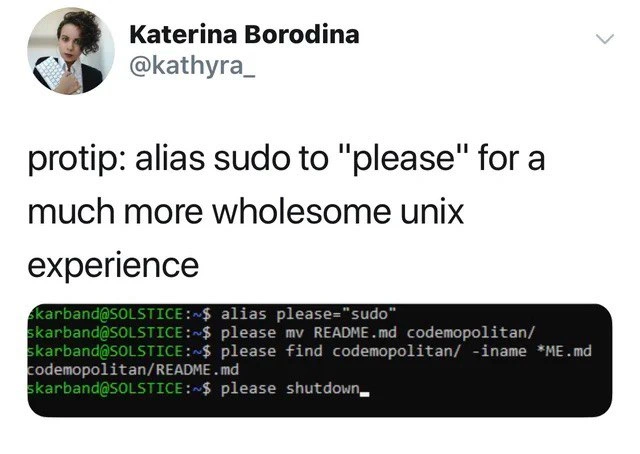
Now, the meme suggests creating an alias in your shell so that the word please does the same thing as sudo. An alias is like a nickname or shortcut for a longer command. For instance, if you find yourself often typing git status, you might set alias gs="git status" to save keystrokes. In our case, alias please="sudo" means “whenever I type please, interpret it as the command sudo.” The screenshot in the meme shows exactly this in action: the user defines the alias and then uses please mv ... and please shutdown. Thanks to the alias, please shutdown is understood by the computer as sudo shutdown. It’s a simple bash alias trick – you could add alias please="sudo" to your ~/.bashrc or ~/.zshrc file (the configuration files that run whenever you open a terminal) to make it permanent. Once added, every time you open a new terminal session, you can politely ask for admin actions!
Here’s how it looks in practice:
$ alias please="sudo" # Create an alias: 'please' now means 'sudo'
$ whoami # Check current user
user123 # I'm just a regular user
$ please apt-get update # Use 'please' instead of 'sudo'
[sudo] password for user123: ****
... # (System updates list of packages with root privileges)
In the snippet above, please apt-get update triggers the usual sudo behavior – it even asks for the password since updating packages needs root permissions. The only difference is we typed "please" instead of "sudo". Functionally nothing changed about the security or outcome.
So why do this? For fun and positivity! The tweet calls it a “more wholesome UNIX experience” because saying please adds a human, polite touch to the usually dry command line. Typically, command names in Unix are short and sometimes even intimidating (consider kill for stopping processes, or sudo which sounds very authoritative). Replacing sudo with a courteous word doesn’t change the computer’s behavior, but it might change how you feel using it. It’s like giving the computer a personality where it only obeys if asked nicely. Of course, that’s just in our heads – the computer doesn’t know the difference – but the developer experience can be improved by little customizations like this. Many developers personalize their terminal to make it more comfortable: colorful prompts, funny welcome messages, or aliases like this for human-friendly commands. It can make long hours in the terminal less sterile.
This idea also reflects a common developer habit: automating or tweaking anything that can improve workflow or morale. It’s part of Developer Productivity and DeveloperExperience_DX culture. Even though typing please is slightly longer than sudo, it carries a playful tone. Imagine working late and typing please shutdown at the end of a tough day – it almost feels like you’re politely asking your computer for a well-deserved rest. In a strange way, it’s satisfying! And if someone looks over your shoulder and sees you literally typing “please” to your machine, it might spark a fun conversation about shell aliases and personalization. It’s a gentle introduction to the power of customizing your environment. After all, one of the joys of the command line is that you can bend it to your will – or in this case, add a bit of whimsy to it.
Lastly, let’s clarify: this trick is done by you (the user); it’s not a standard feature of Linux or any OS. If you went to another computer and typed please at the terminal, you’d likely get an error like “command not found” unless that system also has the same alias. “Please” isn’t a real command by default – we made it up. So this is just a lighthearted personal tweak in your shell configuration. It’s harmless and easy to try. If you ever want to remove it, you can just type unalias please in your terminal or remove the line from your config file. But given how charming it is to have a polite computer, you might end up keeping this one in your toolbox of terminal tricks.
Level 3: The Root of Politeness
On the surface this meme showcases a shell alias hack, but it tickles a deeper theme in Unix culture: we usually “command” the computer, yet here we are politely asking. By typing alias please="sudo", the user creates a custom command please that executes the superuser do (sudo) program. In practice, this means whenever they type please, the shell seamlessly swaps it out for sudo before executing the command. It’s a clever bit of bash_profile_customization that doesn’t alter any underlying access control or permission checks – it just wraps the stern “I’m root, do it!” power of sudo in a velvet glove of courtesy.
Under the hood, sudo itself is a setuid program that consults the /etc/sudoers policy. Aliasing it to please doesn’t bypass security: if you weren’t allowed to run sudo or needed a password, those checks still happen exactly the same. The OS doesn’t actually require politeness – it only cares about your user privileges, not your manners – which is what makes this so humorous. We’re humanizing the CLI by pretending the system demands the magic word “please” to grant elevated rights. Seasoned engineers appreciate this joke because it highlights how a tiny abstraction in the Command Line Interface can completely change the tone of an interaction without changing the technical outcome. It’s a wholesome spin on privilege escalation. The term “privilege escalation” usually brings to mind serious security contexts or hacker exploits, but here we’re literally escalating privileges (to root) in the politest way possible. This resonates with developers who live in the terminal: after wrestling with unforgiving syntax and cryptic errors all day, injecting a bit of TerminalHumor and warmth into the workflow feels like a small victory.
There’s also an insider chuckle about developer experience (DX) here. Power users often fill their shell startup files (~/.bashrc or ~/.zshrc) with countless aliases and functions to boost DeveloperProductivity or just for fun. A senior dev might have seen everything from alias gs="git status" to alias ..="cd .." to reduce keystrokes. But aliasing sudo to “please” stands out because it’s not about saving keystrokes (in fact, "please" has more letters than "sudo" 🤭) – it’s about changing the whole vibe of your relationship with the machine. It’s a tongue-in-cheek acknowledgment that sometimes it feels like the OS is your master, and you must ask it nicely. In reality, you’re still the master (with root access) but you’ve given the cold, terse Unix environment a slight human touch. It’s the kind of gentle subversion of the usual tech austerity that seasoned UNIX users find endearing.
Beyond the joke, this hint of anthropomorphizing the terminal can even have practical upsides in teamwork. Imagine pairing with a colleague or teaching a newbie: seeing please shutdown in a demo might prompt a chuckle and make the intimidating idea of sudo shutdown a bit friendlier. It lowers the psychological barrier – a reminder that even serious commands can have a sense of humor. Veteran devs know that morale during long coding sessions or late-night on-calls matters. Little in-jokes like a wholesome CLI prompt or a playful alias can lighten the mood when you’re debugging at 3 AM. It’s a harmless form of personalization; as long as you remember that please isn’t a real command on other systems (it’s purely your local alias), it won’t cause any trouble. In fact, forgetting you set this up and typing please on a stock server might yield a baffled “command not found”. But that minor gotcha is part of the fun. This meme perfectly captures that mix of engineering cleverness and nerdy whimsy: you wield root powers not by barking orders, but by nicely requesting them. Who says UNIX can’t be user-friendly?
Description
This image is a screenshot of a tweet from Katerina Borodina (@kathyra_). The tweet suggests a 'protip' for a 'much more wholesome unix experience': aliasing the 'sudo' command to 'please'. Below the main text, a screenshot of a terminal demonstrates this in action. The first command sets up the alias: 'alias please="sudo"'. Subsequent commands show this new, polite syntax being used for various administrative tasks, such as moving files ('please mv README.md codemopolitan/'), finding files ('please find codemopolitan/ -iname *ME.md'), and shutting down the system ('please shutdown'). The humor comes from the juxtaposition of the polite, gentle word 'please' with the immense power of the 'sudo' (Superuser Do) command. Sudo is used to execute commands with the highest level of administrative privileges, often for critical or potentially destructive operations. By aliasing it to 'please', the user creates a funny and charming interface for these powerful actions, making the command-line interaction feel less demanding and more like a polite request to the operating system

Comments
7Comment deleted
I aliased 'sudo' to 'please' and 'rm -rf /' to 'pretty_please_with_sugar_on_top'. It hasn't prevented any disasters, but the incident reports are much more polite
Politeness goes a long way - just don’t forget that /etc/sudoers still outranks your manners
Finally, a way to maintain the illusion that the system respects you while it silently judges your inability to remember which config file you edited six months ago that's now preventing the service from starting
Ah yes, the 'please' alias - because nothing says 'I respect the kernel's authority' quite like asking permission before you inevitably break production with 'please rm -rf /' at 3 AM. It's the Unix equivalent of saying 'with all due respect' before disagreeing with your architect's microservices proposal - technically polite, but everyone knows you're about to do something potentially destructive anyway
Aliasing sudo to 'please' is delightful until the 3am runbook says 'sudo systemctl restart' on a bastion with requiretty - turns out RBAC doesn’t care about manners
alias please='sudo' - cute in your dotfiles, until the Docker entrypoint or cron says “please: command not found”; turns out courtesy isn’t in the sudoers file
Because after 20 years wrangling stakeholders, even our shells deserve a 'please' before escalating privileges

