Skip to content
DevMeme
1054 of 7435
Parental Controls Level: Vim Quarantine Enforcement
IDEs Editors Post #1181, on Mar 26, 2020 in TG

Parental Controls Level: Vim Quarantine Enforcement

Why is this IDEs Editors meme funny?

Level 1: Locked by a Sticker

Imagine you’re playing with a door that has a tricky magic lock. Instead of a normal lock, there’s a funny sticker on the door that says “Vim” – which is the name of a super complicated tool that computer people use. The joke here is that this sticker makes the door pretend to be like that tricky tool. It’s like saying, “This door is enchanted: you can’t get out unless you know the secret way!” 🪄🔒

In real life during the 2020 quarantine, many kids and adults were stuck at home unable to go outside. In our meme, the parents are teasing their kid by putting the Vim sticker on the door to his room. Why? Because there’s a long-running joke among programmers that once you go into Vim (a computer program), it’s so confusing that you can’t figure out how to get out. So by putting the Vim logo on the bedroom door, the parents jokingly made it seem like the door itself now has that same confusing “no exit” curse.

It’s funny even if you’re not a programmer because you can relate to the feeling: ever gotten stuck in a room or had a toy you couldn’t turn off because you didn’t know the trick? Here, the “trick” to open the door is just a nerdy reference. There’s no real lock – only a picture – but the kid and their parents pretend that the picture has magical power to make the door impossible to open, just like Vim feels impossible to quit for beginners. It’s a playful way to make being stuck inside a little more entertaining. In simple terms, the parents turned the door into a prank puzzle, saying “Ha-ha, you can’t leave, the door is now as confusing as that program you always complain about!” And that goofy, imaginative play is what makes everyone laugh.

Level 2: How to Exit Vim

For those newer to programming or unfamiliar with the TerminalHumor here, let’s break it down. Vim is a text editor that runs in a terminal window – meaning it’s all keyboard-based, no graphical buttons. It’s actually an improved version of an older editor called vi (so Vim = Vi IMproved). Many developers use Vim to quickly edit files on remote servers or when they’re working inside a command-line (it’s ubiquitous on Linux systems). But Vim has a unique design: it’s modal. This means it has different modes for different tasks. The two main ones are Insert mode (where you type text into your file) and Normal/Command mode (where your keystrokes are interpreted as commands, not as text input). For example, in Normal mode, pressing j doesn’t insert the letter “j” – instead it moves the cursor down. To actually insert text, you press i to go into Insert mode. This is very efficient once you know it, but incredibly confusing to a beginner who just expects to start typing and see letters appear.

Now, the running joke is that exiting Vim is difficult if you don’t already know how. When someone says they “cannot exit Vim,” it’s usually because they opened a file in Vim (sometimes by accident, say by running git commit without configuring a different editor) and suddenly found themselves stuck. None of the obvious keys or shortcuts work to quit. Hitting the Escape key might beep or do nothing visible (if they were already in Normal mode). Clicking the close window button on a GUI terminal just closes the terminal but the Vim session might still be running if it’s a remote connection. Many frustrated newcomers try things like Ctrl+C (which in Vim can actually just cancel a pending command, not exit the program) or even Ctrl+Z (which suspends Vim to the background but doesn’t actually exit — it’s still there if you resume the process!). The proper way to exit is:

  • First, press ESC to ensure you’re in Normal mode (this stops any text insertion and clears any half-typed command).
  • Then type : (colon). A colon will appear at the bottom of the terminal, indicating Vim is ready to accept a command.
  • Type q after the colon, so it reads :q and then hit Enter. This stands for “quit”. If you also want to save changes, you’d use :wq (write and quit). And if Vim complains about unsaved changes and you want to exit without saving, the override is :q! (quit with a bang/force quit).

If you don’t know all that, Vim can indeed feel like a trap. There are countless stories of new programmers googling “how to close Vim” or even rebooting their computer just to get out of a stuck Vim session. It’s an infamous part of the DeveloperExperience learning curve. In fact, this situation has inspired a lot of TextEditorChoice comedy, because more user-friendly editors (like Nano, or modern GUI editors like VS Code) have obvious exit options. Vim’s power comes with the price of learning these arcane key combos.

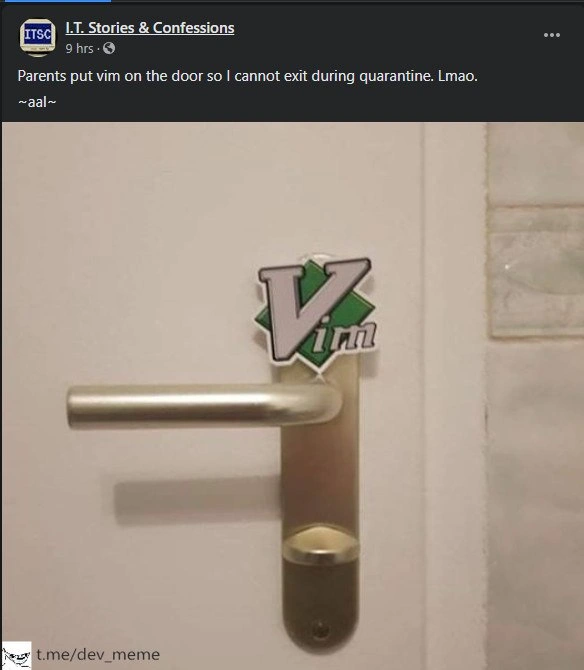
So what’s happening in the meme image? The person’s parents found a Vim logo sticker and put it above the door handle. By doing so, they’re joking that the door is now “powered by Vim.” The caption says, “Parents put vim on the door so I cannot exit during quarantine.” It’s a play on words:

  • In normal English, “exit” means to leave/go out (exit a room).
  • In computer terms, “exit” is also used to mean closing a program or quitting an editor.

Since there’s a huge joke that once you’re in Vim you can’t exit, the parents are effectively saying, “We’ve put Vim on your door, so now you won’t be able to figure out how to get out of your room.” 😄 It’s a prank that only works if you know the tech context. During COVID-19 quarantine, people were literally not supposed to exit their homes except for essential reasons. Many of us felt a bit stir-crazy or trapped in our houses. By invoking the cannot_exit_vim joke, the parents hilariously exaggerated the situation: “You think quarantine keeps you in? Well, now you’re in Vim quarantine — there’s truly no escape!”

For a junior developer or someone just learning about these tools, a few key points to take away:

  • Vim is a command-line text editor, very efficient for those who learn it, but initially confusing.
  • “How to exit vim” became a meme because so many newbies got stuck inside it.
  • The Vim logo on the door is referencing that exact meme – it’s saying the door works like the Vim editor now.
  • It’s funny because it combines a very real situation (staying in your room during lockdown) with a very nerdy programming joke (being stuck in an editor until you know what to do). It’s a bit of door_handle_humor mixed with terminal humor. Even the EditorWars truce for a moment – whether you use Vim, Emacs, or something else, pretty much every programmer can laugh at the idea of being literally unable to leave a room because “Vim won’t let them exit.”

Level 3: No ESC from Quarantine

This meme merges a classic piece of DeveloperHumor with a bit of lockdown life. The core joke riffs on the notorious difficulty many programmers have when trying to exit Vim – the powerful but user-unfriendly CLI text editor. Vim is a modal editor (inserting text in one mode, issuing commands in another), so quitting it isn’t as simple as clicking an “X” or pressing a common shortcut. Instead, you typically need to press the ESC key, then type a colon command like :q or :wq to quit (with or without saving). This non-intuitive exit sequence has long been a source of playful pain in the developer community. In fact, the question “How do I exit Vim?” is so legendary that it’s a running gag on forums and even Stack Overflow – with thousands of upvotes from people who’ve felt that same panic of being unable to quit Vim.

In the photo, the parents have literally taped the Vim logo onto a door, just above the handle. It’s a nerdy pun: by “putting Vim on the door,” they symbolically turned the door into Vim itself – meaning their child “cannot exit” the room. The phrase “cannot exit” works on two levels here. First, during quarantine lockdowns, everyone was stuck at home by necessity; second, in Vim, newbies often feel stuck because they can’t figure out the proper command to leave the editor. The humor is intensified by the context: March 2020 was the height of COVID-19 quarantines, so being physically unable to leave your room was a very relatable scenario. Combine that with the editor war trope of “I opened Vim and now I live here”, and you’ve got a perfect storm of geeky comedy. It’s essentially comparing quarantine to being trapped inside a Vim session – with the Vim logo acting as a “do not exit” sigil on the door.

Seasoned developers chuckle at this because it evokes shared memories of wrestling with Vim’s modal interface. Even those who love Vim (and many do, given Vim’s near-mythical efficiency once mastered) will admit the learning curve is steep. The meme is tagging into TextEditorChoice culture: that ongoing tongue-in-cheek holy war of EditorWars where every dev has a favorite editor (Vim vs Emacs being the classic rivalry). Here, however, it’s not about which editor is better, but about a specific quirk of Vim that’s universally acknowledged. The parents’ prank shows an awareness of developer folklore: they knew that by slapping a Vim sticker on the door, any tech-inclined person would get the joke instantly. It’s the kind of joke that makes a sysadmin or coder smirk and think, “Haha, the door is in vi mode now – good luck doing :q on a doorknob!”

From a DeveloperExperience (DX) perspective, Vim’s design is both its strength and its prank-worthy weakness. Vim is lightning-fast for editing once you know it, but its Command Line Interface heritage means it doesn’t hold your hand. There’s no obvious “Exit” button; the user is expected to know the proper keystrokes. This meme pokes fun at that UX shortcoming by implying that simply encountering Vim (even in sticker form) is enough to lock you in. It’s a light-hearted reminder that sometimes the tools we programmers use can be as perplexing as an escape-room puzzle. And during the actual lockdown of early 2020, turning quarantine memes into tech jokes like this helped take the edge off an otherwise stressful time. In short, the meme lands so well with devs because it translates a famous virtual frustration (exiting Vim) into a real-world laugh. The door isn’t really locked – just like Vim isn’t truly inescapable – but it feels locked if you don’t know the trick. That resonance makes this joke pure gold in the programming community.

Description

A screenshot of a Facebook post from the page 'I.T. Stories & Confessions'. The post shows a photo of a white door with a silver handle. Placed directly above the handle is a sticker of the logo for the Vim text editor. The post's caption reads: 'Parents put vim on the door so I cannot exit during quarantine. Lmao.' The humor is a deep-cut joke for software developers, referencing the infamous difficulty new users have with figuring out how to exit the Vim editor. The command to quit, `:q!`, is not intuitive. By placing the Vim logo on the door, the parents have created a clever, geeky metaphor for being trapped or unable to leave, perfectly applying a classic developer struggle to the real-world context of quarantine
Comments

7
Anonymous ★ Top Pick That door is now in normal mode. To exit, you have to switch to command mode, type ':q!', and hope you didn't accidentally open 15 split windows first
  1. Anonymous ★ Top Pick

    That door is now in normal mode. To exit, you have to switch to command mode, type ':q!', and hope you didn't accidentally open 15 split windows first

  2. Anonymous

    They put a Vim logo on the door - apparently I now need :wqa, and I’m not willing to risk a family-wide two-phase commit without ACID guarantees

  3. Anonymous

    Twenty years of muscle memory typing :wq! and I still panic when someone shares their screen in insert mode

  4. Anonymous

    The parents clearly understand their child is a developer - they know that putting Vim on any exit guarantees at least 20 minutes of frustrated attempts with ESC, Ctrl+C, and random key combinations before someone finally Googles ':q!' for the thousandth time. It's the digital equivalent of a childproof lock, except it works on adults with CS degrees

  5. Anonymous

    Parents slapped Vim on the door; egress is now a modal interface - until I hit ESC :q!, I’m stuck in Normal mode, repeatedly “saving” the room with :wq

  6. Anonymous

    Finally, a doorknob that requires hjkl to navigate

  7. Anonymous

    Zero-trust egress implemented via Vim: door unlocks only after ESC :wq; try :q and you’ll get E37 until your chores are saved

Use J and K for navigation