Skip to content
DevMeme
4037 of 7435
The On-Call Experience
OnCall ProductionIssues Post #4398, on May 26, 2022 in TG

The On-Call Experience

Why is this OnCall ProductionIssues meme funny?

Level 1: Not as Planned

Imagine you and your friends decided to build the coolest treehouse ever. You drew a big detailed plan for a multi-story tree castle with flags and a slide – it looked amazing on paper. But when you started building, you only managed to put together a small, wobbly hut out of some old wood planks. Over time, that little hut started breaking apart, and you had to patch it up with duct tape and band-aids just so it wouldn’t fall down. And the awesome drawing you made of the treehouse? After a few rainy days, it got smeared and faded until it looked like a bunch of cave paintings that nobody can figure out. It’s funny because what you ended up with is nothing like your great plan – the treehouse turned out messy and held together by tape, and the “instructions” are basically useless scribbles.

Level 2: Chainsaw to Cave Art

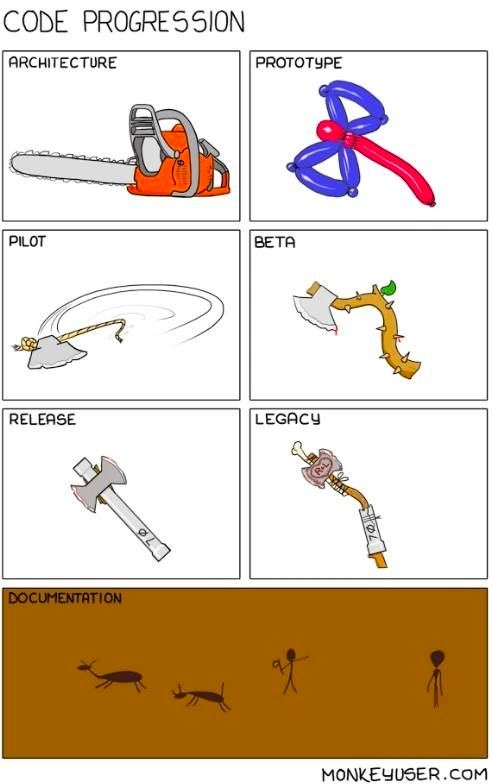
This comic is basically a timeline of a software project’s life, using a series of axe illustrations to poke fun at how code evolves (and devolves) through the SDLC (Software Development Life Cycle). Each labeled panel represents a common phase in developing and maintaining software. Let’s break down what each stage means in simple terms, and how the picture in that panel is a metaphor for the code at that stage:

  1. Architecture – This is the initial design phase. The image shows a brand-new orange chainsaw, symbolizing a powerful and well-engineered plan. In real projects, “architecture” means the high-level blueprint or structure of the software. It’s like planning out how all the parts of the system will work together. At this stage, everything looks perfect on paper. The chainsaw is shiny and heavy-duty, just like the architecture diagrams or design documents that promise a robust, cutting-edge system. For a newbie developer, think of it as drawing up plans for a dream house – you’re picking the best materials and design. Everyone expects the final software will be as impressive as this top-of-the-line chainsaw design.

  2. Prototype – This is an early model or proof-of-concept. The comic shows a silly balloon animal axe (twisted balloons shaped vaguely like an axe). It’s flimsy and not functional for real cutting. In software, a prototype is a quick-and-dirty version of the program created to demonstrate an idea or test a concept, not for actual production use. It’s often hacked together fast, so it might be buggy or incomplete (like a balloon axe that would pop if you tried to chop wood). The prototype stage is about speed and experimentation – you build something just to see if it works. If you’re a junior dev, imagine writing a small program over a weekend to try out an idea, without worrying about all the details or stability. It looks like what you want (it has the shape of an axe), but it’s not strong. Many times, the plan is to throw the prototype away and build a proper version after… though in reality, teams sometimes end up moving forward with parts of that fragile code anyway.

  3. Pilot – A pilot is like a trial run or limited launch of the software. The cartoon shows an axe head tied to a rope, being swung around. This represents a makeshift solution: they didn’t have a proper handle for the axe, so they used a rope and started swinging it. In software terms, a pilot release takes that rough prototype and tries it out in a real (but limited) environment. It’s as if the team said “let’s test this out in the field, even if it’s not pretty.” The axe head on a rope is dangerous and unpredictable – similarly, pilot software can be unstable or only work under specific conditions. It might solve the problem in theory, but the implementation is clumsy. If you’re new to this, think of a pilot as releasing your app to just one department or a small set of users to see how it performs, while knowing it’s held together with duct tape (or here, a rope). The fact that the axe is spinning wildly means things are happening, but without control – a lot like a hurried pilot where you’re fixing things on the fly as it “spins”.

  4. Beta – A beta is a version of the software that’s feature-complete but still in testing, often released to a wider audience (like the public or all customers) to find remaining bugs. In the comic, the beta is depicted as an axe head jammed onto a crooked tree branch, thorns and a green leaf still attached. This is a step up from the rope – now the axe has a handle – but it’s still pretty rough. For code, this means the team has taken that pilot hack and tried to make it more solid. They grabbed whatever “branch” was available (perhaps some quick fix or existing code) to serve as a handle. The thorns and leaf imply it’s not refined: there are still sharp issues (bugs) and bits of unfinished work hanging on. A beta version of software typically works end-to-end, but it’s not polished. New developers will recognize this stage if you’ve ever been involved in testing an app that mostly works but still crashes in certain cases or has rough edges. The beta axe would technically chop something, but you might hurt your hands on a thorn while using it. This mirrors how beta software can do the job, but might poke you with problems – that’s why beta testers are warned things might be a bit unstable. The team is gathering feedback and planning to trim those “thorns” off soon.

  5. Release – The release is the official launch of the software to all users (often called the production release). The panel shows a straightforward hatchet – a small, functional axe. It’s not as powerful as the original chainsaw, but it’s solid and reliable enough for everyday use. In development terms, this means the team likely cut out some overly ambitious features and fixed the major bugs from beta to make sure the product is stable. The hatchet represents a practical, no-frills solution: the final code is simpler or smaller in scope than the grand architecture, but it works consistently. For a junior developer, this stage is like when you finish your project and users start depending on it – you’ve cleaned it up and made it presentable. It might not have every feature you dreamed of, but it’s doing the core job well. The journey from chainsaw to hatchet suggests that the software was downscaled for reliability: maybe the fancy stuff was postponed or canceled so that what ships can be trusted. In plain speak, release time is when the code goes from the lab out to the world, so it must be sturdy. The hatchet isn’t flashy, but you can give it to anyone and it will get basic chopping done.

  6. Legacy – Legacy refers to old, aging software that is still in use. The comic shows a rusty, broken axe held together with duct tape and bandages, with moss growing on it and a snail crawling on it. This represents an application that has been around for a long time – far beyond its intended lifetime – and has decayed in quality. “Legacy code” is a term you’ll hear for code that wasn’t built by the current team (often it’s many years old), is possibly outdated in the technology it uses, but is still critical for the business. In the image, the once-useful hatchet is now bent and dull: that’s like the software becoming inefficient and full of quirks. The tape and bandages are metaphors for all the quick fixes and patches applied over the years to keep it running. If something broke, instead of rebuilding it properly (which would be like forging a new axe), someone just slapped a patch on (like wrapping tape around the cracked handle) because it was faster or safer than a big change. The rust signifies old tech or poor maintenance – maybe the system is using outdated libraries or has performance issues (notice the snail indicating it’s slow now). Moss and a snail also suggest nobody has touched this code in ages unless absolutely necessary; it’s literally gathering dust (or moss). For a new developer, encountering legacy code can be daunting: it’s code that works, but nobody fully remembers how or why things were done, and everyone’s afraid that changing it will break something. This panel is humorous because it’s so exaggerated – a snail on the tool! – but it’s also pretty true to life how old systems feel to those who inherit them.

  7. Documentation – Documentation is any written text or illustrations that explain how the software works or how to use it. Ideally, every stage above should have some docs. But the comic joke here is that after all these stages, the documentation ended up being just cave paintings on a brown wall. In other words: the documentation is virtually prehistoric or useless. This implies either that the final documentation was never properly written, or it’s so out-of-date and primitive that it doesn’t help at all. Maybe the only documentation that exists was written at the very start (during the Architecture phase) and never updated – so now reading it is like looking at ancient petroglyphs that bear no resemblance to what you actually have. For a junior dev, this is a common scenario: you look for documentation on a system and find maybe one old README file or an outdated wiki page that might as well be in cave-man language. It’s both funny and frustrating – the pictures on the cave wall show people hunting, but there’s no axe illustrated at all, meaning the docs don’t even mention the crucial tool (just like some docs don’t mention the most important parts of the code because they were added later without documentation). The bottom line: documentation often lags behind code changes. As the code evolved from chainsaw to balloon to stick to hatchet to rusty axe, nobody kept the docs fully up to date, so the Documentation panel ends up looking like ancient history.

Overall, the meme uses the axe’s “life story” – from a shiny new chainsaw to a rusty taped-up axe – to illustrate how software projects change over time. Each step downscales or degrades the original vision a bit. It humorously highlights concepts like technical debt (when you take shortcuts like using a crooked branch as a handle, you incur debt that leads to a messy fix later) and how ambitious architectures often get watered down to something more practical by release time. It’s also a nod to how code quality can suffer under tight deadlines and continuous quick fixes. And of course, it pokes fun at the all-too-familiar reality that documentation is often an afterthought – by the time you look for it, it might as well be ancient cave art. For someone new to development, it’s a lighthearted lesson: software rarely ends up exactly as originally planned, and without care, over years it can become a weird, patched-up artifact that people approach very cautiously.

Level 3: Entropy Always Wins

This cartoon nails the gradual decay of a software project from lofty Architecture to crusty Legacy code. Each panel uses an axe-themed metaphor to represent a phase of the SDLC (Software Development Life Cycle). The humor comes from how a shiny initial plan inevitably devolves into a patched-up mess over time – a phenomenon every seasoned developer recognizes as the entropy of code. In theory, a brand-new system is designed like a powerful chainsaw – carefully architected, cutting-edge (literally), ready to slice through any challenge. But as the project moves forward, reality sets in: deadlines, changing requirements, and quick-and-dirty fixes start hacking away at that pristine design. As the strip shows, we go from "Let’s build a high-powered cutting machine!" to "Just grab whatever and make it kind-of cut."

In the Architecture panel, the bright orange chainsaw is the grand blueprint. It's overkill, high-performance, and architecturally elegant – think of it like a fully-specced system design with every design pattern and scalability concern addressed up front. This is the phase where architects and tech leads dream big: maybe they drafted a beautiful UML diagram or envisioned a microservices ecosystem that slices through tasks with ease. The chainsaw imagery screams “cutting edge” (pun intended) – it’s heavy-duty and impressive. But the joke’s on us: that perfect design often exists only on paper or in slideshow fantasies. The moment coding starts, that clean architecture meets the messy real world. It’s like the second law of thermodynamics for code: order degrades into chaos once implementation begins – software entropy always increases unless you actively work against it.

By the Prototype stage (panel 2), the comic shows a flimsy balloon animal axe. The mighty chainsaw concept has, in practice, been replaced by something a toddler might twist together at a birthday party. This hilarious downgrade represents the throwaway prototype code developers hack together to prove the concept. It’s colorful and shaped roughly like the idea (an “axe”), but it has zero real cutting power – much like a prototype often has zero real stability or scalability. A balloon axe can’t chop wood; a prototype can’t handle production load. But it looks like the thing we want, enough to demo to the team or stakeholders. Here the humor is the absurd fragility: anyone in tech knows prototypes are often held together by hope and hacks, just as a balloon is one squeeze away from popping. The cynic in me notes that many such prototypes unexpectedly end up living far longer than intended, forming the shaky foundation for the next stages. After all, “Nothing is more permanent than a temporary solution” in software.

Moving to Pilot (panel 3), absurdity cranks up: the blade isn’t even attached to a proper handle – it’s literally an axe head tied to a rope, being whirled around wildly. This is a perfect metaphor for those early deployments or proof-of-concept releases where the solution technically works but in the most improvised, hair-raising way imaginable. In a pilot, you might toss your prototype into a small production-like environment to see if it sticks. Here they’ve literally tossed the axe head. It’s spinning in mid-air, unpredictable and dangerous, much like deploying half-baked code to a test audience: you’re essentially swinging something sharp without a handle, hoping no one loses an arm. This panel screams “we jury-rigged it just enough to demo”. The rope stands in for that one piece of old tech or a quick script that’s awkwardly holding things together. It’s a lasso of death instead of a proper tool – a senior dev sees this and thinks, “Yep, they didn’t have time to build a real handle, so they repurposed whatever was lying around.” The result is both comical and terrifying. Many of us have stories of a pilot program where the core component was hacked together last-minute – basically flailing around, doing the job in the most unsustainable way. And of course, pilots often generate a ton of bug reports (or injuries, in the axe’s case), leading to frantic fixes in the next phase.

Then comes Beta (panel 4). Now we see an axe head jammed onto a crooked tree branch, thorns and all, with a token green leaf still attached. By this stage, the project has tried to become more solid – they finally gave the poor axe head a “handle”, but what a handle it is! A gnarled branch is obviously not the sleek handle the architecture promised; it’s whatever cheap fix could be found under pressure. In software terms, this is when that messy pilot code gets “stabilized” by bolting on some structure from whatever is handy in the codebase. The thorns represent all the bugs and prickly issues still embedded in the system. They didn’t even strip the bark or remove the leaf – an analogy for leaving lots of weird remnants and workarounds in the code. Perhaps the team was rushing to meet a beta release deadline, so they took the spinning axe contraption and hastily gave it a handle (maybe copying in code from an old module or using a quick library they barely understand). The axe head is dented now (probably from the pilot chaos), just like the codebase is now full of odd edge-case fixes after testing feedback. The humor for an experienced dev is painfully accurate here: your beta solution “works”, but it’s ugly and held together by mismatched parts. We often call this kind of system a “Frankentool” or a “big ball of mud” – architecture coherence has eroded. The fancy chainsaw design is long gone; we’re wrestling with a mutant axe-branch thing. It’s effectively architecture decay in action: the original elegant design has decayed into an arbitrary assemblage of parts. And yes, there’s even a literal leaf left on it – like a snippet of dead code or an obsolete config nobody removed, harmless looking but signaling how unpolished things are. At Beta, technical debt is piling up: every thorn on that branch is a quick fix or shortcut that someone promises to clean up later (famous last words).

Next, we hit Release (panel 5). Surprisingly, the tool has simplified – now it’s a plain, functional hatchet. In real software, the release is when you cut out the nonsense and deliver something that (hopefully) won’t embarrass you in front of real users. The hatchet is humble but serviceable: it’s not the beast of a chainsaw we dreamed of, but it will actually chop wood without flying off and killing someone. This reflects a common reality: by the time a project is ready to ship, many grand features or over-engineered components have been pared down or removed. Performance issues? Scope cuts? Perhaps during Beta they learned the hard way that the original plan was too ambitious, so they “right-sized” the tool. They might have thrown away the thorny branch and given the axe head a proper small handle, or maybe they scrapped the whole contraption and rebuilt a simpler version from scratch for stability’s sake. The released hatchet suggests a Minimum Viable Product vibe – not fancy, but it meets the core requirements and won’t immediately self-destruct. To a veteran developer, this panel evokes that sigh of relief: we finally have something that works reliably. It may lack the raw power of the initial chainsaw design (some features got cut, pun intended), but at least now you can trust it not to explode. The humor here is a bit more optimistic: sometimes after all the wild prototyping, you do end up simplifying and getting a decent little tool out the door. Of course, it’s still ironic that after all that effort, we deliver a hatchet when we proposed a chainsaw. But hey, users will take a stable hatchet over a temperamental chainsaw any day, right? This is the classic tale of project scope reduction and late-game refactoring triumphing over early insane hacks – a subdued happy ending, if you will.

Finally, the Legacy stage (panel 6) is where the cynicism really hits home. The once-functional hatchet has now aged into a beat-up, rusty relic. It’s bent, covered in moss, and literally held together by duct tape and bandages. Oh, and there’s a little snail squatting on it – a perfect symbol of slowness and neglect. Every senior engineer has encountered a legacy system exactly like this: it’s been in production for years (maybe decades), never fully refactored, but constantly patched with quick fixes to keep it limping along. The technical debt accumulated over all those earlier stages has come due in the ugliest way. That duct tape around the handle? Those are the dozens of one-off hotfixes and kludges applied over the years to stop things from falling apart. The bent handle and chipped blade shows the code’s structure is warped from all the changes; nothing is straight anymore in the architecture – it’s a twisted mess. Rust coating the axe is a cheeky nod (by the artist) to how outdated the technology is – and perhaps a sly pun that the only “Rust” in this system is the corrosion on it, not the nice modern programming language. The snail is the comedic cherry on top: this system not only looks ancient, it runs at a snail’s pace. Maybe the algorithms are inefficient, or it’s on old hardware, or no one dare touch it to optimize it – resulting in glacial performance. It’s also a metaphor for how progress on that project now moves: any new change is painfully slow, because touching this tangled code without breaking it is like trying not to upset a snail perched on a house of cards. I also love the moss, which implies the code has been left in a dark corner for so long that literal moss could grow – a jab at how some legacy apps are so old that only the original developers (long gone) knew their secrets, and now the system just quietly molds away while still technically functioning. This panel encapsulates “code rot” – over time, if you don’t continuously maintain and refactor, your codebase will rot like an old axe left in the rain. And yet, despite how horrid it looks, people are probably still using this legacy tool every day, because rewriting it is seen as too costly or risky. Every veteran dev has had that “snail-infested, duct-taped axe” project that nobody wants to touch but everybody depends on. It’s both hilarious and painfully true.

After that brutal progression, the comic delivers one final punchline at the bottom with Documentation (panel 7). Instead of an axe, we see a primitive cave painting with stick figures hunting animals. In other words, the documentation is basically non-existent or inscrutable – as if the only record of the system’s design is something cavemen scrawled on a wall eons ago. This is a stinging commentary on how software documentation often ends up: either never properly written, hopelessly outdated, or so vague and low-detail that it might as well be ancient rock art. Notice there’s no depiction of any axe or tool in that cave painting – it’s completely irrelevant to the actual system at hand, much like how many project documents don’t match the real code after years of changes. The cave wall could also imply that the only “documentation” left was the initial vision (from the architecture phase) which is now a historical artifact nobody understands. In this meme, the documentation is literally primitive art, which is shockingly accurate – often you’re better off studying archaeology than reading the project wiki last updated 5 years ago. For example, perhaps the only docs remaining are an old Confluence wiki page from the project kickoff, now as indecipherable as petroglyphs. As a grizzled engineer, I’ve often found that by the time I inherit a legacy project, the only docs I get are some ancient design spec that reads like hieroglyphics, or just tribal knowledge passed by word-of-mouth. The comic’s joke is that after all the high-tech evolution of the code (chainsaws to hatchets), the documentation quality went backwards to the stone age. It’s no surprise to any experienced dev: when schedules are tight, documentation is the first thing to suffer. The end result is a system held together by duct tape, documented by cave art.

Overall, this MonkeyUser comic perfectly captures a common lifecycle: Architecture dreams big, Prototype hacks it together, Pilot swings it wildly, Beta duct-tapes it to work, Release ships a stripped-down version, and Legacy is that sad old thing covered in metaphorical rust. The final Documentation gag drives home why this keeps happening – because we often treat documentation as an afterthought (if we bother at all). The meme resonates with developers because it’s both funny and painfully real. It lampoons our industry’s tendency to accumulate technical debt and let code quality erode over time. Every element – from the balloon axe to the snail – speaks to inside knowledge of developer culture and project dynamics. Any experienced dev looks at this and laughs, perhaps a bit nervously, recognizing projects they’ve worked on in each panel. The comic is a cautionary tale and a shared joke: under the laughter, it’s whispering that if you don’t constantly fight for code quality (sharpen that axe, replace that handle properly, update the docs), entropy will win and you’ll end up with a prehistoric mess that nobody understands.

Description

This meme likely uses a popular format to contrast the expectation versus the reality of being on-call. The 'expectation' panel might show a heroic engineer calmly resolving a critical issue, while the 'reality' panel shows a sleep-deprived person frantically trying to silence a PagerDuty alert at 3 AM. The humor comes from the shared trauma of production incidents and the jarring disruption of on-call rotations. For senior engineers, it's a darkly humorous acknowledgment of the personal sacrifices required to maintain highly available systems and the importance of robust monitoring and alerting to avoid alert fatigue

Comments

10
Anonymous ★ Top Pick Slideware promised a horizontally-scalable chainsaw; six sprints later we’re load-balancing a duct-taped hatchet and the only docs are cave paintings titled “TODO: update diagram before audit.”
  1. Anonymous ★ Top Pick

    Slideware promised a horizontally-scalable chainsaw; six sprints later we’re load-balancing a duct-taped hatchet and the only docs are cave paintings titled “TODO: update diagram before audit.”

  2. Anonymous

    After 20 years in tech, I've learned that 'Architecture' is just the chainsaw we use to cut through requirements before realizing we needed a scalpel, and by the time we reach 'Documentation,' we're basically archaeologists trying to decipher what our past selves were thinking through interpretive cave art

  3. Anonymous

    The architecture deck promised a chainsaw; production got a cursed branch - but at least both are equally well documented in the cave

  4. Anonymous

    This perfectly captures the software lifecycle: we architect with chainsaws, prototype with balloon animals, and by the time we reach legacy, we're holding it together with duct tape and prayers. But the real punchline? Documentation gets the cave painting treatment - because apparently, hieroglyphics are good enough for the next team to decipher our architectural decisions. At least the cave paintings are more detailed than most inline comments

  5. Anonymous

    Architecture: overprovisioned chainsaw for a twig. Documentation: ants evolving faster than anyone updates the README

  6. Anonymous

    The SDLC is a lossy compression algorithm for ambition: architecture promises a chainsaw, GA ships a hatchet behind two feature flags, legacy runs on duct tape and cron, and the docs are cave art

  7. Anonymous

    Our ADRs promised a microservice chainsaw; GA shipped a hatchet MVP, and five years later the runbook is a petroglyph in Confluence

  8. @ZgGPuo8dZef58K6hxxGVj3Z2 4y

    😂😂😂😂

  9. @grandpa_the_kid 4y

    Old but gold

  10. @anatoli26 4y

    Release wasn’t that bad..

Use J and K for navigation