Skip to content
DevMeme
1215 of 7435
Code Formatting Perfection
CodeQuality Post #1355, on Apr 21, 2020 in TG

Code Formatting Perfection

Why is this CodeQuality meme funny?

Level 1: Messy Room with an Unused Broom

Imagine you have a really messy bedroom with toys and clothes all over the floor. Your parent gives you a super-cool automatic cleaning robot (a fancy tool meant to tidy up the room for you). You’re excited and turn it on for a bit, but the room still looks messy because you didn’t set the robot up right and it just kind of wandered around. You shrug and say, “Well, I tried that robot, but nothing changed.” Now your parent turns around in shock, eyes wide, like, “What do you mean nothing changed?!” It’s funny because obviously the robot could clean the room, but if you don’t use it properly, the mess stays. The meme is joking about the same idea: a programmer had a special automatic helper to clean up messy code, but the code stayed messy anyway. The driver’s shocked face is just like a parent’s disbelief when the expensive new cleaning gadget didn’t make any difference — a silly and relatable “you had the help but didn’t use it right!” situation.

Level 2: Formatting Faux Pas

In simpler terms, this meme highlights a common newbie and team mistake: having code formatting tools in your arsenal but not actually benefiting from them. Code formatters (like Prettier for JavaScript/TypeScript, clang-format for C/C++, or Black for Python) are programs that automatically re-style your code to match a predefined style guide. For example, a tool might ensure all your indentations are 4 spaces, insert missing semicolons, or break long lines. Teams adopt these tools to maintain consistency so that every file looks like it was written by the same person, regardless of who touched it. This falls under CodeQuality and best practices in Tooling: a clean, uniform style makes code easier to read and review.

So what went wrong for our unfortunate passenger (the one saying “I used to, but nothing changed”)? A few realistic scenarios:

  • Misconfiguration: She might have installed Prettier but not configured it properly. Without a proper .prettierrc config or if it’s not integrated into the project, running the tool could be a no-op. For instance, if Prettier isn’t set to format certain file types, those files would remain messy. This is akin to a prettier_misconfiguration where the tool’s default rules don’t align with the project’s expectations.
  • Not running the tool at the right time: Many dev teams use pre-commit hooks (scripts that run before you commit code) to auto-format files. If she disabled the hook (perhaps using git commit --no-verify to skip it) or never manually ran the formatter, her code would stay in its original state. She “used to” rely on it, but maybe got lazy or frustrated and stopped truly using it. A format_per_commit_hook only works if you don’t bypass it!
  • Editor integration issues: Often, developers integrate formatters into their text editors or IDEs to format on save. If her editor wasn’t set up correctly or she forgot to install the plugin, she might think she’s using the tool (because it’s installed globally) but in reality, each save leaves the code unchanged. This kind of editorconfig_neglect or general setup oversight is very plausible, especially for juniors.
  • Partial adoption: Perhaps only some files or parts of the project were cleaned up by the tool. If the team didn’t reformat the entire codebase when they introduced the formatter, there could be legacy sections untouched. She might have run the tool on new code, but the old messy style survived in other modules, making it feel like “nothing changed” overall. This happens when teams fear one giant reformat commit (which can indeed cause merge conflicts) and instead apply formatting slowly—during which time inconsistent style persists.

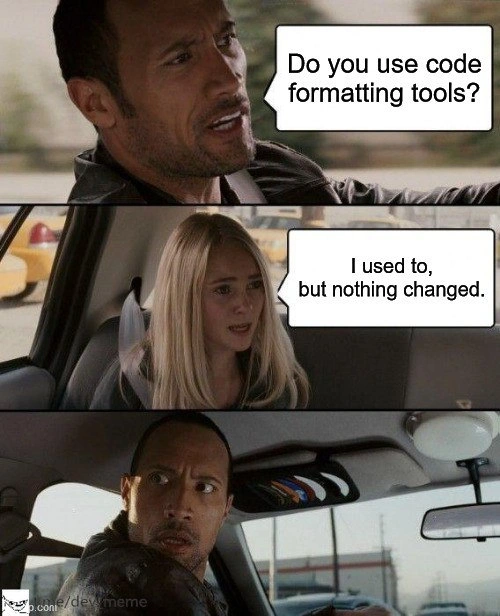
In the meme’s images, the dialogue is comedic. The driver asks, “Do you use code formatting tools?” — basically checking if the coder cares about code style sanity. The passenger replies, “I used to, but nothing changed.” This answer is both funny and cringeworthy to developers. It’s funny because using a formatter should change the code’s appearance (that’s the whole point!). The cringey part: it suggests the person either didn’t notice any improvement or gave up on the tool entirely, implying their code is still a wild mess. The final panel shows the driver whipping his head around with a shocked, angry face — a perfect visual for “What do you MEAN nothing changed?!”

Key terms to know here:

  • Code formatting tools: software that automatically reformats source code. They enforce things like indent size, bracket placement, quote style (" vs '), etc. Example: Prettier will rewrap lines and add consistent spacing. If you had if(x){foo();} it would rewrite it as if (x) { foo(); } by inserting proper spaces.
  • Linter vs Formatter: A linter (like ESLint, Pylint) checks code for both style issues and certain errors or bad patterns, sometimes auto-fixing easy things. A formatter like Prettier is more focused on purely stylistic consistency (it won’t warn about unused variables, for example). In this meme, they’re talking about formatters (the context mentions Prettier, clang-format, etc).
  • Style guide: a set of rules for how your code should look (naming conventions, brace styles, line length, etc.). Many companies or communities publish style guides (Google’s C++ style, PEP8 for Python). Formatters are configured to enforce these rules automatically, so developers don’t argue in code review about trivial things like space vs. tab — the tool handles it. If someone says “I used a formatter but nothing changed,” it’s as if they had a style guide but ignored it.
  • Consistent code style: The ultimate goal. Consistency helps everyone read and navigate the codebase. The meme jabs at the “struggle” to achieve this. Even with tools to automatically tidy code, consistency sometimes doesn’t happen because humans bypass the tooling or configure it poorly. It’s a relatable DeveloperHumor scenario: every junior dev at some point commits code that triggers the senior dev’s formatting OCD, leading to the famous question, “Did you run the formatter?” Here the junior effectively answers, “Meh, I tried it, didn’t see the point,” causing that aghast reaction.

In summary, at this level we see why the joke works in a software context: developers know that using a code formatter is an easy win for code cleanliness. Claiming nothing improved after using one hints either at user error or misunderstanding. It’s a poke at the sometimes lazy or clueless approaches to Tooling that result in zero improvement. The meme is classified under DeveloperTools and CodeQuality for good reason — it’s all about the tools we use (or don’t use correctly) to keep code quality high. And trust me, every dev team has had that person who somehow didn’t get the memo about the auto-formatter, eliciting exactly the face The Rock is making.

Level 3: Prettier in Name Only

When a developer says “I used to [use code formatting tools], but nothing changed,” it triggers collective astonishment in the programming world. The meme’s driver — portrayed by Dwayne “The Rock” Johnson — represents an experienced engineer or team lead who assumes everyone uses modern code formatters (think Prettier, clang-format, or go fmt). Hearing that the passenger’s messy code survived a formatting run is like hearing an airplane mechanic say “I tightened the bolts, but the wings still fell off.” It’s equal parts absurd and exasperating.

From a seasoned developer’s perspective, this scenario highlights a failure in our beloved Tooling. Code formatters are supposed to eliminate stylistic inconsistencies. They parse source code into an AST (Abstract Syntax Tree) and then pretty-print it according to a consistent style guide. In theory, running such a tool should transform any sloppy indentation, chaotic brace placement, or erratic whitespace into clean, uniform CodeQuality. Seeing no diff after running the formatter suggests something is fundamentally wrong. Was the tool misconfigured? Was it even run at all? Maybe the project’s .prettierrc or .clang-format configuration is so lax it doesn’t enforce much. A prettier_misconfiguration can render the tool toothless — for example, if the max line length or other rules aren’t set properly, the formatter might silently skip reformatting certain long lines or weird constructs. The meme is poking fun at this exact situation: the developer installed a powerful DeveloperTool but manages to produce unformatted_code nonetheless.

Another angle for the humor is the perennial gap between lintingRules and reality. Auto-formatters handle superficial structure (spacing, line breaks, quote style), but they can’t rescue truly messy code logic. Perhaps the passenger’s code is semantic spaghetti with obscure naming and monstrous functions. Running Prettier might standardize the indentations, but the CodeQuality remains awful — hence “nothing changed.” It’s a subtle roast of those who think a tool alone can solve deeper problems. The industry has seen this pattern before: teams add a formatter or linter expecting an instant uptick in code clarity, only to discover that consistent 4-space indents can’t save you from convoluted design. The meme exaggerates it for comedic effect, implying the code’s style is so hopeless that even Prettier couldn’t make it “pretty.” The driver’s shocked, disapproving glare (the disappointed_driver_reaction) mirrors that of a senior dev doing a code review on a supposedly “formatted” codebase that still looks like a train wreck.

Underneath the humor, there’s a shared pain point: we’ve all encountered that repository with a fancy format script or pre-commit hook (the format_per_commit_hook setup) which half the team ignores. The project might boast an EditorConfig file defining spaces vs. tabs and line endings, but editorconfig_neglect is rampant — if a dev’s editor isn’t set to honor that file, their contributions will joyfully defy the style guide. This meme resonates because it’s DeveloperHumor drawn from real life. Every experienced coder has war stories of trying to enforce consistency: the CI pipeline that flags misformatted files, the giant “Oops, we forgot to run clang-format for 6 months” reformat commit, the heated debates over where to put braces that led to adopting a formatter in the first place. And yet, here we are — someone managed to slip through the cracks with unformatted code.

The punchline is a meta-commentary on our DeveloperPainPoints: even with the best DeveloperTools at our disposal, human habits and poor team practices can nullify their benefits. It’s a tongue-in-cheek reminder that tools are only as effective as the people who use (or mis-use) them. The Rock’s exaggerated look of betrayal captures the senior dev’s internal screaming: “You had ONE job — configure the formatter and use it — and you didn’t!?” The combination of the familiar taxi_driver_meme_format and a very IT-specific scenario makes this meme painfully relatable and hilarious to anyone who’s chased that elusive goal of a perfectly formatted codebase.

Description

A three-panel meme using 'The Rock Driving' format. In the first panel, Dwayne 'The Rock' Johnson is in a car and asks, 'Do you use code formatting tools?'. In the second panel, the girl in the back seat replies, 'I used to, but nothing changed.'. The final panel shows The Rock looking back at her with a shocked and horrified expression. The joke implies that the developer's code is already so perfectly formatted that automated tools have no changes to make, a feat of consistency that is both impressive and slightly terrifying to experienced engineers who rely on such tools to maintain standards across teams
Comments

7
Anonymous ★ Top Pick Some engineers spend hours configuring Prettier and arguing about trailing commas. Others are apparently just born with a built-in abstract syntax tree formatter
  1. Anonymous ★ Top Pick

    Some engineers spend hours configuring Prettier and arguing about trailing commas. Others are apparently just born with a built-in abstract syntax tree formatter

  2. Anonymous

    We wired Prettier into pre-commit, pre-push, and CI; turns out the only unformatted layer left was Layer 8

  3. Anonymous

    She's the same developer who disabled ESLint because it kept throwing errors about unused variables in her perfectly working code that definitely needed all 47 imports

  4. Anonymous

    Ah yes, the classic 'Schrödinger's Formatter' - simultaneously configured in the repo and completely ignored by the team. It's like having a state-of-the-art CI/CD pipeline that fails on formatting violations, yet somehow every PR still has mixed tabs and spaces. The real question isn't whether the formatter works, it's whether anyone actually committed the .prettierrc to the repo or if everyone's still running with their own local 'preferences.' Nothing says 'mature engineering organization' quite like a 47-comment thread debating whether to use 2 or 4 spaces while the formatter sits there, perfectly capable of making that decision irrelevant

  5. Anonymous

    If your formatter produces a zero‑diff, either you’ve achieved whitespace nirvana or your pre-commit hook never ran - and the odds heavily favor the latter

  6. Anonymous

    Running the formatter in --check and wondering why nothing changed is the codebase equivalent of running migrations with --dry-run and calling it deployment

  7. Anonymous

    Senior dev privilege: Prettier scans your PR and humbly reports 'no changes' - zero diffs, maximum smug

Use J and K for navigation