The Perils of Showing a Work-in-Progress
Why is this Stakeholders Clients meme funny?
Level 1: The Unfinished Drawing
Imagine you’re drawing a picture for your friend. You’ve only sketched the outlines so far – no colors or details yet. But your friend keeps peeking over your shoulder.
“Is it done now?” they ask, even though you’ve just started. You say, “Not yet, I still need to—” but before you can finish, your friend sees the half-drawn picture and goes, “Why does it look so weird?” They’re pointing at the unfinished parts, like the fact that your characters don’t have faces yet or that the background is just blank. You try to explain, “That’s because I’m still working on it, I was going to add that next—” but they cut you off again. Now they get upset: “Ugh, this isn’t at all what I wanted! Start over and change the whole style!”
😖 You’d probably feel frustrated, right? They didn’t even give you a chance to finish the drawing before criticizing it. Of course the sketch looks weird – it’s not done! If they just waited until you added all the colors and details, it would look like the beautiful picture you intended. But instead, they’re judging the unfinished work as if it were final.
That’s exactly what this meme is joking about, but in the world of software. The developer is like the artist, and the client is like that impatient friend. It’s funny in the cartoon because it’s so ridiculous – everyone knows you shouldn’t yell “This is not what I want!” at a half-done drawing. Yet, people do it with apps and websites all the time. The meme makes us laugh because we recognize how silly (and aggravating) it is when someone can’t wait for us to finish our work before jumping in with “feedback.” In simple terms, it’s saying: let the creator finish their creation, or else you’re complaining about an unfinished product! And that’s something even a kid painting a picture can understand.
Level 2: Scope Creep 101
Let’s dial it down a notch and explain what’s happening in this meme in more straightforward terms. This scenario is all about clients/stakeholders clashing with the development process, especially around UI design and project timelines. We have some key concepts at play:
- Stakeholder (Client): In software development, a stakeholder generally means anyone who has an interest in the project’s outcome. Here, the stakeholder is a client – likely the person or company who requested the software or the feature. They’re the ones paying for or expecting the product, so they feel entitled to ask questions and give feedback. The client in the meme is extremely impatient and demanding, which is unfortunately something many devs encounter. Stakeholders can be non-technical people (like a business client or a product manager) who might not fully understand why something isn’t instant.
- UI (User Interface) and UX (User Experience): These terms relate to how the software looks and feels. UI refers to the visual elements – the layout, buttons, text, images, color schemes, etc. UX is about the overall experience and usability – is it easy and pleasant to use? In this comic scenario, the client says, “Why is the UI like this?” They’re basically saying, “Why does the screen look wrong/weird?” Perhaps they see an ugly layout or placeholder content (because the developer hasn’t finished yet). The developer was likely in the middle of building the UI, meaning what the client saw was a half-finished interface. It’s important in real life to show clients polished UX design prototypes or mockups early, so they know what to expect. Here that didn’t happen (or the client ignored it), leading to confusion.
- Scope Creep: This is a term every junior developer learns quickly (often the hard way). Scope means the defined work that’s agreed upon for a project – what features, what design, what problem to solve. Creep refers to the scope slowly expanding beyond what was originally planned, usually due to continuous change requests or new ideas from the client. In the meme, when the client says, “This is not what I want, change it,” they are effectively introducing scope change on the fly. Today it might be “change the UI,” tomorrow it could be “also, add this new feature.” If these changes aren’t controlled, you get scope creep – the project grows and shifts, often without adjusting timelines or budgets, leading to overtime and stress. The meme exaggerates it (the UI isn’t even done once and the client already wants a redesign), but that exaggeration teaches the concept. As a junior dev, if you ever hear a stakeholder say “Can we just add this real quick?” or “This isn’t what I imagined, can you make it do X instead?”, your scope is creeping! 😅
- Misaligned Expectations: This phrase means the client and developer are not on the same page about what the end result should be or how the process will go. Perhaps the client expected a certain style or workflow that wasn’t communicated clearly. In healthy projects, everyone agrees early on what the UI should generally look like (through design meetings, mockups, getting sign-offs). If that doesn’t happen, the first time a client sees the product, they might be shocked that it’s different from what they pictured. Here, either the client didn’t review any designs in advance or they did but changed their mind. The result is disappointment and frustration on their end – “this is not what I want” – and equal frustration on the dev’s end because they weren’t given a chance to get it to the expected state. Misaligned expectations are often the culprit behind a lot of late-stage churn. That’s why project managers try hard to manage client expectations from day one (e.g., by clearly saying “The first version will be basic and then we’ll refine it”).
- Deadlines (UnrealisticDeadlines): Notice the first question: “Is it ready?” implies there’s a due date or at least the client wishes it was done now. Often clients have their own pressures (maybe they promised their boss a demo by Friday), and they pass that pressure onto the developers. A big problem is when those deadlines are unrealistic – meaning almost impossible to meet given the work involved. If a deadline is too tight, clients get very anxious and might start hovering (the dreaded “Are we there yet?” effect). Junior devs often experience this as a manager or client checking in constantly, which can be stressful. In the meme, the constant barrage of questions certainly feels like a result of some deadline stress, real or imagined. It’s as if the client is thinking, “If I keep asking and nitpicking, maybe it’ll magically speed things up.” (Spoiler: it doesn’t, it usually slows things down!)
- Premature Feedback Loop: Normally, feedback is given on something that’s at least ready to be evaluated – like after a feature is implemented, you have a review or a testing phase or a demo. Premature feedback is when feedback is given too early, on something not ready for review. Think of it like yelling suggestions at a movie director while the movie is still being filmed – not edited, not finished, just raw footage. It’s not helpful because so much can change by the time it’s done. In Agile development, frequent feedback is a virtue, but it’s meant to happen at set intervals (say at the end of a 2-week sprint in a review meeting) rather than every few hours. The meme’s whole joke is that the client jumped into a feedback loop prematurely – effectively creating a constant disturbance. For a junior dev, this is a gentle warning: if a client/tester is giving you design feedback while you’re still coding the feature, you need to communicate that it’s not ready yet. Otherwise, you’ll be spinning in circles.
- Interrupted Explanation & Communication Issues: The developer’s lines are “No, I still nee..” and “That's what I'm tryi...”. They literally get cut off. This portrays a communication issue: the stakeholder isn’t truly listening. For someone new to the field: if you can’t even finish explaining why something is the way it is (like “the UI looks odd because the data hasn’t loaded yet” or “we haven’t applied the final style guide colors yet”), then the project is in a dangerous spot. Good communication is as important as good coding. A junior dev might feel intimidated in these scenarios, as if they’re not being respected. It’s important to assert politely that “hold on, let me finish my thought” or get a project manager to mediate. The meme humorously highlights this by visually showing the dev being talked over.
All these concepts combine into a scenario every developer faces at some point: the client feedback storm during development. If you’re early in your career, picture this: you’re working on the front-end of a web app. You’ve only implemented half the page – the layout is in place but the styles are not finalized, maybe some buttons don’t do anything yet. Suddenly the client or your boss walks in and demands to see it. You open your laptop to show the work-in-progress. The page is still loading data, so initially it looks kinda broken – images haven’t appeared, there are weird grey placeholder boxes (often developers use skeleton screens while content loads), some text is misaligned. Immediately, the client goes, “Why does it look all messed up like that?” You try to say, “Well, it’s because we haven’t finished and the content is still loading…” but they cut you off with, “This isn’t what we wanted! We wanted a slick, modern look. Change this font color, move that column over there…” In your head you’re screaming, “I KNOW! I was going to do all that if you’d just give me a day!” but at that moment you just sigh. That’s exactly what this meme is depicting. It’s funny on Twitter, but in a real office it’s pretty frustrating!
For a junior dev, the key takeaways (beyond the chuckle) are:
- Set expectations early: If you show something that’s half-done, clarify “this is an early draft.” Better yet, try to have something somewhat representative for stakeholders to see, or warn them what is missing. Non-technical clients might take what they see very literally.
- Understand scope creep: Recognize when a casual “change it” or “add this feature” request can derail your project. It’s okay to push back or escalate and say “Sure, we can do that, but it will affect the timeline or other features.”
- Communication is key: If someone is interrupting you, find a way to get your explanation across. Sometimes sending a quick email summary of progress can help manage an impatient client, so they don’t feel the need to hound you every hour.
- Patience (or lack thereof): Much of this meme is about impatience. Part of a developer’s job, surprisingly, is educating clients or bosses about why things take time. Early in your career you might be shocked that non-devs think UIs just magically appear instantly. You’ll get better at explaining, “It’s not ready yet because we have to do A, B, and C first.”
In short, the meme is a humorous lesson in project dynamics. It teaches what not to do as a client and prepares new developers for the reality that, yes, sometimes people will demand a polished app even when you’ve barely written the first draft of the code. When you encounter this in life, you’ll remember this joke and hopefully grin through the pain, knowing plenty of others have survived the same situation (often by venting about it in tweets afterward!).
Level 3: Interrupt-Driven Development
At this highest level of analysis, we see a classic scenario of client-driven chaos that every seasoned developer knows all too well. The humor here comes from the painfully accurate portrayal of a premature feedback loop – the stakeholder (client) is essentially reviewing and criticizing the software before it’s even finished loading or being built. This is the opposite of any sane development process, and yet it happens disturbingly often in real life.
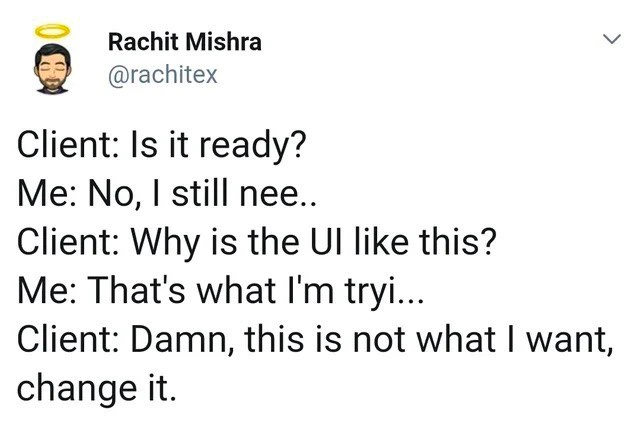
Let’s break down the dialogue in this tweet-style meme:
- Client: “Is it ready?” – The client is impatiently pinging for completion status. This implies either an unrealistic deadline looming or simply a lack of understanding of the development timeline. Seasoned devs reading this instantly sigh, recalling all those “Is it done yet?” pings on Slack when you’ve barely written the first lines of code.
- Me (Developer): “No, I still nee..” – The dev tries to answer honestly that it’s not ready, likely about to say “I still need to finish implementing X.” But the sentence is cut off (“nee..”), showing the client didn’t even let them finish explaining. This visual truncation is a brilliant comedic device: it literally interrupts the developer’s speech, mirroring how the client interrupts the development process. The interrupted_explanation (the dev’s reply being cut short) emphasizes how the client isn’t listening – they’re too busy forming the next demand.
- Client: “Why is the UI like this?” – Ah, the knee-jerk reaction to a half-baked screen. The client sees an incomplete or placeholder UI and is immediately alarmed. They presumably expected a polished interface, but since the product is only partially built, the UI might look weird (missing styles, filler text, obvious bugs). Instead of understanding it’s a half_finished_ui (work in progress), the client treats it as if it were the final result. This is comedic exaggeration of misaligned expectations: the client clearly doesn’t grasp that “done” and “in progress” are very different states. It’s as absurd as taste-testing a cake that’s still in the oven and complaining about the flavor – of course it’s not right yet! For veteran developers, this line triggers a knowing grin: we’ve all had someone barge in on a staging site or a development build and freak out seeing unstyled components or Latin placeholder text (
Lorem ipsumanyone?). - Me (Developer): “That's what I'm tryi...” – The poor developer attempts again to explain: likely “That’s what I’m trying to tell you – it’s not finished/designs aren’t applied yet.” Once more, they get cut off mid-sentence. The meme shows “tryi...” trailing off. Interruption Level 9000. By now, the dev (and the audience) are exasperated. The humor (tinged with horror) comes from how true this feels: the stakeholder not only ignores the answer but derails the conversation entirely. The developer is effectively silenced, which reflects how in real projects the engineering voice can be drowned out by a pushy client’s voice if communication channels are not respected.
- Client: “Damn, this is not what I want, change it.” – Here we reach peak absurdity: the client jumps to a sweeping judgment and a change request before letting the dev finish or the feature mature. This is scope creep served on a silver platter. The client has effectively decided that the half-built UI is representative of the final product and issues a blanket directive to redo it. The humor hides real pain: Scope creep like this – where new demands or drastic changes are requested beyond the initial agreement – is a nightmare for developers. Especially when it’s based on a misunderstanding (the client thinks they’re seeing the final product, but it’s actually an early draft). This one line encapsulates the stakeholder_expectations problem: the client had some vision that wasn’t communicated clearly, and now upon seeing something unexpected, they panic and pivot the requirements on the fly. MisalignedExpectations 101.
So why is this funny (in a dark way) to developers? Because it’s too real. It satirizes an anti-pattern in software projects:
- Premature criticism vs. Agile feedback: In theory, Agile methodology encourages early and frequent feedback – but not like this. Good feedback is structured (e.g., during sprint demos or UI/UX review sessions) and comes after the developer has something coherent to show. In our meme, the feedback arrives while the code is still wet. It’s as if the sprint review happened every minute, with the client breathing down the developer’s neck. Experienced devs chuckle because they know someone who interprets “Agile” as an excuse to nitpick continuously. This is a perversion of agile values – more like fragile development, where constant interference shatters any focused progress.
- Communication breakdown: The developer here isn’t allowed to communicate. Notice how each of their responses is cut short. This is a huge red flag in real projects. If a client or manager doesn’t listen to the engineers’ explanations (like why the UI looks odd right now, or what tasks remain), misunderstandings multiply. The meme exaggerates it to comedic effect: we literally see the dev being cut off with “...” twice. Insiders recognize this pattern: it suggests either an overbearing client, or perhaps a high-pressure environment where the stakeholder is too anxious to let the expert speak. It’s humorous because we empathize with that powerless feeling – StakeholderExpectations run amok can turn a normally rational project into a circus.
- Scope creep and churn: The client’s final demand “change it” before v1 is even done is a textbook case of scope creep. In real life, this leads to what a cynical veteran might call infinite revision hell. You never reach “done” because requirements keep shifting prematurely. The humor here is that the client isn’t even waiting to see if the initial approach might work; they’re already piling on changes. It’s like someone telling a chef mid-way through cooking, “Actually, I wanted a different dish, start over.” On paper it’s ridiculous, but in software projects it sadly happens. Developers laugh (and groan) because they’ve been in that kitchen, tossing out a half-cooked feature because of capricious mid-project changes.
- Unrealistic deadlines fueling panic: The very first question “Is it ready?” hints that perhaps there’s time pressure. Often such impatience stems from unrealistic deadlines. Maybe someone promised the client that a feature/UI would be done by today, and now the client is nervous and hyper-critical. This is a systemic industry issue: sales or management set tight deadlines to please clients, developers rush, and clients hover nervously – a perfect recipe for dysfunction. The meme doesn’t explicitly mention a deadline, but every dev reading it can feel that implicit pressure behind the client’s tone. It’s funny in the way that gallows humor is funny – we laugh so we don’t cry about the crunch-time insanity we’ve endured.
In summary, at this advanced level, the meme is highlighting a project management and UX design nightmare wrapped in a joke. It underscores the importance of managing client expectations, communicating clearly, and setting boundaries for feedback. The humor works because it takes a real-world frustration (constant client interruptions and clueless feedback) and cranks it up to 11, compressing what might be weeks of painful interactions into one rapid-fire exchange. It’s a form of collective developer therapy – we laugh because if we didn’t, we’d be ranting about the PTSD of past projects. The tweet format, with its terse lines and abrupt cut-offs, is the perfect medium to portray this feedback storm. It delivers the punchline (client demands changes) while the “wound” (unfinished UI) is still fresh. And every experienced developer reading it goes, “Oof, I’ve been there – and thank goodness it’s not just me.”
Description
A screenshot of a tweet by Rachit Mishra (@rachitex). The tweet shows a dialogue exchange between a 'Client' and 'Me' (representing a developer). The client asks if the project is ready, and before the developer can finish explaining it's not, the client interrupts to complain about the UI. The developer's attempts to explain are cut off again by the client, who finally demands changes to something they don't like. This meme perfectly captures the frustrating and all-too-common scenario where a non-technical stakeholder provides premature, critical feedback on an unfinished product. It highlights the communication breakdown and lack of understanding about the development process, a pain point deeply familiar to experienced engineers who have learned to carefully manage client demos and presentations
Comments
8Comment deleted
This interaction is why senior devs insist on a product manager: to act as a human shield against clients who treat a WIP branch like the finished product
Client just filed a JIRA to redesign the skeleton loader they saw during the first 200 ms - apparently shimmer gradients weren’t in the spec
After 20 years, I've learned that "Is it ready?" actually means "I need to feel involved" and the correct response is to show them a completely different feature that IS done, let them critique that instead, then quietly finish what you were actually working on
Clients review WIP the way users read error dialogs: they don't, but they have strong opinions about it
The classic 'Schrödinger's UI' paradox: simultaneously not ready for review and already wrong. Clients have mastered the art of quantum observation - collapsing the wave function of your half-built feature into a definitive 'this is terrible' before you've even committed the CSS. It's like code review, but for code that doesn't exist yet, with stakeholders who've achieved the remarkable feat of providing feedback faster than you can type 'display: flex;'
When a stakeholder asks 'is it ready?', you've accidentally triggered UAT on an unmerged branch and created a scope-change ticket without acceptance criteria
Schrödinger’s UI: unready until observed - then it collapses the roadmap and spawns a high-priority “Change it” epic
Client UI reviews: where 'YAGNI' morphs into 'YAGCI' - You Always Gotta Change It, outpacing any framework's deprecation cycle