Chrome's Overzealous Security on Localhost
Why is this Security meme funny?
Level 1: Locked Out by Your Own Lock
Imagine you have a super high-tech lock on your bedroom door to keep out bad guys. This lock has a rule: it will only open if it recognizes a special key from a trusted locksmith. One day, you can’t find that key, so you use a spare key you just made yourself out of a piece of metal. Now, the fancy lock doesn’t recognize this homemade key, so it sounds the alarm: “Intruder alert! Thief might be breaking in!” You’re standing there like, “Hey, it’s my room!” but the lock doesn’t know that. It assumes the worst because that’s what it’s programmed to do for safety. In this story, you are the developer, your room is your localhost website, and the lock is Chrome’s security. The homemade key is like a self-signed certificate that Chrome doesn’t recognize. The whole meme is joking that Chrome is acting like your loyal but overzealous guard dog — it treats you, the owner, like a potential burglar because you didn’t use the “official” key. It’s funny in a goofy way: your own safety system is so cautious that it momentarily doesn’t trust even you, until you prove you are who you say you are.
Level 2: Chrome Means Well
Let’s break down what’s happening here in simpler terms. First, localhost is a special hostname that means “this computer I’m using right now.” It’s not out on the internet; it’s literally your own machine. Developers use localhost to test websites or apps locally, before making them live. It’s like practicing a recipe in your own kitchen before opening a restaurant.
Now, the meme specifically shows an HTTPS scenario. HTTPS stands for HyperText Transfer Protocol Secure, which is the secure version of HTTP — the protocol your browser uses to communicate with websites. HTTPS is secure because it uses TLS (Transport Layer Security, formerly known as SSL) to encrypt data and, importantly, to verify that the website is who it claims to be. This verification is done using something called a certificate. Think of a certificate as a website’s ID card or passport. When you visit https://example.com, your browser expects example.com to show a valid ID (the certificate) that has been signed by a trusted organization, akin to a passport office or government. These trusted organizations are known as Certificate Authorities (CAs). Your browser has a list of CAs it trusts implicitly (built-in through updates or the operating system). If a website’s certificate is signed by one of those CAs (or a chain that leads to one), the browser says “Alright, you’ve got legit ID, come on in” and you see the padlock icon 🔒 in the address bar.
So what’s a self-signed certificate then? It’s kind of like making your own ID in your basement and signing it yourself. 😅 In other words, the website’s certificate isn’t verified by any of those trusted authorities; it just says “Trust me, I am who I say I am, signed Me.” For local development on localhost, developers often use a self-signed certificate because it’s quick and free. The downside? The browser has no way to know if that self-signed cert is legitimate or an imposter. From Chrome’s perspective, it’s exactly what a fake ID looks like.
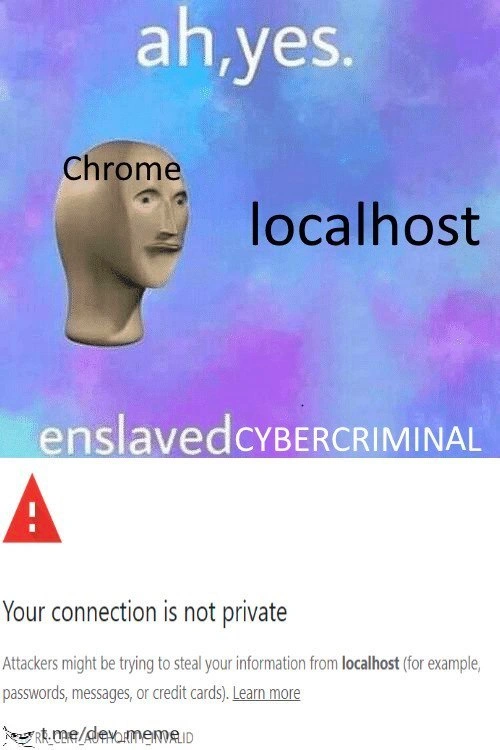
When Chrome encounters an HTTPS site with a certificate that isn’t signed by a known good authority (as is the case with most localhost self-signed certs), it halts and displays a big warning. That’s the bottom panel of the meme: Chrome’s “Your connection is not private” error page. This page is a built-in BrowserSecurity feature. Chrome is essentially saying, “Hold up! I can’t verify this site’s identity, so it might be unsafe. It could be someone pretending to be the site you want.” The text even spells it out: “Attackers might be trying to steal your information from localhost”. Chrome inserts whatever hostname you’re visiting into that message (here it’s “localhost”), along with examples like passwords or credit cards, to drive the point home to everyday users that this could be dangerous. It’s a bit hilarious in this context because you are “Attackers” according to that sentence. We know there aren’t hackers in your PC stealing your info when you connect to localhost (since you’re literally connecting to yourself), but Chrome has no context — it warns you anyway, just in case.
Now, the top part of the meme with the mannequin head and the text “ah, yes. enslaved CYBERCRIMINAL” is a joke format. In various memes, people use the phrase “ah, yes, enslaved X” to humorously rename an everyday thing in a dramatic way. For example, someone might call water “enslaved moisture” for giggles. Here, that format is applied to Chrome calling localhost a “CYBERCRIMINAL.” It’s a sarcastic way to say: Chrome is treating localhost as if it’s an infamous hacker or dangerous entity that’s been caught. It’s funny because localhost is just your own computer acting as a server for development. The mannequin with “Chrome” on its forehead looking at “localhost” implies Chrome is kind of blank-faced yet decisively labeling your local server as a bad guy (enslaving it with the title of cybercriminal, so to speak).
In simpler developer terms: this is a common WebDev gripe. You’re developing a website and maybe you need HTTPS locally. You set it up, and boom — your DevelopmentEnvironment browser throws a fit about the site not being secure. You have to either click an “ignore the warning” option or configure your environment to trust that self-signed certificate. Many developers will go to Chrome’s “Advanced” button on that error page and choose “Proceed anyway” (basically telling Chrome “it’s okay, I know this site”). Others might install the self-signed certificate into their system as a trusted certificate (which is like telling Chrome “actually, this is an ID you can trust, I vouch for it”). There are also developer tools and commands to bypass these warnings (for instance, a secret known trick is typing thisisunsafe on that error screen, which instantly bypasses the warning without extra clicks — a neat shortcut if you’re doing this repeatedly). But the very need to do these things is what’s amusingly frustrating. It’s Chrome doing its job too well in the wrong context.
In summary, Chrome throws up a scary SSL warning even when you’re just working locally with a self-made cert. The meme exaggerates this scenario to highlight how over-the-top it feels. Localhost, a cybercriminal? Seriously? Of course, Chrome’s intention is good — it’s protecting users from potential fraud and eavesdropping. But as a developer, when you see that red alert for your own project, it’s a mix of “ugh, not again” and a chuckle at how your browser basically thinks your own computer might be impersonating… your own computer. It’s a quirky clash between strict security rules and the practical needs of development.
Level 3: Localhost Labeled Hostile
For seasoned developers, this meme hits a nerve in the funniest way. The top panel’s text “ah, yes. enslaved CYBERCRIMINAL” slapped over the mannequin labeled “Chrome localhost” is a riff on a popular enslaved meme format. It’s taking something benign – localhost (your own computer) – and humorously mislabeling it as a dangerous outlaw. Why? Because that’s exactly what Chrome effectively does when you use a self-signed cert in a dev environment. In the lower panel, we see Chrome’s ominous chrome_privacy_error_page: the dreaded “Your connection is not private” screen with the red hazard icon. The warning goes on to say “Attackers might be trying to steal your information from localhost (for example, passwords, messages, or credit cards)”. This is the same dramatic alert a normal user would see if some coffee-shop Wi-Fi was hijacking their traffic. But in a dev’s case, it pops up when you’re just trying to talk to your own machine over HTTPS. It’s the ultimate developer irony: Chrome is basically calling your friendly neighborhood localhost a possible hacker. 😂 (Who knew your PC had such a dark double life, right?)
Every web developer who’s tried to set up a DevelopmentEnvironment with HTTPS has been there. Let’s say you’re building a web app and you need https://localhost for testing – maybe your app uses secure cookies, or you’re tinkering with a service worker/PWA that requires HTTPS even in dev. You spin up a local server, perhaps generate a quick self-signed cert (because who’s going to pay for a real cert for local testing?), and fire up Chrome. Cue the big red SSL warning. Chrome essentially slams the door in your face: “Whoa, hold on! This cert isn’t signed by anyone I trust. This could be a cybercriminal trying to trick you!” The meme magnifies the absurdity: Chrome is treating me like I’m hacking... myself. It’s a mix of frustration and amusement — frustration because it’s a speed bump in your workflow, amusement because you know why it’s happening and it’s kind of overkill for localhost. This is high on the list of DeveloperExperience_DX pain points. It’s like a rite of passage in web development: the first time you see that warning for your own app, you learn firsthand how seriously browsers take BrowserSecurityFeatures.
Experienced devs have a toolbox of solutions (born from a bit of battle-scarring). You might install or generate a local Certificate Authority and add it to your trusted store, so any cert you sign (even for localhost) is treated as legit. Projects like mkcert exist solely to make this less painful by creating a locally trusted CA automatically. Alternatively, many devs just click through the Chrome warning via the “Advanced -> Proceed to localhost (unsafe)” link — a routine so familiar it’s practically muscle memory. (Fun fact: there’s an Easter egg – typing thisisunsafe on the error page instantly bypasses it. Because after the 100th time, even Chrome’s engineers knew devs needed a shortcut! But shh, use that only on your dev box. 😉) Others disable certificate verification in dev tools or launch Chrome with flags like --ignore-certificate-errors when necessary (the nuclear option, definitely not for everyday browsing). All of these are ways to tame Chrome’s overzealous guard dog when you know the context is safe.
This meme resonates because it exaggerates that feeling we all get: “C’mon Chrome, it’s just me! I’m not stealing my own passwords!” The phrase “enslaved CYBERCRIMINAL” is mocking how ridiculous it feels for localhost to be called out with such a sinister label. It’s sarcasm turned up to 11. In reality, Chrome is just following a strict checklist – no verified cert, no entry – and developers respect that (we really do appreciate browsers keeping users safe!). But in our sandbox, it does seem like Chrome is being an overprotective pal, erring on the side of paranoia. We’ve all had that moment where a project demo gets interrupted by this garish warning. Cue the embarrassed explanation to a teammate or manager: “Uh, ignore that, it’s just because we’re using a self-signed cert for now…” Meanwhile, Chrome is effectively yelling in the background about attackers and stolen credit cards – not helping, buddy!
Historically, internal networks or staging sites had similar issues, and the solutions were the same: either do it right with a proper chain of trust (e.g., company-internal CA, or nowadays using something like Let’s Encrypt for public domains), or live with the warnings. By late 2019, Chrome had even started enforcing HTTPS everywhere for certain new features, making it harder to just stick with http://localhost. So the pressure was on to deal with these cert warnings in development. The meme’s timing was perfect: web devs were collectively grumbling about how even our innocent local tests were getting the third degree from Chrome’s security team.
Ultimately, this meme is a wink and a nod from one developer to another. It says: “We’ve all been in this absurd situation, fighting the browser we ourselves set up, all because it’s too good at security.” It’s poking fun at Chrome’s unflinching stance – portraying Chrome as the dopey 3D mannequin earnestly labeling “localhost” (our poor test server) as an “enslaved CYBERCRIMINAL.” The drama is what makes it funny. Yes, it’s over the top, but that’s exactly how the Chrome warning feels when you’re just trying to get your work done. You can almost hear the collective sigh and chuckle from developers remembering the last time they saw that insecure_connection_warning. In the end, we laugh because it’s better than crying – and then we go add localhost certificate setup to the project README so the next newcomer doesn’t panic when Chrome acts like their development machine is out to get them.
Level 4: Zero Trust at Loopback
At the heart of this meme is a lesson in TLS and the unforgiving logic of browser trust. Modern web browsers operate on a zero-trust model: they won’t take anyone’s word for it—not even your own machine—without cryptographic proof. When you visit a site over HTTPS, your browser expects a digital certificate issued by a trusted authority. This is part of the Public Key Infrastructure (PKI), where X.509 certificates act like verifiable ID cards for websites. These certificates aren’t just arbitrary chunks of data; they’re mathematically bound to a website’s public key and digitally signed by a Certificate Authority (CA) that the browser already trusts. It’s a cryptographic handshake where trust is earned, not assumed.
Now enter localhost with a self-signed certificate. “Self-signed” means exactly what it sounds like: the site’s certificate is signed by... itself. In the eyes of Chrome (or any strict browser), that’s no better than a random stranger waving an untested ID. There’s no chain of trust leading to a known root authority. Cryptographically, the browser can’t distinguish this scenario from a potential man-in-the-middle attack. Imagine an attacker intercepting your connection and presenting their own fake certificate — that’s exactly what browsers are designed to thwart. A self-signed cert triggers the same red flags because it lacks a verified signature from a known, trusted CA. The browser’s TLS handshake halts, and it raises an alarm: “This connection could be compromised!”
Under the hood, Chrome is checking its trust store (a list of known good guy certificates). localhost’s homemade certificate isn’t in there, so Chrome’s cryptographic logic screams “🚨 Danger!” by default. It’s not personal; it’s protocol. The browser can’t intuit that you–the developer–are running a local server intentionally. All it sees is a certificate anchor it doesn’t recognize. In security terms, Chrome treats your machine like it would treat any untrusted host on the Internet. The principle of “trust no one, not even yourself” is literally at play: without a signature from a recognized authority or an explicit user exemption, no hostname gets a free pass. Even localhost (which techies know is a loopback address to your own computer) isn’t immune to this rigorous scrutiny. This is security fundamentalism: either the cryptographic proof checks out, or the connection is labeled not private. There’s no middle ground in the pure math of PKI – your dev server’s certificate might as well be a potential cybercriminal until proven otherwise.
Ironically, some developers wish for a special case in the TLS spec: “Hey, it’s me, on localhost – that should be safe, right?” But security theory doesn’t do special cases without weakening the model. There have been proposals and dev tools (like custom local CAs) to ease this pain. However, in December 2019 (when this meme was posted and Chrome’s stance was as strict as ever), BrowserSecurity took a hard line: untrusted certificate = potential attacker. From a theoretical standpoint, it’s a beautiful rigidity – a guarantee that your browser treats every unknown certificate with equal suspicion, be it coming from a sketchy Wi-Fi hotspot or your own development PC. The humor here is that this uncompromising security model, grounded in cryptographic principles and decades of hard-earned lessons in internet security, ends up calling the most innocent of hosts (your localhost) a possible thief. It’s crypto-logic at its finest: ruthlessly consistent, even when it defies real-world common sense.
Description
A two-part meme humorously depicting Google Chrome's treatment of localhost. The top panel uses the 'Ah, yes. Enslaved' surreal meme format. The Meme Man character is labeled 'Chrome,' and he is looking at the word 'localhost.' The punchline below reads 'enslaved CYBERCRIMINAL'. The bottom panel provides the context: a screenshot of Chrome's 'Your connection is not private' error page, specifically warning that 'Attackers might be trying to steal your information from localhost'. The joke is relatable to web developers who frequently encounter this security warning while working on their local development servers, as modern browsers often flag non-HTTPS connections or self-signed certificates, even when the 'attacker' is the developer themselves
Comments
7Comment deleted
I'm not saying Chrome is paranoid, but it just asked me to solve a CAPTCHA to prove I'm not a robot before letting me connect to 127.0.0.1
Chrome marking https://localhost with my self-signed cert as a nation-state threat is PKI’s way of reminding me that even when I’m literally the root CA, I’m still not in the trust store
Chrome treating localhost like a hostile nation-state while happily executing random npm packages with 47 transitive dependencies from developers named xXx_crypto_lord_420
Chrome treating localhost like a threat actor is the browser equivalent of your home security system triggering an alarm every time you walk through your own front door. Yes Chrome, I'm fully aware that the attacker trying to steal my localhost data is... me, running `npm start` at 3 AM while debugging why my CSS grid won't align
Chrome: “Attackers might be stealing your data from localhost.” Finally, zero‑trust that models reality: me, a self‑signed cert, and sudo
Browser flags localhost as an APT; turns out I’m the threat actor who forgot to add the dev CA to the trust store - PKI remains the hardest dependency in the stack
Chrome's reminder that even localhost demands prod-grade TLS - because nothing says 'secure' like debugging with a red screen of death