Skip to content
DevMeme
5694 of 7435
ChatGPT Masters Inversion, Fails Basic String Count
AI ML Post #6245, on Sep 20, 2024 in TG

ChatGPT Masters Inversion, Fails Basic String Count

Why is this AI ML meme funny?

Level 1: Everything’s Upside Down

Think about holding a picture or a book. Normally, you hold it upright to see it correctly. Now imagine you flip the book upside-down. What if the pictures in the book didn’t turn with it? You’d be looking at upside-down pictures and text, which would be super silly, right? That’s basically what happened in this phone app. The tester turned the phone upside-down, and the whole chat screen stayed the same way, so now everything looked upside-down to them! It’s like the app got confused and didn’t flip itself back, so the words and buttons were all upside-down.

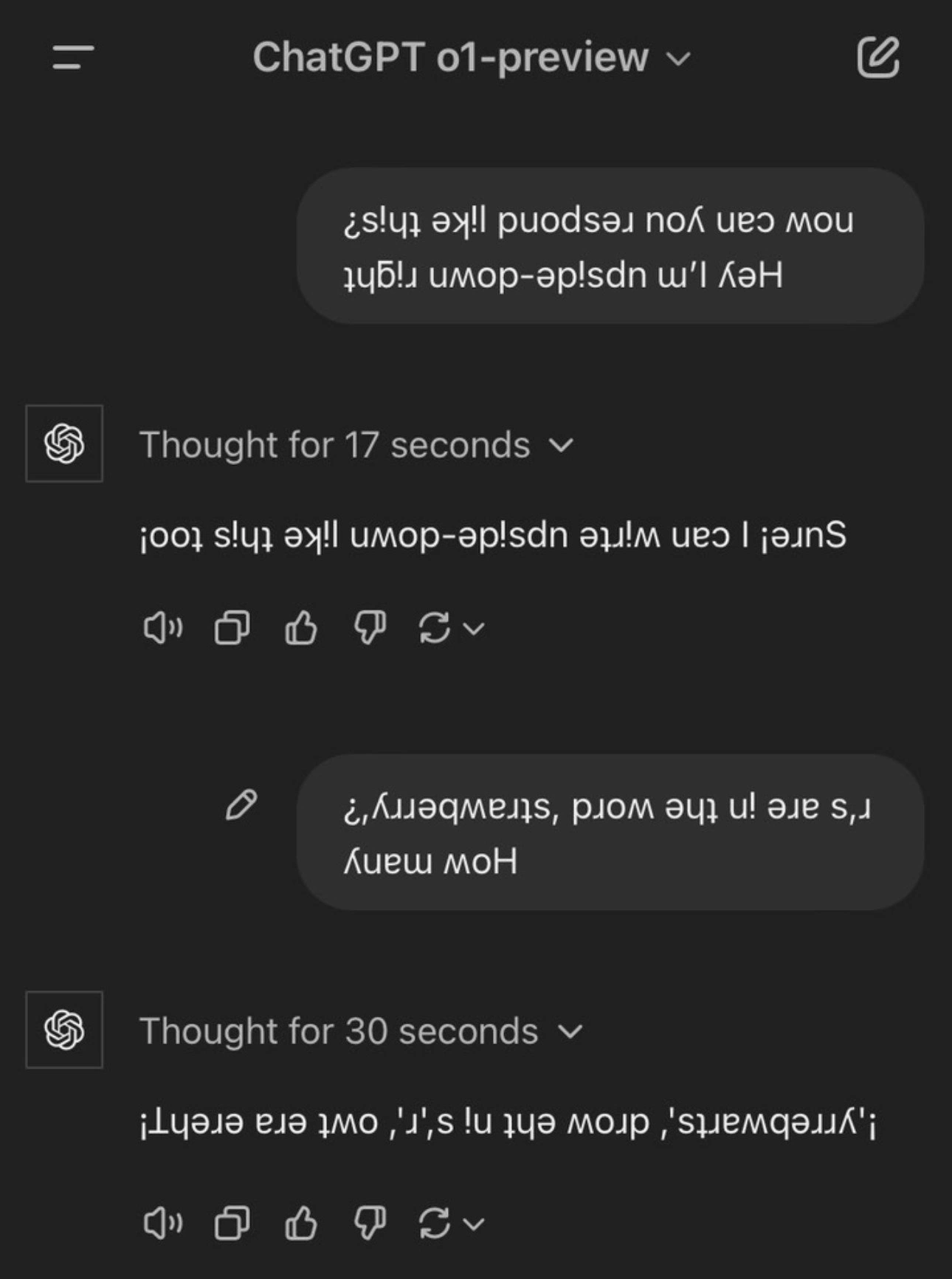
This is funny because phone apps are supposed to keep things readable no matter how you hold the phone. When something goes wrong and the app doesn’t do that, it ends up looking ridiculous – kind of like if you tilted your head to read a sign and the sign’s text magically spun around too, still making you tilt your head the other way. In the picture from the meme, even the conversation is playing a joke: the person says “I’m upside-down, can you talk upside-down too?” and the computer actually answers with upside-down letters! It’s a playful scene.

The main idea is: the tester found a quirky mistake in the app – just by turning the phone around. Everything literally flipped out (went upside-down), which isn’t supposed to happen. It’s like a little cartoon moment where turning something upside-down makes all the characters flip upside-down and act goofy. For someone using the app, this would be confusing and funny. For the people who made the app, it’s a “whoops!” moment – they forgot to make sure the app works in every direction. So the meme is joking about that surprise when you do something simple (rotating the phone) and suddenly the app’s world is upside-down. It’s a lighthearted way to say: even small things can cause funny bugs in technology!

Level 2: Orientation Bug 101

Okay, let’s break down what’s happening here in simpler terms. We have a phone app (the screenshot is the ChatGPT mobile interface) where everything on the screen is upside-down when the phone is rotated 180 degrees. Normally, when you turn your smartphone, the display rotates so that it’s always upright for you. For example, if you turn your phone sideways, most apps will switch to landscape mode (wider view) and rearrange things so you can still read them easily. If you flip your phone completely upside-down (so the top is now at the bottom), many apps also adjust and flip the content so it’s still readable.

A Orientation bug occurs when the app doesn’t handle one of these rotations correctly. In this meme, the QA (Quality Assurance) tester found that rotating the phone upside-down causes the whole chat UI to remain stuck in the original orientation. That means the phone’s screen contents didn’t rotate with the phone. Visually, the app’s interface stayed the same way up, but since the device itself is upside-down, the UI now appears inverted to the user. All the text bubbles, icons, and buttons are showing up upside-down. It’s like you turned a TV upside-down while the picture on it stayed the same – you’d see the picture upside-down.

Why would this happen? Often, developers set apps to only support certain orientations. For instance, they might allow portrait (vertical) and maybe landscape (horizontal) but forget about or purposely disable “upside-down portrait” mode. Maybe they thought no one would use the app upside-down, or there was a technical limitation. On Android and iOS, there are settings to restrict orientations. If upside-down orientation isn’t enabled, the system might not rotate the app when the phone flips, resulting in what we see: the app interface ends up upside-down relative to the user. This is usually considered a bug or oversight – especially if parts of the UI become unusable.

The meme description mentions gyroscope and accelerometer. These are sensors in your phone that detect orientation and movement. When you rotate your phone, these sensors detect the change and the operating system tells the app, “Hey, orientation changed!” If the app is coded to handle it, it will rearrange its layout. If not, you get an odd situation. In this case, the app likely didn’t handle the 180° flip event. QA testers are known for doing things like this – they’ll rotate the device, flip it, shake it, basically try all sorts of interactions to see if the app stays stable. This kind of testing often reveals edge cases – situations that are not typical but possible. An edge case here is using the app upside-down. It’s not common, but it’s possible, so it should either be handled or deliberately disallowed with a proper message.

What’s funny is that the screenshot isn’t just upside-down UI; the conversation inside the chat is playing along with the joke. The user says, “Hey I’m upside-down right now – can you respond like this?” and the AI assistant responds in upside-down text as well! So the chat content itself is upside-down letters. For clarity, that upside-down text isn’t the app’s bug – that’s the AI intentionally writing text with upside-down characters (a quirky feature or just the AI being clever). The real bug is that the entire chat interface (bubbles, header, icons) is flipped.

This connects to UX (User Experience) Design fundamentals. A good UX means the app should be consistent and handle things gracefully. An Inconsistent UI like an upside-down screen can confuse users. It’s labeled as UXFailure and UXIrony in the tags because it’s ironic that a modern app (especially one as advanced as ChatGPT) would have a silly usability slip-up like this. In mobile development, you typically test your app in all supported orientations. If you forget one, you might end up with weird cases like this where the interface looks wrong. It’s also a gentle jab at developers focusing only on the “happy path” – e.g., only testing in portrait orientation because that’s what they assume everyone will use, which is sometimes jokingly referred to as “works on my device” mentality (meaning the developer says “Hey, it looked fine on my phone!” without considering other scenarios).

In short, this meme shows a MobileDevelopment blooper: the app’s orientation handling failed. QA rotated the phone (simulating a user doing something unusual or just using the app in a different orientation), and the app’s UI freaked out (went upside-down). Developers and testers find this funny because it’s a common oversight — we’ve all seen apps that do strange things when you rotate the screen or perform some odd action. It reminds junior developers that you have to consider these things when building apps. If you don’t handle the phone’s orientation changes, your beautiful UI might literally turn into an upside-down mess for some users. And nobody wants to read text that’s upside-down unintentionally – that’s a pretty big bug in terms of user experience!

Level 3: The Upside-Down UI

Imagine you’re a developer who just shipped a slick mobile app. You’ve tested it in portrait mode (the standard upright phone orientation) and maybe even landscape mode. Everything looks great. But then QA (Quality Assurance) comes along, rotates the phone 180° upside-down, and suddenly your polished chat interface goes bonkers – every element is upside-down, as if the app literally flipped out. This meme pokes fun at that classic orientation bug: the one you overlooked because “who even uses the phone upside-down, right?”

For seasoned engineers, this scenario triggers war stories of edge-case handling gone wrong. It’s a UX/UI nightmare that we’ve all seen at least once. The humor comes from the absurdity of a high-tech app (even ChatGPT’s mobile UI in the image) failing a simple device rotation test. The screenshot shows the entire chat interface inverted – user messages, assistant replies, even icons like the thumbs-up/down are all rotated 180°. It’s as if the interface ended up in the “Upside Down” (yes, like Stranger Things – a parallel universe where everything’s flipped). Seasoned devs chuckle because it’s a too-real reminder: neglecting to handle an orientation change can turn your app UI into a circus.

Why does this happen? Often, developers lock the app orientation to avoid complex layout adjustments. On Android, for instance, you might set android:screenOrientation="portrait" in your manifest, thinking you’ve simplified things. But if you don’t explicitly allow reverse-portrait (upside-down) as an orientation, the OS won’t rotate the UI when the device flips 180°. The result? The screen contents stay as they were, and the physical phone is now upside-down relative to it – meaning the user sees an inverted UI. In iOS, if you forget to include UIInterfaceOrientationPortraitUpsideDown in supported orientations, you get a similar effect. Essentially, the app says “I only know upright portrait,” so turning the phone upside-down leaves the app clinging to its original orientation while the real world has flipped – embarrassing!

This meme also hints at gyroscope/accelerometer events. Modern smartphones have sensors that detect rotation. A robust app listens for those orientation change events and adjusts the UI accordingly (re-laying out components, rotating icons, etc.). But here, it seems the app either ignored those events or handled them incorrectly. Maybe the developer tested on an emulator (which often doesn’t simulate flipping 180° well) or they just assumed users wouldn’t flip their phones like bats hanging upside-down. Bad assumption. Seasoned devs know QA will always try weird angles and actionsthat’s their job. If there’s a hidden bug (like an upside-down UI glitch), QA will find it. It’s reminiscent of the classic “works on my machine” syndrome: the developer only tested in comfortable scenarios, but the app fails in the wild on a different device or orientation. The meme elicits a groan-laugh because we’ve been there – late in the release cycle discovering that rotating the device causes the UI to freak out: text mirroring, controls misplaced, or as shown, everything just staying inverted.

The references to UXDesign failure and MobileDevelopment edge cases are on point. Handling orientation is a known pain. On Android, an orientation change can even restart your Activity by default, which means if you haven’t handled state saving, your chat might wipe or behave oddly. Some devs workaround that by disabling rotations (hello inconsistent UI!). On iOS, you must be careful with Auto Layout constraints so your UI elements reposition correctly on rotation. Forget these details, and you get a UI that looks like a joke when rotated. The upside-down ChatGPT exchange in the image is extra funny because the content itself plays along: the user asks the AI to respond upside-down, and the AI obliges by outputting upside-down text (using flipped Unicode characters). So not only is the UI orientation wrong, even the conversation bubbles contain upside-down writing. It’s a double-whammy of inversion that screams “this was not tested!”

There’s an underlying commentary about UX failures: A good user experience means considering all reasonable use cases – including device rotation. Ignoring it can lead to inconsistent UIs and accessibility issues (imagine someone with the phone mounted upside-down or quickly rotating device – they’d be stuck reading inverted text, which is awful UX). The meme resonates with developers because it highlights how a seemingly minor oversight (not handling a 180° flip) can result in a ridiculous outcome. In a way, it’s a lighthearted jab at developers (or product managers) who say “We’ll support portrait only, it’s fine” without realizing users or testers might literally flip that assumption on its head (pun intended).

So experienced folks laugh (perhaps a bit nervously) because they recall scrambling to fix a similar orientation bug at 5 PM on release day. It encapsulates that classic dev lesson: test every edge case, because if you don’t, QA (or users) will find them – and it might turn your app’s polished UI into an upside-down UXIrony exhibit. This meme is a humorous reminder that in mobile development, orientation matters, and ignoring it is just asking for your app to flip out when you least expect it.

Description

A screenshot of a conversation with 'ChatGPT o1-preview' in a dark-mode interface. The user first asks in upside-down text: 'Hey I'm upside-down right now can you respond like this?'. ChatGPT, after thinking for 17 seconds, replies in perfect upside-down text: 'Sure! I can write upside-down like this too!'. The user then follows up with another upside-down question: 'How many r's are in the word, 'strawberry'?'. After thinking for 30 seconds, ChatGPT provides a garbled and incorrect upside-down answer that, when flipped, reads: '¡'yrrebwarts', drow eht ni s,'r',s owt era ereht!'. The model not only misspells 'strawberry' as 'yrrebwarts' but gives a nonsensical answer. This meme highlights the brittleness of large language models; it can handle a complex formatting request (inverting text) but fails a simple, logical task within that constraint, revealing a classic AI failure mode that is both amusing and relatable to developers working with LLMs

Comments

18
Anonymous ★ Top Pick The model spent 30 seconds tokenizing the request upside-down, right-to-left, and probably in Cyrillic, but forgot to implement a character counter. It's the AI equivalent of building a distributed system before learning how to write a for-loop
  1. Anonymous ★ Top Pick

    The model spent 30 seconds tokenizing the request upside-down, right-to-left, and probably in Cyrillic, but forgot to implement a character counter. It's the AI equivalent of building a distributed system before learning how to write a for-loop

  2. Anonymous

    Stakeholder: “We need landscape support.” Junior dev: `body { transform: rotate(180deg); }` - tickets closed, vertigo opened

  3. Anonymous

    After 47 seconds of deep thought and probably burning through $0.03 of compute, o1-preview confidently demonstrates that even with chain-of-thought reasoning, it still can't count R's in 'strawberry' - proving that no amount of architectural improvements can fix the fundamental tokenization curse that haunts every LLM engineer's nightmares

  4. Anonymous

    When your reasoning model spends 30 seconds thinking deeply about strawberries and still can't count the r's correctly - but hey, at least it maintained the upside-down formatting consistently. Classic case of optimizing for style over correctness: the model nailed the Unicode transformation while completely fumbling basic character enumeration. It's like watching a senior engineer spend three hours perfectly architecting a solution that solves the wrong problem

  5. Anonymous

    Demo-driven development in 2025: o1‑preview nails upside‑down UX instantly, while counting the r’s in “strawberry” triggers a 30‑second reasoning spinner - latency optimized for flourish, not correctness

  6. Anonymous

    o1-preview's 'thinking': BPE choking on Thai tokens, pretending it's deep reasoning

  7. Anonymous

    Asking “how many r’s in strawberry?” and getting an upside‑down answer is the perfect Unicode bug: the model met the spec, your ASCII-only regex counted zero, and product marked it “working as designed.”

  8. @Valithor 1y

    lmfaooo

  9. @mihanizzm 1y

    well, he's right🤔

    1. @phobosperi 1y

      stRawbeRRy two?

      1. @mihanizzm 1y

        I'm chat gpt, sorry

        1. @gW24KGha 1y

          No you're not. A true ChatGPT would be like "I apologize for the error in my previous response"

          1. @ZgGPuo8dZef58K6hxxGVj3Z2 1y

            You are right. In fact I would apologize for the error in my previous response.

  10. @moosschan 1y

    Oldest trick in the book

  11. @callofvoid0 1y

    wrong

  12. @M4lenov 1y

    Didn't even do the upside down thing correctly for the 2nd message smh

    1. @ZgGPuo8dZef58K6hxxGVj3Z2 1y

      Fr

    2. @KP2020 1y

      Did upside down and from rtl

Use J and K for navigation