AI CAPTCHA Challenge: Find Waldo to Prove You're Not a Robot
Why is this AI ML meme funny?
Level 1: Find Waldo to Enter
Imagine you want to go into your favorite candy store, but there’s a guard at the door who says, “Before you come in, you have to solve this puzzle and find Waldo on this giant poster.” 😮 You look at the poster and it’s crowded with hundreds of people at a beach, all doing different things. You have to find one tiny character (Waldo, the guy in the red-striped shirt) hiding in there. It’s a really hard and time-consuming puzzle – and you’re just trying to get some candy! That’s what this meme is joking about. It’s like saying websites sometimes make us do crazy tasks just to prove we’re real people. It’s funny because it’s such an over-the-top challenge for something simple like logging in. The feeling is, “I only wanted to sign in, but now I’m stuck playing a huge hide-and-seek game!” It shows in a silly way how too much security can become a big hassle, turning a quick check into a full-on Where’s Waldo search mission.
Level 2: No Bots Allowed
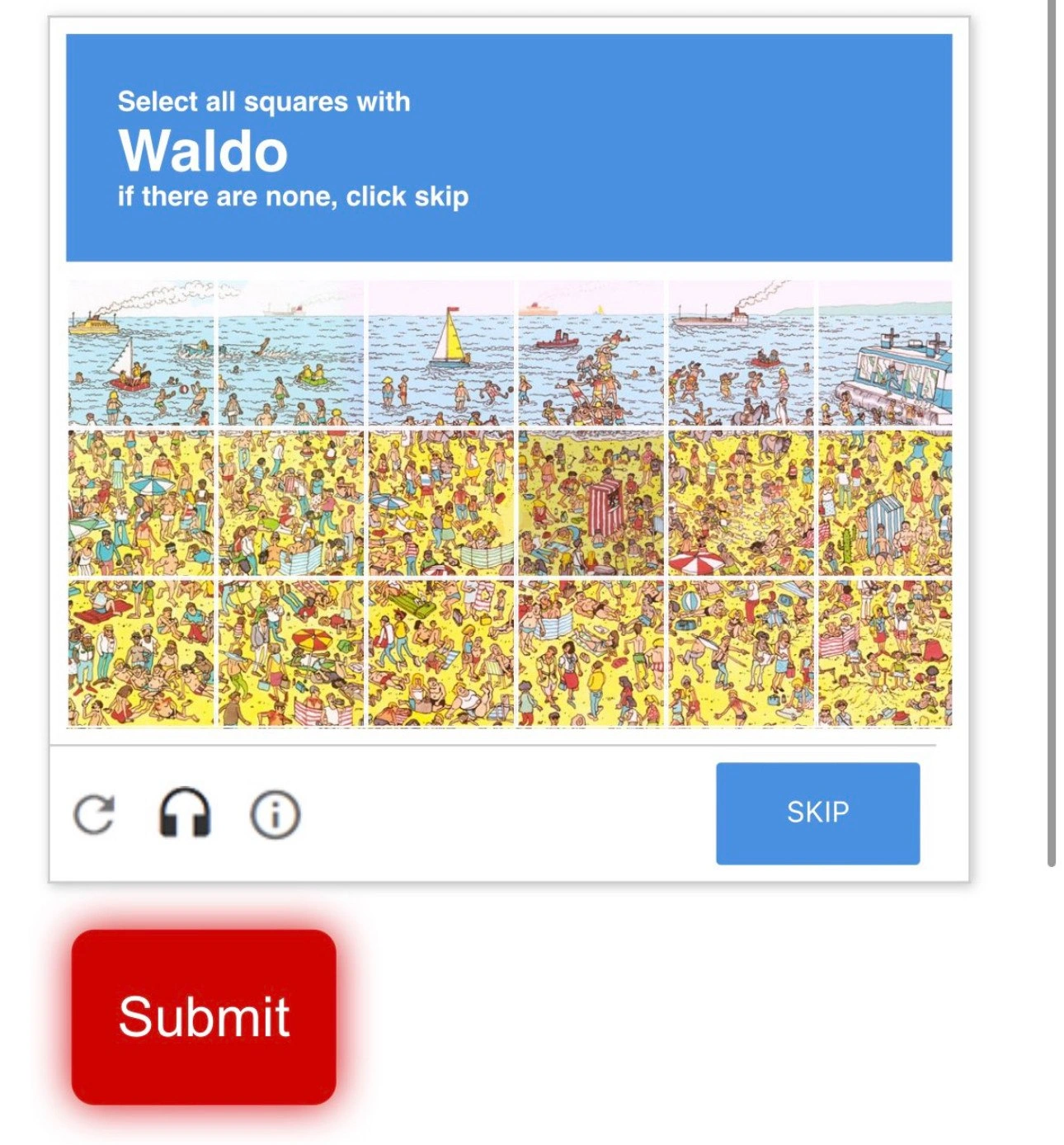
Let’s break down what’s happening here. The image is depicting a type of test called a CAPTCHA. CAPTCHA stands for Completely Automated Public Turing test to tell Computers and Humans Apart – which is a mouthful of words meaning it’s a challenge only a human should be able to solve easily, while bots (automated programs) should struggle with it. Websites use CAPTCHAs as a bot detection mechanism. For example, when you create a new account or post a comment, a CAPTCHA might pop up to check that you’re a real person and not some spam script. Common CAPTCHAs today ask you to identify things in pictures – you’ve probably seen ones like “select all squares with traffic lights” or “click every square that has a bus.” The one in this meme has cranked the difficulty up to a ridiculous level by saying: “Select all squares with Waldo.”
So, who or what is Waldo? Waldo is a character from a famous puzzle book series “Where’s Waldo?” (known in some countries as “Where’s Wally?”). In those puzzles, you have a big, detailed picture with tons of people and objects, and you’re supposed to find one specific character – Waldo – who wears a distinctive red-and-white striped shirt and hat, hiding somewhere in the crowd. It’s tricky even for fun, because there are many red herrings (other people dressed similarly or lots of red-and-white striped beach towels in the scene) to fool your eye. Now imagine shrinking that busy image down and splitting it into a 6x6 grid of tiny squares. The challenge asks you to click every square where you see Waldo. If Waldo isn’t present at all, you’re supposed to hit “Skip.” This format mimics the real reCAPTCHA image tests (a service by Google widely used in web dev for security) – normally it might be “if no traffic light is in any image, click skip.” It’s a bit of an interactive puzzle. In the meme, the puzzle is comically hard on purpose.
Here are the parts of the depicted user interface and what they mean:
- The blue banner at the top with instructions is standard for reCAPTCHA challenges. It literally tells you what to do: here, “Select all squares with Waldo. If there are none, click skip.” It’s usually something like “Select all squares with buses” in real life. They even styled it in that Google reCAPTCHA look.
- The grid of images (6 columns by 6 rows, so 36 little squares) is where you do the clicking. Each square shows a tiny section of a larger beach drawing. Somewhere in that drawing, tiny Waldo is hiding. Maybe he’s only visible in one of those squares. You’d have to scan each little picture to spot his striped shirt or bobble hat. This is much harder than typical CAPTCHAs! Usually, you’re looking for bigger, simpler objects like a car or a dog across 9 images. Here it’s one tiny character among dozens of other drawn people – a true visual puzzle CAPTCHA.
- Below the grid, on the left, there’s a circular arrow icon (🔄). That is the refresh button. If you’re stuck or you think the challenge is too hard, clicking that would give you a new set of images (in real CAPTCHAs, it just loads a different challenge). In the Waldo scenario, imagine hitting refresh and maybe getting a different puzzle – perhaps a different Waldo scene or a completely different task if you’re lucky.
- Next to it is a headphone icon (🔊). That’s for an audio CAPTCHA. CAPTCHAs are a nightmare for people with visual impairments (how can you select images if you can’t see them?), so there’s often an option to hear a test instead. If you click the headphone, typically you’d hear a distorted voice saying some numbers or letters that you have to type in. It’s meant for accessibility, but frankly the audio challenges can be extremely difficult, too – imagine muffled voices with lots of background noise. In our Waldo joke, the idea of an audio alternative is even more absurd (would it describe the scene and ask where Waldo is? That would be wild!). But the presence of the icon in the meme sticks to the official look of reCAPTCHA, highlighting how such puzzles can also exclude people who can’t use the visual interface easily.
- The “Skip” button on the right of those icons is there because sometimes the thing you’re asked to find isn’t present in any of the images. For example, a real CAPTCHA might say “Select all squares with bicycles,” but maybe none of the pictures actually has a bicycle – that’s a trick to ensure you’re paying attention. In that case, the correct action is to hit “Skip.” In the Waldo meme, they include skip as a possibility, humorously suggesting maybe Waldo isn’t even there at all (imagine squinting at all 36 tiny pictures for nothing!).
- Finally, the big red Submit button at the bottom is what you click after you’ve made your selection(s). In a normal CAPTCHA, this is usually a more subdued “Verify” button, but here it’s exaggerated as bright red and oversized. That emphasizes how much of a big deal it feels after such a grueling task – kind of like “Alright, I did it, let me in now!” The color red also playfully suggests frustration or urgency, as if the user is angrily slamming that submit button after hunting for Waldo. It’s a visual punchline by itself.
So why would a website put you through this insanity? It wouldn’t – at least, not literally with Waldo. But the joke highlights a real issue in web development and security: the more we try to keep automated bots out of our websites, the more challenges we end up throwing at actual users. BotDetection is important – it prevents spam comments, stops fake account signups, and thwarts attackers trying to brute-force passwords. However, each layer of defense can also make the site less friendly. It’s a constant balancing act in UX design: you want security measures that are effective but also user-friendly. If you make the test too easy, bots might slip through. If you make it too hard (like our Waldo puzzle), humans will be annoyed or give up. This is often referred to as the security vs. usability trade-off. Good security that completely ignores usability can turn people away or even exclude legitimate users (imagine if someone has poor eyesight – a Waldo CAPTCHA would be practically impossible, which isn’t fair or good design). On the other hand, super easy challenges might not stop actual bad actors.
In the past, CAPTCHAs started simple: early ones were warped or squiggly text that you had to read and type in. Those were based on printed words that computers had trouble recognizing (in fact, reCAPTCHA used to help digitize old books by showing words scanners couldn’t read, killing two birds with one stone!). As machine learning improved, bots learned to solve those text CAPTCHAs by reading the text too. So developers switched to images of everyday objects – because humans are great at recognizing a stop sign or a cat in a photo, while it traditionally took computers much more effort. Fast forward to today: thanks to advances in AI and image recognition, computers have gotten a lot better at identifying objects in images. That’s why Google’s CAPTCHAs have gotten weirder and more complex (like identifying very specific things, or clicking all images containing a partial object, e.g., “any square with a piece of a crosswalk”). They even have “invisible” CAPTCHAs now that try to detect bots in the background by analyzing your behavior (like how you move the mouse, or other signals) so you don’t have to solve a puzzle at all – which sounds great, unless the system thinks a real human is suspicious and blocks them anyway. It’s an ongoing game of one-upmanship between security tech and attackers.
The meme is basically saying: if this continues, CAPTCHAs might become ridiculously hard – as absurd as finding Waldo in a tiny crowded picture! It’s funny to us because it takes a real frustration and blows it up to cartoonish proportions. For a junior developer or someone new to WebDev, it’s a memorable illustration of the concept that more security can sometimes mean a worse user experience. You always have to consider the user experience design while implementing security. After all, a security feature isn’t very useful if it makes real users leave your site in anger. The Waldo puzzle is an extreme example of human verification overkill that would definitely test anyone’s patience. It’s a good reminder: when designing authentication or anti-bot measures, always ask, “Would I be okay doing this myself every day?” If the answer is “no way, that’s too annoying,” then you might need to rethink the approach!
Level 3: The CAPTCHA Arms Race
In this meme, a reCAPTCHA challenge has morphed into a full-blown Where’s Waldo puzzle, humorously illustrating the escalating arms race between bot detection and user experience. Modern web developers know this pain well: as bots get smarter and computer vision improves, CAPTCHAs have become increasingly absurd to keep machines out. Here, the security measure isn’t a simple “select all images with traffic lights” – it’s “select all squares with Waldo,” referencing the famously difficult visual search from the classic puzzle book. It’s a comically extreme example of Security vs Usability: to block advanced bots, we end up challenging even the most patient human users with nearly impossible tasks.
The image shows a 6 × 6 grid of tiny picture slices from a dense beach scene. Waldo (the red-and-white striped character we’re supposed to find) is hidden somewhere in that busy crowd. It’s essentially asking the user to perform a mini image recognition task that could take several long, squinty moments. Ironically, the Waldo challenge is something even a script or a well-trained machine learning model might solve faster than a tired human. After all, CAPTCHAs ask us to do things computers are bad at – but the joke is that computers are rapidly getting good at these tasks too. We’ve reached a point where a determined bot with neural networks might identify Waldo’s distinctive sweater in milliseconds, while a human stares at the screen in frustration. The meme exaggerates this dynamic to absurdity: what was once a playful kids’ puzzle is now a bot detection checkpoint.
For seasoned developers, this lands right in the shared experience:
- Ever-more complex CAPTCHAs: We remember when CAPTCHAs were just warped text. As OCR algorithms caught up, CAPTCHAs evolved to show street signs or storefronts. Now, even those image challenges are getting solved by AI. The Waldo puzzle is a tongue-in-cheek forecast of “what’s next?” in this escalation.
- Trade-off pain: We’ve sat in meetings debating web security versus user drop-off rates. Sure, a tricky CAPTCHA might keep out spam bots, but it can also drive real users away. The meme’s enormous, bright-red Submit button practically screams user frustration – by the time you’ve found Waldo (if you even can), you’re slamming that submit button in exasperation.
- The shared trauma of tricky CAPTCHAs: Developers and users alike joke about how these puzzles sometimes feel like intelligence tests. “Is that a bit of Waldo’s shirt in the corner of this square or just a beach towel?” It’s akin to those real reCAPTCHA moments where you’re unsure if a tiny corner of a traffic light counts. We’ve all cursed at the screen, “I did click all the bikes, why won’t it let me through?!” This meme cranks that frustration to eleven by using Waldo – notoriously hard to spot even when you’re trying to play a game – as the gatekeeper to a website.
- Accessibility and overkill: Notice the little icons under the grid – the refresh 🔄, the headphone 🔊, the info ⓘ, and the Skip button. They’re straight from Google reCAPTCHA’s interface. The headphone icon hints at an audio alternative for people who can’t see the images, but honestly those audio CAPTCHAs are often even worse (distorted speech in a noisy background – imagine a garbled voice saying “Find Waldo” 🤖🔈). The meme is highlighting that we’ve reached nearly comical levels of human verification overkill. It’s a lose-lose: either exclude users who aren’t vision puzzle experts or risk letting smarter bots through. Web developers concerned with UX design and accessibility standards cringe at such choices, because a fundamental rule of UserExperienceDesign is not to punish your real users just to stop the bad actors.
At its core, this meme is a critique of how browser security measures can become user-hostile. It’s poking fun at the way we’ve piled on complexity to stay ahead of malicious scripts. The phrase “Select all squares with Waldo” is something no normal login or sign-up should demand – it’s absurd, and that absurdity is the point. Just as Waldo blends into a chaotic crowd, real users now feel lost in a sea of anti-bot challenges. The security vs user patience struggle has reached the point where you practically need a magnifying glass to log in. The joke has an edge of truth that senior devs recognize: if we don’t find better solutions, our anti-bot tactics might become as convoluted as a Where’s Waldo hunt on a crowded beach.
Description
A screenshot of a website pop-up styled as a CAPTCHA test. The prompt at the top, in a blue header, says, 'Select all squares with Waldo, if there are none, click skip.' Below the prompt is a 3x5 grid of image tiles showing a crowded beach scene from the popular 'Where's Waldo?' puzzle book series. The illustration is colorful and densely populated with characters and objects, making the task of finding Waldo challenging. Below the image grid, there are several icons (refresh, audio, info) and a blue 'SKIP' button on the right. A large, prominent red 'Submit' button is shown below the main CAPTCHA frame. The meme's humor lies in using a task that is famously difficult for humans as a method for human verification, ironically suggesting that AI-powered bots have become so advanced at solving regular CAPTCHAs that only a Waldo-level challenge can effectively distinguish them from people. It's a commentary on the rapid advancement of computer vision and the escalating difficulty of creating effective Turing tests

Comments
13Comment deleted
The ultimate CAPTCHA to secure enterprise systems won't be finding Waldo, it'll be finding the single misconfigured IAM policy in a 10,000-line JSON file
reCAPTCHA post-GPT-Vision: “Select all pixels containing Waldo.” The bot clears it during the TLS handshake; the humans file a Sev-1 against the security team’s “frictionless UX” OKR
After 15 years of implementing OAuth2, JWT tokens, and biometric auth, we've finally achieved peak security: asking users to find a guy in a striped shirt among 500 beach-goers while our ML model quietly judges their mouse movements for 'human-like' behavior patterns
This CAPTCHA perfectly captures the modern web experience: proving you're human by solving a problem that would make even a computer vision model trained on ImageNet throw a 503 Service Unavailable. At least when your authentication service inevitably gets acquired and sunset, you'll have spent quality time developing pattern recognition skills that are completely useless for your actual job
CAPTCHA: Find Waldo. It’s human-in-the-loop labeling, and he’s split across tiles by an off‑by‑one - proof you qualify for prod access
Waldo's the elusive memory leak in your monolith: stripes everywhere, but tracing it needs full-system observability
SSO timed out while I debated whether a 12‑pixel sliver of Waldo’s hat on a tile boundary counts - security optimizing for precision by outsourcing labeling to users
Even AI wouldn't do it, that dev is a menace Comment deleted
waldo? Comment deleted
https://en.m.wikipedia.org/wiki/Where%27s_Wally%3F Comment deleted
wtf how i can complete this stupid captcha if Waldo has been erased Comment deleted
You are bot Comment deleted
get softbanned... the only reason captchas still exist... Comment deleted