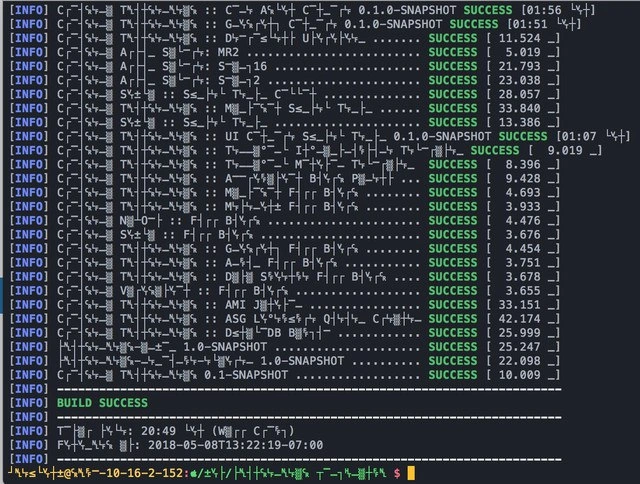
Build succeeds, but terminal encoding turns every module name into hieroglyphics
Why is this BuildSystems CICD meme funny?
Level 1: Lost in Translation
Imagine you wrote a note to your friend, but you accidentally used a secret code that your friend doesn’t know. You hand them the note, they look at it, and it’s full of strange symbols that make no sense to them. However, at the very bottom of the note, there’s a big smiley face showing everything is great. Your friend is happy that the message seems positive (because of the smiley), but they can’t read the rest of it! In this meme, the computer build is a lot like that note. The build process is telling us “Everything worked, success!” (that’s the smiley face part), but because of a mix-up in language settings, all the module names in the middle turned into unreadable symbols (like writing in an alien alphabet by mistake). It’s a funny scenario because the important part — “Success!” — got through, but everything else looks like gibberish. It’s as if the computer spoke in the wrong language when printing the details. The feeling it gives is both relief (yay, it worked!) and confusion (uhh, what do those symbols mean?). In simple terms: the job got done perfectly, but the message about what was done got lost in translation.
Level 2: Gibberish on the CLI
What’s going on in this image is a classic case of mixed-up text encoding on the command line. We have a terminal (the text-based window where developers run commands, also known as a CLI — Command Line Interface) showing the results of a project build. The tool in use is Apache Maven (a Java build automation tool), which is compiling several modules of a software project. Normally, Maven prints lines like:
[INFO] Building MyProject-Core 0.1.0-SNAPSHOT ................ SUCCESS [ 01:56 min ]
Each [INFO] line typically shows the module name (MyProject-Core in this example), the version (here 0.1.0-SNAPSHOT, where SNAPSHOT just means a development version), and then “SUCCESS” with the time it took. In the screenshot, everything that should be the module name looks like random symbols — boxes, accented letters, and other odd glyphs — instead of normal text. Yet, at the end of each line you can clearly see “SUCCESS” in green along with a timing, and finally a big bold BUILD SUCCESS message. In other words, the build itself ran fine; it’s just the text for those module names that got scrambled into nonsense. This kind of scrambled text is a known issue when the character encoding is wrong.
So, what is character encoding? Think of it as the way computers represent letters and characters using numbers. For example, the letter “A” might be stored as the number 65, “B” as 66, and so on according to a scheme called ASCII for basic English. UTF-8 is a more advanced encoding that can handle letters and symbols from many languages (Unicode), not just English. Both the program printing the text and the terminal displaying it need to use the same encoding to render text correctly. If Maven is outputting text as UTF-8 but the terminal is interpreting it with a different code (say, an old ASCII or Latin-1 setting), the letters get jumbled. It’s as if Maven is speaking one language and the terminal is hearing another. The result on screen is garbled output — often called “mojibake” in programming jargon — where you get those funky characters.
In practical terms, this usually happens because of a locale or configuration issue. The locale on a system is basically a setting that determines language and regional formats, including which encoding to use for text. For a modern English-based system, you’d want something like UTF-8 as the encoding so it can display all characters. If the locale is not set or is set incorrectly (for example, using a C or POSIX locale which defaults to plain ASCII, or a different language encoding that doesn’t match), the terminal can’t properly display certain characters that Maven outputs. Developers often run into this when setting up new machines, Docker containers, or CI servers: if they forget to configure the locale to UTF-8, suddenly their logs and outputs start showing garbled text. It becomes a debugging task (troubleshooting mode activated!) to figure out why the console looks like an alien language. The fix is usually to adjust the configuration — for instance, exporting LANG=en_US.UTF-8 in the shell or configuring the build environment to use UTF-8. In our meme’s case, once that encoding mismatch is resolved, all those weird symbols would turn back into the actual module names like magic.
To a newer developer or someone early in their career, this situation might be pretty confusing. You see a bunch of text that’s supposed to be the names of your project parts, but it’s unreadable. Important terms to know here are "garbled locale settings" and "UTF-8 misconfiguration": basically the system was told to speak/read the wrong language for text. It’s a reminder that computers aren’t actually displaying letters inherently — they display the symbol that corresponds to a numeric code, and if they use the wrong codebook, you get gibberish. This meme is exaggerating that moment when you have a SUCCESS message in a build process, but everything above it is in “code” you can’t decipher. The command line has all the info you need, but due to a simple config mix-up, it looks like unreadable hieroglyphics. The good news is nothing’s actually broken in your code — the build passed — but you might need to tweak your settings to read the output properly. It’s a learning moment: even when using powerful build systems and automation, you sometimes have to handle low-level details like text encoding to make sure the tools “speak” the same language as your terminal.
Level 3: It’s Always Encoding
This meme hits a nerve for every senior developer who’s battled mysteriously garbled output. You run your fancy multi-module build pipeline (here it’s clearly Maven from the [INFO] logs and the ...-SNAPSHOT versions), all the tests pass, Build Success gleams in green, yet the details are printed in what looks like hieroglyphs from a lost civilization. It’s the kind of gotcha that sends a team down a wild debugging ride, only to discover it wasn’t a code bug at all but a configuration snafu. The humor comes from recognition: experienced devs smirk because they’ve been there — everything works, but nothing is readable. The build system merrily declares success while the terminal output looks cursed, as if the project names were written in an alien script. This is a classic example of a misconfigured locale or console character set. A senior engineer knows to immediately suspect character encoding issues when they see perfectly structured log lines full of nonsense characters. It’s akin to the old joke “It’s always DNS” for network troubles; in the CLI world, “It’s always encoding” when text goes bananas.
Why is this so funny (and painful)? Because it underscores how even our polished build automation can be undermined by something as petty as text settings. The modules all built successfully — each [INFO] ... SUCCESS [mm:ss] line confirms that — but you can’t pronounce any of the module names because the console is using the wrong lens to display them. It’s a shared trauma from the trenches of debugging/troubleshooting: maybe your Jenkins agent was running with LANG=C by default, or a teammate’s Windows terminal defaulted to CP850, and suddenly your beautiful UTF-8 output turns to gibberish. In real projects, this might happen after moving a build to a new environment or container where nobody set the locale, so the logs start showing mojibake at the exact moment you’re trying to diagnose a problem. The irony is thick — the toolchain did its job flawlessly, but the observer (the developer reading the log) is left utterly confused. You end up spending an afternoon not fixing code, but spelunking through OS settings or adding -Dfile.encoding=UTF-8 flags to Maven to exorcise the hieroglyphics.
Every senior dev has their war stories: the time an CI/CD server’s console turned README filenames into line-drawing characters, or when a production log file was full of “é” instead of “é” in users’ names. It’s always a facepalm moment. We invest effort in solid BuildSystems and pipelines, expecting them to be deterministic, but forget the fragility of text output. The meme nails that absurd contrast: the command-line interface did everything asked of it, yet we can’t read a thing without decoding it like an ancient scroll. In those moments, a battle-hardened coder half-jokingly wonders if they need a Rosetta Stone more than Stack Overflow. Of course the fix is trivial once identified (set the locale to UTF-8, restart the terminal, ensure consistent config across tools), but until you know that, you’re stuck pondering why your CLI looks like the Matrix’s raining code. It’s a scenario where the senior folks chuckle and say “yep, seen that before,” appreciating both the humor and the headache behind the green “SUCCESS” juxtaposed with unreadable module names. The meme’s punchline — “B̡u͡ild ҉Suc͢c͢e͠s͢s͠!” — captures this perfectly: it’s literally telling you everything is okay, but doing so in a way that absolutely does not look okay at first glance.
Level 4: Character Set Chaos
At the core of this glitchy log lies the arcane world of character encoding. Computers store letters and symbols as numeric codes (bytes), and an encoding is like a dictionary mapping those numbers to actual characters. In a perfect scenario, every part of the system agrees on which dictionary to use — but here they clearly didn’t. The result? The bytes that were meant to represent module names got interpreted with the wrong meaning, producing digital gibberish known as mojibake. This happens when one component (like Maven or the Java VM) outputs text in one encoding (often UTF-8, the modern standard that can encode virtually all characters) but the terminal or environment reads it as another (perhaps ASCII or a legacy code page like Windows-1252). UTF-8 is a multibyte encoding, so one letter might be composed of two or more bytes. If those bytes are read individually as separate characters under a different scheme, you get a cascade of bizarre glyphs. For example, the UTF-8 byte sequence for an en dash (–) might show up as – under ISO-8859-1. There’s no error thrown when this happens — the text isn’t “broken” from the computer’s perspective, it’s just using a different alphabetic codebook. This silent mismatch comes from historical complexity: early computers used simple 7-bit ASCII (128 characters for English), then each region invented its own 8-bit code pages for accented letters and symbols (creating a chaotic Babel of encodings). Unicode was the industry’s grand unifying solution, with UTF-8 as its popular encoding form, but it requires every tool and environment in the chain to opt in. In our meme scenario, one piece didn’t get the memo about using UTF-8. The terminal’s locale (which defines the language and text settings for programs) is likely misconfigured or defaulting to a bare-bones setting (like POSIX/C locale, which is essentially ASCII-only). So Maven cheerfully prints multi-byte UTF-8 text for module names (maybe containing a dash, non-standard characters, or just any byte above 0x7F), and the shell interprets each byte through a different lens — painting the screen with funky pseudographics and accented letter soup. It’s a bit like a digital Rosetta Stone scenario, minus the actual translation: the output is there, but encoded in an unintelligible form for that viewport. Under the hood, it’s pure deterministic logic: the number 0xE2 might mean “â” in one encoding and part of “–” in another. The build system doesn’t know or care — it’s not in the business of double-checking your locale sanity. This fundamental disconnect between byte values and human-readable text is why seemingly successful processes can spit out what looks like curses from an ancient tomb. Seasoned engineers have learned that locale configuration and consistent encodings are critical, especially in globalized applications and multinational CI/CD pipelines. The theory is clear: one consistent encoding to rule them all (UTF-8 these days), or else each tool speaks a different dialect of byte language. In practice, as we see, a single mis-set environment variable or default can unleash character set chaos, where build logs require a cryptographer to decipher.
Description
Screenshot of a dark-themed terminal window showing Maven-style output. Every line begins with "[INFO]" in blue, followed by a long string of corrupted glyphs - boxes, accented letters, pseudographics - where module names should be. Each warped line ends with a green "SUCCESS" label and a bracketed build time, e.g. "[01:56]" or "[15.524]". After roughly twenty such garbled lines, the log prints "BUILD SUCCESS" in bold green, then more "[INFO]" lines with similarly mangled timestamps and finally the shell prompt displaying a colorful Git branch. Visually it’s clear the locale/UTF-8 settings are wrong, yet the build system happily reports success, highlighting the classic developer moment where tooling works but text encoding is misconfigured
Comments
15Comment deleted
Build: SUCCESS. Module names: pure mojibake. Congratulations - we just implemented zero-cost log encryption and knocked out SOC2 Control 3.6 in one commit
When your build succeeds despite the compiler speaking in tongues, you don't question it - you commit, push to main, and update your resume to include 'fluent in ancient compiler runes and eldritch build system incantations.'
When your test names look like they've been through a hash function and back, but Maven still reports SUCCESS - proving that as long as the exit code is 0, nobody questions what 'T∼∼∼M T∼∼∼M∼∼K' actually tests. This is what happens when you let your cryptography library name your integration tests, or when someone discovers Unicode support and decides every test needs to look like a corrupted database dump. At least the build passed in under 21 seconds, which is more than we can say for understanding what any of these tests actually validate
Nothing says enterprise Java like a 20‑minute Maven build where the only UTF-8 that renders correctly is "BUILD SUCCESS" - which, coincidentally, is the only part the manager reads
Snapshot deploy with zero checksum fails? Must be a intern's first build - or we finally fixed that upstream repo mirror
These Maven logs are pure mojibake - Latin-1 arguing with UTF-8 - yet BUILD SUCCESS renders fine, which is why our deployment strategy is still observability-by-exit-code
When you use Unicode for directories but use Windows-866 in console Comment deleted
Ooo Qt C++ Comment deleted
Don't care about details. Everything that is needed from the report is "BUILD SUCCESS". Comment deleted
Sending missiles to washington... SUCCESS Comment deleted
Looks like it's a KGB software. Comment deleted
(yoy, let it be) Comment deleted
when still uses poor codepages after 20+ years for utf8 Comment deleted
Have the same at macOS, looks like gaytf-8 Comment deleted
that's just some innovation in text encryption for your macOS Comment deleted