
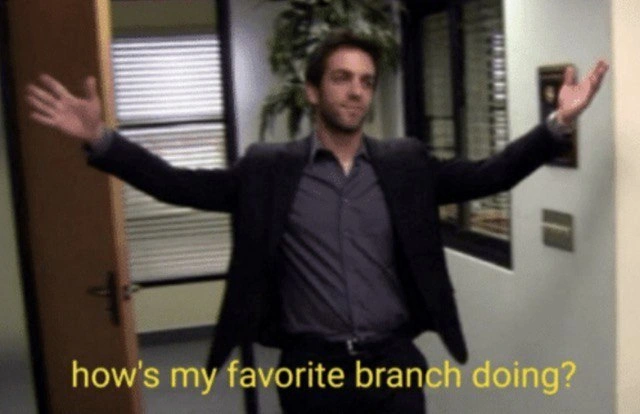
When the lead dev checks in on your long-lived feature branch
Why is this VersionControl meme funny?
Level 1: Favorite Project Check-In
Imagine you’ve been working on a big group project, like building a huge Lego castle with friends. You took a break from it – maybe you went on a little vacation or just had to focus on other homework for a while. During that time, the castle project is still unfinished, sitting off to the side. Now picture your teacher or a friendly camp leader bursting into the room with a big smile, arms wide open, and saying, “Hey there! How’s my favorite castle coming along?” in a super cheerful voice. You’d probably giggle a bit, right? The teacher is talking about the project like it’s a person they haven’t seen in a while. It’s funny because the castle isn’t actually alive (even if you sometimes feel like it has a mind of its own!).
This meme is doing the same thing, but with code. In the world of programmers, a “branch” is like a separate copy of their work (kind of like you working on a copy of the castle). The lead developer is like the teacher or boss, and they’re checking in on this piece of work that’s been going on for a long time. By saying “How’s my favorite branch doing?” in such a playful way, it makes the situation humorous and less tense. It’s as if the branch were a favorite student or a long-lost friend.
Why is that moment both funny and a little awkward? Well, think of how you’d feel if you left your room messy for a week. Then a parent walks in with a huge grin saying, “So, how’s my favorite clean room doing?” You both know the room isn’t clean yet! The cheerful greeting is a friendly tease. In the same way, the lead developer is teasing the programmer about that long-running project branch. It’s their way of saying, “I haven’t forgotten about this! What’s going on with it?” but in a joking, warm manner.
So even if you’re not a coding expert, you can relate: it’s about someone enthusiastically checking on something that probably should have been finished by now. It turns a potentially stressful question (“Why isn’t this done yet?”) into a funny, almost affectionate moment. The picture from the sitcom (like a scene from a comedy show) makes it even more playful. You can almost hear a laugh track in the background! In the end, the meme is reassuring us that even when we procrastinate or things take longer than expected, a little humor can make it easier to face the music and get back to work — just like a big friendly “welcome back” hug for you and your delayed project.
Level 2: Git Branch Reality Check
Let’s break this down in simpler terms and explain the key ideas for those newer to Git and version control. A branch in Git is basically a pointer to a series of commits – think of it as a timeline of changes. When you create a feature branch, you’re making a separate line of development to work on a specific feature or bug fix. This way, you don’t disturb the main code (often the main or master branch) while you work. It’s a super common practice in modern software teams – a core part of many GitWorkflow models.
Now, a long-lived feature branch means this separate line of work has been going on for a long time without being merged back into the main line. “Long” could be weeks or even months. Why is that an issue? Because while you’re working on your branch, other team members are committing changes to the main branch. The longer you wait, the more the main branch drifts away from what your branch started with. By the time you try to merge your changes, the codebases might have significantly diverged. This is where MergeConflicts come into play. A merge conflict happens when Git can’t automatically figure out how to combine changes from different branches – typically because the same lines of code were changed in both branches. If your branch and the main branch both modified, say, utils/dateFormatter.js in different ways, Git will raise its hands and say, “I don’t know which change to take, you need to sort this out.” You’ll see conflict markers in the code (those <<<<<<< HEAD and >>>>>>> other-branch lines) and you have to manually fix things. It’s as fun as it sounds (not very).
So, why would a branch live so long? It might be a big feature that isn’t done yet, or maybe you submitted a Pull Request (PR) – basically asking to merge your branch into the main branch – but the PR is waiting for review. In teams, code review is when peers or a lead dev look over your changes before approving them to merge, to catch bugs or issues. If you go on vacation or get pulled into another task, your branch might just sit there. Ideally, someone reviews it or helps finish it, but sometimes everyone’s busy or they’re a bit wary of touching someone else’s in-progress work. The meme’s post message adds context: “When you come back from vacation and check if anyone reviewed your PRs.” That’s the scenario: you had open PRs, you were away for a while, and now you come back hoping to see that glorious “Merged” notification – but nope. Instead, maybe your tech lead suddenly pings you (or in this case, figuratively bursts into the room) and cheerfully asks about that branch you left hanging. It’s both funny and a little anxiety-inducing. Funny, because of the exaggerated friendliness (as if the branch is a dear pal who’s been around, watering your desk plant or something); anxiety-inducing because it reminds you “oh yeah, I still need to get that code merged and now it’s probably out-of-date.”
The image itself is a guy in an office doorway with a huge grin and open arms. Even if you don’t know the exact sitcom (it’s referencing The Office TV show), you can recognize that trope: a boss or a colleague making a grand entrance saying “Heeey, how’s my favorite X doing?” Usually X is a person or team – like “favorite branch” meaning a branch office or team branch in a company sense. Here, the text swaps in a Git branch as the subject of that greeting. So the dev leader is treating the code branch like it’s a person they haven’t seen in a while. For a newcomer to dev lingo: that’s a playful pun. In Git, a branch is just code, but we often give branches names (feature/add-login, bugfix/payment-crash etc.), and long-lived ones start to feel like distinct projects. The lead dev asking “How’s my favorite branch doing?” is like saying “What’s the status of that long-running feature? Is it alive and well?”
This ties into relatable DeveloperExperience (DX) because whether you’re junior or senior, dealing with branches and merges is part of the job. Early on, you learn that small, frequent merges are easier. If someone mentors you, they’ll warn: “Try not to let a branch sit too long, keep it in sync with main, and push your changes for review regularly.” Maybe you’ve even learned the hard way by experiencing a nasty merge conflict on your first group project (nothing like spending half a day untangling code to teach you a lesson). So when you see this meme, even as a junior dev, you might recall the feeling of a project manager or team lead checking in on your unfinished work. It’s that moment of “uh oh, I hope I have something good to show!” combined with the silliness of the phrasing.
Let’s clarify a few terms in case they’re new:
- Git: It’s a distributed version control system. Basically, a tool that tracks changes in your code over time, and lets multiple developers work on the code simultaneously without stepping on each other’s toes (most of the time).
- Branch: In Git, a branch is like a separate workspace or a parallel timeline of commits. By default, you have a main branch (often named
mainormaster). When you create a new branch, you’re making a copy of that code at a point in time and then working on your copy. Later, you can merge it back. - Feature Branch: A branch dedicated to developing one specific feature or task. It’s a common practice to keep each feature or fix in its own branch. e.g. you might run
git checkout -b feature/login-pageto start a new branch for building the login page feature. - Pull Request (PR): Not a core Git concept, but a feature of platforms like GitHub, GitLab, or Bitbucket. It’s basically a request to merge your branch into another (often into
main). A PR lets others review your code, discuss it, and finally approve merging. It’s how teams collaborate and maintain code quality. - Merge Conflict: What happens when two branches have changed the same part of a file and Git can’t automatically figure out what the final version should look like. The conflict has to be resolved by a human (you), by editing the code to make sense of both changes, then committing the resolution.
Now, the “long-lived” part just means the branch has been around for a long time, with many changes piling up separately from the main line. There’s even an element of branch management strategy humor: some teams have policies like “never let a feature branch live more than a few days” or they enforce continuous integration so that things don’t diverge too far. When those policies aren’t in place (or aren’t followed), you get the scenario we have here.
Picture it from a junior dev’s eyes: You started a branch, you worked hard on a new feature, but it’s taking longer than expected. Maybe you even publish a draft Pull Request and tag your lead, but then you had to pause or you went on a break. A week or two later, your branch is still not merged. The rest of the team has progressed the main branch – perhaps there’s a new library version, or someone refactored the code your feature touches. Now your branch is the odd one out. The lead dev asking about it in a cheery way is kind of a gentle reminder, or could even be read as a bit of a sarcastic jab (depending on team culture). It’s like them saying, “We haven’t forgotten about your feature... in fact, it’s our favorite, because it’s still hanging around!”
If you’ve ever used Git, you probably know that feeling when you run git status on a long-lived branch and see it’s “X commits behind main”. Your heart sinks a little because you know a big merge is looming. The meme exaggerates this with a friendly face instead of an error message. And for anyone who’s watched The Office or similar office comedies, the imagery adds another layer of chuckles – it’s the trope of a boss who’s overly friendly at possibly awkward moments. Combining that with a nerdy Git joke makes it pure DeveloperMemes gold.
To sum up this level: A lead dev checking in on an overdue branch is a scenario that mixes technical challenge (merging old branches) with social dynamics (communicating delays, getting reviews). It’s something a newcomer will encounter eventually, and now they’ll have this meme in mind. You might even preempt your lead by joking, “hey, merging this might be rough – it’s become your favorite branch, eh?” and share a laugh. It’s a lighthearted way to acknowledge a common rookie mistake (or sometimes an unavoidable situation) and to remember that even in serious software work, we find ways to laugh at ourselves.
Level 3: Long-Lived Branch Blues
At the highest level, this meme hits on a familiar VersionControl scenario: the long-lived feature branch. The lead developer bursting in with arms wide (a classic sitcom-style entrance) proclaiming “how’s my favorite branch doing?” is dripping with irony that senior devs know all too well. It’s a comedic mash-up of corporate management clichés with Git puns, and it resonates because it highlights a notorious anti-pattern in BranchManagementStrategy.
In a proper GitWorkflow, feature branches are ideally short-lived – you create a branch to add a feature, get it reviewed, and merge it back into main quickly. But in reality, features can drag on. Maybe the scope expanded, maybe you waited for feedback that never came (especially if you went on vacation hoping Pull Requests (PRs) would be reviewed in your absence), or maybe merging felt risky so you kept putting it off. The result? A branch that’s been alive so long it practically gains personhood. The meme’s humor lies in the lead dev treating this branch like a beloved yet wayward employee: “my favorite branch” – a phrase usually reserved for a branch office of a company (hello, The Office TV reference!) – now applied to a chunk of code that’s gone rogue.
Why is this funny to seasoned developers? It’s a mix of shared anxiety and absurdity. Everyone with some experience has seen a feature branch that overstayed its welcome. It becomes that elephant in the room (or rather, in the repo). The longer a branch lives apart from main, the more it drifts from reality. Other team members continue to commit to main (or develop if you’re stuck in using GitFlow), and your isolated branch keeps accumulating “merge debt.” When the lead dev jovially asks about the branch, it’s likely because they know it hasn’t been merged yet and they’re half-joking, half-nudging: Is this thing ever going to land? They might be picturing the MergeConflicts waiting at the end of this road — those dreaded <<<<<<< HEAD markers ready to strike. It’s a lead dev’s nightmare because long-lived branches often lead to Big Bang merges where everything collides at once, usually right before a deadline.
Practically speaking, this situation arises from a misalignment in DeveloperExperience_DX and process. Modern DevOps preaches “integrate early, integrate often”, but here we are with a sprawling feature branch like it’s 2009. Historically, older version control systems (like SVN or CVS) made branching and merging so painful that teams avoided them or let branches live for entire release cycles. Git changed that with cheap branching and better merges, enabling workflows like GitFlow (which ironically encouraged long-lived branches like develop and feature branches lasting weeks). Over time, many teams realized that those long-lived branches were a source of integration pain, leading to a push for trunk-based development (very short-lived branches, or committing straight to main with feature flags). So this meme also subtly pokes at that evolution: even with great tools, human habits and team culture can recreate the same old problems. The lead dev’s exaggerated welcome is basically saying, “Welcome back to the land of merge hell, my old friend.”
On the interpersonal level, there’s an element of gentle shaming wrapped in humor. The lead dev isn’t literally angry (hence the goofy smile and outstretched arms), but the question “How’s my favorite branch doing?” carries subtext. It implies, “That branch has been around so long that I’ve grown fond of it – maybe too fond. What’s the status? We need to merge it sometime this century.” It’s funny because it’s true: we often use humor to ease the tension around a tough review or a behind-schedule feature. The developer on the branch might grin weakly and reply, “Uh, it’s… doing great! Almost ready to merge!” while internally cringing at the conflicts they’ll have to resolve. The relatable dev experience here is the mix of embarrassment and amusement when your procrastination (or overlong development cycle) is called out in a lighthearted way.
And let’s not ignore the meta-reference from the office_tv_reference context: The image is clearly riffing off The Office sitcom vibes. In that show, a higher-up would visit a regional branch and say something like, “How’s my favorite branch doing?” meaning the Scranton office. In our meme, the branch is not a physical office but a git branch. This play on words adds another layer for those who catch it – it’s a double joke. The lead dev is essentially acting like Michael Scott or some over-enthusiastic regional manager, but instead of checking on sales numbers, they’re checking on code. By combining a pop culture reference with a coding joke, it amplifies the humor for techies: two worlds colliding in one line.
For senior devs, this image might also bring back memories of that one feature that became a running gag in the team. Perhaps every stand-up meeting someone asks “So... that feature branch, still alive?” and everyone chuckles. It’s dark humor because if you’re the one responsible, you know you’re in for a tricky merge, but at least the team finds some levity in the situation. The “favorite branch” phrasing is classic sarcasm. Nobody really wants a long-lived branch – it’s nobody’s favorite in the sense of process – but calling it that softens the truth that it’s a bit of a problem.
In essence, this meme lands so well with experienced developers because it’s a snapshot of DevLife truth: version control gives us enough rope to hang ourselves with branching, and we inevitably learn (the hard way) the importance of not letting a feature branch become an old, out-of-sync monster. The lead dev’s flamboyant entrance is a humorous reminder: don’t be the person still babysitting a “favorite” branch from last quarter. Ship it or strip it, but don’t let it become a legend. Until then, the team might as well give it a pet name and ask about its well-being – after all, it’s practically part of the family now. 😅
Description
The image is a scene from a well-known sitcom: a man in a dark suit bursts through an office doorway with arms spread wide in an exaggerated welcome gesture. His face is blurred for anonymity. The background shows cubicle windows, a door frame, and office plants, giving the impression of a corporate workspace. At the bottom, yellow subtitle-style text reads, "how's my favorite branch doing?" The humor comes from replacing the sitcom’s original line with a Git pun - treating a source-control branch like a person - capturing the awkward yet familiar moment when a tech lead suddenly asks about the status of a half-finished Git branch. It plays on common developer experiences with branching strategies, merge conflicts, and version-control etiquette

Comments
7Comment deleted
Any branch the lead greets like a long-lost buddy has already diverged into an alternate timeline - brace for a 300-commit rebase and a guided tour of git reflog archeology
Ah yes, the branch that's been 'ready for review' for three weeks, has 147 commits, 82 merge conflicts, and somehow still passes CI despite everyone knowing it shouldn't
Every senior engineer knows that moment of cautious optimism when checking on a feature branch after a few weeks - will it merge cleanly, or has main diverged so far that you're essentially looking at an archaeological dig of merge conflicts? The real question isn't 'how's my favorite branch doing?' but rather 'how many hundreds of commits behind main is it, and do I have the emotional bandwidth to deal with the rebase?'
If your org has a “favorite branch”, you’re running snowflake environments inside Git - enjoy the quarterly merge war room and the interest on conflict debt
How’s my favorite branch doing? Great - protected, CI red, and still waiting on a CODEOWNER who left two reorgs ago
When your feature branch has outlived the sprint that birthed it, but still gets more check-ins than main
👆 Comment deleted

