The Elusive 'No Issues Found' Screen
Why is this Bugs meme funny?
Level 1: Out of Sight, Out of Mind
Imagine you’re supposed to clean your room. Instead of actually picking up the toys and trash, you just shove everything into the closet and pull a curtain over it. Then you proudly tell your parents, "Look, my room is totally clean!" On the surface it looks tidy, and you even throw a little celebration for yourself. 🥳 But in reality, the mess is still all there, just hidden out of sight. This meme is joking about the same idea, but with computer bugs. The little robots are celebrating because they think there are no bugs (no mess) at all. They’re vacuuming and sweeping confetti in a perfectly clean room, kind of like you celebrating your "clean" room. The catch is that the only reason everything looks clean is because the problems were hidden by a filter setting (like your mess was hidden in the closet). So the picture is funny because the robots are basically cheering and saying "Hooray, no issues!" when we all know the truth: the bugs might just be hiding where they aren't looking. It's a playful reminder that just because you don't see a problem doesn't mean it isn't there.
Level 2: Filter Fiasco
The meme highlights a funny mishap with a bug tracking system (think JIRA, GitHub Issues, or error trackers like Sentry). In these systems, you usually have a dashboard listing all the bugs or issues in your project. You can apply filters to narrow down what you see — for example, show only open bugs, or only bugs assigned to you, or only high-severity issues. Here, the system says it "couldn't find any issues that matched your filters." That means the filter settings are so specific (or so wrong) that the search turned up zero results.
Normally, seeing "0 issues" would mean yay, no bugs! But as any developer quickly learns, it's rarely that simple in real software projects. There's almost always something in the bug tracker, even if it's a minor glitch or a low-priority tweak. So if you see absolutely nothing, it's a bit suspicious. The meme jokes that instead of truly having zero bugs, the team probably mis-set the filters on their bug tracker or log viewer — essentially, they're looking in the wrong way, so nothing shows up. It's like searching for bugs with a flashlight turned off: you won't find any, but not because they aren't there! This is a classic Debugging lesson for juniors: always check if your tools are configured correctly. For instance, maybe the date range filter is wrong (looking at only the last hour), or the query is pointing to the wrong project name. One common rookie mistake is accidentally filtering for the wrong environment (like looking for errors in "Production" when all your bugs are recorded under "Prod" or another tag). The result? An empty issue dashboard that looks super clean, but only because you're not actually looking at the full picture.
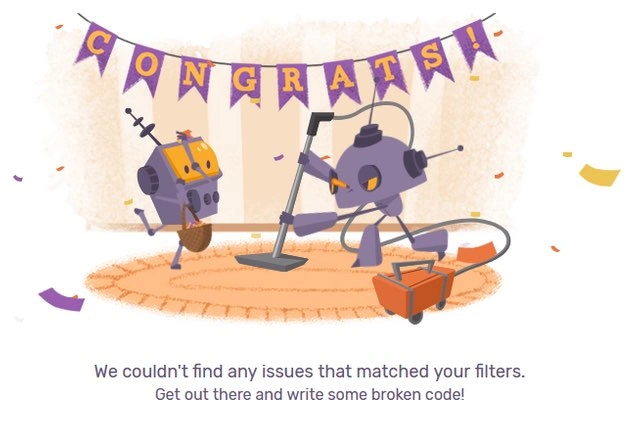
The illustration with the two purple robots is a typical "empty state" artwork that many apps use to keep things light when there's no data to show. Instead of a blank screen, you get these cartoon bots enthusiastically vacuuming and sweeping an already clean rug. It's a cute way of saying "nothing to see here." The "CONGRATS!" banner and confetti are tongue-in-cheek celebration of having no issues. And that extra line, "Get out there and write some broken code!", is a humorous prompt you might actually encounter in an error monitoring tool like Sentry. It literally encourages you to go break something on purpose. Why? Because if you're setting up a new bug tracker or error logger, a typical step is to test it. Often you'll introduce a fake bug or force an error in your application just to see if it gets reported. When nothing is being reported yet, the system nudges you: go ahead and create a small bug so we can confirm everything's wired up.
From a QA (Quality Assurance) perspective, the meme underscores the difference between actually having no bugs and not seeing any bugs. The QA process usually involves actively looking for issues. If your dashboard is empty, a tester would likely double-check: "Am I filtering the right things? Is the system even receiving bug reports?" It's a lighthearted reminder that a bug-free status could be a configuration mistake. In real-life debugging, when you encounter a scenario where you expect to see errors but don't, one of the first steps is to verify your logging and monitoring setup. Is the code that reports errors running? Are the filters or search queries correct? Did someone accidentally turn off the bug feed? These are the troubleshooting basics a junior dev learns pretty quickly after one or two "everything looks perfect... oh wait, it's not" moments.
In summary, the "filter fiasco" shown here is a learning moment: an empty bug tracker might not mean your code is perfect – it might mean you're looking at it wrong. The robots are merrily cleaning up imaginary dust just as a team might congratulate itself on a nonexistent bug count. As a new developer or tester, it's important to remember that debugging isn't just about fixing bugs, it's also about making sure you can see the bugs in the first place.
Level 3: Swept Under the Rug
"We couldn't find any issues that matched your filters. Get out there and write some broken code!"
This cheery message on a bug tracking system's empty dashboard might look like a trophy for flawless code, but every seasoned engineer knows it's more likely a mirage. The meme shows two service-robots joyously cleaning an already spotless rug under a "CONGRATS!" banner with confetti flying — a perfect visual metaphor for a false sense of security in software QA. The larger robot is vacuuming and the smaller one is sweeping; together they celebrate an empty issue list. But why is this funny? Because in real life, an utterly empty bug tracker usually means something's been swept under the rug rather than true perfection.
In a veteran developer's experience, zero bugs is almost never the whole story. If your defect dashboard claims "0 issues", you don't break out the champagne just yet — you start debugging the monitoring setup. The humor here comes from the idea that the team is partying over "no bugs" when in fact they likely misconfigured their filters or logging. It's a hollow victory: the robots (and by extension, the dev team) are oblivious to the fact that they've simply filtered out all the problems. It's like bragging that you have no errors in production when your error logger is turned off. Bugs in software are as inevitable as gravity; an empty bug list can actually be more suspicious than one or two minor issues.
This meme pokes fun at a common scenario in Debugging & Troubleshooting: when your tools tell you everything is fine, but your gut (or your grizzled senior teammate) says "Check the settings". In practice, an empty issue board often indicates one of a few classic situations:
- Nothing being tracked – Perhaps the error logging or bug tracker integration isn't working at all. (Ever had that "Oh, we forgot to initialize Sentry in production" moment?)
- Filters too strict – The team applied an alerting filter or search criteria so narrow that no existing bugs qualify. For example, filtering by only
priority: Criticalor the wrong project name, resulting in an empty query. - New deployment or no users yet – The code hasn't been used enough to generate bug reports, or it's a fresh project. One could momentarily have no issues simply because nothing has happened (the calm before the storm).
- Issues hidden or suppressed – In worse cases, someone might be gaming the QA process: closing bugs prematurely or adjusting statuses to get that coveted "zero bugs" metric. (Yes, some managers care about bug counts more than actual quality, leading to all kinds of filtering shenanigans.)
The combination of the celebratory scene and the caption reveals an industry inside-joke: QA engineers and developers have learned to be skeptical of empty issue dashboards. The robots' blissful ignorance mirrors that of a dev who proudly announces a bug-free release, only to have a senior dev raise an eyebrow and ask, "Are you sure our logging is pointed at the right environment?" The confetti and "CONGRATS!" banner are sarcastic – it's like the application is congratulating you for achieving the impossible (zero bugs!) while nudging you with a wink: "Maybe go write some broken code to make sure I'm working." In fact, the text "Get out there and write some broken code!" is a tongue-in-cheek prompt seen in tools like Sentry, which use playful empty-state messages. It's practically saying, "We haven't seen any errors — maybe trigger one on purpose to verify everything's hooked up." The senior perspective recognizes this as a friendly taunt from the system, not a true all-clear signal.
Ultimately, the meme gets a knowing chuckle from experienced devs because it's a snapshot of debugging reality: sometimes the hardest bug to find is the fact that your bug tracker itself isn't finding bugs. It's a satirical reminder that Debugging and Troubleshooting often starts with questioning the tools and assumptions. The scene of overzealous robots cleaning a perfectly clean rug lampoons our impulse to declare victory too early. Any battle-scarred engineer has learned that in software, "no news is never simply good news". It's either an omen of hidden problems or the result of someone accidentally (or intentionally) filtering out the bad news.
Description
A screenshot of a humorous 'zero results' message from what appears to be an issue tracking system. The top portion is a charming illustration of two purple robots celebrating in a room. One robot is happily vacuuming a rug, while the other prances with a basket. A purple banner with yellow letters spelling 'CONGRATS!' hangs above them, with confetti falling. Below this cheerful scene, the text reads: 'We couldn't find any issues that matched your filters. Get out there and write some broken code!'. This meme captures the rare and joyous moment a developer finds their bug queue empty, immediately followed by a cynical, self-aware joke that their primary job function is to create new bugs. It's a playful nod to the cyclical nature of software development and the inevitability of introducing new issues while building features

Comments
7Comment deleted
An empty bug queue is the calm before the storm - the 'storm' being the next feature request from product
When the defect list is spotless, verify the WHERE clause before bragging to the execs - the last thing you want is to discover production’s still sweeping exceptions under the rug
The only time your Jira board looks this clean is 5 minutes after the sprint planning meeting, right before someone remembers the critical bug that's been in production for three months
Ah yes, the mythical 'zero open issues' state - usually achieved not by fixing bugs, but by perfecting your Jira query filters. The robots celebrating with cleaning equipment is particularly apt: in production, we're not debugging, we're just 'tidying up unexpected features.' The real irony? This empty state probably has better test coverage than your actual codebase, and that 'write some broken code' suggestion is the most honest product requirement you'll see all sprint
Nothing says “prod is healthy” like a zero‑issue queue - right after someone filtered by env:prod and the client SDK was disabled
Issue filters so tight, even the vacuum bots are redundant - deploy that refactor and give 'em purpose
Empty error list? Either we've hit five-nines or someone set the filter to 'staging, last 5 minutes' - both keep the pager quiet, only one keeps reality quiet