Skip to content
DevMeme
1680 of 7435
Started with four bugs, ended the day with eleven - debugging reality check
Bugs Post #1876, on Aug 6, 2020 in TG

Started with four bugs, ended the day with eleven - debugging reality check

Why is this Bugs meme funny?

Level 1: Small Fix, Big Mess

Imagine you’re cleaning your room. In the morning you see four toys on the floor that you plan to put away. Should be quick, right? But as you start picking up those toys, you notice more toys hidden under the bed and behind the closet. By the evening, you’ve found eleven toys that were out of place and need cleaning up! Now you’re surrounded by an even bigger mess than you started with. You say to yourself, “Okay, don’t panic… only 11 left to put away,” trying to stay calm even though it’s way more work than you expected. It’s a bit funny and a bit frustrating at the same time: you tried to fix a small problem (tidy up a few toys), and it turned into a much bigger job (a room full of stuff to clean).

That’s exactly what the meme is joking about, but with computer bugs instead of toys. The programmer thought they had a few bugs to fix, but fixing those revealed a bunch more problems hiding in the code. It’s a silly way to say that sometimes, when you try to solve a problem, you uncover even more problems. The humor comes from that surprise: starting with 4 and ending with 11 feels like a tricky game where the more you clean up, the more you find that needs cleaning. It’s something anyone can understand – whether it’s toys on the floor, weeds in the garden, or bugs in software, sometimes a small task turns into a big project. The meme makes us smile because we’ve all been there, thinking “I got this!” and then later, “Whoops, this is bigger than I thought.”

Level 2: Whack-a-Mole Debugging

Let’s break down what’s happening in this meme in simpler terms. In software development, a bug is a mistake or error in the code that causes the program to behave in a wrong or unexpected way. For example, a bug could be a calculation that adds numbers incorrectly, or a button that crashes the app when clicked. The act of finding and fixing these problems is called debugging (literally “de-bugging,” like taking bugs out of the code). Fun fact: the term debugging originated when early computer engineers discovered a real moth stuck in a relay causing an error – they removed the insect, and the term “debug” was born! Ever since, any glitch or defect in a program is humorously called a "bug", even though they’re not literally insects.

Now, developers often start their day with a to-do list of bugs to fix. Let’s say our developer here began the morning with 4 known bugs to resolve. Maybe these were recorded in a bug tracker or written on a sticky note – something like: Bug 1: Fix crash on login, Bug 2: Total price miscalculation, Bug 3: Align the logo on the homepage, Bug 4: Typo in error message. They plan, “Alright, I’ll knock these out by this evening.” Debugging_troubleshooting tends to sound straightforward: find the cause of each bug and fix it. But in reality, it can be tricky. When you fix one bug, sometimes you unintentionally introduce a new bug elsewhere or discover additional problems in the process. This meme highlights exactly that: by the evening, instead of having 0 bugs left, the developer has 11 bugs left. How can that be?

Several things could have happened during the day:

  • Some bug fixes caused regressions. A regression is when a change in the code breaks something that used to work. It’s like taking one step forward but then two steps back. For instance, in trying to fix the login crash (Bug 1), the developer might change how user data is initialized. That fix stops the crash, but later in the day they find out it logged everyone in as an “admin” by accident – oops, that’s a brand new bug! Now that’s added to the list.
  • The developer might have discovered new bugs while working on the original four. This is common: you go in to fix one error, and while digging around that code, you stumble on some other lurking issue that nobody noticed before. It’s like going to clean a small stain on the carpet, and then realizing the entire carpet has patches you hadn’t seen – now those need cleaning too. So those newly discovered problems get added as additional bugs to fix.
  • The project might involve legacy code, which means old code written by someone else (possibly years ago) that you don’t fully understand at first. Legacy code can be quirky: there may not be good documentation, and it might be written in an outdated or just peculiar style. When you fix one part of legacy code, you have to be very careful because you might not realize how that part connects to others. If the code is entangled (we sometimes call messy, intertwined code a “spaghetti code” codebase), a change in one place can affect many other places unexpectedly. The developer in the meme probably touched something in that tangle and caused a chain reaction of issues – like pulling one thread that knots up others.
  • It’s also possible the bug count went up simply because fixing the known issues allowed the team to finally run parts of the application that weren’t reachable before. For example, imagine there was a bug that always crashed the app at step A. Once you fix that, the app can proceed to step B – but then it hits a different bug and crashes there. Now the team logs that as a new bug. It’s not that the developer wrote bad code; it’s that the system hadn’t gotten to step B in a long time, so nobody knew a bug was waiting there. They essentially unblocked the path to find the next problem.

This whack-a-mole effect – where you fix one issue and two more pop up – is well-known in software circles. In fact, “playing whack-a-mole” is a phrase developers use often to describe this situation. Whack-a-mole is an arcade game where plastic moles keep popping out of holes at random, and you have a mallet to hit them down; every time you whack one, another pops up elsewhere. Debugging can feel exactly like that game: as soon as you solve one bug, another (or several others) show up somewhere else in the program. It can be frustrating, but it’s also pretty normal, especially in complex projects. This meme is a form of developer humor that gets a laugh (or a sympathetic groan) from programmers because it’s a relatable humor scenario. Everyone who has written code has experienced a day where what they thought would be a simple debugging session turned into a marathon of new problems.

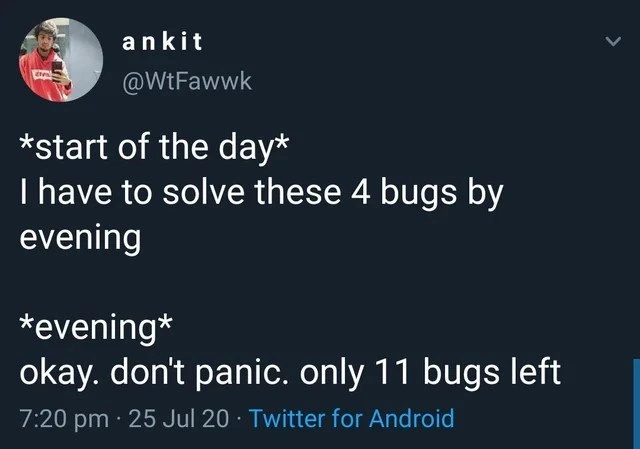
The tweet format of the meme is also worth noting. It uses a storytelling style: “start of the day” and “evening” to contrast expectation vs reality. The developer begins confident – just four pesky bugs and they’ll be done. By the evening update, you can almost hear the exhaustion: “okay. don’t panic. only 11 bugs left.” The phrase “don’t panic” is something we tell ourselves to stay calm, and saying “only 11 left” is ironic because 11 is a lot more than 4! This tongue-in-cheek dramatization is exactly how devs share their DebuggingFrustration in a lighthearted way. It’s a bit of a SharedPain moment – other developers see this, nod their heads, and maybe reply with their own war stories (“Hah, yesterday I fixed 2 bugs and ended up with 5 new ones, I feel you!”).

From a learning perspective, this meme also gently highlights why practices like testing are important. Good teams write automated tests (unit tests, integration tests) for their code so that when you fix one thing, you can run the tests to see if something else broke. They also do code reviews, where another developer looks at your fix to catch any obvious issues it might cause. These processes help catch regressions early, but even with them, you can’t catch everything. As a new developer, it’s important not to get discouraged by this phenomenon. It happens to everyone, and it doesn’t mean you’re a bad coder – it just means the system is complex. The key is to stay systematic: fix bugs one by one, test thoroughly, and don’t be afraid to ask teammates for help when a fix causes confusing new behavior. The meme’s exaggerated outcome (4 bugs turning into 11) is a fun reminder that in coding, things can always get more complicated than they seem. It teaches you to expect the unexpected.

So, in summary: the meme shows a programmer’s day where debugging turned into a game of debugging whack-a-mole. It’s categorized under Bugs and Debugging_Troubleshooting because that’s literally the topic, and it speaks to the daily DeveloperExperience_DX of dealing with ever-multiplying bugs. It’s funny because it’s true – any developer, junior or senior, can relate to the sinking feeling of “I fixed one thing and now three other things are acting up!” and sometimes all you can do is laugh about it and maybe tweet something out to vent.

Level 3: Law of Conservation of Bugs

Every seasoned developer will chuckle (or groan) at this scenario, because it rings so true. There’s even an unofficial law in programming folklore: Lubarsky’s Law of Cybernetic Entomology, which wryly states, “There’s always one more bug.” In practice, it often feels like there’s not just one more bug, but a whole brood hiding in the walls. You start the day with a tidy list of four known issues, determined to drive them to zero, and end the day discovering seven additional problems you never knew existed. It’s as if bugs obey a conservation law – fix one, and the “bug mass” pops up elsewhere in the project. This dark humor is exactly what the tweet-format meme is conveying: the optimistic morning DeveloperExperience_DX (“I’ll polish off these 4 bugs by EOD”) meets the harsh debugging reality by evening (“okay, don’t panic, only 11 bugs left”). The punchline is that rueful “only 11 left,” as if the developer is giving themselves a pep talk when in fact their workload nearly tripled. It’s a classic debugging frustration moment that every developer reading it immediately recognizes. We’ve all been there, shaking our head at the bug counter going up instead of down, muttering “How can fixing stuff break other stuff?!”

Why does this happen so often? A few common culprits lurk behind the bug multiplier effect:

  • Regression Bugs: Often, fixing one thing accidentally breaks something else that was working. Maybe you updated a function to handle an edge case, but another part of the code relied on the old behavior – now that other part malfunctions. This is literally called a regression: the software has “regressed” to a broken state in an area that was previously fine. For example, you might fix a rounding error in a price calculation function, and suddenly the invoice generation (which expected the old rounding behavior) starts misprinting totals. Oops, now that’s a new bug.
  • Hidden Bugs Uncovered: Sometimes the original bug was acting like a cork in a leaky dam – it stopped the program flow before reaching another flaw. Once you fix bug #1, the execution can progress further, only to hit bug #2 lurking deeper in the code. It’s not that your fix created bug #2; it simply revealed it. Imagine an app always crashed at step 5 (bug 1); you patch that crash, and for the first time the app makes it to step 6… where it promptly crashes on a different error (bug 2). You feel like you’re peeling an onion of pain, uncovering layer after layer of issues that no one encountered before.
  • Ripple Effects in Spaghetti Code: In a well-designed system with clear-cut module boundaries, a change in one component ideally shouldn’t break others. But let’s be real – plenty of projects (especially older legacy code) are more like a tangled ball of spaghetti. Global variables, copy-pasted code, mysterious dependencies… Touch one strand and the whole bowl quivers. In such a system, fixing “just one bug” is like trying to remove one card from a house of cards: you disturb the fragile balance and unrelated sections topple over. The codebase might have poor separation of concerns, so a change in the user login code somehow impacts the shopping cart calculation (because, why not? maybe they shared a utility function or global setting). This tight coupling means any local fix can have far-reaching effects — the very definition of a regression spiral.
  • Quick Fixes & Incomplete Understanding: Under pressure to hit that evening deadline, developers might implement a quick fix that treats the symptom, not the root cause. It stops the error message, so it seems like the bug is solved… until later when a slightly different scenario triggers a similar issue because the underlying problem is still there. Junior devs (and yes, even tired senior devs at 7 PM) can misjudge how a change interacts with the whole system. Without fully understanding a convoluted legacy module, a “fix” might violate some assumption elsewhere. Side effects are the bane of debugging: maybe that one-line change fixed the calculation for regular users but inadvertently set a default that breaks admin users’ reports. Now you’ve got new bug reports coming in, and your bug list grows by nightfall.

All these factors boil down to one reality: software is complex and interconnected. Even small changes can have unintended outcomes, especially in large or poorly-documented codebases. That’s why teams do code reviews, write automated tests, and perform regression testing – to catch these surprises. But no process is foolproof. Miss a test case, or have an unclear requirement, and sneaky bugs slip through. The meme’s humor hits home because it exaggerates a common developer experience: the debugging whack-a-mole game. You whack one mole (squash one bug), and three more pop their heads up with a grin. It’s practically a rite of passage in software development to, at least once, leave the office with more bugs on your plate than you started with.

Notice also the format: the meme is a screenshot of a tweet by a developer named ankit (@WtFawwk). The use of *start of the day* and *evening* in asterisks is a popular way on Twitter to denote stage directions or narrate time jumps, almost like writing a tiny play. It sets up a contrast between morning optimism and evening reality. The timestamp “7:20 pm · 25 Jul 20 · Twitter for Android” shows this person likely venting at day’s end via their phone – a modern-day developer coping mechanism. Turning stress into humor for a moment of internet fame (or at least a few commiserating likes) is how we developers often deal with the madness. After all, if you don’t laugh, you might just cry. The phrase “okay. don’t panic. only 11 bugs left” perfectly nails that sarcastic, self-soothing tone. As any experienced engineer will tell you with a smirk, “Only 11 bugs? That’s basically zero in developer math.” In other words, we laugh so we don’t scream. Everyone reading that tweet can almost see themselves at their keyboard, late in the day, discovering yet another issue and whispering “you’ve got to be kidding me…” before tweeting something similar. It’s shared pain, and knowing others have survived it is oddly comforting. The reality check is clear: debugging isn’t a tidy, linear process – it’s an unpredictable slog through a minefield of BugsInSoftware, but at least we’re all slogging through it together.

Level 4: Butterfly Effect in Code

In large software systems, a tiny change can unleash outsized consequences – a bit like the butterfly effect in chaos theory. Fixing a single bug can subtly alter the program’s behavior or timing, which then triggers other latent bugs to surface. Software isn’t a collection of isolated little tasks; it’s an interconnected web of modules, functions, and states. Change one part, and you might inadvertently impact others. In a highly coupled codebase (where many pieces depend on each other’s inner workings), this one-fix-many-bugs phenomenon is practically baked in. A short tweak in the morning (the butterfly flapping its wings) might cause an unexpected crash in some far-off feature by evening (a tornado on the other side of the codebase). This meme comically captures that chaotic reality: one developer’s harmless attempt to clear 4 bugs leads to an explosion of 7 new ones, as if the code base had a mind of its own reacting to each fix.

From a theoretical perspective, ensuring a complex program is completely bug-free is akin to solving an unsolvable puzzle. The space of possible interactions and states in software grows combinatorially with each new feature or fix – meaning it grows so rapidly that it’s effectively impossible to test every combination. There’s even a whiff of the Halting Problem here: Alan Turing proved we can’t have a perfect general algorithm to decide what any given program will do in all cases. Likewise, we can’t anticipate every ripple a code change might cause in a non-trivial system. Formal verification and exhaustive testing attempt to mathematically prove correctness for critical software (like airplane control systems), but for your average app, that level of rigor is impractical. Instead, we rely on best-effort testing… and accept that occasionally a “butterfly” fix will stir up a swarm of new issues. In other words, the moment you think you’ve squashed those last 4 bugs, the universe of code finds a way to present you with a fresh batch – as if to maintain a mischievous equilibrium. It’s almost a law of nature in programming that complexity always finds the cracks.

Description

The image is a dark-mode screenshot of a tweet from the user “ankit” (@WtFawwk), featuring a small blurred profile photo on the left. The tweet text states: “*start of the day* I have to solve these 4 bugs by evening *evening* okay. don't panic. only 11 bugs left”. Below the message, Twitter metadata reads “7:20 pm · 25 Jul 20 · Twitter for Android”. White text sits on a navy background, framed by the standard Twitter UI. Technically, the joke highlights how fixing a handful of defects often reveals or introduces many more, a phenomenon familiar to engineers battling regression bugs and hidden edge cases in legacy code

Comments

6
Anonymous ★ Top Pick Fixed the four visible defects, triggered eleven side-effects - turns out our monolith also supports cascading CREATE BUG ON UPDATE
  1. Anonymous ★ Top Pick

    Fixed the four visible defects, triggered eleven side-effects - turns out our monolith also supports cascading CREATE BUG ON UPDATE

  2. Anonymous

    The first 4 bugs were just the symptoms. The other 7 are what you found when you actually looked at the code instead of just restarting the service and hoping for the best

  3. Anonymous

    This perfectly captures the Hydra principle of legacy codebases: fix one bug, and three more emerge from the tightly-coupled architecture you've been meaning to refactor for two years. By evening, you're not debugging anymore - you're doing archaeological excavation through layers of technical debt, discovering that the 'simple fix' requires touching a God class with 47 dependencies and zero test coverage. The real question isn't how 4 bugs became 11, but whether you should update the sprint burndown chart or just quietly update your résumé

  4. Anonymous

    Bug backlogs obey conservation of complexity: close 4 tickets, open 11 regressions and a retro on why 'low-risk' patches exist

  5. Anonymous

    Bugs follow exponential growth: fix n, queue becomes 2.75n by close of business - classic undocumented feature of any nontrivial monorepo

  6. Anonymous

    Fixed 4, got 11 - our bugfix function has gain > 1; the burndown chart just turned into a control loop begging for a release freeze

Use J and K for navigation