Browser Engine Fine Dining
Why is this WebDev meme funny?
Level 1: The Broken Cookie
Imagine you have two friends at snack time. You give each of them a cookie. One friend is super fussy: if the cookie has even a tiny piece broken off, they refuse to eat it – “Eww, it’s not perfect!” They want the cookie to be whole and just right. The other friend is more easygoing: even if the cookie is a bit cracked or broken, they’ll shrug, say “No problem!” and eat it happily. In this meme, Firefox is like the fussy friend who won’t touch the snack if it’s not exactly how it’s supposed to be, and Chrome is like the easygoing friend who gobbles it down even if it’s a mess. It’s funny because we’re comparing how two web browsers “eat” a piece of code. One browser is picky and complains when the code isn’t perfect (it won’t show the picture because something in the code was broken), and the other browser doesn’t mind and shows the picture anyway. So it’s like serving the same slightly broken treat to two people: one panics and won’t taste it, the other one smiles and eats every crumb. That contrast – one saying “No way, I can’t deal with this!” and the other saying “Mmm, still good!” – is exactly why the picture is humorous and so relatable to people who build websites.
Level 2: Picky vs Forgiving Eaters
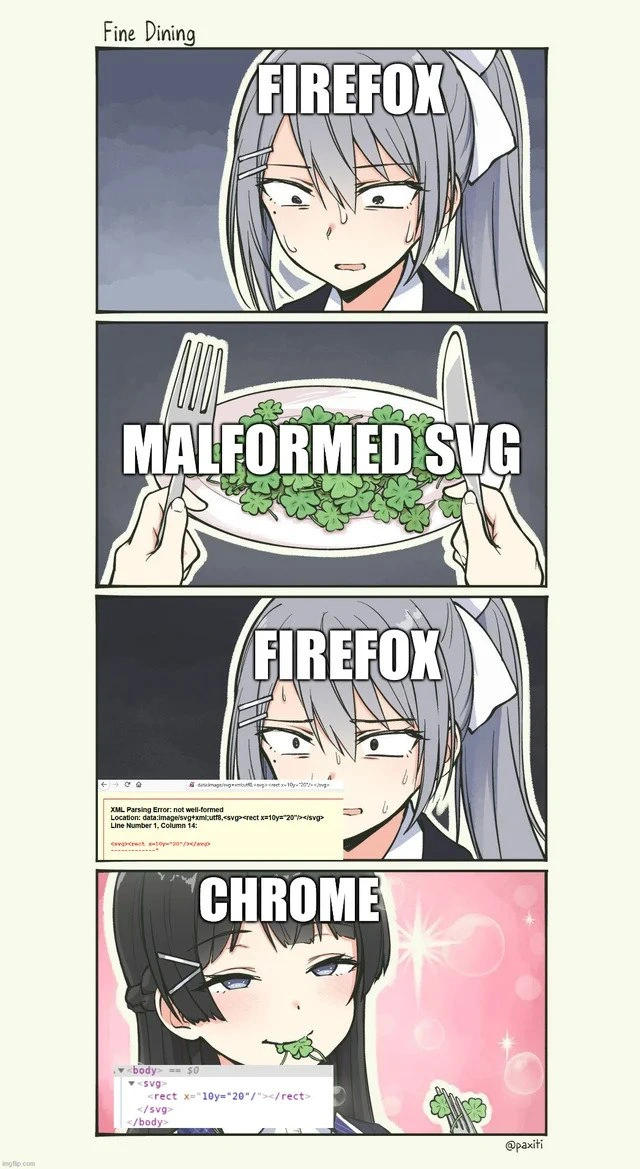
So, what’s happening here? This meme is about web development and the sometimes buggy differences between browsers. The dish on the plate is a chunk of SVG code. SVG stands for Scalable Vector Graphics, which is a way to draw images with XML code (kind of like drawing instructions). XML is a strict format – the rules say every tag that opens must close properly, just like matching parentheses in math. A malformed SVG means there's a mistake in that SVG code structure. In this case, the developer wrote a <rect> (rectangle) tag without closing it. It’s like leaving a quotation mark hanging in a sentence – it confuses the browser.
Firefox (the gray-haired anime maid in the meme) is shown as a picky eater here. The text “XML Parsing Error: not well-formed” in panel 3 is literally what Firefox shouts when it encounters bad XML. It’s Firefox saying: “I can’t swallow this, there’s something wrong with it!” Firefox strictly follows XML rules (this is called strict XML parsing). If the SVG code isn’t perfectly in order, Firefox refuses to display it at all. That’s why in the meme Firefox looks worried and starts sweating; she’s presented with a plate of coding errors (the “MALFORMED SVG” vegetables) and just can’t eat it. In real web development, this means your image or graphic simply won’t show up in Firefox, and you’ll see an error like the one shown.
Chrome (the dark-haired maid with a smug face in panel 4) is the opposite – a forgiving eater. Chrome’s engine is designed to be more relaxed about certain errors. It tries to make sense of even broken code. In the meme, Chrome happily munches on the malformed SVG as if nothing is wrong. The Chrome DevTools window visible near her shows the SVG rendered normally (you can see <svg> ... <rect x="10" y="20" ...></rect> ... </svg> inside the <body> tag in the screenshot). This means Chrome went ahead and fixed or ignored the mistake (it likely auto-closed the <rect> tag internally). In practical terms, as a developer you might not even realize your SVG code had an issue if you only test in Chrome, because Chrome displays it without complaint.
The humor and frustration behind this meme come from BrowserCompatibility issues. “Browser wars” is a lighthearted term for how different browsers (like Firefox, Chrome, Safari, etc.) behave differently. Each browser has its own engine under the hood (Firefox uses Gecko, Chrome uses Blink), and they don’t always agree on how to handle mistakes in web code. This leads to classic frontend development bugs: something works in one browser but not in another. If you’re newer to web dev, imagine you added an SVG image to your webpage. In Chrome, the image shows up fine, so you think all is well. But then a user or a tester opens your page in Firefox and the image is just missing with an error. 😱 You check Firefox’s developer console and see an error message complaining about an XML parsing issue. That’s Firefox essentially being more standards-compliant and telling you “your code has a problem.” Chrome didn’t warn you, so it was easy to overlook the bug. This meme captures that scenario with a funny anime meme format called "Fine Dining", where the browsers are personified as people trying to eat a meal. The anime style maids make it visually amusing, but it’s really illustrating a tech lesson: always close your tags properly (especially in XML-based stuff like SVG), and always test in multiple browsers! The BrowserDevTools (like the Chrome DevTools shown) are a lifesaver here, because they help you inspect what the browser did with your code. In Chrome’s dev view, you’d see that it fixed the missing </rect> for you, whereas Firefox’s dev tools would show nothing because it flat-out refused the SVG. This difference between FirefoxBrowser and Chromium-based browsers is a common quirk. Frontend devs often have to remember these little differences or consult compatibility docs. In summary, Firefox is acting like the strict teacher who marks your work wrong for any little mistake, and Chrome is the easygoing teacher who gives you the benefit of the doubt. The meme humorously shows how that dynamic plays out over a “meal” of code.
Level 3: Cross-Browser Culinary Clash
At the cutting edge of Frontend Development, this meme serves up a proverbial browser compatibility feast. It highlights how two major browsers – Firefox (using the Gecko engine) and Chrome (with the Chromium/Blink engine) – handle a malformed serving of code differently. The "dish" in question is an SVG (Scalable Vector Graphics) image that isn't properly formed (think of an SVG as an XML-based vector image format). In the first panel, the Firefox character eyes a plate of malformed SVG veggies nervously. The code on that plate has a bug: a <rect> tag isn't closed correctly, making the SVG not well-formed XML. Firefox, being a stickler for standards, immediately chokes – it throws a XML parsing error and refuses to render anything at all. This is strict XML parsing in action (often dubbed draconian error handling in XML land): one tiny syntax mistake and the parser says "Nope, I'm done!"
Meanwhile, in the final panel, the Chrome character cheekily munches on the same broken SVG without a care. Chrome’s engine is more lenient and essentially autocorrects or ignores the SVG’s flaw, rendering the image just fine. This difference is a classic Frontend cross-browser bug scenario: code that “works in Chrome” but breaks in another browser. Seasoned web developers immediately recognize the humor and pain here – we've all heard, “But it works on my Chrome!” 🙃. It’s a browser war of philosophies: Firefox adheres to the XML spec to the letter (no well-formed XML, no render, period) as if on a strict diet of standards, while Chrome follows the HTML5 mentality of being forgiving with parsing errors (a more lenient palate, willing to digest whatever it can).
Under the hood, the discrepancy comes from how each browser processes an inline SVG. SVG images are XML documents, so Firefox’s XML parser demands every tag be properly closed and nested. In our meme’s example code, the developer forgot to close the <rect> tag (it should be either </rect> or self-closed as <rect ... />). Firefox encounters this malformed SVG data and barfs out an error box (shown in panel 3 as an XML Parsing Error, at “Line Number 1, Column 14” – right where it noticed the structural problem). Chrome, on the other hand, treats the data more like HTML (where parsers are designed to recover from minor mistakes). Chrome’s DevTools screenshot (in panel 4) even shows the DOM structure: it happily added a </rect> for you inside the <svg> and rendered the green graphic, sparkles and all ✨. Essentially, Chrome eats the error and keeps going. This comedic contrast riffs on real-life debugging: one browser acting as a stern code critic and the other as an easygoing friend. It’s funny because it’s true – such BrowserCompatibility issues can drive developers crazy. You might spend hours wondering why your feature works fine in Chrome but just won’t show up in Firefox, only to discover a tiny syntax bug. The meme’s “Fine Dining” title is ironic: Firefox expects a perfectly plated, standards-compliant meal (or it sends it back to the kitchen), whereas Chrome will scarf down even a sloppy dish and ask for seconds. For senior devs, this meme hits on the broader lesson: be mindful of strict vs forgiving implementations. Web standards and browsers evolve, but the old mantra remains – always test your web app in multiple browsers, because what one browser accepts, another might spit out with a laugh (or an error box).
Description
A four-panel anime comic strip titled 'Fine Dining' that personifies the rendering engines of Firefox and Chrome. In the first panel, an anime girl with silver hair, labeled 'FIREFOX', looks stressed and disgusted. The second panel shows a plate of clovers labeled 'MALFORMED SVG' being served to her. The third panel shows Firefox's reaction: she is horrified, and in front of her is a depiction of the Firefox browser displaying a yellow error box with 'XML Parsing Error: not well-formed'. The error points to an invalid attribute in an SVG tag: '<rect x=10y="20"/>'. The final panel shows a different, smug-looking anime girl with black hair, labeled 'CHROME', calmly eating the clover. In front of her, the Chrome DevTools inspector is shown successfully parsing the broken SVG code and creating a DOM tree, effectively ignoring the error. The meme humorously illustrates the long-standing difference between Firefox's strict, standards-compliant parser, which rejects invalid code, and Chrome's more lenient parser, which often attempts to correct or interpret broken code to render something anyway. This is a classic frustration for web developers who find their code works in one browser but not another
Comments
13Comment deleted
Firefox treats the spec like a legal document, while Chrome treats it as a list of suggestions. That's why your UI looks 'fine' in Chrome until you realize it's built on a foundation of syntax errors and regret
Chrome reads a half-closed <svg> and mutters “Postel’s Law, looks fine,” while Firefox declares a SEV-0 and halts - guess which browser QA uses and which one Product demos with
After 15 years in the industry, you learn that 'works in Chrome' is just another way of saying 'we'll fix the SVG validation errors when a Firefox user files a bug report in production' - which is exactly why your monitoring dashboard silently filters out XML parsing errors
Firefox is that senior architect who refuses to merge your PR because you forgot a semicolon in the JSDoc, while Chrome is the tech lead who just ships it to production with a 'works on my machine' and somehow it actually does. Both approaches have merit, but only one lets you sleep at night when the SVG inevitably breaks in Safari
Firefox: SVG spec purist, rejects malformed like TypeScript noping a bad type. Chrome: JavaScript vibes - 'Eh, it'll render, ship it.'
Gecko reads the spec; Blink reads your typo, and your visual-regression suite files the incident
Firefox reads the spec; Chrome reads your intent - one throws “XML not well‑formed,” the other draws the rectangle and gives QA a false sense of quality
Use Firefox for vk music and vk opt Comment deleted
Dude, who needs vk? Comment deleted
I use it only for music and memes Comment deleted
You defenitely should use Tor! Otherwise secret service officers will know about your terrible taste in music 😉 Comment deleted
Use Firefox for vk music and vk opt myspace Comment deleted
АХАХАХАХАХХАХАХАХАХАХАХАХ Comment deleted