Skip to content
DevMeme
2123 of 7435
The Raw Power of 'docker-compose down'
Containerization Post #2372, on Nov 27, 2020 in TG

The Raw Power of 'docker-compose down'

Why is this Containerization meme funny?

Level 1: Tiny Command, Big Impact

Imagine you have a giant building full of lights and machines, and you flip one little switch that makes the entire building go dark and quiet. You’d feel pretty powerful, right? That’s what’s happening here, but with computer programs. The developer types a short command (like a tiny switch) to turn off a bunch of services running together. It’s a simple action — just typing a line and pressing Enter — but it causes a huge effect: all the running parts of an app stop at once. The meme jokes that doing this makes the person feel as mighty as a hero using magic to pull a huge spaceship out of the sky. In other words, a small everyday action in coding can feel as dramatic as a scene from Star Wars. It’s funny because in reality nothing flashy is visible (just text on a screen), but inside the developer’s mind it’s an epic, triumphant moment.

Level 2: Bringing the Stack Down

Let’s break down what’s happening in more relatable terms. Docker is a technology that allows developers to package applications into lightweight, isolated units called containers. You can think of a container as a mini-computer or a sandbox that holds one piece of your application (for example, one container might hold a database, another might hold a web application, etc.). Docker Compose is a tool that helps manage and run multiple Docker containers together as a single “stack” or group, defined by a YAML configuration file (commonly docker-compose.yml). Instead of starting and stopping each container one by one, Docker Compose lets you control the whole group with simple commands. For instance, docker-compose up will launch all the services defined in the config, and docker-compose down will stop and remove them all.

So, when you execute sudo docker-compose down in a terminal, here’s what actually happens: the command tells Docker to stop all the running containers that were started by your Compose setup. “Stopping” a container means the application inside it is told to shut off (kind of like shutting down a program on your computer). The docker-compose down command also cleans up the Docker network that was created for those containers, and if you’ve configured it to do so, it can remove any stored data (volumes) related to those containers. Essentially, you are turning off an entire multi-component application with one instruction. The sudo part means you’re running it with administrator privileges, because controlling Docker often requires higher permission (Docker needs low-level access to your system to manage containers).

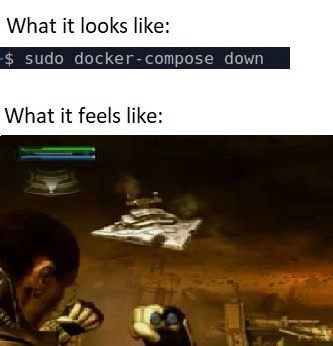
The meme compares this real-life command-line action to a dramatic scene from a video game (specifically Star Wars: The Force Unleashed). In that scene, a powerful user of “the Force” literally drags a gigantic Imperial Star Destroyer spaceship out of the sky and smashes it down. The top text “What it looks like:” paired with the $ sudo docker-compose down snippet shows the plain, unexciting reality — just a developer typing a command in a text-only CLI (Command-Line Interface) window. There’s no fancy graphics, no explosions, just the cursor blinking. But the bottom “What it feels like:” image illustrates the emotion of that moment: it feels as if you just did something as monumental as pulling a starship from orbit.

Why would shutting down containers evoke that feeling? For many developers (especially those in DevOps/SRE roles), controlling infrastructure or services with a single command is a powerful experience. You might be tearing down a whole testing environment or stopping a set of microservices – and doing it instantaneously. There’s a sense of epic scale versus simple action. It’s also a bit of a relief and adrenaline rush rolled into one. If you’ve ever been responsible for a bunch of services, the moment you bring them all down (hopefully intentionally and not due to a crash!) you can’t help but picture something dramatic. It’s relatable developer humor: we often exaggerate our everyday coding and server tasks as grand battles or heroic feats to make them fun. After all, managing even a small fleet of containers can feel like commanding a spaceship fleet when you’re deep in the zone. This meme cleverly uses the Star Destroyer scene to capture that feeling. Even if you’re a relatively junior developer just learning containers, the first time you run docker-compose down and watch all your app pieces stop one by one, you might think, “Whoa, I have the power!” — half-joking, half-proud. The meme just takes that internal feeling and dials it up to sci-fi blockbuster levels for comedic effect.

Level 3: Jedi-Level Container Control

On the surface, running docker-compose down is a mundane command in a terminal, but under the hood it's orchestrating a mini infrastructure teardown of your containerized stack. Think about it: with one line, you're instructing Docker to gracefully shut down multiple services (databases, web servers, caches – whatever is defined in your Compose file) and disconnect the networks between them. It's a bit like a DevOps Jedi using the Force to bring down an entire fleet at will. No wonder it feels epic:

$ sudo docker-compose down

This seemingly simple CLI incantation does a lot:

  • Stops each container in the application stack, sending proper signals (e.g. SIGTERM) so each service can shut down cleanly.
  • Removes the container processes once they're stopped, freeing up system resources (CPU, memory) they were using.
  • Tears down the Docker network that was linking those containers (so your frontend container isn’t still trying to talk to a backend that’s gone).
  • Optionally, if you include certain flags, it even deletes volumes (the persistent data) so you can destroy every trace of the environment.

In essence, docker-compose down is a one-liner that coordinates a cascading shutdown of an entire environment. What makes the meme funny is the contrast in scale: a lone developer typing a short command vs. the galactic-scale destruction that command initiates. The top half “what it looks like” shows the plain reality – just text on a screen. The bottom half “what it feels like” shows a scene straight out of Star Wars where a character uses the Force to yank a colossal Star Destroyer out of orbit. That visual is ridiculously over-the-top, and that’s the joke: executing a service teardown with Docker might technically be routine, but it feels like you just pulled off a legendary feat of power.

Seasoned DevOps and SRE folks chuckle because there’s truth in it – with great power (and sudo privileges) comes great responsibility. The presence of sudo in the command is no coincidence either: it elevates you to superuser level, essentially the Emperor of the machine, which is fitting when you’re about to pull the plug on an entire cluster of containers. It’s the kind of everyday DevOps humor that plays on the dramatic inner rush of controlling complex systems. In real life, dismantling an application stack used to mean logging into multiple servers and shutting things down one by one (or writing custom scripts to do so). Now, thanks to containerization and tools like Docker Compose, one engineer can perform a coordinated multi-service shutdown in seconds. It’s efficient – but it can also be terrifying if done at the wrong time or in the wrong environment. That mix of potency and peril is why executing this simple command can make you feel like you’re using an invisible hand to do something huge. It’s almost enough to make you hum the Imperial March under your breath as you hit Enter.

Description

A two-panel 'What it looks like vs. What it feels like' meme. The top panel, labeled 'What it looks like:', displays a simple command typed into a terminal: '$ sudo docker-compose down'. This is a standard command used to stop and remove all containers, networks, and volumes associated with a Docker Compose application stack. The bottom panel, labeled 'What it feels like:', shows a dramatic screenshot from the video game 'Star Wars: The Force Unleashed'. In the image, the powerful character Starkiller is using the Force to pull a massive Imperial Star Destroyer down from the sky, an epic and destructive feat. The meme humorously captures the immense sense of power and satisfaction a developer feels when executing a single, simple command that tears down a complex, multi-service environment, likening the abstract digital action to a monumental act of destruction in a video game

Comments

7
Anonymous ★ Top Pick The feeling is epic until you realize you ran 'docker-compose down -v' on the staging database you were supposed to be backing up. Then it feels more like you were the stormtrooper who hit the wrong button on the Death Star
  1. Anonymous ★ Top Pick

    The feeling is epic until you realize you ran 'docker-compose down -v' on the staging database you were supposed to be backing up. Then it feels more like you were the stormtrooper who hit the wrong button on the Death Star

  2. Anonymous

    `docker-compose down --volumes --remove-orphans` - because nothing says “cattle, not pets” like yanking a 30-service Star Destroyer out of the cloud so marketing can test a new CSS variable

  3. Anonymous

    After 15 years in the industry, I've learned that 'docker-compose down' is the modern equivalent of 'rm -rf /' - except now we've containerized our existential dread and made it reproducible across environments

  4. Anonymous

    Running 'docker-compose down' in production feels less like graceful container orchestration and more like commanding a fleet of Star Destroyers to glass an entire planet - especially when you realize three seconds later you forgot to check which compose file was active, and now you're frantically scrolling through Slack trying to figure out if anyone noticed the payment processing stack just vanished into the void

  5. Anonymous

    docker-compose down --volumes: the rare dev command that actually delivers orbital strike satisfaction after orphaned container hell

  6. Anonymous

    docker-compose down is Terraform destroy: localhost edition - right up until you forget -v and Postgres strolls back in with yesterday’s schema like nothing happened

  7. Anonymous

    'sudo docker-compose down' is the DevOps equivalent of force-pulling a star destroyer: tiny command, galactic blast radius - add '-v' and you've named the postmortem

Use J and K for navigation