Browser Compatibility: A Knitted Nightmare
Why is this WebDev meme funny?
Level 1: Browser Buddies and the Odd One Out
Imagine you’re organizing a group play activity and you have three helpers (browsers) to work with:
Chrome is like a super-strong friend who always gets things done right and on time. If you ask Chrome to help glue something or carry something heavy for your project, Chrome does it quickly and everything looks great. You feel like you can always count on this friend without worry.
Firefox is another friend who maybe isn’t as strong as Chrome but is your loyal, kind buddy. This friend has a few unique habits (maybe they hum a funny song while working or use a special way to paint), but you love working with them because they care about doing a good job and they’ve helped you a lot in the past. You give Firefox a big hug because you’re happy with how they help, even if sometimes you have to adjust a little to their style.
Internet Explorer is like a third friend who unfortunately is a bit clumsy and often feels unwell. Whenever you give IE a task, something goes wrong: maybe they fall asleep, or they drop the scissors, or they just don’t understand the instructions. It’s not that IE means to cause trouble, but they’re always a step behind. You end up frustrated because you have to stop the project to help this friend or fix what they messed up.
In this little story, you (the web developer) are trying to finish a project (build a website) and these three “friends” are the helpers (the browsers displaying your site). Chrome the strong friend makes you relieved and happy because everything works smoothly. Firefox the lovable friend might make you chuckle and you happily adjust to their small quirks. Internet Explorer, the clumsy friend, makes you a bit exhausted or annoyed because you spend extra time just getting things to work for them. It’s funny in the story because it’s so clear who’s the reliable one, who’s the beloved quirky one, and who’s the troublesome one – and that’s exactly how web developers feel about Chrome, Firefox, and Internet Explorer when they test their websites.
Level 2: Browser Quirks 101
Let’s break down the meme in plainer terms, focusing on what each element means in the daily life of a web developer dealing with BrowserCompatibility:
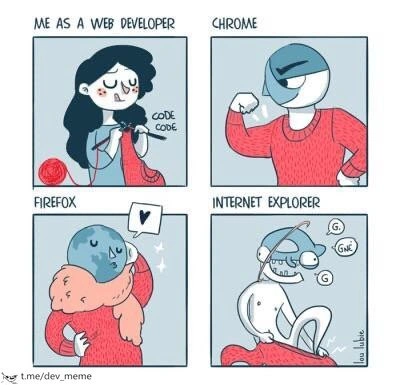
"Me as a Web Developer" (Top-Left Panel): Here we see a developer calmly knitting some red yarn and murmuring "code code." This represents the developer writing code to build a website or web app. The knitting metaphor is a cute way to show how coding is done carefully, loop by loop (just like knitting a sweater stitch by stitch). The developer looks peaceful at this moment, suggesting they’re happily working on features. However, any experienced dev knows this calm might be short-lived once testing on different browsers begins! Essentially, this panel sets the stage: the dev has created something and is about to see how it runs everywhere. (Fun fact: Yarn is also the name of a JavaScript package manager, but here it's likely just a coincidence with the knitting yarn).
Chrome (Top-Right Panel): Chrome is shown as a muscular, confident character with the Chrome logo for a head, flexing its arm. Chrome is a web browser made by Google, and it's currently the most widely used browser. The meme gives Chrome a strong, superhero-like personality. Why? Because as a developer, when you test your website in Chrome, it almost always works as expected. Chrome’s technology (the Blink rendering engine and V8 JavaScript engine) is very advanced, so it handles modern websites easily. Developers trust Chrome; it’s like the reliable friend who never lets you down. In real life, you’ll often hear things like "it runs fine on Chrome." Chrome tends to strictly follow modern web standards and get new features early, meaning fewer bugs or surprises. The browser_dominance of Chrome also means devs usually optimize for Chrome first. The buff pose in the comic is saying: Chrome is strong and capable – a champion of running web code. (One inside joke: Chrome can be memory-hungry, but that’s like a strong athlete who eats a lot; still, it gets the job done.)
Firefox (Bottom-Left Panel): Firefox is portrayed as something adorable being hugged by the developer (with a heart in the speech bubble). The object being hugged – a blue globe wrapped by an orange tail – is actually the Firefox logo. Firefox is another major browser, created by Mozilla (a non-profit organization). It’s known for being open-source and privacy-focused. Developers often have a warm, fuzzy feeling about Firefox because historically it helped improve the web (especially when Internet Explorer was causing trouble). The meme gives Firefox a lovable, slightly quirky personality. The developer hugging Firefox suggests that devs support and care about this browser. In everyday terms, Firefox usually also displays websites correctly (it adheres to standards well, like Chrome does), but it might have a few unique behaviors or minor bugs that are different from Chrome. These are the browser_quirks – for example, maybe a certain CSS effect needs a tweak in Firefox, or some new feature is implemented a bit differently. However, these quirks are usually small and, importantly, Firefox’s dev tools and community ethos make developers want to accommodate it. This is why the dev in the comic is happy and affectionate towards Firefox – it’s like that slightly eccentric friend who might do things their own way, but you admire and love them regardless. The tag firefox_loyalty is about how many devs remain loyal fans of Firefox even if its market share isn't as high as Chrome’s.
Internet Explorer (Bottom-Right Panel): Internet Explorer (often abbreviated as IE) is shown as a frail, drooling character wearing a light-blue helmet shaped like the old Internet Explorer "e" logo. This is a pretty unflattering depiction – and that’s intentional, because IE has a notorious reputation among web developers. Internet Explorer is an older browser from Microsoft. By 2020 (when this meme was posted), IE had been largely replaced by Microsoft Edge for the general public, but many developers still had to support IE, especially IE 11, because some businesses and users hadn’t upgraded. The tag legacy_browser_support applies here: “legacy” means older, outdated software that people still use. Supporting IE is often considered frontend pain because IE historically did not follow web standards strictly and lacked support for many modern features. The meme basically calls IE the weak, “sick” browser that often breaks. For example, a layout that looks perfect in Chrome and Firefox might look wrong in IE. Maybe a flexbox or grid doesn’t appear correctly, or a modern JavaScript feature (like a Promise or an arrow function) throws an error because IE doesn’t understand it without a polyfill (a piece of code that makes new features work in old browsers). The speech of IE in the drawing, "G G GNE...", implies that IE is so out-of-date that it can’t even communicate properly – it’s like it’s crashing or freezing mid-sentence. This dramatizes how IE often freezes or crashes on modern sites, or how developers find it incomprehensible why IE acts so strangely. In summary, IE is depicted as the problem child of browsers – something that causes a lot of extra work and headaches. It’s funny to developers in a dark way, because we’ve all seen a project work everywhere else but then internet_explorer_issues pop up and we’re left scratching our heads or pulling our hair out.
Now, why do these differences exist? It boils down to each browser using a different engine under the hood to interpret HTML, CSS, and JavaScript. Chrome’s engine (Blink/V8) and Firefox’s engine (Gecko/SpiderMonkey) are modern and actively maintained according to web standards set by bodies like W3C and WHATWG. IE’s engine (Trident and its JS engine Chakra/JScript for older versions) is outdated – Microsoft stopped fully updating it long ago. When developers do cross_browser_testing, they are essentially checking how these different engines render the same code. It’s a crucial part of web development: you have to test your site in Chrome, Firefox, Safari, IE/Edge, etc., because each might have slight differences. This meme captures the emotional journey of that testing:
- You start optimistic, coding your features (the calm knitting).
- You test in Chrome, and usually everything’s great on the first try (Chrome flexes = passes the test).
- You test in Firefox, and maybe you discover a minor quirk (perhaps a slight CSS difference), but it’s usually easy to fix, and you still feel good about it (hugs and a heart).
- Finally, you test in Internet Explorer… and something invariably is broken or behaves oddly (IE slumped over, drooling). You might see your console fill with errors or the layout is all messed up, and you sigh, "Oh no, IE… not again!" This is where a developer might need to spend hours debugging or writing special-case code for IE. It’s a near-universal experience for those who have had to support IE: hence the developer_feels_vs_browsers tag. The developer’s feeling towards each browser is different because of these experiences: gratitude (Chrome), fondness (Firefox), and exasperation (IE).
In short, this meme is using humor to highlight how each major browser tends to behave from a developer’s viewpoint. It emphasizes the BrowserCompatibility challenge: the code is done, the site works... but will it work everywhere? Chrome is like a solid A-student, Firefox is the beloved friend who maybe needs a tiny bit of help with homework, and Internet Explorer is the one who didn’t study and causes the group project to grind to a halt. Every web developer, especially those who do front-end work, immediately understands these personas because they’ve lived this scenario over and over. That shared understanding is what makes the meme hilarious and relatable.
Level 3: Rendering Rumble
At the highest technical level, this meme captures the ongoing browser wars through a humorous lens. Each panel personifies a browser's rendering engine and behavior, reflecting the shared experiences of seasoned frontend developers. The top-left panel shows a developer quietly knitting red yarn and muttering "code code," a tongue-in-cheek way to depict the toil of writing web code (perhaps even a sly nod to using Yarn as a package manager, weaving dependencies together). The other three panels label the major browsers: Chrome, Firefox, and Internet Explorer (IE). This setup is instantly recognizable to any veteran web dev who’s battled with cross_browser_testing and browser_quirks. Why is it funny? Because it’s painfully true: each browser has a distinct "personality" in how it runs your code.
Chrome is depicted as a buff, muscular figure confidently flexing an arm. This represents Chrome's reputation as the powerful, reliable workhorse of modern browsers. Technically, Chrome’s strength comes from Google’s high-performance V8 JavaScript engine and Blink rendering engine, which aggressively optimize web code. Chrome often implements new web standards quickly and tends to just work in most cases. It dominates market share ("chrome_dominance") and sets the pace for web platform features. Seasoned devs see Chrome as the browser that rarely gives nasty surprises during testing – it’s strong like an ox, handling whatever fancy HTML5/CSS3/ES6 feature you throw at it. The flip side (hinted by that beefy physique) is Chrome’s notorious appetite for memory and CPU. It’s as if Chrome is a heavyweight champion lifter: incredibly powerful, but guzzling RAM like protein shakes. Still, when you've spent days wrestling with IE, Chrome’s compliance with standards feels like a superhuman feat. The meme’s Chrome panel captures that senior-dev sentiment: "Chrome is my dependable muscle; it might exhaust my machine, but it never skips leg day when supporting modern features."
Firefox is shown in a warm, affectionate scene: the developer hugging a cute blue globe wrapped in a fox’s tail, with a little heart floating above. This visual is actually a play on the classic Firefox logo (a fox encircling a globe) and embodies "firefox_loyalty." Many experienced developers have a soft spot for Firefox, not just as a browser but as a symbol of the open web. Back in the early 2000s, Firefox (with its Gecko engine) broke Internet Explorer’s stranglehold by championing web standards. In the comic, the dev’s loving hug suggests that Firefox might have a few quirks or be a bit of an underdog (it’s not flexing muscles like Chrome), but developers cherish it nonetheless. Perhaps Firefox isn’t always the fastest or most dominant these days, but it has idiosyncrasies you forgive because it’s that trusty friend who stood by you in past battles (like when IE6 was being a tyrant). Technically, Firefox’s engine (Gecko, and later enhancements from the Quantum project) highly values privacy and developer tools, which many devs appreciate. It's that browser where something might behave a tad differently – maybe a CSS layout needs a tweak or a feature is implemented slightly later – but you’re happy to accommodate because Firefox respects the web’s ideals. The hug and heart illustrate the emotional truth: devs love Firefox not for raw power, but for its principles and the nostalgia of how it rescued us from the dark ages of IE. It’s the cuddly fox we root for, even if Chrome usually scores higher on benchmarks.
Then we get to the infamous Internet Explorer, in the bottom-right panel, portrayed as a sickly, drooling, barely-upright character wearing a pale blue “IE” helmet. This is where the meme’s satire goes directly for the jugular of veteran frontend pain. IE is shown stammering "G G GNE" (perhaps trying to say "g-g-gone" or just gibberish), which captures how IE often behaves: sluggish, incoherent, and prone to giving up on modern web content. For anyone who’s done legacy_browser_support, this panel is both hilarious and trauma-inducing. It harkens to those countless hours spent debugging why the site that looks perfect in Chrome/Firefox is a broken mess in IE. The depiction of IE as drooling and decrepit is an exaggeration of its notorious fragility during compatibility testing. By 2020, Internet Explorer was effectively the undead zombie of browsers: officially superseded by Edge, but still haunting developers who couldn’t drop support for it due to that one client or internal user stuck on IE11. Technically, IE’s engine (Trident, with its JScript quirks) lagged far behind on web standards. It lacked support for many modern JavaScript features (necessitating loads of polyfills and transpilers like Babel) and often required special CSS hacks to behave. Seasoned devs recall horrors like IE’s misinterpretation of the CSS box model in older versions, or weird JS bugs (e.g., for...in looping order issues, or needing attachEvent instead of addEventListener). The meme distills all that frustration: IE is the weak link that always needs extra help or breaks unexpectedly. The drooling, incoherent speech bubble says it all — IE just can't keep up with the conversation. Any senior developer who’s maintained a frontend project pre-2020 likely cringed and laughed seeing this, because we’ve all uttered some version of:
"It works in Chrome and Firefox… why on earth is it broken in IE?!" – Every weary web developer at 3 AM
The humor lands so well because it’s rooted in truth: BrowserCompatibility issues give each browser a “personality” in our minds. Chrome is the rock-solid heavyweight champion, Firefox is the lovable sidekick, and IE is the stumbling antagonist causing trouble. It’s essentially a comic exaggeration of real developer_experience_DX. We spend days carefully knitting our code (like the dev with the yarn), then don the QA hat and test in each browser. Chrome sails through (flex, grin), Firefox might need a gentle tweak (but we happily oblige, pat pat), and IE… IE usually faceplants, requiring weird workarounds and eliciting exasperated groans. This meme resonates strongly with devs because it visualizes that shared narrative in a lighthearted way. Under the hood, it's poking fun at how different browser engines (Chrome’s Blink/V8, Firefox’s Gecko, IE’s Trident) interpret the web. These engines are built by different teams with different philosophies and historical baggage, so web code isn’t 100% consistent across them. The result? Frontend devs end up treating browsers like characters: some are reliable allies, one is the problem child.
To illustrate in code how a weary developer might see cross-browser testing, consider this pseudo-JavaScript:
function crossBrowserTest(feature) {
console.log("Testing " + feature + " in Chrome...");
// Chrome: passes easily
console.log("Chrome is OK 💪");
console.log("Testing " + feature + " in Firefox...");
// Firefox: might have minor quirks
console.log("Firefox is okay with some quirks, but we love it");
console.log("Testing " + feature + " in Internet Explorer...");
// IE: throws a tantrum
throw new Error("IE broke again 😱");
}
In this dramatization, calling crossBrowserTest('NewFeature') would log Chrome and Firefox succeeding (Chrome flexing its muscles, Firefox getting a little love), but explode with an error on IE – a comedic reflection of reality. Experienced devs chuckle at this because it’s a scenario we've seen time and again: a new CSS grid or modern JavaScript works flawlessly in modern browsers, then IE throws a fit ("Object doesn't support property or method…").
The developer_feels_vs_browsers dynamic in this meme is a cathartic acknowledgment of those frustrations. It’s funny because it’s true: after enough all-nighters adding IE-specific fallbacks or explaining to stakeholders why a feature has to be simplified for that one legacy browser, you really do start imagining Chrome as the dependable ace, Firefox as your buddy, and IE as the infuriating slacker drooling on your test bench. The comic exaggeration helps us laugh at what otherwise might make us cry. In essence, this meme compresses years of web development history and browser pain_points into four simple panels – a true FrontendHumor masterpiece for the battle-hardened web warrior.
Description
A four-panel comic illustrating the frustrations of web development and browser compatibility. The first panel, labeled 'ME AS A WEB DEVELOPER,' shows a character diligently knitting a red sweater, with the words 'CODE CODE' next to her, symbolizing the careful crafting of website code. The second panel, 'CHROME,' depicts a cool, confident character wearing the sweater perfectly. The third panel, 'FIREFOX,' shows a character with a globe for a head also wearing the sweater stylishly, indicating success. The final panel, 'INTERNET EXPLORER,' presents a distorted, chaotic character tangled helplessly in the same red sweater, making nonsensical sounds ('G', 'GNÉ'). This meme visually represents the historical struggle for web developers to make their code work on Internet Explorer, which was notorious for its non-standard rendering, while modern browsers like Chrome and Firefox interpret the code as intended. The joke resonates with any developer who has spent hours debugging issues that only appear on IE
Comments
7Comment deleted
Supporting IE was like being a tailor forced to make a bespoke suit for a client who insists on wearing it on their head. You're not fixing bugs, you're accommodating chaos
Cross-browser QA is like a microservice mesh: Chrome boasts perfect SLIs, Firefox responds with JSON and a cuddle, and IE is the zombie service running a 2003 COM object that accounting still calls every quarter
The real browser compatibility matrix: Chrome works perfectly in your local environment, Firefox works perfectly after clearing 47GB of cache, and IE works perfectly in the parallel universe where we all still use table layouts and ActiveX controls
The four stages of frontend grief: 'It works in Chrome!' (denial), 'Firefox needs a small tweak' (bargaining), 'IE broke everything' (anger), and finally accepting that you'll spend 80% of development time supporting 2% of users still running IE11 because some enterprise client's legacy Java applet won't let them upgrade
Cross‑browser testing: Chrome flexes your GPU, Firefox hugs the spec, and IE asks for Quirks Mode, conditional comments, and an ActiveX installer - aka the enterprise trifecta
Chrome flexes like it owns the GPU, Firefox offers a consoling hug via devtools, and IE shows up in Compatibility Mode demanding ES5 and -ms- prefixes like it’s a critical enterprise stakeholder
Chrome flexes V8 muscle, Firefox hugs the open web, but IE6's the ex forcing endless polyfill commitments