When You Forget the Depth Buffer in the Vulkan Graphics Pipeline
Why is this Graphics meme funny?
Level 1: Forgetting to Erase
Imagine you are drawing a picture on a whiteboard. You draw a stick figure in one position, and then you want to draw the same figure in a new pose right next to it. But suppose you forget to erase the first drawing before making the second one. Now you have all these extra lines criss-crossing – the old drawing and the new drawing overlap and it looks like a big scribbled mess. That’s basically what happened in this meme, but with computer graphics. In a game, each frame (like each drawing) should start with a clean screen. Here, the programmer forgot to erase the “depth” from the previous frame before drawing the new one. Depth is like an invisible sketch that tells the computer which objects are in front of others. By not erasing that, the computer got very confused and the final picture came out all wrong – kind of like drawing on top of an old drawing without erasing. The meme is funny because the first five panels show the picture coming out nicely step by step (like a well-drawn cartoon character), and you expect it to end perfectly. But then the last panel is a total chaos of colors and noise, as if someone knocked the paint water onto the canvas. It’s an “oops!” moment. We laugh because we’ve all had times when a simple forgotten step (like not cleaning the board) led to a silly mistake. The text in that last panel – full of shock and a bad word or two – is basically the programmer yelling “Oh no, I forgot to wipe the slate clean, and now everything is ruined!” It captures that mix of panic and comedy when a tiny oversight causes a big goofy glitch. In simple terms, the lesson is: always start with a clean slate (or screen), or you might end up with art that even a glitch-loving modern artist would find extreme!
Level 2: Remember to Clear
Let’s break this down in simpler terms. Vulkan is a graphics library (an API) that game developers use to draw images on the screen. It’s known for giving developers a lot of control over the graphics pipeline – the step-by-step process that turns 3D models into the pixels you see in a game. With great control comes the need to handle every little detail manually. One of those details is managing the depth buffer, which is super important in making 3D images look correct.
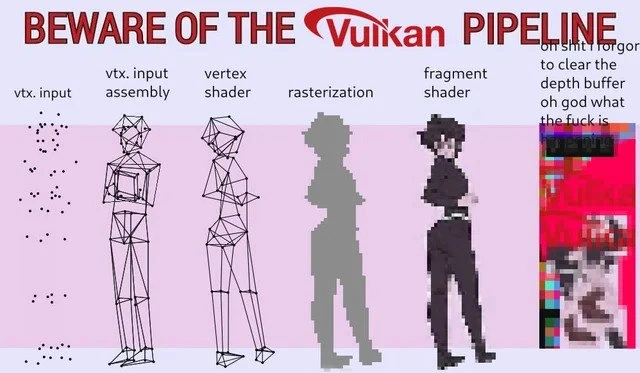
Firstly, what are these stages we see in the meme? The image is effectively showing the pipeline stages in Vulkan:
- Vertex Input: Think of this as feeding in the raw data. A 3D model is made up of points (called vertices). In the first panel (“vtx. input”), those black dots are the raw vertices of a model. At this stage, they’re just unconnected points in space.
- Vertex Input Assembly: Now the GPU takes those points and connects them into shapes (usually triangles) that form the model’s surface. The second panel shows a wireframe humanoid figure – this is the assembled model made of lines connecting the vertices. Essentially, the dots have been connected to outline the 3D figure.
- Vertex Shader: This is like a mini-program running for each vertex. It typically moves the vertices around – for example, positioning the model in the scene, or animating it. The third panel shows a more refined wireframe (maybe the model rotated or posed correctly). After the vertex shader, the GPU knows exactly where each vertex should appear on the 2D screen after 3D projection.
- Rasterization: Here the pipeline converts those vector shapes (triangles from the wireframe) into actual pixels. The fourth panel shows the character as a blocky silhouette made of squares – that’s a visualization of pixels being filled in. Rasterization is like coloring in the triangles on a grid (the screen), producing fragments (potential pixels) that will be shaded.
- Fragment Shader: Another mini-program that runs for each fragment (pixel) to decide its final color. This is where we apply textures, lighting, etc. The fifth panel shows a nicely colored anime-style character – the fragments have been shaded to look like the final art. After this stage, we have a complete colored image of our model, ready to be seen on screen.
Now, what’s the depth buffer? In 3D rendering, we have to handle the fact that some objects are in front of others. If two objects overlap on the screen, the one closer to the camera should cover the one behind. The depth buffer is how the GPU keeps track of what’s in front and what’s behind. It’s basically a grid (same size as the screen) where we store depth values (often referred to as Z values). Every time a fragment (pixel) is drawn, it has a depth (distance from the camera). The GPU checks the depth buffer at that pixel’s position to see if there’s already something closer recorded. If the new fragment is behind something already drawn, it shouldn’t be visible, so the GPU will discard that fragment. If it’s closer, then it gets drawn and the depth buffer is updated with this fragment’s depth (because now it’s the foremost thing at that pixel). This process is called the depth test or Z-test. It’s crucial for drawing 3D scenes correctly, so nearer objects hide farther ones automatically.
However, the depth buffer only works right if we reset it at the start of each new frame. Clearing the depth buffer means we’re basically saying “okay, new frame, nothing has been drawn yet, treat every pixel as empty with depth = far away”. Typically, we set the depth buffer to some default like 1.0 (which usually represents the furthest possible depth) for all pixels at the beginning of drawing a frame. This is analogous to wiping a chalkboard clean. If we don’t clear it, the depth buffer will still have the information from the last frame we drew. That means the GPU will incorrectly think last frame’s objects are still there in front of everything. So when we go to draw the new frame, almost every new pixel will be considered “behind” an old pixel (because the depth buffer is full of leftover depth values). The GPU will then refuse to draw a lot of the new frame’s pixels, because it believes it shouldn’t overwrite what was there before. The outcome is that the new image doesn’t render properly at all. You might see nothing change on screen (if the old depth said “already filled!” everywhere), or you might see weird pieces of the new image where the depth test passes in some spots and not others. It’s a very confusing bug when you first encounter it!
In the meme’s final panel, that’s exactly what happened: the person forgot to clear the depth buffer. The caption (with some panicked profanity) is the developer realizing their mistake as everything goes horribly wrong. The nice anime character from the fragment shader stage should have been the final output, but because the depth buffer wasn’t reset, the final output turned into a garbled mess. The “glitch” image with random colors is an exaggeration for comedic effect — in reality, maybe the character wouldn’t appear at all, or you’d see a flicker, or leftover bits of the previous frame. But the meme artist chose a wild rainbow static to visually represent “catastrophic failure”. It really drives the point home in a funny way: one oversight and your beautiful frame becomes nonsense.
For someone new to GameDevelopment or graphics, this meme is a cautionary tale. Vulkan doesn’t hold your hand. In a higher-level engine, you rarely have to think about manually clearing the depth buffer because the engine does it for you each frame. But in Vulkan (and similar low-level APIs like DirectX12 or Metal), you as the programmer must explicitly clear or define what happens with each buffer every frame. It’s easy for a beginner to forget that step when writing their first triangle on the screen, leading to exactly this kind of issue. In fact, debugging graphics can be really tricky because when something goes wrong, you often just see a black screen or a bizarre image — there’s no simple error message telling you what you forgot. So developers learn through experience (and frustration) to double-check things like clearing buffers, setting up proper states, etc.
The categories and tags associated with this meme (Graphics, GameDev, Bugs, GraphicsAndMultimediaProcessing, DebuggingFrustration, etc.) all point to this being a common scenario in graphics programming where a tiny bug causes a headache. The community finds humor in it because once you’ve solved it, you can’t help but laugh at how such a simple thing caused such havoc. This meme basically says: “Hey, remember all those pipeline stages you carefully set up? None of it matters if you forgot to do this one little thing at the start!” It’s simultaneously a lesson and a light-hearted poke at all the times we’ve screamed at the GPU only to realize the mistake was ours. So, remember to clear that depth buffer (and your other buffers) each frame – otherwise you might end up with a very funky looking game screen and a fair bit of embarrassment when you realize why!
Level 3: Depth Buffer Disaster
This meme captures a GraphicsProgramming nightmare that many game developers know all too well. It humorously walks through each stage of the Vulkan rendering pipeline, showing how a 3D model goes from a bunch of vertices to a fully shaded character. Everything marches along perfectly through the GameDevelopment pipeline – until the final step, when one tiny mistake blows up the whole image. The joke is essentially: “All these complex stages worked, but forgetting one simple housekeeping step (clearing the depth buffer) turned the final output into complete garbage.” For seasoned developers, this hits home because it’s a classic bug scenario in graphics: you spend hours debugging why your scene looks like a glitchy abstract art piece, only to facepalm when you realize you never reset the depth buffer between frames. The meme even transcribes the panicked internal monologue of the developer: *“oh st i forgot to clear the depth buffer oh god what the f is…”* – trailing off in sheer horror. That chaotic rainbow block of pixels in the last panel is comically exaggerated, but any graphics dev will recognize the feeling. Often the actual symptom of a forgotten depth-clear is that your new frame doesn’t render at all (or objects flicker in bizarre ways), but subjectively it feels as jarring as that glitch image looks.
Let’s break down what each panel in “BEWARE OF THE Vulkan PIPELINE” represents and why it’s funny when it goes wrong:
- Vertex Input – The first panel shows a sprinkling of black dots labeled "vtx. input". This is the stage where raw vertex data (points in 3D space) is fed into the pipeline. It’s basically your model’s coordinates as loaded from memory. Nothing visual has been formed yet except a cloud of points.
- Vertex Input Assembly – Next, labeled "vtx. input assembly", we see those points connected into a wireframe skeleton of a humanoid figure. The GPU is grouping vertices into primitives (like triangles) according to the model’s index data – essentially connecting the dots. At this stage, you get the mesh outline.
- Vertex Shader – The third panel ("vertex shader") shows a more refined wireframe. The vertex shader is a small program that runs on each vertex, typically applying transformations (like moving the model into the correct position, perspective projection, maybe skinning for animation). After this stage, the vertices are in their final positions on screen, forming a detailed wireframe model.
- Rasterization – The fourth panel is labeled "rasterization" and depicts the figure now as big blocky pixels. Rasterization is when the GPU takes the assembled triangles (from the vertex stage) and breaks them into fragments (potential pixels) on your 2D screen. The model goes from mathematical triangles to pixels in a grid – hence the chunky, pixelated look. It’s like the silhouette of the character in low resolution.
- Fragment Shader – The fifth panel ("fragment shader") finally shows the character rendered properly with smooth colors, shading, and presumably texture – in this case an anime-style character. The fragment shader runs for each of those fragments produced by rasterization, computing the final color (applying lighting, textures, etc.). After this stage, we have what should be our correct final image of the 3D model, nicely drawn. In a perfect scenario, that’s what you’d see on screen.
Up to this point, the Vulkan pipeline is complex but everything is under control – the meme humorously visualizes it step by step. Now enters the culprit: the depth buffer. Between the fragment stage and actually displaying the image, the GPU performs depth tests using the depth buffer. Every pixel drawn has a depth value (how far it is from the camera). The depth test checks this against the depth buffer (which holds the depth of whatever was last drawn at that pixel) to decide if the new pixel should be drawn in front or tossed out because something nearer is already there. Clearing the depth buffer at the start of a frame sets all those depth values back to a default (far-away) value, basically saying “no pixel drawn yet, everything is clear”. If you skip that clear, the depth buffer still thinks last frame’s objects are covering the scene. It’s the graphics equivalent of not erasing yesterday’s drawing before starting a new one today.
So in the meme’s final column – the “oh sh*t” moment – the developer forgot to clear the depth buffer. The caption is half gibberish (likely cut off by the image) to mimic a shocked, swearing reaction as the frame comes out utterly mangled. Why mangled? Because all the fancy pipeline stages did their job, but when it came time to write the pixels to the screen, the GPU said: “Wait, according to my depth buffer, there’s already something closer in nearly every pixel, so I won’t draw these new fragments.” The new frame’s fragments mostly get discarded. What’s left on the screen might be fragments of the previous frame, or random bits where something did draw. It might manifest as a silhouette of the old scene, or bizarre color artifacts where data didn’t update. The meme artist chose to illustrate this as a rainbow static block – basically maximal chaos – conveying that the final image is completely wrong. The humor is in how drastically things go off the rails: one second you have a beautifully rendered character (fragment shader output), the next you have a nightmare Picasso painting because of one forgotten line of code. DebuggingFrustration indeed! Anyone who’s been in GameDevelopment or fiddled with a GPU pipeline has likely hit a moment where a missing clear or a state not reset turned their screen into a surreal mess. It’s a rite of passage in low-level graphics programming to exclaim “Why on earth is nothing showing?!” only to realize you were out of your depth (pun intended) by neglecting the depth buffer.
The meme’s title “BEWARE OF THE Vulkan PIPELINE” is tongue-in-cheek. Vulkan is notorious for being powerful but very demanding – the pipeline has many stages and you must manage a lot of details yourself. The meme warns (with a big Vulkan logo) that this pipeline can bite you if you’re not careful. The final panel’s absurd glitch is exactly the kind of “gotcha” Vulkan newbies (and even veterans in a rush) run into. In the world of BugsInSoftware, a small oversight can have dramatic visual consequences. Seasoned devs find this funny because it’s so relatable: that exact “oh no... what the...?” feeling is practically a meme of its own in graphics circles. In fact, the multi-panel format here sets us up: each stage looks correct, lulling us into a sense that the rendering will be fine – then BAM! chaos. It’s a comedic exaggeration of the classic bug-hunt narrative: everything was fine until the very end, and then it all imploded. Experienced programmers laugh (maybe a bit bitterly) because they remember being in that situation at least once, poking at code and swapchains, only to discover a forgot-to-clear oversight was the villain all along.
From an engineering perspective, this meme is also commentary on explicit APIs like Vulkan. Unlike higher-level engines (Unity, Unreal) or older APIs (OpenGL) that might handle some boilerplate for you, Vulkan expects you to do it all. The GameDev veterans reading this nod knowingly because they’ve learned that “did you clear the depth buffer?” is one of those first questions you ask when the screen doesn’t render properly. It’s akin to “Is the monitor turned on?” for graphics debugging. The DebuggingAndTroubleshooting process in graphics often starts by checking the basics: Are the shaders compiling? Are the buffers bound? Did I clear my render targets? That final panel is basically a dramatization of the moment you realize that step 0 – clearing the frame – was skipped. The mix of dread and relief (because once you know, it’s easy to fix) is something only those who wrestle with GPUs understand. The meme gets a chuckle because we’ve all muttered “I can’t believe it was just that” after hours of garbled output. It’s a perfect encapsulation of a Graphics bug that is equal parts terrifying and comic in hindsight.
// Pseudo-code for a frame in Vulkan
beginFrame();
// Normally, clear color and depth to start fresh:
// cmdClearColorImage(colorImage, {0,0,0,1});
// cmdClearDepthStencilImage(depthImage, 1.0f);
// ...Oops, forgot to clear depthImage...
renderScene(objects); // vertex shader -> fragment shader, etc.
endFrame();
// Result: depth test finds last frame's depths, new fragments don't show up -> GLITCH!
Above is a simplified pseudo-code showing the culprit in context. The comment “Oops, forgot to clear depthImage” is essentially the mistake the meme highlights. In Vulkan you typically specify clear operations when you begin your render pass (for example, using VK_ATTACHMENT_LOAD_OP_CLEAR for the depth attachment). If instead you use VK_ATTACHMENT_LOAD_OP_LOAD or neglect to clear, you’re telling Vulkan “carry over the existing depth buffer contents”. The code snippet illustrates how easy it is to forget that one call. The outcome of such a bug is exactly what the meme illustrates: a Depth Buffer Disaster where the final composed image is wrong. For seasoned devs, just seeing that warped final panel immediately screams “depth buffer issue!” – it’s practically a reflex. In summary, Level 3 perspective recognizes the meme as a playful warning and a shared laugh at those “D’oh!” moments in low-level graphics programming. It’s funny because it’s true: the Vulkan pipeline will punish forgetfulness, often in spectacular fashion.
Level 4: Ghosts of Frames Past
At the deepest technical level, this meme highlights a fundamental graphics pipeline invariant: each frame’s rendering should start on a clean slate. The depth buffer (often called a Z-buffer) is a core concept in computer graphics algorithms, dating back to the 1970s as a solution for hidden surface removal. It stores a depth value for every pixel on the screen, representing how far the closest object at that pixel is from the camera. The classic Z-buffer algorithm relies on initializing these depth values to a far distance (often 1.0 in normalized depth) at the start of rendering a new frame. This ensures that when the GPU draws a new triangle, any fragment will appear closer than the “nothingness” currently recorded, thus allowing the fragment to pass the depth test and update the buffer. If that initial clear/reset doesn’t happen, you’ve effectively invited the ghosts of frames past to haunt the new image.
In Vulkan, the graphics API mentioned, nothing is done implicitly for you – it’s a design emphasizing explicit control for performance. Vulkan requires the programmer to specify exactly how each render target (color, depth, etc.) is handled at frame start. You choose whether to CLEAR an attachment or to LOAD existing content. Forgetting to clear the depth buffer (or misconfiguring the render pass to load when you meant to clear) breaks the basic assumption of the Z-buffer algorithm. All the new fragments will then be compared against stale depth values left over from the last frame (or even random memory if uninitialized), a bit like using last frame’s depth landscape as if it were still relevant. Mathematically, if a pixel’s depth from the prior frame was, say, 0.2 (very close), any new fragment with a depth greater than 0.2 will fail the depth test and get discarded. In the extreme case, nothing in the new frame can draw because every pixel position is “occupied” by an invisible phantom closer than the new geometry. The result? A catastrophic rendering artifact – possibly leaving behind a mishmash of the old frame’s color or just a jumble of fragments that survived in unpredictably small areas. It’s the graphics equivalent of a pipeline hazard or a caching bug: stale data leads to a wildly incorrect output.
From a hardware perspective, GPUs optimize away work whenever possible. If you don’t explicitly clear a buffer, the GPU might skip clearing for speed, assuming you know what you’re doing. On tile-based rendering GPUs (common in mobile devices), a clear can be as simple as setting a flag to zero out tiles, but skipping it means tiles might carry over depth values from the previous render pass. Historically, OpenGL and older APIs left less room for this mistake by providing convenient glClear() calls, whereas Vulkan’s philosophy means with great power comes great responsibility (to clear your damn buffers). This design is by intent: Vulkan’s low-level control can yield higher performance, but it also exposes developers to low-level pitfalls akin to forgetting to initialize memory in C. The meme’s glitchy final panel is an exaggerated visualization of what can happen: those rainbow pixels hint at reading errant memory or depth values as colors, essentially a framebuffer fever dream born from a single oversight. And while real-world outcomes might be a black screen or objects mysteriously missing, the principle stands: violating the assumptions of the rendering pipeline yields absurd results. In short, the meme is rooted in a key truth from computer graphics theory and GPU architecture – if you don’t reset state properly between frames, the system’s previous state will interfere. The humor (and horror) comes from knowing just how precisely this one missed step can unleash chaos in an otherwise beautiful frame, thanks to the unforgiving logic of the Z-buffer.
Description
The meme shows a six-column progression under the header text “BEWARE OF THE Vulkan PIPELINE”. From left to right the columns are labeled (with visible text) “vtx. input”, “vtx. input assembly”, “vertex shader”, “rasterization”, “fragment shader”, and a final glitch panel whose caption reads “oh shit i forgot to clear the depth buffer oh god what the fuck is”. Visually, the first column is a sparse cloud of black vertex dots; the second assembles those dots into a low-poly wireframe humanoid; the third applies vertex shading for more complete wireframe detail; the fourth rasterizes the figure into chunky block pixels; the fifth applies a smooth fragment-shaded anime-style character; the sixth panel is a garbled rainbow block of corrupted pixels illustrating a catastrophic render failure. Technically, the image humorously walks through each stage of the Vulkan GPU rendering pipeline and highlights how forgetting to clear the depth buffer can obliterate the final frame, a pitfall familiar to graphics programmers and game developers
Comments
8Comment deleted
Vulkan’s idea of “explicit control”: spend days perfecting a PBR pipeline, skip one vkCmdClearDepthStencilImage, and your hero character debuts as early-2000s glitch art - proof the spec hands you both the paintbrush and the foot-gun
After 15 years in the industry, you realize the real pipeline hazard isn't branch prediction - it's explaining to stakeholders why fixing a depth buffer clear took three sprints and why the junior who suggested 'just use Unity' is now crying in the server room
Vulkan gives you explicit control over every pipeline stage, which means every frame of corruption comes with a notarized confession that it was your fault
Ah yes, the classic Vulkan developer experience: spending three days meticulously setting up your render passes, descriptor sets, and pipeline state objects with military precision, only to forget `vkCmdClearDepthStencilImage()` and watch your perfectly valid geometry transform into what can only be described as 'algorithmic modern art.' The depth buffer doesn't clear itself - unlike your weekend plans after you realize you'll be debugging this until Monday
In Vulkan, forgetting VK_ATTACHMENT_LOAD_OP_CLEAR doesn’t crash - your swapchain just opens an abstract‑expressionist gallery while you argue whether it’s a barrier or a subpass dependency
Vulkan: skip one depth buffer clear and the pipeline calmly composes a cubist remake of your scene using last frame’s z-values - no errors, just modern art
Vulkan: Expanding 'glClear' into a render pass orchestra, where forgetting a barrier turns frames into desync hell
Why am i laughing so hard Comment deleted