Skip to content
DevMeme
2179 of 7435
Backend Developer's Kryptonite: Centering a Div
Frontend Post #2431, on Dec 8, 2020 in TG

Backend Developer's Kryptonite: Centering a Div

Why is this Frontend meme funny?

Level 1: Elephant vs Mouse

Imagine a big, strong elephant that isn't afraid of anything in the jungle. But then a tiny mouse scurries by, and suddenly the huge elephant jumps back in fright. It's funny because you'd think something as small as a mouse couldn't possibly scare a giant elephant – but it does! This meme is like that, but with a computer twist. The elephant is a super skilled computer expert who can handle giant, complicated jobs without breaking a sweat. The mouse is a tiny task, like trying to neatly line up a piece of text or a button on a webpage. You'd expect the big, tough elephant (the expert) not to be bothered by a little mouse (a simple task). But here, the opposite happens – the expert runs away from that little task! It's showing that even really capable people can have one small thing that freaks them out, which makes us laugh because it's so unexpected and relatable.

Level 2: Front-End vs Back-End

Let's break down why this scenario happens. Front-end development is all about what the user sees and interacts with in a web application. This includes the layout of the page, colors, buttons, and the alignment of text – basically the whole user interface that shows up in your browser. CSS (Cascading Style Sheets) is the language used to style and position those elements. So, "aligning elements in CSS" means using CSS rules to arrange things on the page (for example, centering a login box in the middle of the screen or right-aligning a menu). It sounds straightforward, but if you don't know the exact CSS tricks, it can be confusing. Many of us, even early in our careers, have had to search for how to do something like center a box on a page because the correct CSS isn't obvious at first. (Hint: there are specific combinations of CSS properties – and nowadays, features like CSS Flexbox – that make it easier once you learn them.)

Back-end development, on the other hand, runs behind the scenes on the server. It deals with things like talking to the database, implementing the application logic, and processing data. When you see "complex database queries" in the meme, it's referring to using SQL (Structured Query Language) to ask the database for information or to combine data from multiple tables. For example, a back-end dev might write a single SQL query to get all users who signed up in the last month and sort them by how many posts they've made. That query might join two or three tables and have several conditions. It's a bit like a very advanced recipe – it can get long and complex, but it's written in a structured, logical way. Back-end folks write and optimize these queries as part of their day-to-day job, so over time they become comfortable with that complexity.

Now, here's where the humor comes in: a developer who's really good at back-end work (like writing those tricky SQL queries or handling server code) might not spend much time with CSS, especially things like precise page layout. Front-end and back-end require different skills and even different ways of thinking. Front-end is more visual and often involves a lot of tweaking to get things to look just right on all screen sizes, whereas back-end is more about data, logic, and rules. So it's entirely possible (and actually pretty common) that someone can be fearless in writing a 100-line database script but feel completely lost trying to vertically center a loading spinner with CSS.

For a newer developer, it's easy to imagine this scenario too. Maybe you've tried to make a simple web page and found yourself utterly stuck trying to move a button to the center of the screen. Meanwhile, using a database or writing a basic query might have felt more straightforward after some practice, because it's more like solving a puzzle step-by-step. Everyone has different comfort zones. This meme plays on that by showing a confident back-end developer who thinks "No big deal" about a huge folder of SQL tasks, but then panics when faced with a small CSS task. It's a playful reminder that "hard" and "easy" depend a lot on what you're used to. What feels simple to a front-end specialist (like tweaking CSS for layout) might feel daunting to someone who lives mainly in back-end code, and vice versa.

Level 3: CSS Centering Conundrum

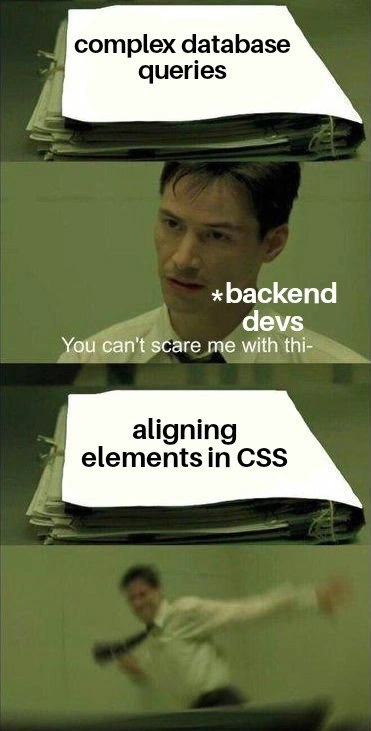
At the top panel, a stack of papers labeled complex database queries sits thick and intimidating, yet the backend dev in the scene looks unimpressed. This is a nod to how deeply complex some database logic can get – think of multi-page SQL statements with numerous JOIN clauses and subqueries – but for a seasoned backend engineer it's all in a day's work. They handle databases and intricate SELECT statements regularly, optimizing queries with indexes and reading execution plans. So when faced with a giant folder symbolizing heavy-duty data logic, our back-end pro is basically saying "You can't scare me with this." It's almost a brag about their comfort zone: structured data and logic.

But then the meme flips the script. In the final panel, the label changes to aligning elements in CSS, and suddenly that same confident developer is seen literally running off in terror. The humor comes from this dramatic reversal. It's poking fun at a well-known quirk in the developer world: many back-end experts who wrestle with concurrency or complex algorithms daily will recoil at the sight of a seemingly "simple" front-end task like CSS styling. Specifically, CSS alignment (like getting that pesky <div> perfectly centered on the page) has a legendary reputation for causing frustration. It's the classic case of developer kryptonite: no matter how fearless you are with heavy logic, the CSS box-model or alignment rules might still give you nightmares!

There's a reason this joke lands so well with devs. Aligning elements in CSS has historically been a tricky puzzle – one that caused disproportionate pain relative to its apparent simplicity. In theory, all you want is a bit of text or a button nicely centered or aligned, maybe both horizontally and vertically. How hard could that be? But anyone who's tried it in pure CSS (especially before modern layout techniques) knows it often turned into a cascade (pun intended) of confusion. Do you use margin: auto? text-align: center? position: absolute with quirky pixel offsets? You might even recall trying vertical-align: middle and discovering, to your horror, that it doesn't work on normal block elements the way it does in a table cell. Even Stack Overflow has countless threads devoted to the eternal question, "How do I center a div?". In fact, there's a tongue-in-cheek saying among developers listing the "hardest problems in computer science" – after naming things and cache invalidation, some jokingly add centering a div in CSS to that list. It's obviously an exaggeration, but it became folklore for a reason: aligning a simple element reliably was the quintessential css_centering_nightmare that could baffle even a savvy coder.

On the flip side, complex database queries involve joins, groupings, and possibly even sub-selects or window functions. It's serious computer science stuff under the hood (query planners, B-tree indexes, big-O complexity – oh my!). But crucially, it's the kind of complexity that back-end devs expect and train for. They have debuggers, "EXPLAIN" plans for queries, and a mental model of how data is stored and retrieved. The processes might be intricate, but they follow a consistent set of rules (like relational algebra) that these devs are comfortable with. In contrast, CSS can feel almost like art or experimentation: there are rules, but sometimes the combination yields weird results if you don't understand every nuance of the frontend world. For instance, the outcome of a few CSS rules can depend on subtle details like whether an element is inline or block, or if its parent container is using modern CSS Flexbox. It's declarative, meaning you describe what you want done and the browser figures out how to do it – often leading to those "Why is it doing that?" moments for the uninitiated.

This divide reflects a real difference in developer skill sets and DeveloperExperience_DX. Back-end development (server logic, database interactions) and front-end development (user interface, HTML/CSS styling, and browser behavior) require different mindsets and knowledge bases. Our meme exaggerates for comic effect, but there's truth in it: a back-end specialist might joke that they'd rather debug a complex server crash or optimize a tangled query than spend an afternoon fiddling with CSS to get a layout perfectly centered. It's not that aligning a button is objectively harder than writing a query; it's that it's hard in a different way. It's the kind of problem where trial-and-error and deep knowledge of Cascading Style Sheets quirks come into play. As a result, even brilliant engineers can feel like absolute beginners when they step into unfamiliar territory like front-end styling. The common refrain "Works on my machine" might turn into "It looks fine on my browser" – until you check another device and the alignment is off again!

Thankfully, the frontend world has introduced tools to tame this alignment beast. Modern CSS features like CSS Flexbox and CSS Grid were designed (in part) to solve these positioning headaches. With Flexbox, for example, you can center an element both ways with just a couple of rules:

.container {
  display: flex;
  justify-content: center; /* center horizontally */
  align-items: center;     /* center vertically */
}

Suddenly, what used to require a dozen odd tricks can be achieved in three lines! If our panicked back-end dev knew about this, they might slowly holster their fear. But again, it all comes down to familiarity: if you live in SQL and server code all day, you might not even be aware that the front-end landscape evolved with these new convenience methods. So part of the joke is also a gentle prod: "Hey back-end folks, it's 2020, CSS isn't so scary anymore!". And yet, it acknowledges that to many, it still is scary, because if you haven't kept up, aligning things with CSS might as well be black magic.

This meme strikes a chord because it captures a shared experience in developer culture: being incredibly skilled in one complicated area, while feeling totally out of your depth in another area that outsiders might think is "easy." It's a lighthearted reminder that in tech, "simple" is relative. The next time someone brags about conquering a hardcore database problem, ask them if they can center a <div> on the first try – you'll likely get a chuckle (or an eye-roll) in response.

Description

A four-panel meme using the 'Neo Dodging Bullets' format from The Matrix. In the first panel, a large stack of files is labeled 'complex database queries.' The second panel shows Neo (labeled '*backend devs*') looking calmly unimpressed, with the caption 'You can't scare me with thi-'. The third panel presents another stack of files, this time labeled 'aligning elements in CSS.' The final panel shows Neo in a blur of motion, desperately dodging away in fear. The meme humorously illustrates the common stereotype of backend developers, who are masters of complex logic and data, but are often terrified by the seemingly unpredictable and frustrating nature of frontend CSS layout challenges. It's a relatable joke for any developer who has crossed the backend/frontend divide and discovered that different skill sets are required
Comments

11
Anonymous ★ Top Pick Backend devs treat CSS like a non-deterministic quantum state: until you view it in a different browser, an element is simultaneously centered and not centered
  1. Anonymous ★ Top Pick

    Backend devs treat CSS like a non-deterministic quantum state: until you view it in a different browser, an element is simultaneously centered and not centered

  2. Anonymous

    I can coax a 12-table recursive CTE into linear time, but the moment Safari decides `align-items: center` is a Schrödinger directive, I’m reconsidering my career in ASCII art

  3. Anonymous

    After 15 years of optimizing N+1 queries and designing distributed systems, I still Google 'center div vertically' every single time - and somehow the answer is different depending on whether Mercury is in retrograde

  4. Anonymous

    Backend engineers will confidently write recursive CTEs with window functions over millions of rows, architect complex join strategies across normalized schemas, and optimize query plans down to the index scan - but ask them to vertically center a div and suddenly they're Googling 'CSS flexbox align-items vs justify-content' for the hundredth time. It's the universal truth: you can master ACID transactions and CAP theorem, but CSS will humble you every single time

  5. Anonymous

    I've sharded petabyte clusters with zero-downtime queries, but mention 'vertical-align: middle' and I'm outsourcing to Figma

  6. Anonymous

    I’ll hand-tune a 9-table join with window functions, but centering a div in CSS still feels like achieving distributed consensus under subpixel rounding

  7. Anonymous

    I’ll hand‑tune a recursive CTE with window functions before coffee; ask me to vertically center an icon across variable fonts in Safari and I start proposing a Kafka rewrite

  8. @TERASKULL 5y

    howtocenterincss.com

  9. @RiedleroD 5y

    honestly, it's not too bad if you avoid certain features and use flexbox *a lot*

  10. @dontmindmehere 5y

    place-items: center; ^that's a new feature in css which helps aligning stuff. One line includes:

  11. @MickSaaaw 5y

    fucking true

Use J and K for navigation