When a 'Simple' Regex Becomes a Monster
Why is this Languages meme funny?
Level 1: The “Easy” Lego Set
Imagine someone gives you a big box of LEGO pieces and says, “This will be simple to put together, super easy, you can do it no problem!” You open the box and find hundreds of tiny pieces and no clear instructions – you have to figure out how to build the toy yourself. Not so easy, right? You’d probably look back at that person with a skeptical face, thinking, “Are you serious? This is supposed to be easy?”
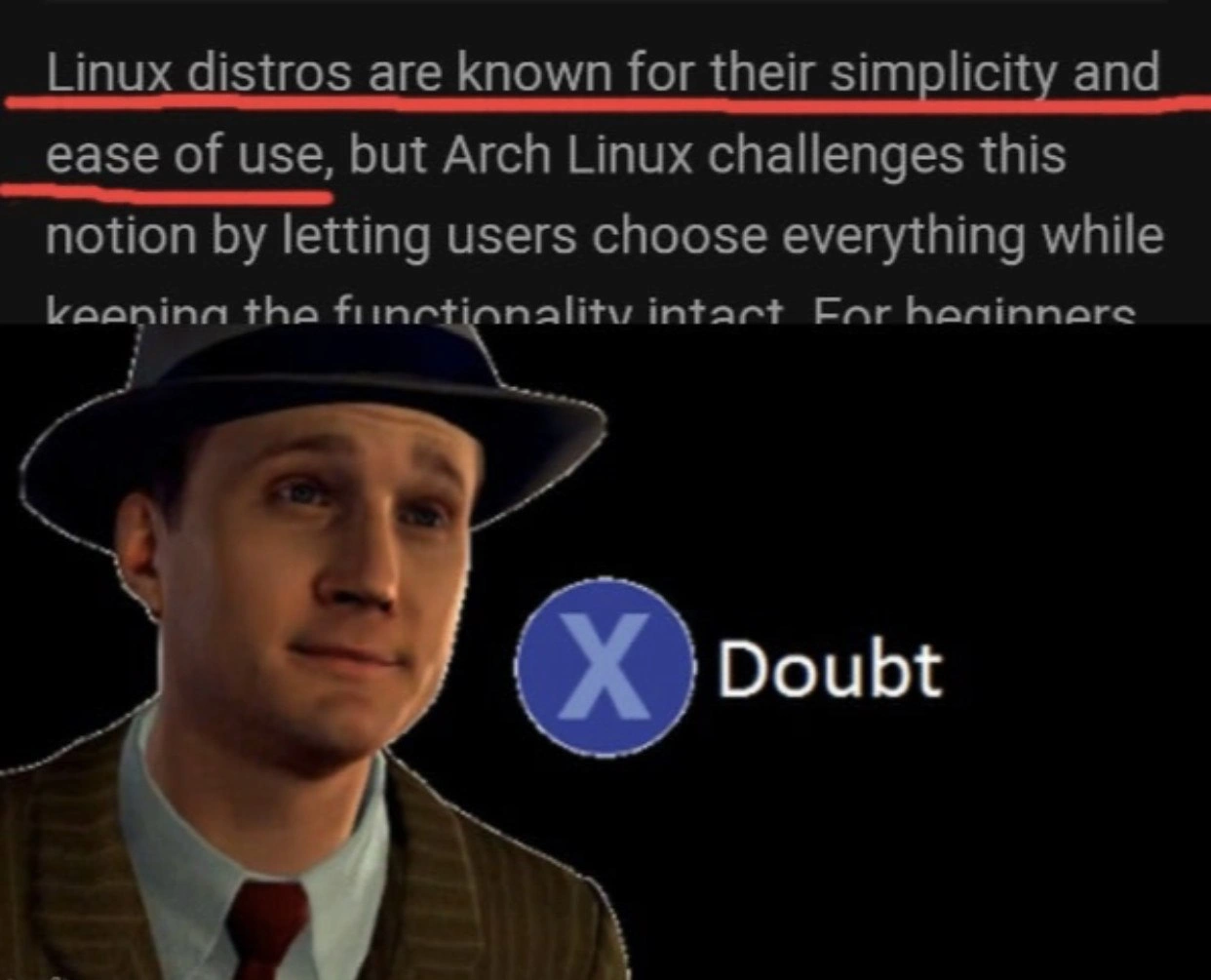
That’s exactly what’s happening in this meme. The top part is like the person claiming, “Oh, Arch Linux is simple and easy to use.” Arch Linux is a version of the Linux computer system that actually makes you do all the setup work yourself (kind of like building the LEGO toy from scratch). The bottom part, with the detective and the “X Doubt,” is the reaction of an experienced computer user giving that “yeah, I don’t believe you” look. In simple terms: someone said “It’s easy!” but people who know Arch Linux are laughing and saying “No, it’s definitely not that easy!” The humor comes from that obvious mismatch – it’s like calling a complicated DIY project “kid’s play” and everyone who’s done it before just shakes their head and smiles because they know the truth.
Level 2: Partition, Pacstrap, and Pray
Let’s break down what’s going on for those newer to Linux. Arch Linux is a popular distribution (flavor) of the Linux operating system, but it’s known for being hands-on and controlled entirely via the command line (CLI) during setup. Unlike user-friendly Linux editions (like Ubuntu or Mint) which have graphical installers and defaults, Arch gives you a bare-bones starting point and expects you to set everything up. The meme highlights the gap between marketing language and the real developer experience (DX) of Arch. The top part is basically saying “Linux is simple and easy, and Arch lets you choose everything easily.” The bottom part (the detective with an “X Doubt” prompt) is a reaction meme indicating disbelief. It’s from a game called L.A. Noire where the player can press the “X” button to doubt a suspect’s statement. Here, it means the experienced folks really doubt that claim about Arch being easy to use.
Why would they doubt it? Because installing and using Arch is not as easy as that rosy description implies. In a typical beginner-friendly Linux distro, you might: boot from a USB, get a nice installer window, click next a few times to select your language, timezone, maybe pick a username and password, and the system sets up everything (disk partitions, copying system files, installing a boot menu) automatically. Arch Linux, by contrast, drops you into a text-only environment (a TTY console with a blinking cursor) and says “have at it!” You have to enter all the commands yourself to get the system up and running. It’s like the CLI equivalent of assembling a piece of IKEA furniture with just a manual – no pre-drilled holes, no numbered bags, just parts and a diagram.
Here are some key tasks and terms involved in an Arch install (and why they’re tricky for beginners):
- Manual partitioning: You must divide your hard drive into sections (partitions) for things like the system, swap, etc. In Arch, you do this with command-line tools like
fdiskorparted. There’s no graphical slider or auto-mode. If you’ve never partitioned a disk, it’s a bit daunting – one mistake can wipe a drive or make it unbootable. - Formatting and mounting: After partitioning, you format each partition with a filesystem (e.g., ext4) using commands like
mkfs.ext4. Then you mount them (attach them to a directory path) so the system can use that space. Other distros do this for you behind the scenes; in Arch you run commands to do it. - pacstrap: This is an Arch-specific script/command that installs the base operating system packages into your mounted partitions. It’s essentially “copy the minimal OS files to my new system”. It uses pacman (Arch’s package manager, kind of like
aptin Debian/Ubuntu) under the hood. There is no GUI progress bar – you typepacstrap /mnt base linux linux-firmwareand watch text scroll as the core files install. If you forget to include a package or the command fails, it’s on you to fix. - chroot (Change Root): After copying the base system, you chroot into it, which means you switch your shell’s root directory into the new installed system. It’s like stepping inside the new system while still running off the installer media. This lets you configure the new system as if you had booted into it. For instance, you’ll set up things like timezone, locales, and install additional packages from within this chroot environment. This concept is unfamiliar to newcomers – it’s a bit like inception: running a system within a system.
- fstab: Stands for “File System Table”. This is a configuration file (
/etc/fstab) where you list all the partitions and where to mount them (attach them in the directory tree) every time the system boots. Many user-friendly installers create this file automatically for you. In Arch, you generate it with a command (genfstab) or even manually edit it. Messing upfstabcan mean your system won’t know where your drive is when it reboots (and that’s as bad as it sounds). - Bootloader: This is the small program that actually loads your operating system when the computer starts. Common bootloaders are GRUB or systemd-boot. Arch doesn’t install a bootloader for you automatically – you have to install and configure it. In something like Ubuntu, the installer would set up GRUB behind the scenes so when you reboot, you get a menu to select your OS. In Arch, after
pacstrap, your new system has no idea how to boot – until you manually add a bootloader. You might run commands likegrub-installandgrub-mkconfigto set this up. If you skip it or do it wrong, your system simply won’t start.
All of that is a lot of moving pieces for a beginner. Now, Arch’s philosophy is that by doing this yourself, you get exactly what you want and nothing you don’t. It’s highly customizable and teaches you how Linux works under the hood. But it’s definitely not plug-and-play. Newcomers often have moments of confusion or frustration, like “Why won’t the internet work?” – then they realize they have to install Wi-Fi drivers or plug in an Ethernet cable and configure the network interface manually. The meme’s description mentions “fighting Wi-Fi firmware in the TTY” – a common struggle if your wireless card needs special drivers not included by default. An experienced Linux user reads that marketing line “simplicity and ease of use” and immediately remembers their own hard-won battles in Arch, hence the skeptical “Doubt” reaction.
To put it in perspective, compare a beginner-friendly Linux distro to Arch Linux:
| Friendly Distro (e.g. Ubuntu) | Arch Linux |
|---|---|
| Provides a graphical installer with a wizard (point-and-click setup). | Provides only a command-line environment; you follow a text guide and type everything. |
| Auto-partitions and formats your disk by default or with simple options. | You manually partition the disk and format it using CLI tools (full control, but all on you). |
| Installs a desktop environment (GUI) and common software out-of-the-box. | Installs only a minimal base system. You decide and install every additional component (no default GUI). |
| Pre-configures most hardware (network, video, sound) so it “just works”. | Assumes you will configure or install drivers as needed. If something isn’t working, you troubleshoot it manually. |
| Targets ease-of-use: good for Linux beginners, things work with minimal tweaking. | Targets power-users: you learn and tweak everything. Great for understanding Linux, not aimed at first-timers looking for convenience. |
As you can see, Arch Linux is a totally different approach. The meme jokes that marketing is glossing over these differences. The phrase “choose everything while keeping functionality intact” sounds like Arch magically makes advanced setup as easy as pie – but really it’s saying Arch lets you pick everything because it doesn’t pick anything for you. Functionality is “intact” in the sense that Arch can be made to do anything a Linux system can, but you are responsible for assembling that functionality. It’s a bit like saying “This kit lets you build any car you want and it’ll drive great – once you’ve built it.” A senior developer reading that knows how much work is involved and can’t help but chuckle. They mash “X for Doubt” because they know a newcomer reading that line and trying Arch would be in for a surprise.
One more thing: Arch Linux has something called the Arch User Repository (AUR). This is a huge collection of community-contributed packages (software) that aren’t in the official repositories. It’s one of Arch’s superpowers – you can get tons of software, often the latest versions, by pulling the build recipes from AUR. However, using the AUR often means compiling software from source or using helper tools, which again is more involved than a typical app store or package install on other distros. It epitomizes Arch’s philosophy: you can have whatever you want, but sometimes you’ll work for it. An inexperienced user who’s told “Linux is easy!” and then encounters something like building an AUR package is going to feel misled. And that’s exactly why the seasoned folks find this meme so relatable and hilarious. They’ve been there, they know the learning curve disguised behind the word “simple.”
In summary, the meme contrasts marketing fluff with real-world Linux experience. The L.A. Noire detective’s doubtful expression = an older developer reading fluff about Arch being “easy” and going “Yeah, right…”. It’s a nod to the gap between how tech is sold and what it’s actually like to use, especially in the context of operating systems and command-line tinkering.
Level 3: KISS in Theory, TTY in Practice
When an article claims “Linux distros are known for their simplicity and ease of use” – and uses Arch Linux as an example – every battle-scarred sysadmin in earshot reflexively reaches for the virtual X Doubt button. The top half of this meme is basically corporate copywriting painting all Linux as user-friendly. Seasoned engineers know that’s a huge stretch, especially for Arch. Arch Linux is infamous for its DIY installation. Calling it “simple” is like calling an advanced model kit plug-and-play. Sure, Arch follows the KISS (Keep It Simple, Stupid) philosophy in design, but that simplicity is at the system level (minimal bloat, no hand-holding) – which means complexity for the user. The meme’s bottom half – the detective from L.A. Noire with the “X Doubt” prompt – perfectly captures a senior dev’s reaction: Yeah, I’m not buying it.
Why the skepticism? Because anyone who’s installed Arch remembers the tty_install_marathon: hours in a black-and-white terminal (TTY) doing everything manually. No graphical installer, no friendly wizards – just you and a shell prompt. To a marketing team, “letting users choose everything” might sound empowering, but seniors know it translates to “nothing is set up for you, good luck!” It’s the ultimate litmus test of Linux chops. Network not working? Better figure out iwctl or wpa_supplicant in the console. Forgot to install the right drivers or enable DHCP? Enjoy debugging that with no internet until you fix it. Ease of use indeed! Experienced Arch users have war stories of spending an afternoon in a TTY wrestling with a stubborn Wi-Fi firmware or GPU driver – hardly the rosy plug-and-play experience that phrase “simplicity and ease of use” conjures up.
Let’s recall what installing Arch Linux actually involves (versus the one-click fantasy). It’s a multi-step geek ritual: manually partitioning your disk, creating filesystems, bootstrapping the base system with pacstrap, chrooting into it, editing config files, setting up a bootloader, and more. In other words, not exactly “Next, Next, Finish.” For example:
# 1. Partition the disk (manual steps, no safety net)
parted /dev/sda -- mklabel gpt # make a GPT partition table
parted /dev/sda -- mkpart primary ext4 1MiB 100% # one big ext4 partition
# 2. Format the partition with a filesystem
mkfs.ext4 /dev/sda1 # create an ext4 filesystem on the new partition
# 3. Mount the target installation volume
mount /dev/sda1 /mnt
# 4. Install base packages into /mnt (using Arch's pacman package manager)
pacstrap /mnt base linux linux-firmware # minimal OS base and kernel
# 5. Enter the new system's environment to configure it
arch-chroot /mnt
# 6. Generate fstab (so the system knows disk mount points)
genfstab -U /mnt >> /mnt/etc/fstab
# 7. Install and configure a bootloader (so the system can actually boot)
pacman -S grub efibootmgr
grub-install --target=x86_64-efi --efi-directory=/boot --bootloader-id=GRUB
grub-mkconfig -o /boot/grub/grub.cfg
# ... Set up network, users, root password, etc. ...
exit
reboot # Moment of truth: will it boot to a login?
Each of those steps is an opportunity to mess up. Mistype a partition ID or skip generating the fstab, and you might end up with a unbootable system or a kernel panic on first boot. There’s no safety net of a polished installer correcting you. Seasoned developers have PTSD from late-night installs where one missed step meant starting over (or chrooting back in to fix it). So when we see a line bragging about Arch “keeping functionality intact” while being simple, we can’t help but smirk. Marketing vs. reality: the cognitive dissonance is hilarious. The meme nails this disconnect – the detective’s skeptical face is basically every senior dev saying, “Sure, Arch is totally easy… and I’m the Queen of England.”
Now, to be fair, in 2021 Arch Linux introduced an optional archinstall install script meant to streamline this process a bit. Maybe that’s why some copywriter got bold calling Arch user-friendly. But even with a script, Arch is no Ubuntu. The script itself asks a bunch of questions and doesn’t hide the gritty details – it’s more of a guided manual install than a true wizard. And any Arch user will tell you: once installed, you’re still on your own for system upkeep. Arch is a rolling-release distro; you’re expected to update regularly (sudo pacman -Syu for the win) and handle occasional breakages. Installing new software often involves reading the Arch Wiki or using the AUR (Arch User Repository) to compile community packages. None of this is what you’d call “plug and play”. It’s powerful and flexible, yes, and many developers love Arch for that exact reason – but it absolutely demands a higher level of user involvement and knowledge.
The humor here is rooted in shared experience and a bit of gatekeeping comedy. Veteran Linux users have earned their stripes the hard way – editing config files in Vim, manually resolving dependency conflicts, recovering from a black screen because Xorg didn’t configure properly. They know Arch’s “simple” philosophy really means minimalistic (no bloat, no automation) rather than user-friendly. So when marketing glosses over that distinction, it’s like a bad inside joke: “Oh, Arch is super easy, trust us!” Press X to Doubt. The bottom line: calling Arch Linux “simple and easy to use” will get you some serious side-eye from anyone who’s actually installed it. The meme brilliantly captures that moment of collective incredulity among seasoned devs.
Description
This meme shows a picture of an eldritch horror, a writhing mass of tentacles and eyes, with the caption: 'My 'simple' regex for validating an email address.' This meme humorously exaggerates the complexity that can arise from seemingly simple tasks, like writing a regular expression for email validation. For senior engineers, it’s a nod to the infamous Stack Overflow post about the horrors of regex, and the understanding that what seems like a simple pattern matching problem can quickly spiral into an unholy, unmaintainable mess

Comments
7Comment deleted
There are two problems in computer science: cache invalidation, naming things, and off-by-one errors. And regex
If Arch qualifies as a ‘simple, user-friendly’ distro, my 400-line Kubernetes manifest must be the new Notepad
Calling Arch "beginner-friendly" is like calling Kubernetes "a simple container runner" - technically true if you ignore the 47 YAML files, three networking plugins, and the PhD in distributed systems you'll need by Tuesday
Arch Linux: where 'simplicity' means you only need to read 47 wiki pages, manually partition your drives, configure your bootloader, compile your own kernel modules, and debug systemd conflicts before you can finally install a desktop environment. But hey, at least you'll know *exactly* what's running on your system - assuming you survive the installation process and remember to enable networking before rebooting
Arch’s KISS translates to “simplicity for maintainers”; the complexity is rebilled to you as configuration‑as‑a‑service
Arch Linux: where 'simplicity' means hand-crafting your initramfs because trusting mkinitcpio defaults is for distro noobs
Arch’s “simplicity” is the kind where the installer hands you fdisk, pacstrap, and a Wiki - congrats, you’re now the distro’s SRE