The 'It Works on My Machine' Dilemma
Why is this Bugs meme funny?
Level 1: Miracle Mix-up
Imagine you have a toy robot that usually bumps into walls, and you decide to improve it by tweaking its controls. You expect it might still crash because you’re not sure your fix will work. But when you test it, the robot suddenly dances perfectly around every obstacle – like magic! That feels miraculous, right? Now, before you cheer, you notice something: the robot you were watching wasn’t yours at all, but your friend’s robot that was already well-trained. Whoops! You weren’t actually testing your new changes. That’s why it looked so flawless. In simple terms, the funny quote in the meme says the same thing about coding: if your result is unbelievably good, maybe you weren’t running your code like you thought. It’s a mix-up! The humor comes from that “Aha!” moment of realizing the amazing performance was just an illusion. Just like testing the wrong robot, running the wrong program can trick you into thinking you did a genius job – until you find out you had the wrong one all along. The meme basically gives a warm chuckle and a friendly nudge: always make sure you’re actually testing what you think you’re testing, or you might be celebrating a miracle that isn’t real.
Level 2: Stale Cache Surprise
Let’s dial it down and explain the technical bits in simpler terms. This meme is about debugging – the process of finding and fixing problems (bugs) in your code. The quote warns: if your program’s result is unbelievably good (a “miracle”), something’s fishy. In fact, you might not be running the program you think you are. How could that happen? Quite a few ways, even for a junior developer:
- Running the Wrong Program: Imagine you wrote code (say
Program A) and also have an older version (Program B) on your computer. You intend to run your new code, but by mistake you keep openingProgram B. Of courseProgram Bmight work perfectly (it’s older and well-tested), so you’re amazed your new changes “fixed everything” – except they didn’t, because you never actually ran them! Always double-check you executed the right file. - Didn’t Rebuild or Save: In many languages (C++, Java, etc.), after editing code you must compile or build it to create a new binary (the actual executable program). If you forget to do that, you’re still running the last compiled version. For example, if you expected your app to print “Hello Confucius” after your change, but it still prints the old “Hello World”, it might be because you never really compiled the new code. The “miracle” of nothing breaking is just the old app still running. In simpler terms: you changed the recipe but didn’t actually bake a new cake, so you’re still tasting yesterday’s cake and thinking your new recipe is fantastic.
- Build Cache Issues: Modern development tools often use caching to save time. A stale build cache is when the tool mistakenly thinks “nothing changed” in your code and skips building a part of it. It then reuses an old chunk of program. So you run the app and it behaves as if the bug is gone – wow! But actually, the buggy part never updated and wasn’t executed at all. It’s like hitting refresh on a website but seeing an old page because your browser cached it. Looks fine, but it’s not the latest content.
- Wrong Deployment/Environment: In web development or any deployment, you might upload your new code to a server, but users still hit an old server by accident. Or your test might be pointing to the wrong environment. Suppose you have a testing server and a live server – you think you’re testing the new code on the test server, but you’re actually still on the live server (with old stable code). Everything works great and you think, “Awesome, my fix works!” until you realize you never really tested the new code at all. Oops!
The term Heisenbug mentioned in the tags is a fun one: it’s a mashup of “Heisenberg” (the physicist behind the Uncertainty Principle) and “bug”. A Heisenbug is a bug that disappears or changes when you try to study it. For example, you have a bug causing random crashes. You then run the program with a debugger or add print statements to locate the issue – and the bug magically stops happening. Frustrating, right? It’s not voodoo; by observing or altering the program’s conditions (even slightly), you changed the timing or memory layout, so the bug went into hiding. The meme’s scenario is a close cousin to that: the bug seems gone, but only because you weren’t truly looking at it in the first place (running different code). In both cases, the lesson is don’t trust miraculous solutions. Always verify you’re really testing what you think you are.
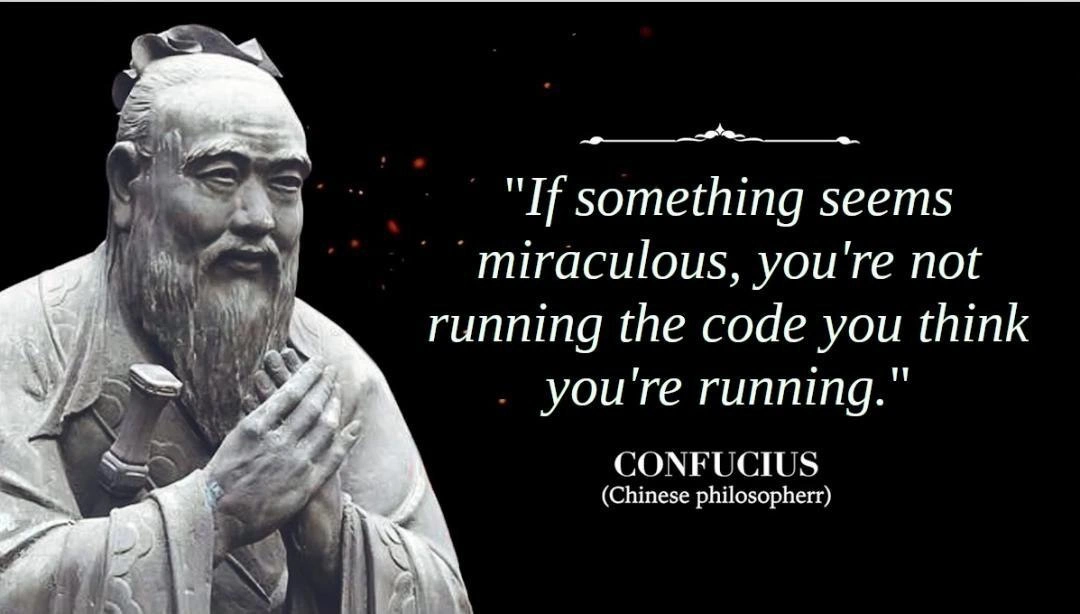
Even the styling of the meme adds to the joke once you know what to look for. The quote is attributed to CONFUCIUS (Chinese philosopherr) – notice the misspelling with an extra “r” in philosopher. That’s a small goofy detail. It signals that this is meant to be lighthearted. It’s as if the meme is winking at you: the content looks wise and serious, but there’s a tiny bug (typo) right in the attribution, much like there was a little “bug” causing your miraculous code result. It’s a playful reminder that errors can lurk anywhere, even in ornate wisdom quotes. As a new developer, it’s important to learn that debugging often involves checking assumptions. If something works and you can’t explain why, don’t just celebrate – investigate! In coding, understanding why something works is as important as fixing why it doesn’t. The real-world Confucius didn’t program computers, but if he did, he might indeed advise: verify your environment, for the code may not be what it seems. This meme wraps that practical tip in humor, making it memorable and shareable among coders.
Level 3: Debugging Enlightenment
This meme delivers a nugget of hard-earned debugging wisdom dressed up as ancient philosophy. The image shows Confucius—a symbol of deep wisdom—pronouncing a very modern piece of advice: “If something seems miraculous, you’re not running the code you think you’re running.” Experienced developers immediately grin at this because it hits on a relatable developer experience: those head-scratching moments when a program’s output is unbelievably (and suspiciously) perfect or weird. In plainer terms, if your software suddenly works like a charm in spite of bugs, or produces output too good to be true, it likely means there’s a mix-up in what’s actually being executed. The humor here comes from reframing a painful debugging lesson as if it were an ancient proverb – a bit of coding humor blending reverence and sarcasm.
Why is this funny? Because any seasoned engineer has learned (often the hard way) that miraculous output usually isn’t a real miracle – it’s a mistake in disguise. Perhaps you compiled new code but accidentally ran an older binary. Maybe your stale build cache served an artifact from last week, so the “new” feature you’re testing is actually an old version quietly running without the bugs you just introduced. It’s a form of self-deception every programmer encounters. The meme elicits a chuckle of recognition: of course the bug seems gone – nothing actually changed under the hood!
Let’s break down common scenarios behind this quote, the kind that cause debugging pain but become war stories later:
- Wrong Binary Deployed: You push a hotfix and deploy, but the server is still running the previous build. Everything looks stable (a miracle?), until you realize you were hitting the old code all along.
- IDE Cache Gremlins: You hit “Run” in your IDE, and the app works flawlessly. But unbeknownst to you, the IDE didn’t compile your latest changes due to a cache. The flawless run was an artifact of yesterday’s code.
- Multiple Environment Mix-up: You test on what you think is QA, but it’s actually still the production environment or a different server. The code behaves “magically” well because you’re not testing the new unstable build at all.
- Implicit Defaults: Perhaps you updated a config file or environment variable for the new behavior, but your program is still reading a default config elsewhere. The code runs with safe defaults and avoids the crash you expected. A miracle? No, just the wrong config being used.
- Observer’s Paradox: Similar to a classic Heisenbug, you add a
console.logor breakpoint to investigate an issue, and suddenly the issue disappears. The program seems healed, but in reality the added debug code altered the timing or memory layout just enough to hide the bug. You didn’t truly fix anything.
In all these cases, the “miracle” is that things seem better, but only because of a mix-up in what code or settings are actually in effect. Seasoned devs have a healthy skepticism of sudden success. Like a monk achieving debugging enlightenment, they’ve learned to question: “Am I really testing what I think I’m testing?” This meme encapsulates that enlightenment with witty gravitas. Even the presentation drips with irony: a solemn statue of Confucius delivering what sounds like timeless wisdom, while a tiny typo in “philosopherr” (with an extra “r”) hints that we shouldn’t take it all too seriously. That double-r feels intentional – a nod to the fact that in tech, even authoritative-looking things can have small errors. (It’s almost like an off-by-one error slipped into an ancient scroll!) The ornate divider and fancy serif text complete the parody of a profound quote.
By invoking Confucius, the meme elevates a mundane troubleshooting tip into a philosophical axiom. It’s poking fun at how often senior developers spout such advice with an air of wisdom: “Check your assumptions, young padawan. The bug might not be where you think.” In essence, this meme brilliantly compresses a whole saga of debugging & troubleshooting lessons into one cheeky quote. It’s funny because it’s true: the real miracle is finding out you were testing the wrong thing entirely! As Confucius (apparently) might say: “Man who celebrate bug’s disappearance without understanding, will find bug never left.”
Level 4: The Binary Uncertainty Principle
At the highest level, this meme hints at a Heisenbug-like scenario in software, invoking almost quantum uncertainty in debugging. Just as Heisenberg’s Uncertainty Principle in physics suggests that observing a particle can change its behavior, a Heisenbug in programming is a bug that seems to vanish or alter when you try to inspect it. Here, the “miraculous” result is analogous to an electron appearing where it shouldn’t – a seemingly impossible outcome under the code’s known rules. If your program’s output defies logic, there’s likely a deeper systemic quirk at play. Often it means the program you’re observing isn’t the one you intended to run, introducing a form of binary uncertainty: the code and the execution have become decoupled. In complex systems, layers of build tools, JIT compilers, and caching can behave like opaque layers of quantum states – the final running binary might be an older or different state than your source code. This is where advanced concepts like cache invalidation and non-deterministic behavior come into play. For example, an undefined behavior in C++ (like using an uninitialized pointer) might by pure chance produce the “correct” result in one build configuration and crash in another. Senior engineers know that such “luck” is a red flag born of underlying chaos, not true success. The meme’s wisdom resonates with formal principles: in debugging, as in quantum mechanics, the act of observation (and environment setup) can drastically change outcomes. The quote cleverly transforms that complex reality into a pithy proverb. It nudges us toward a fundamental truth of computing: when you encounter a miracle in your program, start questioning your assumptions about what code actually executed – because in a properly deterministic system, miracles shouldn’t happen. This is the zen of debugging at a theoretical level: reality at runtime is determined by the code that’s actually running, not the code you believe is running. And if those two differ, all bets are off.
Description
This meme captures the classic developer excuse, 'It works on my machine.' It shows a developer shrugging nonchalantly, while in the background, a server room is on fire, representing the production environment. This humorously illustrates the disconnect that can happen between a developer's local setup and the live production environment. For senior engineers, it's a knowing nod to the complexities of environment parity, containerization, and the importance of robust CI/CD pipelines to prevent such discrepancies

Comments
7Comment deleted
Docker was invented to containerize the 'works on my machine' problem, so now we can say it works on my container, which is technically still my machine
Ancient proverb: when the demo works on the first try, grep the SHA - enlightenment usually reveals you’re still shipping last week’s artifact
The ancient art of debugging: spending three hours investigating quantum entanglement in your code before realizing you've been refreshing the production build while editing localhost
Every senior engineer knows that moment of existential dread when their 'impossible' fix works on the first try - it's not divine intervention, it's just that you've been debugging yesterday's Docker image while your IDE was helpfully running today's local build with completely different environment variables
At staff level, 'divine intervention' means PATH shadowed last week’s binary and your tests hit staging - make clean is the exorcism
Every “miracle fix” I’ve seen was a stale Docker layer, the wrong branch, or PATH resolving to a different interpreter - true enlightenment is running the binary you think you built
Prod latency vanishes overnight? You're running the load-test stub, not your actual service - classic enlightenment