Skip to content
DevMeme
2976 of 7435
AI's World Domination, Postponed by a Typo in 'February'
AI ML Post #3286, on Jun 18, 2021 in TG

AI's World Domination, Postponed by a Typo in 'February'

Why is this AI ML meme funny?

Level 1: Monkey See, Monkey Do

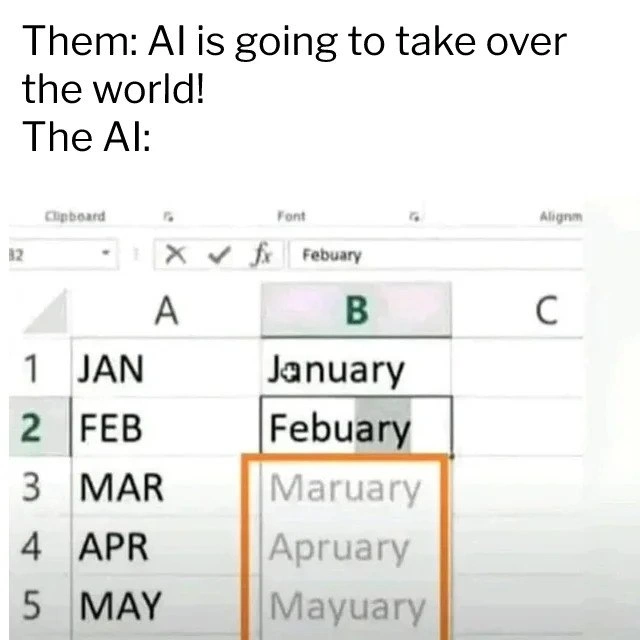
Imagine you’re teaching someone how to spell the months of the year, but you accidentally teach them one wrong spelling. You say “January” is J-A-N-U-A-R-Y (that’s correct), and then you accidentally say “February” is F-E-B-U-A-R-Y (oops, that’s wrong – it should have an “R” after the “B”). Now, this person doesn’t know it’s a mistake. Next, they try to be clever and guess the pattern for the rest of the months. Since you taught them two month names and both happened to end in “uary” (because of the typo), they assume every month must end in “uary”. So for March, they happily say “Maruary”; for April, “Apruary”; for May, “Mayuary” – all completely wrong and silly sounding.

This is basically what happened in the picture. The top caption jokes about people being afraid that artificial intelligence (AI) will take over the world. But the picture (the “AI”) is acting like a kid who learned something the wrong way and is confidently repeating the mistake. It’s doing “monkey see, monkey do” – copying a pattern exactly without understanding it. We find it funny because the big scary AI we’re supposed to be worried about is making a very goofy, obvious error. It’s like someone said “Watch out, that robot is super smart!” and then the robot comes in and trips over a toy because it didn’t see it.

In plain terms, the machine in this meme just copied a human’s typo and kept on going. It shows that the computer isn’t really “thinking” like a person; it’s just following whatever example it was given. The joke’s heart is that contrast: people worrying that computers will be smarter than humans, while here the computer is clearly dumber than a fifth-grader at spelling. It’s a light-hearted reminder that for now, computers only do exactly what they’re taught – if we teach them something wrong, they’ll do it wrong, with absolute confidence and no common sense, which can be pretty funny to see.

Level 2: Mimicking Mistakes

Let’s break down what’s going on in this meme in simpler technical terms. We have an Excel spreadsheet on display. In column A, you see the three-letter abbreviations for months: JAN, FEB, MAR, APR, MAY (for January, February, March, April, May). In column B, someone is trying to fill in the full month names. They correctly typed "January" next to JAN in B1. Next, they intended to type "February" next to FEB in B2, but made a typo, spelling it as "Febuary" (missing the first 'r').

Now, modern Excel has a feature often called Auto Fill or specifically Flash Fill, which is a bit of built-in “intelligence” to make data entry easier. Essentially, Excel watches what you’re doing and tries to guess the pattern so it can fill the rest of the column for you automatically. It’s like an autocompletion for spreadsheets. In this case, Excel looked at the two examples you provided (JAN → January, FEB → Febuary) and said “Aha, I see a pattern!” It then offered suggestions (in that grey/orange highlighted way) for MAR, APR, MAY in column B based on the pattern it guessed.

But here’s the catch: Excel’s guessed pattern was wrong. It noticed that in the examples, both results ended in "uary" ("January", "Febuary"). So it assumed every month must follow that rule: take the three-letter code and add "uary". Following that logic:

  • For MAR it suggested "Maruary" (since it thinks: MAR + "uary").
  • For APR it suggested "Apruary" (APR + "uary").
  • For MAY it suggested "Mayuary" (MAY + "uary").

Those suggestions – "Maruary", "Apruary", "Mayuary" – are nonsense words. The real month names are March, April, May, which don’t follow the "uary" pattern at all. So why did Excel do something so silly? Because it was mimicking the mistake the user made. The user accidentally taught it a bad pattern. Excel’s auto-fill doesn’t actually know what months are or how they’re spelled; it’s not pulling from a calendar or spelling dictionary in this mode. It just looks for a consistent transformation from column A to column B based on what you’ve done so far. In other words, it’s doing pattern recognition: “Maybe the rule is add this particular ending to everything.” With only the first two rows as examples, "add 'uary'" did look consistent! Excel essentially thought it had learned your rule for converting abbreviations to full names.

This is a simple example of the principle "garbage in, garbage out." If the input data or examples have an error (here the typo "Febuary"), the output will keep carrying that error forward. Excel’s little AI didn’t have a built-in sanity check or knowledge of months to say, “Hold on, 'Maruary' isn’t a real month.” It just blindly trusted the pattern from the user-provided data.

For a new developer or someone early in their tech learning, a few key terms pop up here:

  • AI (Artificial Intelligence): In this context, it’s not a super-advanced thinking machine, but rather a feature that uses smart programming to make a guess. Companies often label features like this as AI because they mimic intelligent behavior (like figuring out a pattern), even if under the hood it’s a set of simple rules or a basic machine learning model.
  • Auto-fill / Flash Fill: A tool in Excel that automatically fills in values by detecting what you’re trying to do. For example, if you type a couple of full dates or formatted names, Excel might offer to fill the rest of the column for you. It’s meant to save time.
  • Typo: A small typing mistake. Here "Febuary" is a typo for "February". This one little slip-up fooled the algorithm.
  • Pattern matching: The process of looking at data and finding a rule that explains it. Excel matched the pattern “three-letter code -> word ending in 'uary'” even though that pattern was really just a fluke.

So the meme text “Them: AI is going to take over the world! The AI:” combined with this image is highlighting that the so-called AI in this spreadsheet isn’t that smart at all. In fact, it’s imitating a human mistake. From a junior developer perspective, it’s a reminder that even cool automation features can be pretty naïve. We often need to provide correct examples or more data for these tools to work right. If you’ve ever used a phone keyboard that learns from your typing, you might have seen a similar effect: if you accidentally typed a misspelling often, the phone’s autocomplete might actually start suggesting that incorrect word because it “learned” it from you! This Excel case is the same idea: the tool is helping you, but it will trust whatever pattern it sees, even if that pattern comes from an error.

Ultimately, the meme is funny because it shows a big contrast: People fear super-smart AI, yet here we have a very dumb mistake by a simple AI. It’s the kind of thing you notice and go, “Wow, if this is AI, maybe we’re not in danger of a robot uprising just yet.” For a newcomer learning about AI, it’s a quick lesson: most AI today, especially in everyday software, is narrowly focused and not foolproof. It can mess up in almost childlike ways if we’re not careful with our inputs.

Level 3: First, Learn to Spell

This meme’s humor strikes experienced developers (and really, anyone following tech AI hype vs reality) right in the funny bone. We constantly hear grand proclamations like “AI is going to take over the world!” – conjuring images of Artificial General Intelligence running amok, maybe a real-life Skynet situation. But then reality crashes the party in the form of a trivial Excel feature utterly face-planting on something as simple as month names. The top text sets up the hype: Them: “AI will rule us all!” and then the punchline: The AI: [does something embarrassingly dumb]. In this case, the “world-conquering AI” can’t even spell February correctly – it confidently auto-completes "Maruary", "Apruary", "Mayuary". It’s a perfect comedic contrast between lofty expectations and current limitations.

For seasoned developers, this juxtaposition is painfully relatable. We’ve sat through meetings where higher-ups or marketing insist “We must add AI to our product because AI is the future” (classic IndustryTrends_Hype). Everyone’s hyping machine learning and automation to solve all problems, sometimes even feeding a bit of AutomationAnxiety (fear that AI will replace jobs or take over tasks). But those of us in the trenches have also seen how brittle these so-called intelligent systems can be. This meme encapsulates that cynical chuckle tech folks have when an “AI” screws up something trivial. It’s a reminder: today’s AI, especially the kind baked into everyday tools, often has severe limitations. Far from plotting global domination, it’s struggling with basic spellings and common-sense checks.

Consider what happened in this Excel scenario from a practical Developer eXperience (DX) angle: Microsoft added a fancy AI-powered Flash Fill to make users’ lives easier by automating pattern completion. Great idea in theory – it saves time on repetitive data entry. But as any experienced engineer knows, edge cases and bad input can turn a smart feature into a support ticket. Here a small human mistake (a typo: "Febuary") led the algorithm completely astray. Instead of noticing the user’s mistake, the AI doubled down on it. It’s as if the software proudly said, “Got it! I’ll apply your ‘uary’ rule everywhere!” This is a classic AI limitation: no ability to recognize context or correct obvious human errors, just a blind following of learned patterns. An old-school hard-coded approach (like a built-in list of month names or a spellcheck) would have easily caught this, but the new “intelligent” approach didn’t. Ironically, a simpler non-AI algorithm (e.g., filling from a known sequence of months) would have been smarter here. Seasoned devs appreciate that sometimes a dumb, explicit solution outperforms a “smart” solution that can learn – because the latter can learn wrong.

The collective industry experience has many analogies to this. Think about autocorrect fails on your phone, or AI assistants misunderstanding a name and stubbornly repeating it wrong. Or take a developer-centric example: GitHub’s AI code assistant Copilot sometimes picks up a quirky pattern from your code comment and then confidently generates incorrect code based on that misunderstanding. In all these cases, the AI doesn’t truly understand the task; it’s extrapolating patterns. When those patterns are flawed (like a misspelling or a misleading comment), the results range from funny to facepalm-inducing. We laugh because we’ve been on the receiving end of these “AI gone silly” moments many times.

This meme also subtly nods to the AI hype cycle. There’s intense hype about AI and automation replacing human work or even controlling humanity. Yet, here we have a grounded reminder that current AI can be incredibly narrow. The Excel AI is excellent at mimicry but ignorant of meaning – it’s not thinking, it’s parroting. For a developer, it’s a call to keep hype in check: Before worrying about robot overlords, maybe we should get our AI to pass a spelling test or handle a simple data entry sequence without supervision. It’s both comforting and comical to realize Skynet is a long way off when “Maruary” is the state of the art.

In the daily life of a software engineer, this scenario is too real. We’ve debugged situations where an AI-driven feature misbehaved because of an unforeseen input. We’ve dealt with managers over-selling an “AI-powered” solution that we know is basically some pattern matching that will break on uncommon cases. This meme crystallizes that shared understanding: AI isn’t magic. It’s powerful, yes, but also quirky and fallible. As the meme suggests with a wink, maybe we can hold off panicking about AI world domination until it learns to handle a simple thing like months without making up "Mayuary"!

Level 4: Flash Fill Fallacy

At the deepest technical level, this meme illustrates an overfitting scenario in a simple spreadsheet AI. Excel’s Flash Fill (an AI-driven auto-fill feature introduced to automatically recognize patterns) appears to have deduced a flawed rule from minimal data. In machine learning terms, the system learned from too few examples and generalized incorrectly. Here’s what likely happened under the hood:

  • The user provided two example mappings in Excel: "JAN" ➡️ "January" and "FEB" ➡️ "Febuary".
  • Excel’s algorithm tried to infer a transformation function f(prefix) = full_word. Given those examples, one consistent hypothesis was: take the three-letter month prefix and append “uary”. This hypothesis fits both provided examples (even though "Febuary" was a misspelling by the user).
  • Without any semantic understanding or a dictionary of month names, the algorithm had no idea "Febuary" was a typo. It treated the typo as ground truth for the pattern. In the realm of program synthesis by example, it found a program (a simple string concatenation rule) that perfectly matched the given inputs, unaware that this pattern was spurious outside the provided data.

In essence, the AI over-fit to the literal pattern “<First3Letters> + uary” because that rule explained 100% of its training data. It’s a textbook example of a learning algorithm picking the simplest hypothesis that fits observed examples, but that hypothesis doesn’t reflect the real-world rule. The real series of month names follows a non-uniform pattern (most months don’t end in "uary"), but the AI isn’t actively cross-checking against a knowledge base of calendar facts – it’s just performing blind pattern extrapolation.

We see here a clash between narrow AI pattern recognition and actual human knowledge. The Excel AI (really more of a heuristic algorithm than a sentient intelligence) lacks any context beyond the letters it sees. There’s no semantic model telling it that "Maruary" is not an actual month. This is akin to a machine learning model trained on biased or noisy data: it will confidently extend the noise as if it were signal. In fact, what Excel’s feature did is reminiscent of a classic overfitting problem in ML, where a model memorizes a quirk in the training data (here, a typo) and then faithfully reproduces that quirk in all future predictions.

To put it in pseudo-code, the AI essentially learned something like:

# Hypothetical rule learned by Excel's Flash Fill:
def complete_month(prefix):
    return prefix + "uary"

prefixes = ["MAR", "APR", "MAY"]
for p in prefixes:
    print(complete_month(p))
# Output:
# Maruary
# Apruary
# Mayuary

The fallacy of this Flash Fill approach is assuming correlation equals truth. Excel’s auto-fill mechanism found a coincidental pattern (both "JAN→January" and "FEB→Febuary" end in "uary") and ran wild with it. There was no constraint or second-guessing step to ask, “Does this pattern hold for all months? Does it even produce real words?”—that kind of holistic check is beyond a narrow pattern learner. In more advanced terms, the algorithm lacked a form of regularization or domain validation to prevent such over-generalization. It’s a small-scale demonstration of why purely data-driven AI can fail without contextual knowledge: the model will confidently suggest nonsensical "Maruary" if its training clues point that way. This deep dive reveals how something as mundane as Excel’s auto-complete is actually a microcosm of machine learning pitfalls: garbage in, garbage out (or rather, typo in, typo propagated). It’s a humble reminder that however fancy the “AI” label, without robust design it’s just pattern-matching strings – and it can easily learn the wrong pattern.

Description

A meme that humorously contrasts the hype surrounding artificial intelligence with its often flawed and simplistic real-world applications. The top text reads, 'Them: AI is going to take over the world! The AI:'. Below this is a screenshot of a Microsoft Excel spreadsheet. Column A lists the three-letter abbreviations for months: JAN, FEB, MAR, APR, MAY. Column B is an attempt to autofill the full month names. However, 'February' is misspelled as 'Febuary'. Based on this single error, the autofill feature (representing 'The AI') incorrectly predicts the following months as 'Maruary', 'Apruary', and 'Mayuary'. The joke lies in the fallibility of so-called 'AI', which is often just a brittle pattern-matching algorithm. For senior developers, this is a relatable jab at the 'garbage in, garbage out' principle and a reality check on the current state of AI, mocking its inability to handle minor, human-like errors

Comments

7
Anonymous ★ Top Pick Everyone fears the singularity, but the real risk is an AI that gets one-off-by-one errors in a date library and schedules every meeting in 'Maruary'
  1. Anonymous ★ Top Pick

    Everyone fears the singularity, but the real risk is an AI that gets one-off-by-one errors in a date library and schedules every meeting in 'Maruary'

  2. Anonymous

    Excel Flash Fill sees one misspelled “Febuary,” overfits the entire Gregorian calendar, and management still wants it doing code reviews

  3. Anonymous

    After 20 years in tech, I've learned that the same AI that promises to solve climate change and cure cancer still thinks 'Maruary' is a perfectly reasonable month name when it sees 'January, February' in a spreadsheet. We're safe from the robot uprising as long as they keep using regex to parse dates

  4. Anonymous

    When your autocomplete algorithm discovers that all months end in '-uary' and decides to helpfully extrapolate this pattern to its logical conclusion, you realize the real AI apocalypse isn't Skynet - it's a regex gone rogue in Excel that's convinced October should be 'Octuary' and your production data pipeline just inherited this logic

  5. Anonymous

    Everyone’s worried about AGI, but our “AI” is just regex with a GPU: it overfits .*uary, hallucinates Maruary, and reports 0.99 confidence - great at tokens, hopeless at calendars

  6. Anonymous

    AGI imminent? More like prompt engineering's eternal February 29th in Maruryary

  7. Anonymous

    Classic product move: slap 'AI' on an autocomplete with no schema or validation; now it overfits to 'uary' and the only thing it is taking over is our incident queue

Use J and K for navigation