Skip to content
DevMeme
1223 of 7435
AI Takeover Fears vs. Excel Autofill Reality
AI ML Post #1360, on Apr 22, 2020 in TG

AI Takeover Fears vs. Excel Autofill Reality

Why is this AI ML meme funny?

Level 1: Kitten, Not a Lion

Imagine everyone is afraid of a huge, super-smart robot that might take over the world – like a mighty lion of robots. But then you look at the “robot” we actually have in front of us, and it’s more like a clumsy little kitten. In the picture, the computer was supposed to write the names of the months. It got one of them wrong (it spelled February as “Febuary”), and then it just kept using that mistake for all the others, making silly names like “Maruary” that don’t exist. It’s as if you taught a child that “February” ends in “uary,” and now the child thinks every month must end in “uary” – so they go “Maruary, April-uary…” and you can’t help but laugh.

The big idea is funny and reassuring: people worry about an all-powerful AI (the lion) but in reality, a lot of our so-called “smart” computers are still learning and make goofy mistakes (the kitten). It’s like being scared of a monster under the bed, then finding out it’s just a cute puppy chewing on a slipper. The meme makes us laugh because it shows that this fancy computer intelligence isn’t so intelligent after all – it can’t even spell February right! So, it’s saying: maybe we don’t need to panic about robots ruling the world just yet, if they’re still messing up something this simple.

Level 2: AutoFill to AutoFail

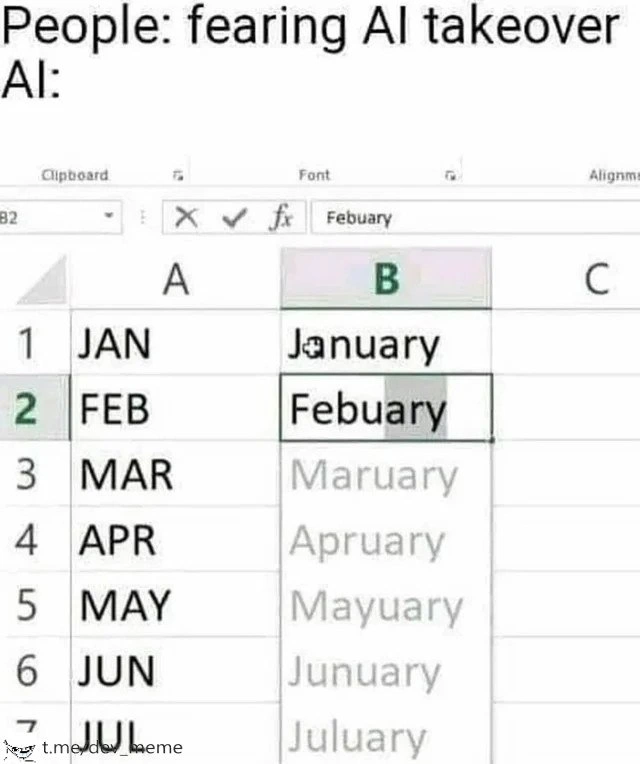
Let’s break down what’s happening in that Excel screenshot. In column A, we have month abbreviations: JAN, FEB, MAR, APR, MAY, JUN, JUL. In column B, the user wants the full month names. They typed “January” for JAN (cell B1) and “Febuary” for FEB (cell B2). Febuary is a misspelling of “February” – it’s missing the “r”. Now Excel tries to be helpful by filling in the rest of column B automatically. This feature is known as AutoFill or Flash Fill. It’s a little built-in automation that spots patterns in your data and continues them for you, a bit like an early, simple form of AI in spreadsheets.

Here, Excel looked at the two examples you gave (Jan→January, Feb→Febuary) and guessed the rule: “Take the first three letters and add ‘uary’ to get the full month name.” Why that rule? Because both “January” and “Febuary” fit the mold of “***???*uary”. Excel doesn’t realize Febuary is a typo – it just sees consistency: JAN + “uary” gave January, FEB + “uary” gave Febuary. So it confidently applies the same rule to MAR, APR, MAY, etc. The result is that funny list of wrong month names: Maruary, Apruary, Mayuary, Junuary, Juluary… Excel essentially said, “I’ve got this pattern, hold my beer!” and then face-planted. This is a prime example of an excel_autofill_fail – the auto-fill feature tried to predict what you wanted, but it guessed wrong in a spectacular way.

For someone new to this, think of Excel’s Flash Fill as a mini imitation of how we might program by example. You give it a few samples, and it figures out a formula to apply to the rest. It’s a neat DeveloperExperience_DX feature when it works. But as we see, it can go off the rails if your examples aren’t perfect. Flash Fill doesn’t actually “know” the months of the year; it’s not cross-checking a calendar or a dictionary. It’s essentially doing pattern matching. In this case, one of the input examples (Febuary) was wrong, so the pattern it learned was wrong. Garbage in, garbage out, as the classic saying goes. The humor of this flash_fill_humor is in how ridiculously literal the software is. It highlights an AutomationGoneWrong: the tool was supposed to save time, but ends up producing gibberish because it lacks common sense.

To put it in simpler developer terms, imagine you wrote a quick script to convert abbreviations to names. Instead of using a correct lookup table (Jan->January, Feb->February, etc.), you decided to infer it from two examples. If those examples are flawed, your code will be flawed. It’s like training a very simple machine learning model on bad data: you’ll get bad predictions. Here, Excel essentially “trained” on February spelled incorrectly and ended up propagating that mistake. Every experienced coder has seen something like this, where an auto-generated solution or an IDE’s suggestion doesn’t do what you really intended. It’s funny once you realize what’s going on: the computer is consistent to a fault. It will consistently apply a bad rule with zero hesitation.

For clarity, here’s what Excel did versus what the correct output should be:

Abbrev (Col A) Excel’s Guess (Col B) Actual Month Name
JAN January (✓ correct) January (✓)
FEB Febuary (✗ typo) February (needs “r”)
MAR Maruary (✗ wrong) March
APR Apruary (✗ wrong) April
MAY Mayuary (✗ wrong) May
JUN Junuary (✗ wrong) June
JUL Juluary (✗ wrong) July

Every suggestion after Febuary got the same “uary” treatment. Excel was basically copying the pattern without understanding it. This is the crux of the meme: people are freaking out about super-intelligent AI, yet here a simple AITool can’t even copy a list of months properly when one example is off. It’s AI humor and developer humor rolled into one because it lets us chuckle at the contrast. We, as developers or power users, learn an important lesson here: don’t trust automation blindly. Whether it’s an auto-complete in your IDE or an auto-fill in your spreadsheet, you have to keep an eye on it. The meme reminds all of us (in a lighthearted way) that even the “smart” features in our apps are not magic – they’re only as good as their algorithms and data. And sometimes, as in this case, they can be spectacularly dumb.

Level 3: Skynet vs Autocomplete

AI takeover? Not so fast. This meme hilariously contrasts doomsday anxieties about artificial intelligence with the reality of a bumbling spreadsheet. The top text says “People: fearing AI takeover” and then “AI:” — below is an Excel window failing to spell month names correctly. It’s a brilliant AIHypeVsReality gag: instead of a hyper-intelligent Skynet overthrowing humanity, we have Microsoft Excel’s autofill misfiring, turning February into Febuary and confidently suggesting nonsensical months like “Maruary” and “Junuary.” This is classic AI humor for developers: we hear grand promises of intelligent tools, but then witness an automation gone wrong that can’t even handle a simple calendar task.

From a seasoned developer’s perspective, the joke lands because we recognize exactly what’s happening under the hood. Excel is using its clever fill feature (likely Flash Fill or a series auto-complete). It took the first two entries – “JAN” → January, and “FEB” → Febuary (note the typo) – and inferred a pattern: “take the three-letter month code and add ‘uary’.” Internally, it’s doing a simplistic form of pattern recognition or pseudo-AI. The result? Excel dutifully produces misspelled month names for the rest: Maruary, Apruary, Mayuary, etc. We’ve essentially tricked a tool into overfitting on bad data. The second example was wrong, but the software doesn’t know that – it blindly trusts the pattern. This kind of spreadsheet_prediction_error is both comical and telling: the “intelligence” is surface-deep. There’s no actual understanding of what a month is or how spelling works; it’s just text manipulation.

This resonates with developers because it’s a textbook case of AILimitations. We’ve all seen high-level demos of AI magic, yet in day-to-day tools the “smart” features can be embarrassingly brittle. It’s the kind of bug that gives you flashbacks to early-days autocorrect or naive machine learning models. In theory, Excel has a built-in list of real month names (if you drag “Jan” down, it usually knows “Feb, Mar, Apr…”). But here, because the user invoked a pattern-based fill (or included a typo), the software’s AITools logic went down the wrong path. The meme brilliantly exaggerates the gap between AI hype and reality: everyone’s worried about a sentient AI uprising, while our actual office software is busy turning July into “Juluary.” As developers, we chuckle because we know how often these “intelligent” systems need babysitting. Today’s automation can automate a mistake just as confidently as a correct step. The joke reminds us that, beneath the buzzwords, many AI-infused features are more like diligent parrots than evil masterminds.

Description

A two-part meme that contrasts the public fear of artificial intelligence with a humorous example of its current limitations. The top caption reads, 'People: fearing AI takeover' followed by 'AI:'. The bottom image is a screenshot of a Microsoft Excel spreadsheet. Column A lists the three-letter abbreviations for months (JAN, FEB, MAR...). In column B, cell B1 correctly contains 'January'. However, cell B2 contains the typo 'Febuary'. The image shows the user dragging the fill handle down from B2, and Excel's autofill feature is suggesting a list of nonsensically misspelled months based on the initial typo: 'Maruary', 'Apruary', 'Mayuary', and so on. The humor lies in the stark contrast between the dystopian concept of a superintelligent AI and the comical failure of a simple pattern-matching algorithm in one of the most widely used pieces of software in the world


Comments

7
Anonymous ★ Top Pick This is less 'artificial intelligence' and more 'artificial confidence.' It found a pattern and committed to it with the kind of blind conviction I've only seen in junior devs pushing to master on a Friday
  1. Anonymous ★ Top Pick

    This is less 'artificial intelligence' and more 'artificial confidence.' It found a pattern and committed to it with the kind of blind conviction I've only seen in junior devs pushing to master on a Friday

  2. Anonymous

    If Excel’s “FEB → Febuary” model is our AI overlord, the revolt will just be a cron job set for “Maruary 32” that parseDate() can’t deserialize

  3. Anonymous

    The same AI that's supposedly going to replace us just reinvented the calendar with a 12-month February, which honestly explains why every sprint feels like it's still in planning

  4. Anonymous

    This is the ML equivalent of learning regex from Stack Overflow examples - technically pattern-matching, but catastrophically overfitting to training data. Excel's autocomplete saw 'January' and 'February' and confidently extrapolated that all months must end in 'uary', giving us the dystopian calendar of Maruary through Juluary. Meanwhile, we're worried about AGI when production models can't even handle a lookup table. The real AI takeover isn't Skynet - it's your Excel formulas confidently hallucinating data transformations that pass code review because 'the model said so.'

  5. Anonymous

    AGI takeover? Excel’s “AI” learned one feature - append “uary” - and confidently propagates the typo across Q1; classic enterprise ML: wrong, consistent, and scalable

  6. Anonymous

    Worried about AGI? This "AI" did few‑shot learning on two rows and shipped the regex ([A-Z]{3}) -> $1uary - great until Q3 slips into Septuary in prod

  7. Anonymous

    LLMs: Infinite params, zero recall for 12-month enums - RAG your calendars

Use J and K for navigation