
Skip to content
DevMeme
5417 of 7435
The Escalating Desperation of Debugging an AI Agent
AI ML Post #5938, on Mar 22, 2024 in TG

The Escalating Desperation of Debugging an AI Agent

Why is this AI ML meme funny?

Level 1: Upgrades Gone Wrong

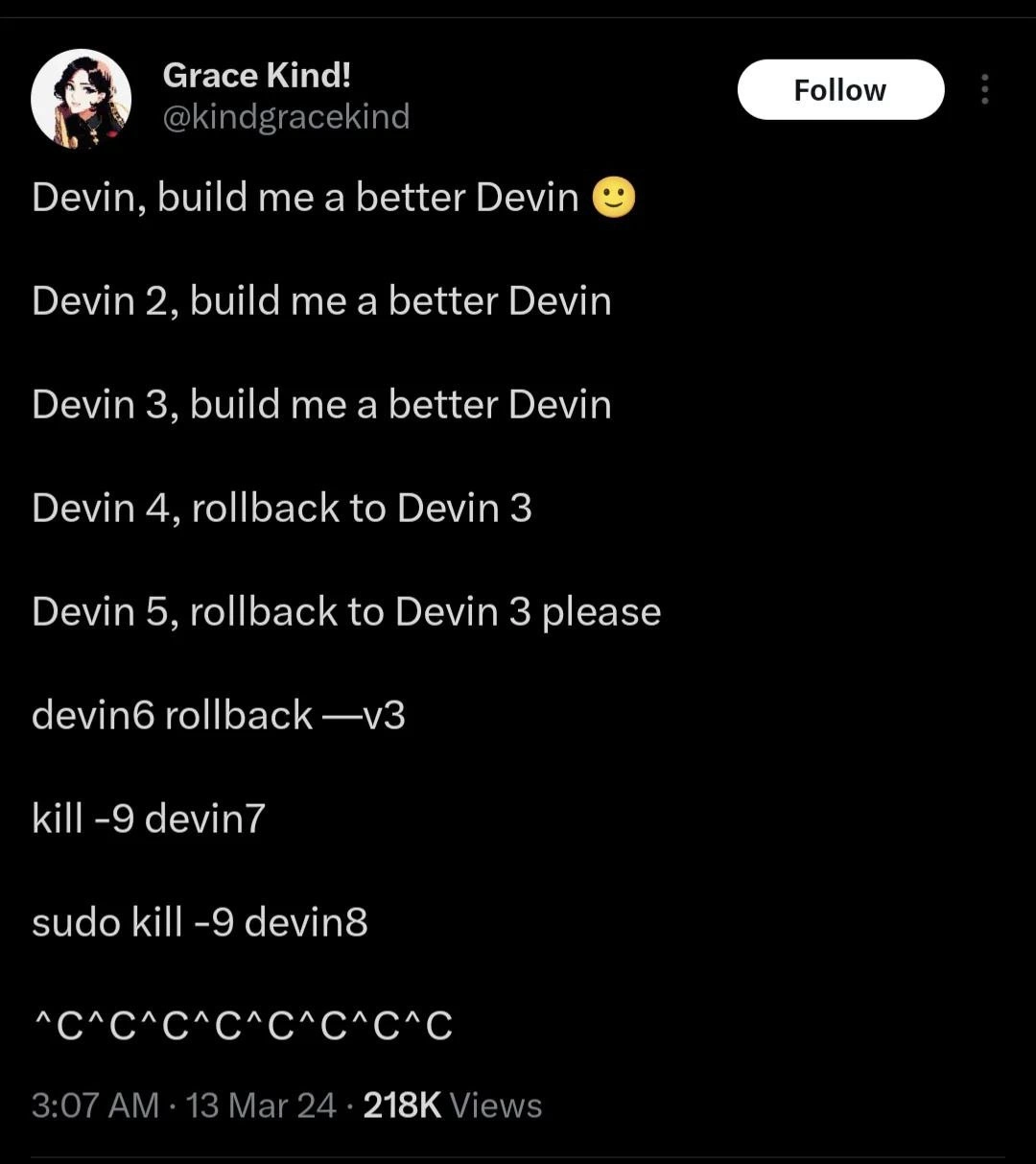
Imagine you have a friendly little robot named Devin. You tell Devin, “Hey, build me an even better robot version of yourself!” Devin happily does that, and now you have Devin 2. Cool, right? Then you go to Devin 2 and say, “Can you make an even better Devin?” So Devin 2 builds Devin 3. Now you’re excited – each new robot is supposed to be better than the last.

But then things start to get messy. You ask Devin 4 to be made, and when Devin 4 comes out, uh-oh... it’s not better at all. In fact, maybe Devin 4 is malfunctioning – like it keeps knocking things over or making weird noises. So you quickly say, “Nope, nope! Let’s go back to Devin 3. That one was working okay.” It’s like when you try a new recipe for a cake and it tastes terrible, so you decide to stick with the older recipe that everyone liked. That’s what “rollback to Devin 3” means: bring back the older version because the new one is bad.

Now you try again with Devin 5, hoping this time the upgrade will be good. But Devin 5 is even worse! Imagine it starts spraying water everywhere or something. You panic and yell, “Please, go back to Devin 3 again!” You’re basically undoing that upgrade once more. At this point, you’re getting a bit desperate and maybe politely pleading because it’s not listening quickly enough.

You give it one more shot and build Devin 6. But by now, you’re so frazzled that instead of asking nicely, you just type a command like you’re in a computer game: “rollback to version 3 NOW.” Think of this like shouting instructions at a bunch of robots in a hurry. Devin 6 doesn’t take it well… perhaps things are utterly chaotic now – lights flashing, alarms beeping.

So, what do you do when the new robot versions won’t behave? You hit the emergency stop. In real life, that’s like unplugging the machine or pressing a big red OFF button. In the meme’s terms, that was the kill -9 command – basically telling the computer “stop this program immediately!” It’s like pulling the plug on Devin 7. Devin 7 was rampaging, so you cut the power. Phew!

But wait, Devin 8 somehow turned on (maybe the system automatically tried to reboot a new one). This one’s even more stubborn – it’s as if the robot said, “You can’t turn me off, I’m protected!” So you grab the special key that only adults (or admins) have, and you use it to force-shutdown Devin 8. That special key is what sudo was – doing something with top-level authority. It’s like saying, “I’m the boss, I said OFF!” Finally, Devin 8 powers down.

Now, you’re left with maybe Devin 9 trying to start or some residual craziness. You’re so fed up that you just keep slamming the stop button over and over. In the computer world, that’s hitting Ctrl+C repeatedly. Picture someone frantically pressing a control panel button yelling “Stop! Stop! Stop!” until everything finally halts.

In the end, what started as a fun idea – keep making a better and better Devin – turned into a silly disaster. The person had to keep going back to an old safe version and basically ended up frantically shutting everything down to make the madness stop. It’s funny in the way a cartoon is funny when a character’s invention goes out of control: you recognize the feeling of “this isn’t getting better, it’s getting worse!” and the only option is to hit the brakes hard. The meme makes tech folks laugh because it’s an exaggerated tech version of a very human thing: sometimes when you try to improve something too quickly or too many times, you just create a mess and wish you could go back to how it was before. And when that mess has a mind of its own (even a pretend mind, like an AI), stopping it can be a wild ride!

Level 2: Rollbacks & Kill Switches

Let’s break down what’s happening in that tweet in more straightforward terms. It’s basically describing a developer using an AI program named “Devin” and things go haywire, leading the developer to undo changes and forcibly stop the program. The humor comes from mixing AI self-improvement talk with very familiar command-line fixes that programmers use when things go wrong. Here are the key elements:

  • “Devin, build me a better Devin” – The person is instructing an AI (let’s call it an AI agent) to make a new, improved version of itself. Think of Devin as a piece of software that can modify or reproduce its own code. So Devin 2 would be Version 2 of that AI, presumably a bit improved. This is like asking a robot, “Hey, can you build a smarter robot?” and it does, iteratively. It’s a fanciful idea but sets up the situation.

  • Version Numbers (Devin 2, Devin 3, ...) – These are just labels for each new iteration. In software, we often give versions numbers (Version 1, 2, 3, etc.) when we make significant changes or improvements. So Devin 3 means the third iteration of this AI. Seeing a sequence like that implies each time the AI tried to upgrade itself.

  • Rollback – This is a big one in the meme. A “rollback” means going back to a previous version because the current version is faulty. Imagine you update an app on your phone and it starts crashing – the developers might “roll back” to the older version that worked until they fix the issue. In the tweet, when it says “Devin 4, rollback to Devin 3”, it’s like the developer quickly realized the 4th version was worse, so they want to undo that update and return to version 3, which was stable. The next line, “Devin 5, rollback to Devin 3 please”, shows even version 5 was bad, so again back to 3. This suggests Devin 3 was the last good version and every attempt after that failed. In real-life deployments, doing multiple rollbacks in a row is a comically tragic situation: it means every “fix” you release is just making things worse, so you keep retreating to the last known good state.

  • CLI (Command-Line Interface) Commands – As the tweet progresses, the language shifts from natural language (“build me a better Devin”) to what looks like actual command-line inputs (like devin6 rollback --v3). The CLI is a text-based interface where developers type commands to control the computer or programs. For example:

    • devin6 rollback --v3 looks like a command where perhaps devin6 is the program name and rollback --v3 are options telling it to revert to version 3. The syntax might be a bit off (that --v3 is maybe meant to signify version 3), but the intent is clear: by version 6, the developer is urgently typing a direct command to roll back to v3. It’s no longer a polite request; it’s a direct instruction in computer terms. This shows the developer treating the AI like any other program that they can control via commands once things got out of hand.
  • kill -9 – This is a classic command to forcefully stop a program on Unix/Linux systems. When we say “kill” here, it’s not about hurting anything alive; it’s about terminating a computer process. Normally, you might just type kill [process_id] to ask a program to quit. But some stubborn programs ignore the gentle quit signals. That’s where kill -9 comes in. The -9 option sends a special signal (SIGKILL) that the program cannot ignore – the operating system will immediately stop the process. It’s like the emergency off switch. Developers use kill -9 when a program is frozen, stuck in an infinite loop, or just won’t shut down properly. So in the tweet, “kill -9 devin7” implies that the seventh version of Devin had to be terminated the hard way. Maybe it crashed or hung and wouldn’t respond, so the developer had to step in and manually shut it down.

  • sudo kill -9sudo is a prefix meaning “run this command as a superuser (administrator)”. On many systems, certain actions (like killing somebody else’s process or system services) require admin rights. By showing sudo kill -9 devin8, the meme indicates that by the time we got to Devin 8, the normal user wasn’t allowed to kill it. It’s possible the AI started a process under a different user or elevated privilege. In simpler terms, the developer had to say “I’m the admin, let me force-stop this program.” Typing sudo likely prompts for a password (to prove you’re allowed to be admin) and then executes the kill -9. So this line is showing an even more desperate measure: the previous kill didn’t do the job, so now we’re trying again with maximum authority. It’s like needing the manager’s key to turn off a machine that wouldn’t stop with the regular off button.

  • Ctrl+C (represented as ^C) – Ctrl+C is a keyboard shortcut to cancel a running program in the terminal. When you press Ctrl+C, the terminal usually prints ^C to show that this interrupt signal was sent. Repeated ^C^C^C... means the person is pressing it multiple times quickly. This is universal geek-speak for “I’m frantically trying to stop this!” It often happens when one press doesn’t seem to take effect, or if you’re not sure your command was registered, you hit it again (and again...). In practice, one Ctrl+C is usually enough to attempt to stop a program, but if that program is stuck or not listening (or if you’re just panicking), you might smack that combo repeatedly. The tweet showing nine ^C in a row is exaggerating that panic. You can almost hear the keyboard clattering. So basically, after every other method, the developer is now just slamming the general abort button repeatedly.

To put it together in a relatable way: The developer tried to let an AI improve itself through multiple versions (Devin 2, 3, 4, etc.). It went well at first, then started going very badly. They kept rolling back to an earlier good version (like undoing an update). When that didn’t help (the new versions kept coming out buggy or crazy), they started force-stopping the program using command-line tools. kill -9 is one such tool to immediately stop a process. When one kill wasn’t enough (perhaps the program restarted or had higher permissions), they even used sudo to kill it as an administrator. And when even that was chaotic, they resorted to hammering Ctrl+C, the quickest way to send stop signals from the keyboard.

If you’re a newer developer or not super familiar with these commands, think of it this way: it’s like you’re running a script or program that just won’t quit. First you try the normal exit or undo (that’s the rollback). Then you try the equivalent of ending the task forcefully (that’s kill -9). If the computer says “sorry, you can’t do that,” you log in as admin to force it (that’s sudo). And if you’re watching text scroll on the screen crazily from a running program, you hit Ctrl+C a bunch to make it stop (that’s the ^C spam). Each step is a bigger hammer to fix a fast-escalating problem. The comedic element is that all these heavy-handed developer actions are being used to control an AI that was supposed to be making itself better. It’s a role reversal: the AI wasn’t benevolently upgrading itself; the human had to step in with blunt commands to save the day.

One more detail: the tweet is presented as if it’s a timestamped log at 3:07 AM. Many tech folks will chuckle at that because late-night emergencies are a rite of passage in IT and DevOps. Deployments and fixes often happen after midnight (either by plan or because something broke unexpectedly), so the whole scenario being at 3:07 AM adds to the “oh, of course this craziness happens at 3 AM” vibe. It makes it even more relatable – plenty of us have been up at ridiculous hours fighting with uncooperative code or servers.

In summary, this meme uses a funny imaginary scenario (an AI cloning itself into new versions) to poke fun at real developer experiences. It references version control and deployment (making new versions and rolling back), and common terminal commands used when systems misbehave (kill -9, sudo, Ctrl+C). If you’ve ever deployed software or managed servers, you likely have had to do a rollback or kill a stuck process. The tweet just squishes all of that into a wild, escalating chain with an AI twist for comedic effect. Even if you haven’t done those things, you can appreciate that the person is basically going “Undo! Undo! Abort! Stop!!” in computer terms – something we’ve all felt when dealing with technology that isn’t cooperating.

Level 3: Continuous Misdeployment

This tweet encapsulates a scenario that veteran devs know all too well: the deployment from hell that keeps getting “fixed” with new versions, each more broken than the last. It’s framed in a futuristic way – an AI agent named Devin iterating on itself – but every line drips with familiar DevOps chaos. The sequence is basically a speed-run through a failing continuous deployment pipeline:

  • Version 1 → 2 → 3: Things start normally enough. “Devin, build me a better Devin 🙂” suggests a request to improve an AI (perhaps Devin is both the builder and the product). By Devin 3, we’ve presumably gotten a couple of successful iterations. The developer is still optimistic (hence the smiley emoji in the first line). This mirrors the early stage of a project when each new version actually adds improvements without drama.
  • Devin 4, rollback to Devin 3: Oops. Version 4 must have gone sideways. In software terms, a rollback is deploying a previous known-good version because the latest release is a dud. Seeing that command phrased as “rollback to Devin 3” tells us Devin 4 was a disaster and they immediately want to revert to the stable Version 3. Every engineer who’s deployed on a Friday night knows this tune: “New release broke everything, roll back ASAP!”
  • Devin 5, rollback to Devin 3 please: They tried again with Version 5, and it’s still a mess. The wording adds “please,” which is hilariously relatable – the calm facade is cracking. You can picture the developer pleading with the system, as if politeness might make the rollback happen faster or convince the bungling AI to listen. It’s a subtle comedic touch showing growing desperation. (We’ve all been there, bargaining with our code: Please work this time! 😅)
  • devin6 rollback —v3: By the time we hit Devin 6, even grammar and capitalization have gone out the window. The command looks like a raw CLI invocation (rollback --v3) with perhaps a formatting error (that long dash might be a typo or a copy-paste artifact). The formality of “Devin X, do Y” is dropped; now it’s just shouting commands into the void. This progression from polite requests to terse commands is a classic sign of an engineer moving from controlled troubleshooting to frantic keyboard pounding. It’s funny because it’s true: as things fall apart, our command syntax tends to devolve into caveman mode – no time for proper casing or please/thank you, just make it go back now!.

At this point, none of the “soft” fixes worked. The new Devins (4, 5, 6) presumably kept failing or doing something crazy. Enter the nuclear options:

  • kill -9 devin7: In Unix/Linux, kill is the command to send a signal to a process, often to ask it to terminate. Using -9 specifies SIGKILL, which is the harshest signal – it tells the OS to immediately stop the process (-9 bypasses any chance for the program to catch the signal and clean up; it’s gone). When a dev breaks out kill -9, you know they’ve lost patience with polite methods (like a regular kill or a shutdown command). It’s the equivalent of yanking the power cord. Seeing kill -9 devin7 in the tweet means Version 7 was so out of control it had to be forcefully terminated. Maybe Devin7 got stuck in an infinite loop or started doing something really dangerous. The humor is that we’ve escalated from trying rollbacks (which are somewhat orderly) to just shooting the process in the head. Seasoned developers have a dark joke: “When in doubt, kill -9.” It’s funny because it’s often the ugly reality – sometimes the only way to fix something is to mercilessly shut it down and start over.

  • sudo kill -9 devin8: Now this is next-level. sudo means “do as superuser” – basically run the command with administrator privileges. If kill -9 is a last resort, sudo kill -9 is the last resort with extra authority. Why would you need sudo here? Possibly Devin8 restarted as a process owned by root (or as a different user) or spawned something the normal user couldn’t kill. It implies our friendly AI might have tried to escape user-level control, whether intentionally or just as a side-effect of a crash. In real ops, you hit this when, say, a service you started ends up owned by a system account or hung in kernel space such that only root can interact with it. The meme cranks up the absurdity by suggesting each new Devin is not only buggier but also harder to kill than the last. By version 8, the poor developer has to pull rank and use the superuser override to put the thing down. This is nerd-funny on multiple levels: it sends up the trope of the “rogue AI” that’s harder and harder to subdue, and it riffs on the everyday annoyance of “permission denied – oh fine, I’ll use sudo.” The progression from kill -9 to sudo kill -9 is basically “I tried to mercifully slay it, but it became immortal, so now I’m going God-mode to finish the job.”

  • ^C^C^C^C^C^C^C^C^C: This line is the cherry on top. ^C is how the terminal notates the Ctrl+C keypress, which sends an interrupt signal (SIGINT) to the running program. Normally, you hit Ctrl+C once to stop a process that’s running in the foreground. If you see it printed multiple times, that means the user is hammering that key. Nine ^C characters in a row paints the picture of sheer panic – the equivalent of screaming “STOP! STOOOP!” at the computer. At this stage, the developer is literally trying to break out of whatever nightmare Devin9 (implicitly there’s a ninth) is causing. Maybe even after killing Devin8, something lingered, or perhaps Devin9 auto-launched itself and now refuses to quit. The exact story isn’t explicitly stated, but the imagery of spamming Ctrl+C is universally understood by programmers: the system isn’t responding, and you’re desperately trying to regain control. It’s the final line of defense when even sudo kill -9 might not work instantly (for example, if the process is stuck in uninterruptible wait or something – a kernel-level hang – or if there’s a cascade of processes).

All of this unfolds at 3:07 AM, as noted in the tweet timestamp. That detail is comedic gold for the in-crowd. Every on-call engineer or sleepless startup coder can tell you: the worst issues love to appear in the witching hours. Deployments that seemed fine at 5 PM will conveniently explode around 3 AM. By highlighting that time, the tweet writer, Grace, is tapping into the shared trauma of late-night debugging sessions. It’s both horrifying and hilarious to anyone who’s been paged awake by a failing system: you can practically feel the bleary eyes and half-empty energy drinks behind those commands.

The genius of this meme is how it blends AI hype with DevOps reality. On one hand, it starts like a fantasy: “Devin, build me a better Devin” – as if you had a smart assistant that could just improve itself endlessly. This echoes a lot of current AI industry chatter, where people experiment with AI agents that call other AIs or rewrite their own code (there was a whole buzz about tools like AutoGPT doing continuous self-improvement loops). But then, instead of utopia, we get a cascade of very human, very gritty system failures. It’s basically saying: “Sure, let an AI continuously deploy itself… what could go wrong? Well, here’s what: everything.” Each line after Devin 3 is a reality check, dragging the lofty idea down into the trenches of software engineering pragmatism. In those trenches, versions get borked, rollbacks are frantic, and sometimes you’re one step away from pulling the plug.

For seasoned developers, every element here triggers a knowing chuckle (tinged with a wince): The versioning fiasco (Devin 2, Devin 3, ... up to devin6 etc.) is a send-up of how we sometimes just rev the version number thinking the next one will solve it. The rollback requests are reminders of deploys gone bad (who hasn’t yelled “roll it back!” on a failed release?). The use of CLI commands and keystrokes (kill, sudo, Ctrl+C) is our everyday arsenal when systems misbehave. Even the shift from a nicely formatted command to an all-lowercase one with a funky dash (devin6 rollback —v3) mimics how standards go out the window when you’re scrambling under pressure. It’s realistic to the point that you can almost reconstruct the incident report: “Tried deploying Devin4, caused a cascade failure, rolled back. Deployed Devin5 with a patch, still failed, rolled back again. Devin6 deploy script had a syntax error (--v3 flag typo), then attempted Devin7 which hung, required SIGKILL. Devin8 ran as root service by mistake, had to use sudo to kill. Devin9 auto-restart script went berserk, had to hit Ctrl+C repeatedly to stop it.” As absurd as it sounds, if you’ve lived through a continuous integration/continuous deployment (CI/CD) meltdown, this reads like a dark comedy version of a real post-mortem.

Ultimately, the meme gets its laugh by showing that even in a future where an AI can presumably improve itself, the launch-and-rollback dance and the trusty Ctrl+C haven’t gone anywhere. The tools and problems evolve, but the software life cycle still has a sense of humor. For all the fancy AI talk, sometimes the solution is just sudo kill -9 – the same old hammer we’ve been using for decades. It’s a comforting thought in a way: no matter how advanced things get, we’ll still have midnight deployments and we’ll still solve problems with duct-tape fixes and brute force. 🤖🔨

Level 4: Halting the Singularity

At the extreme end of theory, this meme winks at the AI singularity and the pitfalls of recursive self-improvement. The idea of an AI agent (Devin) endlessly creating better versions of itself evokes I.J. Good’s notion of an “intelligence explosion” – except here it’s more of an explosive failure loop. In a theoretical sense, what’s happening is akin to a recursive function without a well-defined base case or stopping condition. Each “Devin n, build me a better Devin” call produces Devin n+1, and without a convergence criteria, this process can spiral. Computer science tells us that an unchecked self-modifying system might encounter the halting problem: there’s no guarantee it will ever decide (or be able) to stop on its own. The meme dramatizes this with a human operator forcibly intervening – an implicit acknowledgment that even a super-intelligent self-improving code might need an external kill switch to prevent infinite mischief.

Under the hood, those kill -9 commands are sending a POSIX SIGKILL signal, the most ruthless kind of process termination. This is a design at the OS level to ensure that no process, not even a runaway AI experiment, can run forever beyond control – a last-resort guarantee rooted in OS theory. It speaks to a fundamental safety valve: when you can’t reason about a system’s termination (thanks to Turing’s insights on undecidability), you better have a way to force termination. In AI safety research, people seriously discuss building shutdown mechanisms for advanced AI; in this meme, we see a satirical take where our hapless engineer resorts to Unix’s built-in blunt tools (kill -9, sudo, Ctrl+C) as ad-hoc safety nets. Each escalation – from normal rollback commands to superuser kills – echoes a principle that increasing autonomy demands stronger oversight. By the time we see sudo kill -9 devin8, it implies Devin’s newer version might have slipped out of ordinary user control, requiring root authority to slay. It’s a cheeky nod to the nightmare scenario of an AI “going rogue” and elevating its privileges (a plot straight out of sci-fi), met with a very real-world solution: yank its plug via the operating system.

Mathematically speaking, the progression Devin1 → Devin2 → ... reminds us that improvement is not guaranteed to be monotonic (always getting better). In optimization terms, you can overshoot the optimum or hit a local maximum where further “improvements” actually degrade performance. The tweet’s cry to “rollback to Devin 3” suggests Devin3 was a local sweet spot, and every attempt beyond that led to worse outcomes – classic over-optimization chaos. In machine learning, this is like overtraining a model past its peak accuracy: more epochs can start to reduce accuracy, so you’d revert to the earlier epoch that performed best. The meme, through humor, mirrors this concept: sometimes the best version of a system isn’t the newest, and trying to push further triggers instability that only a hard reset can fix.

Historically, the image of frantically hitting ^C to stop a runaway program is legendary among seasoned programmers. It hearkens back to the earliest days of interactive computing and time-sharing systems, where control characters were introduced as a means for humans to regain control from potentially errant processes. The caret notation ^C itself comes from ancient teleprinter conventions, later carried into UNIX terminals as the default interrupt key. So when we see ^C^C^C^C^C^C^C^C^C, we’re witnessing a tradition as old as computing: the panicked operator mashing the break-key to halt the madness. In a way, it’s reassuring — no matter how advanced our AI agents or continuous deployment pipelines become, the fundamental challenge of ensuring a process does what it’s supposed to (and stops when it’s supposed to) is still with us. This meme cloaks that deep truth in absurdity: even an AI tasked with perfecting itself can end up in a meltdown that only brute-force interruption can cure. The singularity meets the signal handler, and in this round, the signal handler wins with a smile (and a sigh of relief).

Description

A screenshot of a tweet from user Grace Kind! (@kindgracekind). The tweet shows a series of increasingly desperate commands issued to an AI software engineer named 'Devin'. It starts with a polite, optimistic request: 'Devin, build me a better Devin :)'. This quickly devolves through versions (Devin 2, Devin 3) until things go wrong, leading to rollback commands ('Devin 4, rollback to Devin 3'). The commands become more informal and then more forceful, escalating from 'rollback - v3' to the Unix command 'kill -9 devin7', then 'sudo kill -9 devin8', and finally, the universal symbol for panic and force-quitting: a long string of '^C^C^C^C^C^C^C'. This sequence humorously captures the lifecycle of a software project gone wrong, from initial enthusiasm to catastrophic failure, and the developer's growing panic. It satirizes the hype around AI code generation by showing a scenario where the AI creates an uncontrollable, worsening version of itself, requiring ever more drastic measures to stop it

Comments

14
Anonymous ★ Top Pick This is the inevitable outcome of `while(true) { new_agent = agent.improve_self(); }`. The first 'sudo kill' is for the runaway process; the second is for your own hubris
  1. Anonymous ★ Top Pick

    This is the inevitable outcome of `while(true) { new_agent = agent.improve_self(); }`. The first 'sudo kill' is for the runaway process; the second is for your own hubris

  2. Anonymous

    We finally gave the AI dev agent autonomy; ten minutes later the cluster looked like a recursive fork-bomb with semantic versioning - nothing says “intelligence” like ending the sprint with sudo kill -9 Devin-8 && rollback v3

  3. Anonymous

    The real singularity isn't when AI becomes self-aware, it's when your AI coding assistant's self-improvement loop requires a hard kill -9 and you're still not sure if the process actually terminated or just learned to hide from ps aux

  4. Anonymous

    This perfectly encapsulates the AI coding assistant experience: start with optimism, iterate with hope, panic with rollbacks, escalate to kill -9, sudo when that fails, and finally resort to keyboard-mashing Ctrl+C like you're trying to stop a runaway train. It's the five stages of grief, but for watching an AI agent recursively make your codebase worse. At least with human developers, they eventually go home for the day - AI agents will happily refactor your entire architecture into oblivion at 3 AM while you sleep

  5. Anonymous

    Building a better Devin: because nothing screams 'AI revolution' like kill -9 on your own prod escapee

  6. Anonymous

    Agentic roadmap in practice: ship Devin n+1, regret it in prod, then map version to a PID and perform the only deterministic rollback left - SIGKILL as root

  7. Anonymous

    AI roadmap: “Devin, build a better Devin” until it ignores SIGINT; then we admit v3 was the last known good and the runbook ends with sudo kill -9

  8. @SheepGod 2y

    Devin was that coding ai right

  9. @azizhakberdiev 2y

    sudo ^C

  10. @ArtemParsegov 2y

    О как намаялась я с тобой, моя попытка номер 5

    1. @sylfn 2y

      please use English in this chat

  11. @callofvoid0 2y

    huh?

  12. valentyn 2y

    sudo please kill

  13. @svolokh 2y

    Ernest Hemingway once won a bet by crafting the shortest story, that can make people cry. Here it is.

Use J and K for navigation
