Devin AI Ad on Reddit: Vibecoding Not Working on Your Complex Codebase?
Why is this AI ML meme funny?
Level 1: Magic Mess Fixer
Imagine you have a giant pile of tangled-up wires – like the worst jumble of phone chargers, headphones, and cords you’ve ever seen. It’s so bad that no matter how you pull, the knots just get tighter. Now, you’ve been trying to untangle this mess by just winging it – tugging one cable here, another there, kind of hoping it magically sorts itself out. But it’s not working; you’re just getting frustrated. Along comes a friendly robot in an ad saying, “🎵 Not having luck untangling that mess by feel? Try me – I’m built to handle really messy tangles!” The meme is basically this situation in a coding context. The “tangled wires” are like a super messy program, and “winging it” is like coding by vibe. We all chuckle because the idea of a one-click robot fix for such a huge mess sounds too good to be true – it’s a funny mix of wishful thinking and skepticism. The humor comes from that feeling: it’s like a cartoon where a character promises, “I’ll clean your disastrously messy room in one minute flat!” You’d laugh and think, “Yeah, right, but wouldn’t that be nice!”
Level 2: Spaghetti Code 101
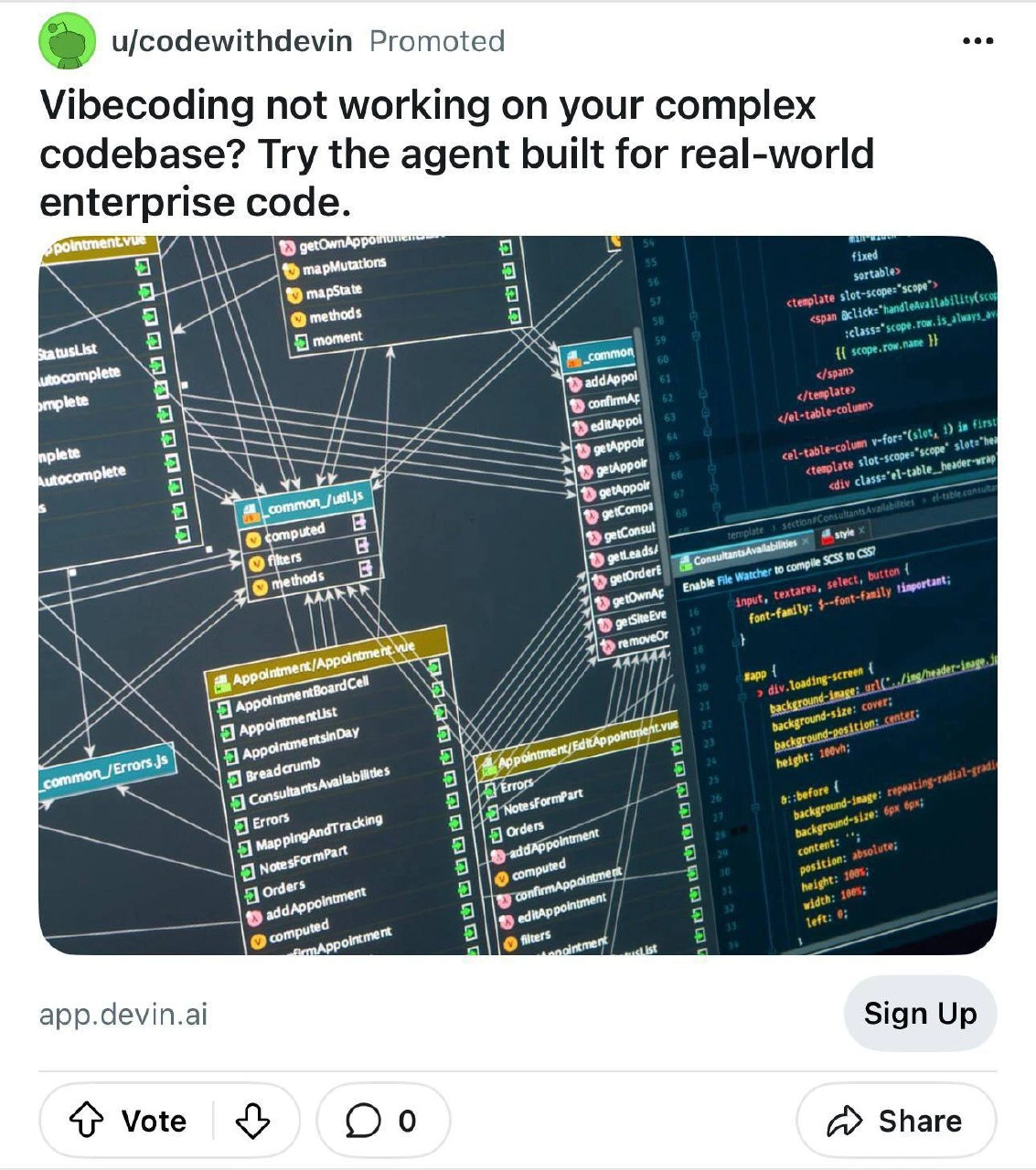
Let’s break down what’s going on here in simpler terms. The image and text are referencing a really messy codebase and a new tool that claims to fix it. In software, when we say “spaghetti code,” we mean code that’s twisted and tangled up like a bowl of spaghetti noodles. It’s not literally pasta, of course – it’s a metaphor. Spaghetti code happens when a project grows without good structure: every piece of code ends up depending on many other pieces in confusing ways. In the meme’s picture, each colored box (like Appointment/Appointment.vue or common/_utils.js) is a file or component in a big application. The little lines connecting them are like arrows showing “this file uses something from that file.” When there are too many of those connections criss-crossing, it becomes really hard for a developer to understand or change the code – because one change might affect five other parts unexpectedly. This is what we call a dependency graph overload: a graph (network) of dependencies (connections) so dense it’s practically unreadable. It’s the hallmark of a large, old enterprise code monolith – meaning a single huge application, as opposed to many small services. A monolith might have hundreds of features all mashed together in one codebase. Over years, people add quick fixes and new features, often sticking things into “common” utilities or making ad-hoc links between modules. Eventually, you get something like the screenshot: a hairball diagram that basically screams “Yup, everything’s connected to everything.”
Now, the text “Vibecoding not working on your complex codebase?” is calling out a certain approach to programming. Vibecoding isn’t a strict technical term; it’s more of a slang or meme term. It implies coding by vibe – like just winging it, going with your instincts, or maybe improvising as you go along (picture a developer with headphones on, just casually writing code and hoping it works out). In a simple project, vibecoding (coding with minimal planning, relying on trial-and-error and intuition) can sometimes get you through. But in a complex codebase like this, that approach fails. Why? Because there’s so much interconnected stuff that you can’t just guess or make a quick change without potentially causing an issue somewhere else. Imagine trying to freestyle a change in a program where one file (_utils.js) is used by 50 different other files – you’d better know exactly what you’re doing or you’ll break something. So the meme’s question is basically: “Having trouble just winging it with your super complicated project? Yeah, not surprising!”
Enter the proposed solution: “Try the agent built for real-world enterprise code.” This is referring to an AI development agent – essentially an Artificial Intelligence tool designed to help with coding tasks. The ad (from user u/codewithdevin on Reddit) is pitching a product (app.devin.ai) that presumably can analyze your messy code and do helpful things, like suggest improvements or refactor it (reorganize the code to be cleaner) automatically. Real-world enterprise code just means the kind of messy, large-scale code that actual companies have, as opposed to neat example projects you see in tutorials. The ad is basically saying, “Your usual tactics aren’t cutting it on this gnarly code, so try our AI, which was made to deal with exactly this kind of mess.” It’s like a sales pitch targeting developers who work on huge legacy systems. A Reddit promoted post means it’s a paid advertisement appearing in Reddit’s feed, targeted to users (in this case, likely developers). Sometimes devs find these kinds of ads amusing or dubious, especially if they promise almost magical solutions. That’s why this is meme-worthy – it’s a tech ad in the wild that people are poking fun at.
Now, let’s decode some of the specific tech gibberish in the image to see just how deep this rabbit hole goes. The code visible on the right side of the image looks like Vue.js single-file components (those .vue files). Vue.js is a popular JavaScript framework for building web UIs. A single-file component in Vue usually contains three sections: a <template> for the HTML, a <script> for the JavaScript logic, and <style> for CSS, all bundled in one file. In the screenshot, we see <template slot-scope='scope'> – this indicates the code is using an older Vue feature called scoped slots. (In Vue 2, slot-scope was an attribute that allowed a child component to expose some data to the slot content; it’s a bit of an advanced pattern, and the syntax changed in later versions of Vue, which tells us this code might be a bit outdated). We also see something like <td-table-column fixed sortable> which looks like a custom table column component in a UI library (possibly a company-internal component or a UI framework component). That suggests this application has a lot of custom UI parts – again typical of a big enterprise front-end app.
In the CSS snippet, there’s .appDiv { font-family: $font-family !important; }. A couple of things here: the $font-family looks like a Sass/SCSS variable (a way to define CSS variables in a preprocessor), and the !important flag in CSS is usually a sign that the styles are hard to untangle – you’re forcing some style to override others. Seeing !important scattered in the styles is like a red flag that the styling of this app got so complicated that developers had to use brute force to get things to look right. In a clean codebase, you’d avoid a lot of !important, but in a messy one, people use it as a quick fix (“I don’t know why this button is blue from some other CSS file, so I’ll just !important it to red here”). This is another form of “spaghetti”, but in styling – lots of global or overlapping CSS rules.
We also have file names like common/_utils.js and common/_Errors.js in those boxes. The common directory typically contains utilities or constants that are used all over the place. The fact that they have an underscore prefix (like _utils.js) might just be a naming convention, but often it implies something about load order or an attempt to mark them as special. These files likely hold generic functions and error definitions that many parts of the app use. Over time, such common utilities can grow huge and become dumping grounds for miscellaneous functions (“Oh, where to put this function? Let’s stick it in utils!”). That leads to many parts of the code depending on these god-files. For instance, if Appointment.vue and EditAppointment.vue and a dozen other components all rely on common/_utils.js, you have a situation where if you change one little helper function in _utils.js, you might inadvertently affect every feature that uses it. Scary, right? This is why the dependency lines in the graph are so entangled – a few common pieces lie in the center of a lot of components.
Now, to a junior developer or someone new, all this can be overwhelming. So how does an AI agent play into it? AI coding tools (like GitHub Copilot, or in this case possibly “Devin AI”) are designed to assist developers. Copilot, for example, can autocomplete code or suggest how to solve small coding tasks by using a large language model that was trained on tons of code. An AI agent for code would be a bit more advanced: it might not only suggest a line or two, but actually analyze many files, understand the structure, and propose bigger changes or generate documentation. The idea here is that the agent could look at that spaghetti map and help untangle it – maybe by identifying which parts of the code are too interdependent or suggesting how to split them into modules. It could also mean the agent might navigate the code for you, like you can ask it “hey, where is the definition of addAppointment?” and it will find it across that maze. Essentially, it’s using AI (probably some mix of machine learning and rule-based static analysis) to improve Developer Experience when dealing with a big messy project. That’s a hot topic: using AI to automate code refactoring or guide developers through complex code is a trending thing in the industry (IndustryTrends and definitely a bit of Hype around it).
The reason this is all wrapped in humor (the meme with laughing emojis and an absurdly tangled diagram) is because every developer knows the feeling of staring at confusing code and half-jokingly wishing, “Can someone else (or something else) just fix this for me?” It’s relatable because dealing with large, messy codebases is practically a rite of passage in software development – and it’s never fun. The meme text and image together are basically saying: Here’s this ridiculously complex code map (something all devs dread), and look, some ad is cheekily offering an AI savior for it. Ha ha, wouldn’t that be nice! There’s skepticism implied too: like an inside joke that we’re not totally convinced an AI can really do that, but it sure is a good marketing angle.
To sum up the key points in plain language:
- Spaghetti code – a nickname for code that’s all tangled up with no clear structure. Hard to follow, hard to maintain.
- Dependency graph – a picture or model showing which pieces of the code rely on which others. In the image, it looks like a spiderweb because of how many cross-links there are.
- Enterprise code / monolith – a very large application that has grown over time, usually all in one chunk. Enterprise means it’s used by a business for real work (as opposed to a demo), and monolith means it’s one big interconnected codebase rather than smaller independent services.
- Vue.js components – the code files shown (
*.vue) are components in a front-end app built with Vue.js. Each component might be a part of the user interface, like a form or a table or a widget, and here many components are importing stuff from others or from common utilities. - Vibecoding – a casual way of saying “coding by feeling your way through.” Fun for quick projects, but unreliable in huge systems.
- AI dev agent – a tool powered by artificial intelligence aimed at helping developers with tasks like understanding or improving code. In this context, it’s advertised to help manage or untangle a complicated codebase.
- Promoted Reddit ad – meaning this meme actually came from a real advertisement seen on Reddit. Devs often screenshot or share such ads if they find them noteworthy or funny, which is likely the origin here. The ad is by someone (possibly a Dev named Devin) who is promoting their AI tool (at
app.devin.ai).
All these elements mix together to create a scenario that’s humorous to people in the software field. It highlights a pain point (messy code), shows an arguably over-optimistic solution (an AI agent that can handle it), and does so in a setting (Reddit ad) that we don’t usually take super seriously. If you’re a newer developer, it’s also a small cautionary tale: this is what could happen to your nice project if you’re not careful with structuring your code! And also, hey, the future might hold smarter tools to help, but don’t believe everything an ad tells you.
Level 3: Web of Dependencies
Look at that screenshot closely – it’s basically a portrait of an enterprise monolith in all its tangled glory. Those colored boxes labeled common/_utils.js, common/_Errors.js, Appointment/Appointment.vue, Appointment/EditAppointment.vue, etc., each listing things like computed properties, methods, and Vuex mapState/mapMutations, are the anatomy of a huge JavaScript/Vue codebase. The white lines criss-crossing between modules form a giant web of module relationships. This is the infamous spaghetti code visualized: every component and utility is intertwined. It’s practically a constellation of dependencies so dense that it looks like a bowl of noodles spilled onto the screen. Seasoned developers have seen this horror before – when a “modular” front-end app grows over years into an unholy tangled mesh where every piece knows about every other piece. The meme hits home because many of us have clicked an architecture diagram or dependency graph for a legacy project and literally gone “holy 💥, that’s unreadable.” The diagram here is a static analysis visualization of a complex JS codebase – useful in theory, but in practice it just confirms our fears: this code has become a big ball of interdependent stuff.
Now enter the hero of the ad: an AI dev agent promising to rescue us from this tangle. The tagline “Vibecoding not working on your complex codebase? Try the agent built for real-world enterprise code.” is poking fun at two things at once. First, vibecoding – the idea of just coding by feel or improvisation, powered by inspiration (or perhaps by AI auto-complete suggestions, lo-fi beats in the background, and blind optimism). That might fly when you’re writing a simple app or a weekend project. But in a monster like this Vue app, “coding by vibe” quickly lands you in dependency hell: one misplaced import or a casual tweak in common/_utils.js could unleash a cascade of bugs in modules you didn’t even know were connected. The ad is essentially saying, “Okay, your chill coding vibes aren’t enough to handle this nightmare. You need something smarter and stronger – an AI agent specifically trained for messy enterprise legacy stuff.” It’s cheeky because it resonates with any developer who has gone from carefree solo projects to maintaining a giant legacy system and felt that harsh wake-up call.
The phrase “built for real-world enterprise code” is a sly nod to the fact that a lot of hype tech works great on toy examples or well-curated open-source libraries, but chokes on the kind of ugly, real code that businesses actually run. Real-world enterprise code has decades of tech debt, weird naming conventions (_Errors.js with a leading underscore? Hmm…), copious use of global state (Vuex everywhere!), and patterns that might have made sense once but are now just tribal knowledge. It’s code that’s been patched, extended, hot-fixed, and duct-taped by dozens of different devs. In other words, it’s code with history – and not the good kind. The ad capitalizes on this, implying “our AI isn’t fooled by your 1000-line functions and circular dependencies – it lives for that stuff.” As senior devs, we can’t help but smirk here: we’ve heard pitches like this before. From static code analyzers to IDE assistants, everyone claims to handle enterprise scale, but usually the first thing they do is produce a graph like the one shown – basically saying, “Yup, it’s tangled,” which we already knew! The humor is in that unspoken truth: mapping the mess is one thing; actually cleaning it up without breaking everything is another.
Why is this funny and painfully relatable? Because we’ve all wished for a magic button to refactor our worst legacy code. You know, the kind of repo where a single-file component like Appointment.vue ends up depending on half the app, or where removing a seemingly unused function in _utils.js triggers 17 build errors and a Prod incident. It’s the stuff of on-call nightmares. The meme is effectively calling out the current AI hype: “Sure, Copilot can autocomplete a for-loop, but can it untangle this?” It highlights the gap between AI hype vs. reality in developer tools. The industry trend is to sprinkle AI on everything (hello AI_ML tag), claiming it will revolutionize Developer Experience (DX) by handling the boring or complex parts for us. And indeed, tools are emerging that attempt to refactor code, find bugs, suggest improvements. But any senior engineer knows that an AI would need almost superhuman insight to modify a gnarly system safely. We’re talking about understanding business logic, reading between the lines of code comments (if any exist), and knowing that when Orders.vue calls a method in Appointment.vue it’s doing so for a strange historical reason that isn’t documented anywhere except maybe Jira tickets from 2018. Humans barely juggle this context; an AI would have to be exceptional to not introduce regressions.
There’s also a shared joke here about tooling overload. Developers already use a slew of tools: linters, code formatters, static analyzers, build monitors, dependency checkers… You name it. Now along comes yet another tool – an AI agent – claiming to be the silver bullet for code complexity. It’s both exciting and comical. Exciting, because who wouldn’t want a robot sidekick to refactor code at 3 AM while we sleep? Comical, because we all know how these promises often turn out. (“This time it will be different,” says every new tech trend about the last one). The ad being a Promoted Reddit post adds an extra layer of developer skepticism. The audience for this meme is likely thinking, “Ah yes, a random Reddit ad is going to solve the pile of 💩 I deal with at work. Sure, let me click Sign Up right away!” That little “app.devin.ai – Sign Up” call-to-action is the cherry on top of the satire sundae. It suggests that all it takes is a sign-up and your codebase will be healed. It’s poking fun at the almost naïve optimism of some startup pitches in the IndustryTrends_Hype era. The seasoned dev in us chuckles because we know that no SaaS sign-up has ever instantly untangled a true enterprise Big Ball of Mud.
However, beneath the humor, there’s a grain of truth that makes it hit hard: developer teams are desperate for better code quality solutions. Wrestling with a legacy monolith drains productivity and morale. The idea of an AI tool that could even semi-reliably navigate those dependency webs and suggest meaningful refactorings is tantalizing. It’s just that we’ve been burned by promises before. We’ve seen tools that supposedly “understand” code end up requiring so much hand-holding that you might as well do it yourself. Remember the era of visual programming and model-driven architecture? Or all those code generation wizards that were supposed to eliminate hand-coding? 😆 Experienced folks recall those with a mix of fondness and frustration – the hype was huge, the reality… not so much. Today’s AI agents are the latest actors in that long-running drama. The meme beautifully captures that feeling: an AI agent hero riding in on a white horse to save the day, against the backdrop of an impossible snarled codebase complexity diagram. It’s both hopeful and hilariously optimistic. In real life, untangling that web requires careful human analysis, tests, incremental changes, and frankly, a lot of patience (and coffee). The ad copy “built for real-world enterprise code” is basically an inside joke – real-world enterprise code is the final boss that has defeated many a tool. If this agent can handle that, it’s either Skynet-level smart or… more likely, it’s marketing exaggeration.
So, the senior-perspective takeaway: We’re laughing because we’ve been in the trenches with these spaghetti monsters, and we’d love some help, but we’re not holding our breath that a Sign Up button and an AI label will succeed where countless human developers and past tools have struggled. It’s a mix of “Haha, yeah right,” and “Wouldn’t it be nice though?”. The meme uses that contrast to get a knowing laugh from developers: the vibe-driven idealism of coding meets the harsh reality of enterprise legacy systems, with an AI deus ex machina dangled in front of us. It’s the ultimate AI humor cocktail for anyone who has tried to fix a gnarly bug at 2 AM and wished for an all-knowing code genie.
Level 4: NP-hard Noodles
At the theoretical extreme, untangling a massive dependency graph like this verges on solving an NP-hard problem. Each module and connection in that diagram is part of a complex graph structure. Deciding an optimal way to reorganize such a graph for better code quality (e.g. minimal dependencies or maximum cohesion) is analogous to tackling a graph partitioning or optimization problem, which in general is computationally intractable for large systems. In other words, finding the perfect way to reorganize spaghetti code is computationally expensive – the search space of possible refactorings grows superlinearly with every new intertwined module. The ad’s promise (“agent built for real-world enterprise code”) hints that some heavy algorithmics or ML is involved, but no matter how smart, it’s up against combinatorial explosion when dealing with decades of tangled logic.
There’s also a whiff of the Halting Problem lurking in this scenario. Any AI powerful enough to autonomously “fix” or refactor arbitrary code must understand what the code is supposed to do in every edge case. Determining the full intent and effect of an arbitrary piece of code is theoretically undecidable in the general case (thanks to Alan Turing’s little party-crasher proof). Modern static analysis and AI tools can approximate understanding with heuristics, but they can’t guarantee to capture every nuance. This limitation is fundamental: Rice’s Theorem tells us that any non-trivial property of a program’s behavior is undecidable. In plain terms, an agent can’t perfectly discern which parts of the tangled code are critical behavior and which are incidental quirks, not for a complex codebase with no formal specification. So the AI might separate one noodle only to accidentally sever a crucial strand of logic – a risk that computability theory warns us about.
Even if we set aside pure theory, the entropy in a long-lived enterprise codebase is like the second law of thermodynamics in action – it tends to increase. Untangling it isn’t just logically hard; it’s fighting the natural software entropy that accumulates when multiple developers hack on a project for years without a complete rewrite. In academic research, this relates to formal verification and refactoring automation: tools that prove code correctness or restructure code systematically. Those techniques often succeed only in well-scoped domains or with simplified models of the software. Real-world spaghetti often contains hidden side-effects, implicit global state, and unpredictable input/output behaviors that defy neat mathematical modeling. As a result, any agent claiming to handle this has to grapple with incomplete information and exponential possibilities – a recipe that would give theoretical computer scientists heartburn. In short, the core humor here is that an AI is marketed as a magical solver for a problem that is, at its heart, as hard as untangling an arbitrary ball of knots – something even theory tells us doesn’t have a tidy one-click solution. The Flying Spaghetti code monster isn’t easily slain, not even by the fanciest algorithms or the largest language model on the block.
Description
A screenshot of a promoted Reddit ad by u/codewithdevin for app.devin.ai. The ad headline reads: 'Vibecoding not working on your complex codebase? Try the agent built for real-world enterprise code.' The ad image shows a chaotic dependency graph visualization of a codebase on the left (with files like common_/util.js, Appointment/Appointment.vue, and tangled connections) alongside code snippets on the right. The irony is that Devin - an AI coding agent - is advertising specifically to developers frustrated by vibe coding failing on real codebases, essentially marketing against the very approach that other AI tools promote. The post shows 'Vote 0' and 'Sign Up' button
Comments
11Comment deleted
Devin's marketing: 'Your AI tool can't handle real code? Try OUR AI tool!' The circle of AI hype is now eating its own tail
An AI agent to fix enterprise code is a bold promise. Its first task will be parsing a 20,000-line XML config file that's only documented in a Word document on a retired employee's laptop
Sure, just point the LLM at that Vue monolith - what could go wrong besides token limits and your AWS bill?
After 15 years of untangling enterprise spaghetti, I've learned that 'vibecoding' works great until you hit that one service written by the architect who left in 2019 and whose only documentation is a Post-it note saying 'here be dragons' - then even AI needs a therapy session
When your codebase dependency graph looks like a bowl of spaghetti that achieved sentience and started a startup, you know you've reached peak enterprise architecture. The real question isn't whether an AI agent can navigate this Lovecraftian horror - it's whether the AI will file for workers' comp after experiencing the existential dread of discovering that 'common_/Main.js' imports from 47 different modules, each of which was written by a different contractor who's now unreachable
Wake me when the “enterprise code agent” can trace that Vuex spiderweb, rename Appointment without breaking payroll, and still pass the flaky E2Es - until then, vibecoding is just our canary release for production debugging
Devin: Because tracing that controller-to-DAO call through 17 layers manually is why we invented LLMs with long-context windows
Show me an enterprise-ready AI agent that can refactor a Vue2 slot-scope table, untangle that dependency spaghetti, and delete the stray !important - then it can have CAB approval and prod access
A programmer?? Comment deleted
Vue with element ui 🤔 Comment deleted
Vue mentioned Comment deleted