stdout vs /dev/null: You Took Everything From Me / I Don't Even Know You
Why is this CLI meme funny?
Level 1: Letters to Nowhere
Imagine you have a special mailbox, and you put all your important letters and drawings into it. But here’s the catch: this mailbox has a secret shredder inside. Every time you drop a letter in, the mailbox just cuts the paper into tiny pieces and never delivers it to anyone. You come back later and realize none of your letters ever reached their destination – they’re all gone. You feel upset and shout at the mailbox, “You took everything from me!” But of course, the mailbox is just a machine that destroys whatever it’s given. It doesn’t even know who you are or what was on those papers. The mailbox isn’t angry or anything; it’s simply oblivious, doing its job of making things disappear. This funny image is like that: one character is angry because everything they tried to send out was lost, and the other character is basically the “nothingness” that made those things vanish and doesn’t even realize it. It’s a playful way to show how sending something into a void means it’s truly gone, with nobody on the other end to even notice.
Level 2: Output to Nowhere
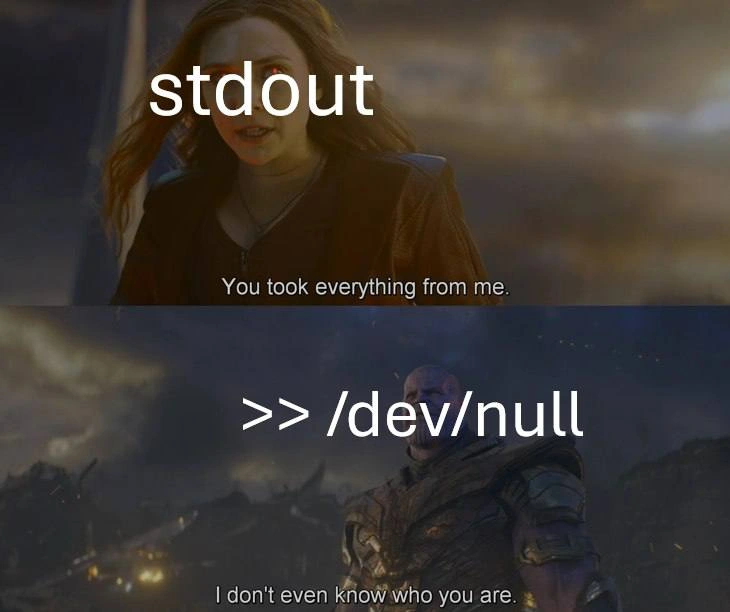
This meme uses a scene from a Marvel Avengers movie (Scarlet Witch vs. Thanos) to illustrate a nerdy joke about the command line. The text labels in the image are stdout and >> /dev/null, which are references to Unix/Linux terminal commands and streams. Let’s break those down. STDOUT stands for standard output, which is basically the default place where a program’s output goes — usually your screen/console. When you run a command in a CLI (Command Line Interface) and it prints text, that text is coming out via stdout. On the other side, /dev/null is a special file on Unix-like systems often nicknamed the “null device” or bit bucket. It’s like a trash can for data: any output sent (written) to /dev/null just disappears completely (the system doesn’t save it anywhere). In other words, /dev/null is a device file that immediately discards anything you write to it. It’s useful when you want to ignore some output.
The notation >> /dev/null in a shell command is called an output redirection. In a Unix shell (like bash, zsh, etc.), you can use > or >> to redirect a command’s output to a file. For example, my_command > output.txt would send the output of my_command into the file output.txt instead of printing it on screen. The >> operator does the same but opens the file in append mode (adding to the end of it, instead of overwriting from the start). In the case of >> /dev/null, it means “append the output to the file /dev/null.” Since /dev/null isn’t a normal file (it’s that special black hole), it doesn’t actually accumulate data – it just throws it away. Using > or >> with /dev/null effectively does the same thing: it redirects the program’s output into nowhere. The program will run, it will think it wrote out its results, but you won’t see any of it, because it all went into the void of /dev/null.
Now back to the meme: The top panel has Scarlet Witch labeled “stdout” with the subtitle “You took everything from me.” The bottom panel has Thanos labeled “>> /dev/null” replying “I don’t even know who you are.” The humor is that we’re imagining stdout and /dev/null as two characters in a confrontation. When you use >> /dev/null in a command, from stdout’s perspective, all of its output (everything it ever produced) has been taken away and lost. That’s why Scarlet Witch (stdout) is shouting “You took everything from me” — it’s as if stdout is angry that all its data was stolen by the null device. Meanwhile, /dev/null (Thanos in the meme) says “I don’t even know who you are,” because /dev/null doesn’t actually keep anything or know anything about the data sent to it. It just deletes whatever comes its way, without prejudice or recognition. It’s oblivious, much like Thanos in that scene didn’t even recognize the hero who was confronting him.
In simpler terms, the meme is joking that sending output to /dev/null is like making that output disappear without a trace. Silenced output is funny here because stdout is personified as being upset about it. Developers often do this intentionally: if a program or script is very noisy (prints a lot of unnecessary information) or if we don’t care about its output, we might run it with > /dev/null (or >> /dev/null) so that the terminal stays quiet. It’s a common trick in scripting and terminal commands to avoid clutter. For example, in a Linux bash shell you might do:
$ echo "Hello, World!" >> /dev/null
# This will not display anything on screen,
# because the Hello, World output is sent to /dev/null (and thus discarded).
Normally echo "Hello, World!" would print text to the screen, but >> /dev/null redirects that output into the black hole, so nothing appears. People use this in real life for cases like cron jobs (automated scheduled tasks). By default, a cron job will email any output it produces to the system administrator. To avoid spamming emails for routine messages, it’s common to redirect both stdout and stderr to /dev/null (you’ll often see >/dev/null 2>&1 in cron job lines) so that even if the job prints something, it’s thrown away. That way, you only get notified if there’s a different kind of failure (and even those can be silenced if one isn’t careful!).
The categories mentioned (DevOps/SRE, Observability/Monitoring) come into play because while redirecting output to /dev/null can be convenient, it also means you lose all logs and information that would help you observe or debug your system. Logging is a big part of observability – it lets you see what happened with a program. So if you always send logs to /dev/null, you won’t have any record of what the program did. That’s why senior engineers chuckle at this meme: they know the habit of aggressively silencing outputs can come back to bite you. It’s both a practical shortcut and a running joke. We laugh because we recognize ourselves doing it (“Heh, I’ve definitely done command >> /dev/null to ignore something”) and we also recognize the slight absurdity – it’s like saying “Don’t tell me anything, I don’t even want to know what’s happening.” In the meme, stdout is acting like it did want those outputs (as if they were valuable), complaining that /dev/null took them. And /dev/null is basically saying, “Who are you? I never even saw what I deleted,” which is true: it just deletes blindly.
In summary, this meme is a play on a famous movie confrontation, using it to represent how redirecting output to /dev/null makes all that output disappear. Stdout loses all its data (so it’s upset), and /dev/null simply doesn’t care (because that’s its job, to consume data without a care). It’s a bit of terminal humor that anyone who has worked with Unix commands or the Linux CLI can appreciate. It teaches a lighthearted lesson too: if you send everything to /dev/null, you’d better not need it later, because it’s as good as gone!
Level 3: Bit Bucket Showdown
In this meme’s dramatic Avengers: Endgame-style showdown, stdout is personified as a wronged hero and >> /dev/null (the infamous output redirection to the “bit bucket”) is cast as the impassive villain. It’s hilarious to seasoned developers because it captures a familiar scenario: we often silence noisy programs by redirecting their output to /dev/null, effectively dumping logs into nothingness. The top panel’s subtitle, “You took everything from me,” is stdout lamenting that all its output — every log line, every print statement — has been stolen away. The bottom panel’s retort, “I don’t even know who you are,” is /dev/null’s cold reply, highlighting the absurd truth: the null device doesn’t care what it deletes or who sent it. It just gulps down data without a second thought. This mismatch in emotional intensity is the joke: stdout feels robbed, while /dev/null is like a clueless Thanos, having obliterated half the universe’s logs and not even noticing.
For many of us in DevOps or SRE roles, this meme hits home. How many times have we seen a cron job or deployment script with something like >/dev/null 2>&1 tacked onto it? It’s practically a rite of passage in IT to use that one-liner to silence a script. Maybe a nightly job was emailing the team too much noise, or a command line tool was cluttering the console with debug info, so some engineer (possibly our past selves) said, “Enough! Let’s dump all that output into the void so we can get some peace.” Sure, it stops the spam and keeps the logs tidy… until the day something goes wrong. That’s when the observability horror begins: you check the logs and find nothing. No error output, no clue — because all those details were piped to /dev/null and effectively erased from existence. It’s the developer equivalent of sweeping evidence under the rug. At 3 AM during an outage, discovering that the critical cron job’s output was redirected to /dev/null can make a battle-hardened SRE cry. (I’ve been there, furiously muttering “Who the heck thought sending all output to /dev/null was a good idea?” while staring at an empty log file.) This meme captures that frustration perfectly in a tongue-in-cheek way.
The humor also lies in the pop-culture framing. In the film, Scarlet Witch accuses Thanos of taking everything from her, and Thanos genuinely doesn’t recognize her. Translate that to tech: stdout (the stream that carries all those precious log lines and printouts) is furious at /dev/null for effectively erasing its entire reason for existence — all those bytes of output. And /dev/null, like an unrepentant supervillain, blankly says “I don’t even know who you are,” because truly, it doesn’t. The null device doesn’t keep a tally or memory of what it’s been fed. It’s not a log storage or even a buffer; it’s literally a sink with no bottom. To /dev/null, data from stdout, stderr, or any source all look the same: as soon as they come, they’re gone. It’s indifferent annihilation. The meme exaggerates this into a personal confrontation, which is funny because we know there’s nothing personal about it — it’s just a shell feature being depicted as a villainous act.
Seasoned developers laugh (maybe a bit ruefully) because we’ve all done this dance. Redirecting output to /dev/null is a quick fix in countless Stack Overflow answers and deployment scripts. It’s the classic “I don’t want to see it, just make it go away” move. For example, a build script might call a tool that prints tons of info; rather than deal with it properly, someone just slaps >> /dev/null on the command to keep the console clean. Problem solved, right? Until later, when you actually need that information. It’s a shared joke in the CLI and Linux community that /dev/null is the one place that’s always happy to take more data. We even nickname it the “bit bucket” or “black hole”, and jokes abound like “My logs aren’t complaining anymore… I sent them to therapy at /dev/null.” This meme plays on that culture: stdout confronting the bit bucket as if it’s an arch-nemesis.
There’s also an irony in seeing Thanos – a character who vanishes half the universe with a snap – representing /dev/null, which vanishes 100% of whatever you pipe into it. It’s overkill in the best way. And Scarlet Witch, who is exploding with anger in the scene, stands in for every developer or sysadmin who’s ever looked for output that wasn’t there. The line “You took everything from me” could be a sysadmin screaming at a blank log file after a critical job ran with >> /dev/null. And the sysadmin gets only silence in return, because, well, that output is gone. In reality, we have no villain to yell at except perhaps our own short-sighted decision to discard the logs — but boy, do we wish we could personify /dev/null sometimes just to vent at it!
This meme cleverly highlights the trade-off and a bit of folly in our practices. Sure, sending output to /dev/null can be useful – it prevents spammy output from cluttering consoles and saves disk space by not logging trivial info. But it’s also a reminder: if you nuke your logs, you lose visibility. Observability and monitoring suffer when important information is treated like junk mail. Experienced engineers have learned (often the hard way) that blindly dumping everything into /dev/null can lead to a painful debugging session later. It’s a case of short-term convenience vs. long-term understanding. The meme’s humor is that it dramatizes this mundane tech action as an epic battle. It’s funny because it’s true: we’ve all felt that pang of regret or anger when crucial output was nowhere to be found. And it’s also funny because of the sheer absurdity — picturing a stoic cosmic titan (>> /dev/null) shrugging off the accusations of a heartbroken superhero (stdout). In the end, it’s a wink and a nod from one engineer to another: “Yep, I’ve sent my output to /dev/null and lived to regret it, too.”
Level 4: The Kernel Black Hole
Under the hood of a Unix-like system, stdout (standard output) is just an integer file descriptor (usually file descriptor 1) pointing to a destination (by default, your terminal). When you use the shell redirection operator >> (append) to /dev/null, the shell invokes the ancient Unix mantra "everything is a file" in a very literal way. It opens the /dev/null device file (a special pseudo-file representing the null device) and then reroutes stdout to that file. In practical terms, the command shell does a system call to open("/dev/null", O_WRONLY) and then dup2 that handle onto file descriptor 1. Now every byte meant for stdout will flow into this special file. And what does the kernel do with data written to /dev/null? It immediately and silently discards it. The null device driver in the OS is essentially a black hole: any data you write is accepted and immediately tossed into the void. The write system call still returns success (write reports “yep, all bytes written”) because the kernel purposely lies to make it seem like everything went fine – and it did, except none of those bytes actually went anywhere useful.
This design goes back to early Unix history – the bit bucket concept has existed for decades because even 1970s engineers needed a way to dispose of unwanted output. The device file /dev/null is typically a character device (on Linux you can see it with ls -l /dev/null, showing something like crw-rw-rw- 1 root root 1, 3 ... /dev/null). That means it’s handled by a tiny driver in the kernel whose sole purpose is to eat data. If you try to read from /dev/null, it immediately returns end-of-file (as empty as empty gets). If you write to it, the driver just increments a counter of bytes (for bookkeeping) and then forgets them. It’s an infinitely large sink with essentially zero IO cost – no disk writes, no memory saved, nothing. Writing to /dev/null is probably the fastest “write” operation possible, since the kernel doesn’t actually have to do anything with the data except throw it away. In fact, in the source code of many operating systems, the null device’s implementation is literally a couple of functions that do nothing and return success.
So, when you run a command like my_program >> /dev/null, the poor program’s output stream is redirected into oblivion. The program dutifully sends every line of log or result to stdout, and stdout’s file descriptor says “great, here’s 100 bytes to write” – and the kernel’s null driver just nods and drops them. Every single byte ends up nowhere. The stdout stream, if it were self-aware, would indeed feel like someone “took everything from it.” And /dev/null as an entity remains utterly unaware – it doesn’t store data, doesn’t keep state of who wrote what; it’s the most indifferent component of the OS. In a way, it’s like an I/O event horizon: information crosses the boundary and never returns. (Even a real black hole might emit a photon or two via Hawking radiation, but /dev/null? It gives you absolutely nothing back.) The system is designed this way so that processes can run quietly when needed – a feature that’s incredibly useful but also a bit dangerous. If you pipe away all output, you’re essentially turning off a source of information. The kernel happily provides this oblivion outlet as a service, assuming you know what you’re doing. But as we see in this meme, it sets the stage for some darkly comedic drama between the output stream and the bottomless pit that swallowed it.
Description
A two-panel Marvel Avengers: Endgame meme. Top panel shows Wanda Maximoff (Scarlet Witch) labeled 'stdout' saying 'You took everything from me.' Bottom panel shows Thanos labeled '>> /dev/null' responding 'I don't even know who you are.' The meme perfectly captures the relationship between standard output and /dev/null in Unix systems - stdout produces all the output, but when redirected to /dev/null, everything is silently discarded without acknowledgment. The >> operator appends output to /dev/null, which is the Unix black hole that consumes all data sent to it
Comments
13Comment deleted
/dev/null is the ultimate senior engineer: processes everything you throw at it with zero complaints, zero output, and zero memory of what just happened
Redirecting logs to /dev/null is the universal sign for 'I trust my code enough to ignore its whining, but not enough to actually fix the warnings.'
Some days /dev/null is the busiest microservice in the fleet - zero latency, infinite throughput, and a perfect record of keeping secrets
After 20 years of piping critical logs to /dev/null in production, you realize it's not a performance optimization - it's a philosophical statement about the impermanence of all debugging efforts and the hubris of believing your code would ever need troubleshooting
The relationship between stdout and /dev/null perfectly encapsulates every senior engineer's experience with legacy logging systems: you spend years carefully crafting informative output messages, only to discover production has been piping everything to /dev/null since 2015 because 'the logs were too noisy.' At least stderr still remembers you exist - until someone does `2>&1 > /dev/null` and even your errors become philosophical questions about whether output that no one reads ever really happened
Stdout to /dev/null: 'I piped my soul into you, yet you return not even an exit code of acknowledgment.'
If your cron '>> /dev/null 2>&1' is your logging strategy, expect postmortems that read: root cause unknown, evidence intentionally discarded
Nothing says enterprise observability like a cron job piping stdout >> /dev/null and forgetting 2>&1 - until the pager asks where the logs went
(sudo rm -rf /* & >> /dev/null) Comment deleted
Lost it after & Comment deleted
2>&1 Comment deleted
Redirects stderr to stdout. What's the advantage? redirect to null and suppress everything, never let them know ur nexx move Comment deleted
disown Comment deleted