
VS Code User Rage Quits After Accidentally Deleting Everything
Description
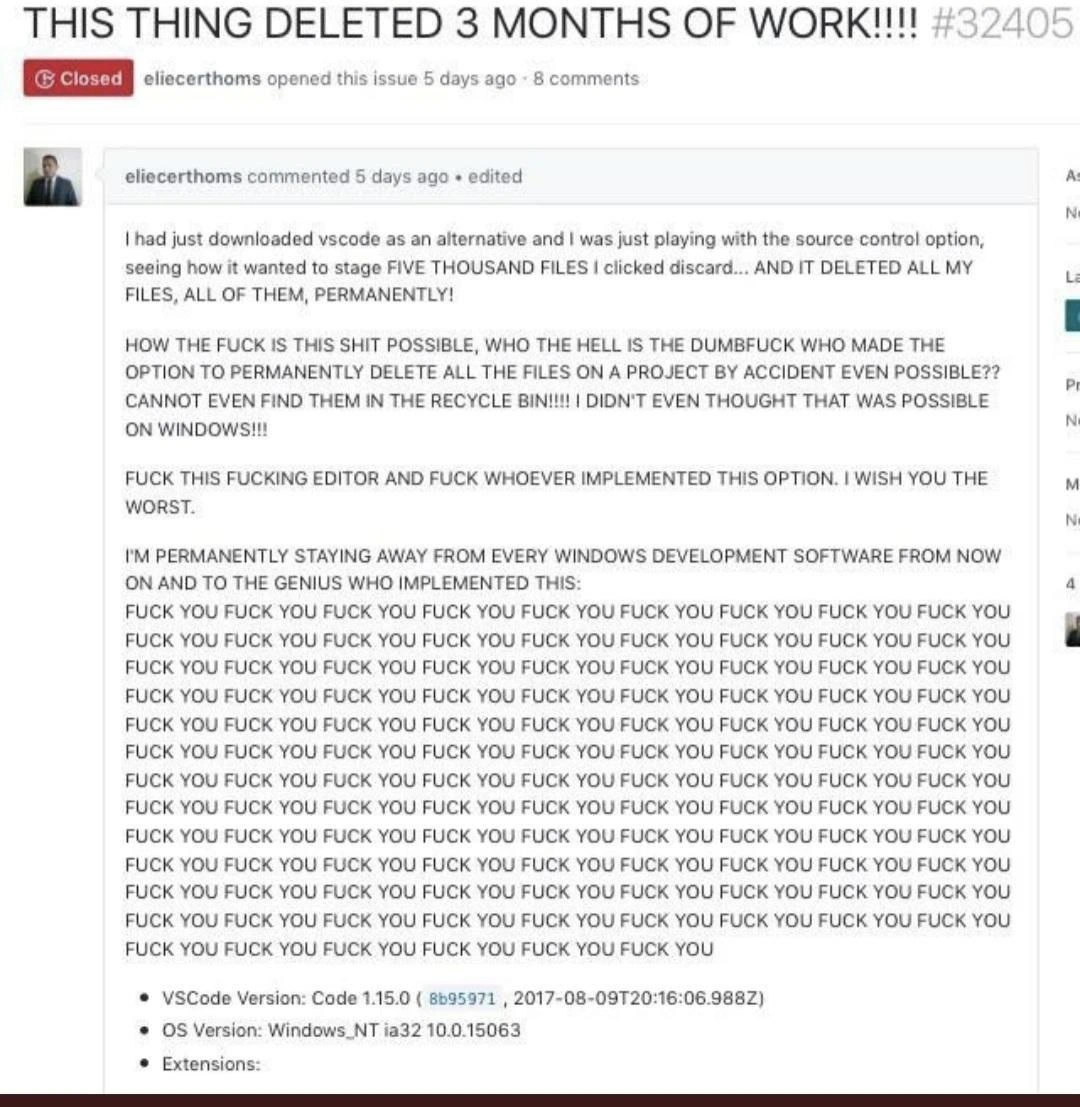
A screenshot of a closed GitHub issue, number #32405, titled in all caps: 'THIS THING DELETED 3 MONTHS OF WORK!!!!'. The issue was opened by user 'eliecerthoms' and shows an extremely angry comment. The user recounts downloading VS Code and, while experimenting with the source control option, accidentally clicking 'discard' on five thousand files, which permanently deleted them without sending them to the recycle bin. The comment is filled with profanity and disbelief that such a destructive, irreversible action is possible. The user vows to stop using all Windows development software and repeatedly curses the implementer of the feature. At the bottom, VS Code version 1.15.0 and Windows_NT ia32 10.0.15063 are listed. The meme captures the universal developer fear of accidental mass file deletion and the rage that follows when a tool's UX is perceived to be dangerously unintuitive, leading to catastrophic data loss. It's a classic example of user frustration when guardrails are missing from powerful features

Comments
54Comment deleted
The fastest way to clean up a messy codebase is to give a junior dev the 'discard all changes' button in VS Code without a confirmation dialog. It's the 'rm -rf' of GUIs
Reminder: if a single UI button translates to `git clean -xfd && sync`, you’re not using an editor - you’re running `rm -rf .` with theme support
The only thing more permanent than a git commit is apparently VSCode's interpretation of 'discard changes' on untracked files - turns out it's less 'git checkout' and more 'rm -rf /*' with extra emotional damage
Three months of work and the first git command ever run on the repo was, effectively, git clean -fdx. The real issue was filed against the wrong repository
Ah yes, the classic 'discard changes' operation that senior engineers know really means 'permanently delete everything without confirmation or backup' - because who needs a staging area metaphor to actually behave like a staging area? This is why experienced devs treat new IDE features like production deployments: test in isolation, read the docs twice, and always have a backup. The real tragedy here isn't just losing three months of work; it's discovering that your version control UI can bypass the OS-level safety net (Recycle Bin) while you're still learning the tool. This is the kind of footgun that makes you understand why enterprise teams mandate specific IDE versions and configurations - and why 'works on my machine' evolved into 'works with my exact toolchain snapshot.'
VSCode’s “Discard All” is just a GUI for git clean -fdx - if that nuked three months of work, your DR plan was “single laptop, no replication, pray to the Recycle Bin.”
VS Code's 'Discard All Changes': the only feature with worse UX than a git reset --hard after three months unsaved
If your IDE wires “Discard All” to git clean -fdx, congrats - you’ve shipped a one-click DR exercise; when RPO equals hope, the Recycle Bin isn’t a strategy
never seen a man as dumb as he is Comment deleted
If I saw discard button I'd thought that it means don't change anything. So it's not user that's stupid but UI that's shit. But that's normal for Microsoft Comment deleted
it's actually git behavior they implemented. But the page is epic none the less Comment deleted
Apparently he didn’t use git before, actually there is a pop up to ask you to confirm to discard option if you accidentally click the discard. Comment deleted
Yet there's a logical difference between "unstage" and "discard" Comment deleted
visual studio once wiped my project it crashed and leaked RAM whch was stuck i rebooted and project no more exists, only zero bytes folder remains Comment deleted
VSCode or VS? Comment deleted
vs it was 2-5 years ago when i still used шindoшs Comment deleted
Well you could tell no more than just "visual studio once" Comment deleted
https://github.com/microsoft/vscode/issues/32405 Comment deleted
hey… I think that's a dev I know… Comment deleted
Люди делятся на три типа: Те, кто пока не бекапит данные Те, кто уже бекапит данные И те, кто проверяет, что бекапы живые People are divided into three types: Those who do not backup data yet Those who already backup data And those who check that the backups are alive Comment deleted
But does Git repo count as backup? Comment deleted
not if you're keep it in your local storage Comment deleted
That’s exactly how he managed to delete everything. Read the GitHub thread Comment deleted
So do as me — GitLab or Gogs VM with full backup of this VM. Comment deleted
Hetman partition recovery и нет проблем Comment deleted
ALWAYS use a version control (means Git). Commit frequently in your feature branch. Push your branch to remote at the end of the day, even if it's a work in progress... Comment deleted
+100500 Comment deleted
Svn is fine! Comment deleted
and he didn't have git? Comment deleted
And yet discard could be named more explicitly Comment deleted
Anyway working with things thru commands should be taken with attention, I often pray when I merge just because Comment deleted
It is true if you think yourself as a engineer. Always know what you are doing. Comment deleted
step 2 is unnecesary Comment deleted
Seems about right. He used windows anyway... (But tbh, what happened to him is really painful; now I will have raised heartbeat and tense hands when I use git.) Comment deleted
it is harder to nuke history tho so if files are in git they aren't going anywhere Comment deleted
I use vscode on Fedora and another one on Mac. Comment deleted
Oh, I like vscode, just the windows part sounds kinda off Comment deleted
People should not use inferior text editor like vscode Comment deleted
first vscode deleted his files, then windows deleted his github account, lol, they are really after him. Comment deleted
just because he wrote a wall of fuck you, that's no reason to be deleted! Comment deleted
This is what the guy saw, clicked on "discard all" and then blamed the editor for it. It's hilarious 😂 Comment deleted
oh lol Comment deleted
"discard all changes" != "delete all files" Because the files were already there. That's really dumb behavior to delete the files and not mention that files will be deleted. Almost as dumb as not having a backup of all important source code. Two extremely dumb devs found each other. Comment deleted
It is saying that all untracked files will be deleted, always did Comment deleted
well if its your first commit - you`re just discarding new changes. Comment deleted
The thing is... He didn't do any CHANGES. So there's was no problem to discard em IRREVERSIBLE. He had some(~5000 omg) files linked and he was okay with discarding changes (that he didn't do at all). It is version control software or shit mixing machine? I can see why he's upset Comment deleted
just use vim lol Comment deleted
Thats why i just use git from cli always :v Can never be sure how are they implementing which functionality Comment deleted
You can check git output log to see the actual command. Comment deleted
After the execution :v Comment deleted
Adding files to a folder is a change. Comment deleted
You need to reply his message so that he can see your reply. Comment deleted
Don't really care if he does or not Comment deleted
having whole project done as one big commit that he had discarded - is totally his fault Comment deleted