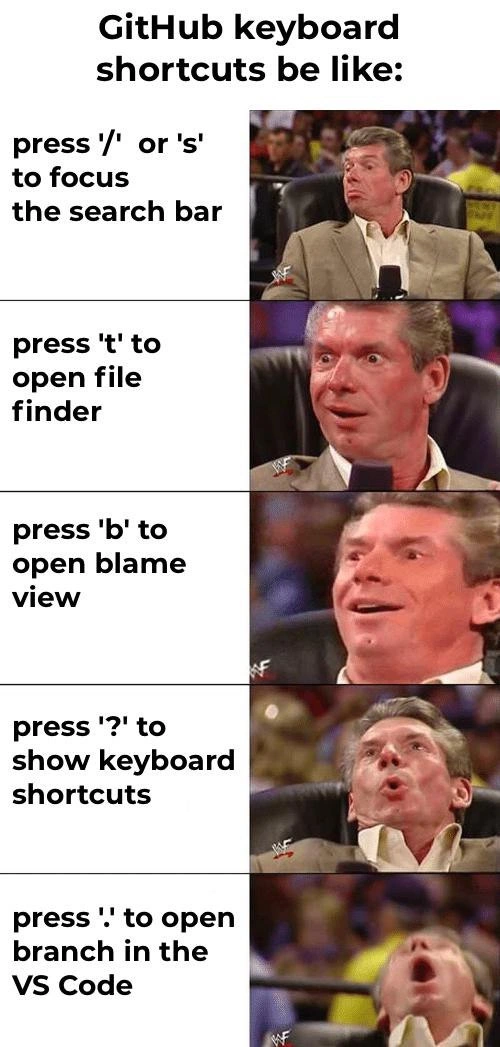
Each GitHub shortcut escalates developer excitement from useful to mind-blowing
Why is this VersionControl meme funny?
Level 1: Secret Cheat Codes for Work
Imagine you’re playing a video game and someone shows you a special button that skips a boring level – you’d get pretty excited, right? Now picture that they keep showing you even cooler tricks, one after another. The first trick is useful, the next one is even better, and by the last trick, it feels absolutely magical, like a cheat code that lets you do something impossible.
That’s what’s happening in this meme, but instead of a video game, it’s a website for programmers (where they keep and edit their code). The meme says: there are hidden “cheat code” buttons on the keyboard that make using this coding website way easier. The man in the pictures is getting more and more excited with each new secret button:
- First, he learns a trick to search quickly (nice! saves a bit of time).
- Then, a trick to find anything in the project instantly (cool! even faster).
- Then, a trick to see who worked on each line of code (wow, that’s handy to solve mysteries).
- Next, a trick to reveal all the other tricks (whoa, an actual list of secret powers!).
- Finally, the biggest trick: one button that magically opens the whole project in a coding program (mind blown 🤯 – it’s like the whole workspace appears out of thin air).
Each new “cheat code” makes him happier than the last. By the end, he’s as astonished as if he saw a magic wand at work.
In simple terms, the meme is funny because it shows how discovering small shortcuts or time-savers can make someone ridiculously happy. Just like finding a hidden door in a game or a secret shortcut in real life, these little discoveries bring a lot of joy. You don’t even need to know programming to get the joke: it’s the idea that finding an easier way to do something can make you go from “Oh cool” to “OMG WOW!” in five steps.
It’s basically saying: even grown-up programmers get giddy like kids when they find a new trick that makes their job easier – and it’s adorable and funny to see that excitement escalate.
Level 2: Hidden Power-User Tricks
For someone newer to coding or GitHub, let’s explain what’s going on. GitHub is a popular website where developers store and collaborate on code using Git, a version control system. It’s like a library for code with tools to browse and manage that code. Now, keyboard shortcuts are quick key presses that perform certain actions without clicking buttons. This meme lists a bunch of GitHub’s keyboard shortcuts that can make navigating and editing code much faster, and it jokes about how each new shortcut makes the person (Vince McMahon, a WWE figure known for over-the-top reactions) more and more excited.
What each shortcut does:
Pressing
"/"or"s"to focus the search bar: On GitHub’s site, there’s a search box to find repositories or code. Normally, you’d have to move your mouse and click on that box before typing your search. But by pressing the/key (forward slash) or theskey on your keyboard, GitHub will automatically jump your cursor to the search bar from anywhere on the page. It’s a small convenience – you save a second or two – but if you’re searching for code or projects often, it feels smooth and professional. For a developer, keeping your hands on the keyboard and not having to reach for the mouse is a little victory. Imagine if you could snap your fingers to open a search box, that’s the feeling here.Pressing
"t"to open the file finder: When you’re looking at a repository’s code on GitHub, finding a specific file by clicking through folders can be slow, especially if the repo has many directories. The file finder is a feature that lets you search for a file by name. When you press thetkey on your keyboard, a small window pops up (kind of like a search bar) where you can start typing a file’s name. As you type, it filters and shows matching filenames in that repository. Once you see the one you want, you hit Enter and GitHub takes you straight to that file. This is much faster than clicking through multiple folders. New developers might not know this exists, so discovering it is exciting – it’s like finding a secret passage in a maze that takes you right where you want to go. This shortcut is especially loved in DeveloperExperience circles because it mimics what many code editors do (for example, in VS Code or Sublime Text, pressingCtrl+Popens a similar “go to file” dialog). It turns the normally tedious task of hunting for a file into a quick type-and-go action.Pressing
"b"to open blame view: “Blame view” might sound negative, but in Git/GitHub it’s actually a tool to see the history of each line of a file (who last changed it, and in which commit). It’s called git blame because it’s often jokingly used to find out “who wrote this bug” (i.e., who to blame). On the GitHub web interface, when looking at a file’s code, pressingbswitches to the blame view for that file. This overlays each line with metadata about the last commit that touched it and who the author was. Why is this useful? Let’s say you find a weird line of code and want to know when it was introduced or who can explain it. Blame view gives you that context immediately. For a junior developer, this is like a detective tool – it helps track changes and understand the history behind code. Normally, you’d either run agit blamecommand in your terminal or click a “Blame” button on the web page. The shortcutbjust makes it instantaneous. In the meme, by the time we get to this third shortcut, Vince McMahon’s expression is getting really hyped. That reflects how a developer might feel when they learn they can reveal code history with a single key press. It’s a mix of “cool, I feel like a hacker” and “this will save me some effort”. Plus, there’s the cheeky aspect: devs often joke about using blame to literally find who wrote a piece of code (hence the name), so having a hotkey for it is kind of funny and empowering.Pressing
"?"to show all keyboard shortcuts: This one is like finding the cheat sheet or treasure map. When you hit the?key on GitHub, a pop-up appears listing all the keyboard shortcuts available on that page. There are quite a few (for navigation, editing text in issues, moving between comments, etc.), and they’re not obvious until you see this list. For someone who’s new, it’s like discovering an instruction manual of all the hidden tricks you can do on GitHub – pretty eye-opening! In the meme, Vince’s face is astonished at this point. That’s because if you didn’t know about?, you might have been missing out on dozens of time-saving shortcuts. It’s almost ironic: a shortcut to learn about shortcuts. But it ensures you don’t have to rely on random blog posts or memos to learn these; GitHub will show you right there. This feature encourages users to become “power users.” For a junior dev, pressing?might reveal, for example, that you can pressg cto go to the code view, oryto copy a permalink to a file line, etc. It’s a cascade of “Oh wow, you can do that too?!” moments. The meme captures that feeling of being pleasantly overwhelmed by new info that can make you faster and happier using the tool.Pressing
"."to open the repository in VS Code (web version): This final shortcut is the grand finale. If you press the.(dot) key while on a GitHub repository page, it will launch an online version of Visual Studio Code (VS Code) right in your browser, with the repository’s content loaded. Essentially, without installing anything, you get a web-based code editor that looks and feels like the VS Code application many developers use on their desktop. This environment is often accessed via the URLgithub.dev(which is what the shortcut opens behind the scenes). For a newer developer, this might need a bit of background: VS Code is a very popular text editor/IDE for coding, and Microsoft (who makes VS Code) also owns GitHub, so they connected the two. The idea is that if you want to edit or explore the code with the full power of an editor (like multiple files open, search across files, syntax highlighting, etc.), you can do it on the fly, from anywhere, just by pressing.. It’s like magic – one second you’re viewing a static webpage of a repository, next second you have an interactive coding workspace, without needing to clone the repo to your machine or open an app. This is incredibly useful if you want to quickly edit a file in the browser or browse the project structure more fluidly. When people first learned about this feature, many literally said it blew their mind (hence the meme’s final over-the-top reaction). It shows how far developer tools have come: you can get a whole coding environment with one keystroke. If you’ve ever used something like CodePen or an online editor, it’s a similar concept but directly integrated with your GitHub project. For a newbie, think of it as going from reading a book to suddenly being able to write in the book and flip pages super fast, all online. The excitement is because it removes so many steps (no need to open Terminal, rungit clone, open VS Code on your computer, etc.). It’s instant gratification for editing code.
The meme uses the Vince McMahon reaction format to exaggerate a sequence of emotions:
- In the first panel, he looks interested but calm (that’s the
/search – nice, but not earth-shattering). - Next panel he’s visibly happy (the
tfile finder – more exciting). - Next his eyes are wide (the
bblame – ooh, powerful). - Then he’s almost falling back with eyes glowing (the
?all-shortcuts menu – overwhelmed by possibilities). - Finally, he’s practically exploding out of his chair (the
.VS Code in browser – mind completely blown).
For a junior developer or someone new to GitHub, the meme is saying: as you learn each new trick on GitHub, you’ll get more and more excited about how much easier it makes your life. It’s humorous because it’s true – developers really do get happy about these efficiency boosts, sometimes to the point of giddiness. It also implies a bit of “if you know, you know” bragging rights: knowing these shortcuts is like being in a club of savvy GitHub users. But thanks to the ? shortcut, anyone can join that club by learning what’s available.
In context of DeveloperExperience_DX: All these features are about making the developer’s interaction smoother and faster. Companies like GitHub invest a lot in these little details because they know how much frustration they can save over time. As a new developer, you might not immediately realize they exist, but once you do, you’ll likely incorporate them into your routine. It’s like learning hotkeys in any software (e.g., Ctrl+C for copy, Ctrl+V for paste) – at first, you might use the menus, but once you get the shortcuts, you can’t go back because it’s so much faster.
To sum up, at this level: the meme is a funny way to learn that GitHub has some really handy keyboard shortcuts. It lists them explicitly (so hey, you just learned five new things you can do on GitHub using keys alone!) and captures the feeling of joy and surprise that comes with each discovery. As a new developer, you might not be literally jumping out of your chair like Vince, but you might think “wow, that’s cool!” a few times. And the more you use GitHub, the more you’ll appreciate how these little shortcuts can make you feel like a coding wizard who knows all the tricks.
Level 3: Shortcuts to Euphoria
At first glance, this meme celebrates power-user knowledge on GitHub with Vince McMahon’s increasingly ecstatic reactions. Each panel highlights a keyboard shortcut that boosts developer productivity, escalating from a neat trick to an almost magical developer experience (DX) revelation. The humor comes from how dramatically excited developers get over these small QoL improvements – something only fellow coders truly get. It's a playful nod to the culture of keyboard-centric workflows and discovering hidden features that feel like secret cheat codes.
Let’s break down each shortcut and why it’s such a big deal in a developer’s daily version control workflow:
Focus search (
/ors) – Pressing/(forward slash) orson any GitHub page instantly focuses the search bar. This means you can start typing a repository name, code snippet, or issue term without touching the mouse. For seasoned devs who live in the keyboard, it’s a satisfying timesaver. Historically, reaching for the mouse to click the search field isseen as a sign of weaknessjust slower. By shaving off even a second, this shortcut feels slick. It’s similar to how many apps (like Slack or Gmail) let you hit/orCtrl+Kto jump straight to search – a subtle nod to UI design patterns that cater to efficiency.File finder (
t) – Hitting thetkey on a repository’s code view opens the file finder (a quick file search modal). This is essentially GitHub’s version of the IDE “Go to File” (Ctrl+Pin VS Code, for example). In a large repo with hundreds of files and folders, manually clicking through an explorer tree or scanning directories is tedious. File Finder is a godsend – just presst, start typing a filename, and boom, you can jump directly to that file. Experienced developers recognize this as the web equivalent of runninggrepor using an editor’s fuzzy search. It’s a VersionControl power move, letting you navigate a codebase at lightning speed, right in the browser. No more “Where’s that config file hidden?” – thetshortcut is like a homing missile for code.Blame view (
b) – Pressingbon a file view opens the Git blame view, which annotates each line with who last modified it and when (viagit blameunder the hood). The term “blame” is tongue-in-cheek; it’s really about accountability and understanding history. In the meme, this is where Vince’s face shows serious excitement – because every senior dev knows how crucial blame is when debugging or reviewing spaghetti code. It’s how you answer “Who wrote this and why did it break?” without trawling through commit logs manually. Being able to toggle blame with a single key press is both useful and darkly humorous – useful because you can quickly see line-by-line history, humorous because it feeds the age-old joke of literally assigning blame to the last committer when something goes wrong. In shared developer lore, “git blame” is how you find the guilty party when the build breaks 😅. This shortcut encapsulates that trope in one tap, improving DeveloperExperience_DX by making code archaeology effortless.Shortcut help (
?) – Now we’re getting meta: pressing?brings up a dialog listing all GitHub keyboard shortcuts. This is the holy handbook of power-user navigation on the platform. Vince’s reaction here is pure astonishment – it’s like discovering the instruction manual to a secret gadget you’ve been using for years. Many devs don’t realize GitHub has dozens of hotkeys (for notifications, issues, PRs, etc.), so stumbling on?is mind-blowing. It’s a moment of “There’s a shortcut for THAT too?!” The meme humor derives from the idea that a simple question mark grants you an entire arsenal of shortcuts. In other words, GitHub actually guides you to become an even faster, mouse-eschewing power user. For a seasoned developer, this is both exciting and a tad overwhelming – like finding an Easter egg that reveals even more Easter eggs. It exemplifies how Tooling and platforms encourage efficiency: once you see the cheat sheet, you realize how much more streamlined your workflow could be. The excitement builds because each new trick unlocks new speed.Open in VS Code (
.) – The final panel is pure ecstasy. Pressing the.(dot) key on a repository triggers GitHub’s web-based VS Code environment (atgithub.dev). In one keystroke, your browser transforms into a full-fledged IDE with your repo loaded, complete with syntax highlighting, editing, and even Git operations (via extensions or GitHub Codespaces if you go further). This blew developers’ minds when it was introduced – it feels like sorcery. Imagine: you’re browsing code, you hit., and suddenly you’re in VSCode in your browser, editing files with intellisense, without cloning the repo or opening a local editor. It erases the barrier between web-based code browsing and actual code editing. Vince McMahon basically falling out of his chair with incandescent joy captures how devs felt: “Wait, I can spin up an editor anytime, anywhere just by pressing a single key?!” This represents the pinnacle of DeveloperExperience_DX improvements in the meme – a tiny action yielding a massive capability. Technically, this works because Microsoft (which owns GitHub) integrated VS Code’s editor (specifically the Monaco editor that powers VS Code) into the browser. It’s a triumph of developer tooling: the kind of seamless integration that makes you wonder if you accidentally typed a Konami code for coding. It hints at the future of development, where your development environment is accessible on-demand in the cloud. No wonder it’s depicted as mind-blowing – it essentially warps you from a read-only code view to an interactive coding session instantly.
The escalating reactions in the meme mirror a dev’s journey from discovery to mastery:
- Curiosity – “Oh neat, I can jump to search with
/. That’s handy.” - Pleasant surprise – “Press
tto find files by name, nice! Saves me a bunch of clicks.” - Thrill – “Whoa,
bshows blame annotations! This will really help track changes.” - Amazement – “Press
?and there’s an entire menu of shortcuts? I’ve been missing out on so much!” - Mind Blown – “Hitting
.gives me a whole VS Code in-browser IDE?! This changes everything!! 🔥”
Each step ups the ante, tapping into that developer enthusiasm for efficiency. The meme’s comedy lands so well among coders because we’ve all had moments of glee upon learning a new shortcut or tool that simplifies our life. It’s exaggerated here for effect (most of us don’t literally flip out of our chair… usually), but the sentiment is true. In an industry where projects can be complex and time-consuming, any little boost feels disproportionately exciting. The final panel, in particular, is almost mind-boggling: it represents a paradigm shift in how we can interact with code on GitHub. The suited man (Vince McMahon) practically airborne with joy is an apt metaphor for a developer discovering a feature they can’t believe exists.
In summary, the meme humorously encapsulates how Developer Experience improvements – especially in version control platforms and coding tooling – can turn a calm, seasoned developer into an elated fanboy. It satirizes that progression from “cool, that’s useful” to “shut up and take my money!” excitement. Each GitHub shortcut is like leveling up a superpower, and by the end you’ve gone from a simple search trick to essentially conjuring a full IDE out of thin air. The punchline is clear: these shortcuts are life-changing (for devs, at least)! And the more you know, the happier you become.
To visualize the impact of these shortcuts versus the old way:
| Task | Traditional Way (Mouse/CLI) | Shortcut Way (Keyboard only) |
|---|---|---|
| Search repository | Click search box, then type query | Press "/" or s to focus search instantly |
| Open a specific file | Manually navigate through folders, click file | Press t, type part of filename, hit Enter |
| See who last changed a line | Run git blame in terminal or check file history manually |
Press b on file to open blame view |
| Learn available shortcuts | Dig through documentation or guess | Press ? to show shortcuts overlay |
| Edit files in an IDE | Clone repo locally, open VS Code or start Codespace | Press . to open VS Code in browser |
Each shortcut bypasses a bunch of clicks or shell commands. Especially for veteran devs, this is nirvana: no context-switching, no extra apps – everything happens in one interface with a few keystrokes. The meme exaggerates the emotional payoff, but it’s grounded in truth. We genuinely get excited about these things because they remove friction from our workflow. In the world of programming, fewer obstacles = happier dev.
Ultimately, the meme speaks to how DeveloperExperience_DX wins (even small ones) can spark outsized joy. It’s a shared wink among developers: “Yeah, I made that same face when I learned about pressing . on GitHub.” It’s funny because it’s true – our passion for tooling and shortcuts can make us react like a WWE meme, and we’re not even embarrassed about it!
Description
A five-panel vertical Vince McMahon reaction meme is headed by the sentence "GitHub keyboard shortcuts be like:". In the left column, black text on white rectangles lists shortcuts: "press '/' or 's' to focus the search bar", "press 't' to open file finder", "press 'b' to open blame view", "press '?' to show keyboard shortcuts", and "press '.' to open branch in the VS Code". Each corresponding right-hand panel shows the same suited man sitting in a wrestling-arena chair, his blurred face progressing from calm interest to eyes-wide, slack-jawed euphoria, culminating in an almost airborne scream of delight in the final frame. The meme humorously dramatizes how power users discover GitHub hotkeys that accelerate repository navigation, Git blame analysis, and instant browser-based VS Code editing, highlighting small DX improvements that feel revolutionary. It plays on familiar version-control workflows and keyboard-centric productivity revered by experienced engineers
Comments
16Comment deleted
Senior dev hierarchy of GitHub shortcuts: '/' to search tech-debt, 't' to locate the file, 'b' to nominate the scapegoat, '?' to flex your mastery, and '.' for the inevitable Friday hotfix-from-the-airport that reappears in next year’s blame
The real power move is explaining to your PM why you spent three hours configuring vim keybindings in the GitHub web editor after discovering the '.' shortcut, only to realize you could've just cloned the repo and used your local setup with 15 years of muscle memory intact
The real GitHub power move isn't knowing these shortcuts - it's the existential crisis when you realize you've been clicking through the UI like a caveman for years while '.' could've opened VS Code in the browser this whole time. That final panel perfectly captures the moment a senior engineer discovers they've been manually navigating file trees when they could've been pressing 't' like a civilized human. It's the developer equivalent of learning your IDE has had a 'Go to Definition' shortcut all along while you've been grep-ing through codebases
Pressing 'b' for blame in our blameless postmortems is peak irony; meanwhile '.' is the highest‑ROI key this quarter - github.dev launch, zero installs, near-zero context switch
GitHub shortcuts map the panic curve: '/' optimistic search, 't' monorepo archaeology, 'b' locating the Friday merge, '?' pretending there’s documentation, and '.' accepting you’ll ship the hotfix from github.dev
GitHub hotkeys: where ? shows you ?, proving even the help needs help after 20 years of repo wrangling
Press Ctrl + K to open the command palette Comment deleted
Press Ctrl + Backspace to delete word Comment deleted
Press Alt + F4 for memes Comment deleted
Am I the only one who edits code in Vim and then pushes to the repo!? Comment deleted
no Comment deleted
Yes, only you are using vim and then pushes to the repo Comment deleted
LOL, I know I'm not, I just don't find it useful to code in a browser!! Comment deleted
Apparently it's actual VS Code, but in a real browser. You can install plugins here. Of course with it's limitations: Comment deleted
Ohh, I see, I tried compilling VS Codium with no success, I don't have VS Code installed yet!! Comment deleted
also, there is vim key bindings plugin for vs code 👀 Comment deleted