Mark Zuckerberg's Final Boss: The CAPTCHA Test
Why is this Security meme funny?
Level 1: Proving You’re Human, the Hard Way
Imagine you want to go into a secret club that only allows humans, no robots. At the door, there’s a guard who says, “If you’re really human, prove it by reading this!” Then the guard shows you a card with a word on it – but the word is written in such crazy, wavy, messy handwriting that you can’t even tell what letters you’re looking at. You squint, you tilt your head, you maybe stick your tongue out in concentration, but it just looks like a bunch of squiggles. It’s as if someone took a normal word and scribbled all over it. In frustration you say, “Um… I honestly can’t read this. Can someone help me?” It’s funny and silly because the test meant to show you’re human is so hard that even a human like you can’t do it! That’s basically what’s happening in the meme: websites sometimes give us these scribbly words called CAPTCHAs to check we’re not robots. But when they get too hard to read, we feel confused and a bit annoyed, kind of like being given an impossible puzzle. The joke is that the test to prove you’re human ends up making a real human feel as lost as a robot would. It’s like asking someone to prove they’re not an alien by solving a riddle in a made-up alien language – pretty unfair, right? The humor comes from that over-the-top situation and the relatable feeling of, “Wait, I’m human… so why can’t I read this?!”
Level 2: CAPTCHA Crash Course
So what exactly is going on with this unreadable jigsaw of letters, and why is it so funny to developers? Let’s break it down in simpler terms. CAPTCHA is a term you’ll hear often in web development and security. It stands for Completely Automated Public Turing test to tell Computers and Humans Apart (a mouthful, we know). In practice, a CAPTCHA is that little test popping up on websites that asks you to do something like “Type the letters you see in the box” or “Click all images that have a bus in them.” Websites use CAPTCHAs to figure out if you’re a real person or an automated program (a bot) trying to do things like spam a form, create tons of fake accounts, or scrape data. It’s like a gatekeeper challenge: only humans (in theory) can pass easily, while bots get tripped up.
Now, the meme jokes about a situation we’ve all probably experienced: sometimes these CAPTCHAs are ridiculously hard to read. The text is twisted into weird shapes, the background is noisy with random colors and lines, letters overlap – basically it’s hard_to_read_captcha syndrome. The intention behind that chaos is security. By making the text hard to decipher, the site is trying to ensure that an automated program (which finds it hard to recognize distorted text) can’t get through. But here’s the catch: if you overdo it, humans can’t read it either! Suddenly, what was meant to be an easy human check becomes a challenge even for actual humans. This meme blows that problem up to humorous effect.
Imagine you’re on a website signing up for something. You fill in your info, and at the end, the site says “prove you’re not a robot” (the classic are_you_a_robot check). Usually, that means you either tick a checkbox or they give you one of these puzzles. Now, instead of a normal easy puzzle, you get presented with something like a bunch of squiggly, funky words: “plobxzxl”, “zagxtwcxk”, “lucyfpft”. They look more like a cat ran over a keyboard than actual words! You try to read the first one… “Is that a p or maybe a q? Is that last letter a t or an f?” It’s super frustrating. You might refresh it to get a new challenge, but sometimes that’s just as bad. This is a prime example of a security_ui_tradeoff, which means the site increased security (harder puzzle to stop bots) at the cost of a worse user experience (it’s now hard for you, a real user, to get in). In other words, Security vs. Usability in action. Developers have to balance these two all the time in web development: you want to keep the bad guys out, but you don’t want to keep the good guys out with them!
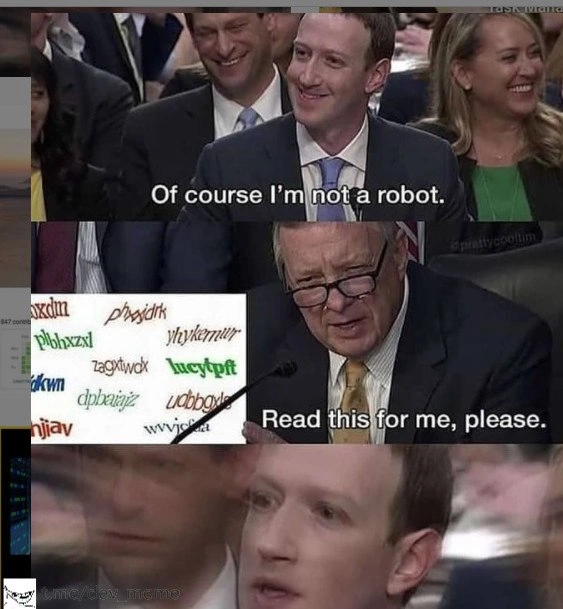
The meme itself uses a funny setting: a U.S. congressional hearing room. In the first panel, the suited guy (a tech executive witness) says, “Of course I’m not a robot.” That’s funny because on websites we often literally declare “I am not a robot” by clicking a checkbox labeled that. It’s a direct reference to those interactions. Then in the second panel, a senator or official is shown a bunch of those impossible CAPTCHAs (like a whole gallery of mangled text). The senator is basically saying, “Oh, you’re not a robot? Prove it. Here, read this!” That’s exactly what a website does to us: “Prove you’re human by reading this distorted text.” And finally, the tech guy’s face in the last panel is blurred as he says, “Read this for me, please.” – as if even he can’t read it and needs help. It’s poking fun at the absurdity: the test meant for humans is so tough that a human is asking for assistance (maybe from a computer or anybody else). It’s like the ultimate UX failure – the user throwing their hands up and saying “I can’t do this!”
For a junior developer or someone new to this, it highlights why we always talk about CAPTCHA in terms of a trade-off. You now see why CAPTCHAs exist: to stop bots. Some common types include:
- Text-based CAPTCHAs: like the ones shown, where you type letters from a distorted image.
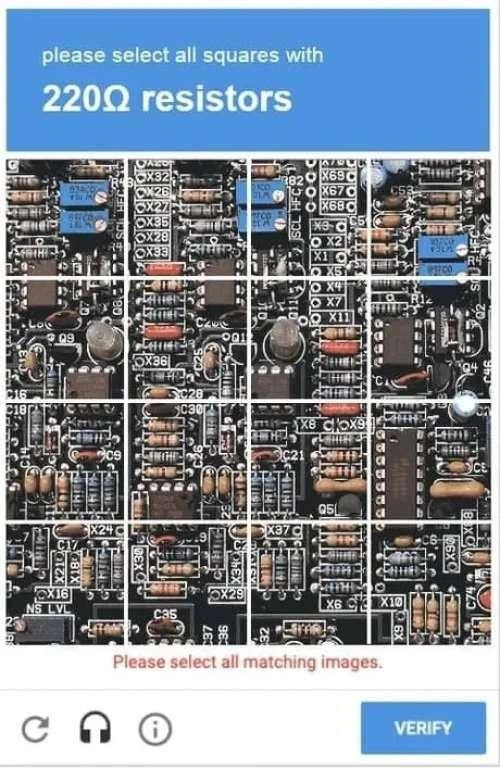
- Image selection CAPTCHAs: you’ve likely clicked on pictures, selecting all the ones with traffic lights or buses. That tests if you have human-like image recognition.
- Simple question CAPTCHAs: like a math question (what’s 2+5?) or a simple logic question (what color is the sky?). These are easier on users, but very basic ones can sometimes be solved by bots that are programmed for them.
- Invisible CAPTCHAs: you might not even see these – the site analyzes your behavior (how you moved the mouse, how quickly you filled the form, etc.) to guess if you’re human. If you ever just clicked a checkbox saying “I’m not a robot” and nothing else happened, that was an easy CAPTCHA – it decided you were human enough from just that click and your browsing fingerprint.
The reason developers joke about CAPTCHAs is because we’ve all had moments implementing them or using them where we think, “This is overkill!” There are memes of people seeing a CAPTCHA and jokingly saying “I failed the Turing test” or “Maybe I am a robot, who knows?” after struggling with one. It’s relatable humor (RelatableHumor) because everyone from novices to experts has at some point stared at a squiggly word like “WvvvvvW” (is that double v, or w, or what?!) and felt a mix of confusion and annoyance. The BotDetection goal is noble, but if done poorly, it just ends up testing the patience of your real users. And that’s the heart of this meme: it exaggerates the situation to point out how comically bad it can get. A serious governmental hearing turning into a CAPTCHA reading test – that’s absurd, and that’s why it’s funny. It shines light on a real tech problem using a silly scenario. After seeing this, as a developer you’re reminded: always consider the user experience (UX). Security is important, but if your security measure frustrates or locks out genuine users, you’ve kind of defeated the purpose. A good CAPTCHA or bot prevention method is one that most humans don’t even notice but stops the bad bots quietly. We’re getting better at that, but as the meme jokes, we sometimes still get it hilariously wrong.
Level 3: Security vs Usability Showdown
From a senior developer’s perspective, this meme nails a classic Security vs. Usability dilemma we face in web development. The whole scene is a playful exaggeration of what happens when our zeal for web security overshoots practicality. We add a human verification step to stop malicious bots from spamming our site, but in making it foolproof against bots, we’ve also managed to stump our actual users. It’s a relatable UX failure: the security mechanism (CAPTCHA) is so aggressive that it backfires, undermining the user experience it’s supposed to protect. The humor lies in the absurd overkill of the situation: “Prove you’re human by decoding this impossible puzzle.”
In the meme’s panels, a suited witness in a congressional hearing confidently says, “Of course I’m not a robot.” That’s a tongue-in-cheek reference to the common web prompt asking if you’re a robot (and arguably a nod to the running joke that this particular tech CEO-like figure might seem robotically composed). In the second panel, instead of a straightforward verification, he’s confronted with a collage of ridiculously distorted CAPTCHAs – the kind that make you tilt your head and squint. Words like “plobxzxl” or “dbplazajz” smeared with colors and lines – they’re practically gibberish with a bad case of motion blur. It’s a nightmare of captcha_legibility. Even a seasoned developer who’s implemented these before would balk at reading such scrambled text. By the third panel, the exasperated official (in the meme, a senator figure addressing the witness) slides the CAPTCHA over saying, “Read this for me, please.” The punchline lands: the ultimate test to prove you’re not a robot is to decipher something that looks like a robot wrote it. The witness’s face blurs in panic – a dramatic zoom effect meme-lovers recognize as shock or stress. In developer terms, that’s the “oh no, production is on fire” face, but here it’s “oh no, I can’t even pass my own anti-bot test.”
This perfectly encapsulates the frustration developers and users feel towards overly strict CAPTCHAs. We implement these puzzles to stop spam sign-ups, credential stuffing, or blog comment bots, and we pat ourselves on the back for deploying “advanced bot detection.” But then the support inbox starts filling with messages like “I can’t create an account because I literally cannot read your CAPTCHA!” Legitimate users are hitting the wall. It’s a scenario many devs know too well: we tighten security to keep the bad actors out, and suddenly our conversion rates drop or regular customers are complaining. It’s a Pyrrhic victory where in trying to prove everyone else is a robot, we’ve made our own site feel robotic and hostile.
The security_ui_tradeoff here is real. On one side, you have security engineers saying, “Bots are getting smarter, we need to harder CAPTCHAs!” They crank up the distortion, add more letters, maybe even throw in an arithmetic problem or a second image selection round. On the other side, the UX/UI team is groaning, knowing this will tank the user experience. There’s even an internal joke that sometimes our anti-bot measures are so unwieldy that only an actual bot armed with OCR and machine learning could solve them consistently! It feels like we’re asking users to prove they’re not robots by performing tasks that only a sophisticated robot might manage. This meme underscores that irony with humor: a powerful tech figure is reduced to pleading for help to read the darn CAPTCHA. It’s funny because it’s true – we’ve all been there, clicking refresh on a CAPTCHA 5 times until a readable one comes up, or listening to that crackly audio CAPTCHA that sounds like aliens whispering, all to prove our humanity.
For developers, it’s a cautionary tale. We strive for web security by adding layers of defense like CAPTCHAs to prevent abuse. But every added layer is also an added hurdle for real users. There’s a constant balancing act: How do we keep the bots out without making the humans feel like second-class citizens? In practice, the industry’s moved towards friendlier solutions: for example, Google’s reCAPTCHA v2 introduced the one-click “I’m not a robot” checkbox, which uses subtle clues (how you moved the mouse to the checkbox, your browsing history via cookies, etc.) to decide if you seem human, only giving you the crazy puzzle if you’re borderline suspicious. And reCAPTCHA v3 goes further, running completely in the background to score your likely humanness without interrupting the user at all. These are responses to exactly the problem the meme highlights – that classic CAPTCHA graphic of warped text has become a symbol of bad UX, a necessary evil we’re trying to retire.
Yet, many sites still use the old-school CAPTCHAs or similarly convoluted ones. Why? Some reasons: they’re simple to implement, they don’t rely on third-party services, and admins can tweak difficulty manually. Also, not everyone trusts Google’s invisible tracking, so they roll their own solution – which often results in those nearly unreadable challenges. And let’s be honest, unless a dev team regularly updates their CAPTCHA, once hackers figure out how to parse the images, that CAPTCHA’s effectively useless except for annoying users. It’s a lose-lose if not maintained. Senior engineers have plenty of war stories of CAPTCHAs gone wrong: from causing drop-offs in sign-up funnels to accessibility nightmares (visually impaired users often can’t solve them at all, leading to compliance issues). The meme’s scenario of a user saying “Of course I’m not a robot” only to be met with unintelligible text is a comedic exaggeration of these real experiences. It’s basically the website saying “Oh you claim to be human? Prove it under extreme conditions.” The congressional hearing setting just amplifies the absurdity – picturing a serious government proceeding devolve into a CAPTCHA test is hilariously incongruent. It also slyly pokes fun at that hearing where tech CEOs were asked clumsy questions, flipping the script so that the techie is asked an even sillier one.
In essence, the meme resonates with developers because it captures a universal frustration: security measures that undermine usability. We’ve all been both the annoyed user and the developer responsible for someone else’s annoyance. Good security in web development is about finding that sweet spot where bots get blocked but users breeze through. When you overshoot, you end up with scenes like this – where even a human (or a suspected robot-man, jokingly) has to ask for assistance. The laughter comes with a knowing wince. We chuckle because it’s absurd, then realize we might have created similar moments for our own users. It’s a prompt to reflect: are our users internally screaming “Read this for me, please!” at our convoluted security hoops? If so, time to iterate and find a better balance, because no one wants their “prove you’re not a robot” test to require a PhD in cryptography (or a friendly bot) to solve.
Level 4: The CAPTCHA Arms Race
At the deepest technical level, CAPTCHA (an acronym for Completely Automated Public Turing test to tell Computers and Humans Apart) embodies a mini Turing Test on the web. It’s a clever concept from the early 2000s rooted in academic research: create a task that is easy for humans but hard for machines. Originally, that task was reading distorted text. The theory was simple: humans excel at recognizing familiar patterns (like letters) even when warped or noisy, whereas algorithms would stumble. This concept leverages the gap in pattern recognition capabilities between organic brains and silicon circuits. In practice, a server picks a random word or string and applies warping, random arcs, colors, and background noise to generate a cognitive puzzle image. The user sees something like “plobxzxl” twisted into a psychedelic shape and must type it back. The computer already knows the answer (since it generated the image from text), so verification is trivial for the system. But solving it is meant to be computationally AI-hard – ideally requiring human intuition. It’s almost like a one-way function in cryptography: easy to verify, hard to invert.
However, what’s hard for machines is a moving target. Optical Character Recognition (OCR) algorithms and later machine learning models caught up quickly. Each time bots got better at reading the squiggly letters, CAPTCHA designers dialed up the distortion. This led to an arms race in bot detection: more obfuscation, more noise, weirder fonts, multiple overlapping characters – all in an attempt to stay one step ahead of automated scripts. Research papers and hackers went back and forth: one side designing more fiendish CAPTCHAs, the other training smarter OCR or using convolutional neural networks to decode them. By the mid-2010s, advanced bots could solve many text CAPTCHAs with alarming accuracy. In response, CAPTCHA evolved beyond text into image recognition (“Click all the squares with a crosswalk”) and logic puzzles, seeking new tasks where humans still hold an edge. This progression underscores a broader AI vs. human challenge: every time we find a task machines can’t do, it’s only a matter of time before they learn – forcing us to find even harder tests. It’s a real-world iteration of the Turing Test played out in browsers across the world.
We also see a fascinating historical twist: early CAPTCHAs weren’t just security tools, they doubled as crowdsourced AI training. The famous reCAPTCHA project (later acquired by Google) took scanned words from old books that OCR couldn’t recognize and fed them as CAPTCHAs to humans. Every time you proved you’re human by deciphering a funky word, you also helped digitize books and newspapers. Later versions asked us to label images of street signs or store fronts – slyly using our answers to train computer vision algorithms (for tasks like improving maps or self-driving car AI). In other words, the human verification mechanism was secretly harnessing our brainpower to solve problems machines struggled with. It’s an irony and brilliance at the core of CAPTCHA design: turning a security chore into useful work. But it also means CAPTCHAs have had to mutate as those very algorithms improved using our answers. Security vs. AI is a constant cat-and-mouse game; as soon as computers get fluent in one human task, we change the rules. Modern implementations like Google’s No CAPTCHA reCAPTCHA (“I am not a robot” checkboxes and invisible background behavioral analysis) even try to verify humanness by how you move the mouse or how your browser acts, resorting to image challenges only if things look suspicious. This all stems from fundamental principles of computer science and security: make the easy path hard for attackers but seamless for legitimate users. Yet, as the meme humorously points out, sometimes in this escalating war, the tasks become so hard that even legitimate users (humans!) struggle. The theoretical ideal of a perfect human-only test collides with the practical reality of ever-smarter machines and the messy variability of human capability. We end up asking: if an AI eventually passes all our CAPTCHA challenges consistently, does that mean it’s essentially as “human” as we needed for this context? At that point, the Turing test would be effectively beaten on the web’s front lines – a profound (and slightly scary) milestone hidden behind a goofy login form. For now though, we live in this awkward interim: CAPTCHAs must be complex enough to stump AI, but not so complex that they lock out real people. It’s a fine balancing act derived from core principles of security design and the ever-advancing frontier of AI capabilities.
Description
A three-panel meme set during a congressional hearing, featuring Mark Zuckerberg. The first panel shows a smiling Zuckerberg with the subtitle, 'Of course I'm not a robot.' The second panel shows a senator holding up a piece of paper with a classic CAPTCHA challenge - a series of distorted, unreadable words - and saying, 'Read this for me, please.' The third and final panel is a close-up on Zuckerberg's face, now looking visibly stressed and panicked, with a motion-blur effect. The humor is built on the long-running internet joke that Mark Zuckerberg's public demeanor is robotic. The meme places him in a scenario where he must pass a Turing test (a CAPTCHA) to prove his humanity, and his panicked reaction suggests he is about to fail. For tech professionals, this is a layered joke combining a famous tech personality, a common web security feature, and the philosophical concept of the Turing test
Comments
7Comment deleted
His OS can handle complex data privacy questions, but its text-rendering engine has a known vulnerability when it comes to parsing CAPTCHAs. It’s a critical flaw in the human emulation layer
Congrats on the new CAPTCHA - our ResNet clears it at 99.8% while the VP of Product times out; we’ve finally automated the Turing test… backwards
After spending millions on computer vision models that can identify every pixel of your face across the internet, we still make humans prove they're not robots by squinting at warped text that even our best OCR systems gave up on in 2010
After 20 years of CAPTCHA evolution, we've successfully created a system where bots pass with 99% accuracy using ML models, while legitimate users abandon checkout flows because they can't distinguish between 'rn' and 'm' in a font designed by someone who clearly hates humanity. The real Turing test isn't whether machines can think like humans - it's whether humans can still prove they're not machines to systems that assume everyone's guilty until proven frustrated enough to give up
"I'm not a robot," he says, then proxies the CAPTCHA to our OCR microservice - the only Turing test where bots outscore the humans it's meant to admit
CAPTCHAs are the only security control where the false‑positive is me, and the attacker’s pipeline - headless Chrome + LLM + 2captcha - has a better P99 than our login SLO
CAPTCHAs: the dev tax for skimping on rate limiting, where even your CEO's VPN gets flagged as a botnet