
You're Not a Real Developer Until You Ditch the Mouse
Why is this CLI meme funny?
Level 1: Training Wheels Off
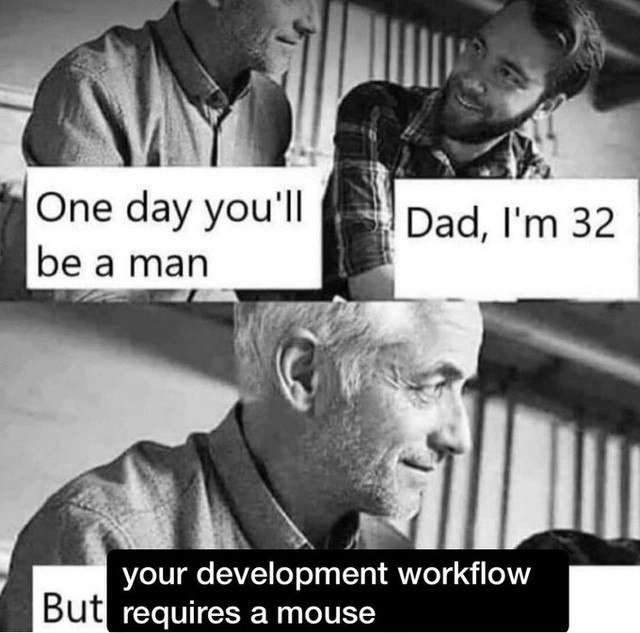
Imagine you’re learning to ride a bicycle. At first, you use training wheels — it’s easier to balance, but every “big kid” eventually takes them off. In this meme, the mouse is like those training wheels. The dad is joking that his grown-up son isn’t a “real man” yet because he still uses the easy tool (the mouse) when he codes. It’s a silly, exaggerated comparison. Of course, being an adult (or a good coder) isn’t really judged by whether you use a mouse or not! But just like a kid might feel proud graduating from training wheels to riding a bike solo, some programmers feel proud doing everything with just the keyboard. The joke is funny because the dad treats using a mouse as if it’s some kiddie thing, which is a ridiculous way to measure someone’s maturity. It’s basically a playful nerdy way of saying, “You’ll be a real pro when you can do it the hard way, not the easy way,” and we’re laughing because we know how over-the-top that sounds.
Level 2: Keyboard vs Mouse Showdown
For less experienced developers, let’s break down what this meme is talking about. It’s contrasting two styles of working: one that uses mostly the keyboard and command-line, and one that relies on a mouse with graphical tools. The father in the meme is essentially saying, “You’re not a grown-up developer until you stop using the mouse in your workflow.” In everyday dev terms, a workflow that never needs a mouse means doing everything with the keyboard, often in a text-based environment. This could mean coding in a terminal text editor like Vim or using an IDE (Integrated Development Environment) solely with shortcut keys. The son’s reply, “Dad, I’m 32,” emphasizes how ridiculous that sounds — he’s an adult, but dad jokes he’s not truly a “man” (i.e., an expert developer) until he codes like a keyboard guru.
So why would a developer not use a mouse? Mainly speed and efficiency. Constantly moving your hand between the keyboard and mouse can slow you down. Using keyboard shortcuts and terminal commands, you keep your hands in one place and can execute commands in seconds. CLI stands for Command-Line Interface, which is a text-based way to interact with your computer by typing commands. Think of the black or blue terminal window where you might run npm start or git pull — that’s CLI. In contrast, a GUI (Graphical User Interface) provides visual menus, buttons, and windows that you navigate with a mouse (or touchpad). Many modern coding tools, like Visual Studio, Eclipse, or VS Code, are GUI-based IDEs that newbies often find friendly: you can click icons to open files, press a big green “Run” button to start your program, or use a visual debugger.
In a keyboard-only workflow, you’d avoid those clicks. For example, instead of clicking a “Build” menu, you might press a hotkey combination or type a build command. Instead of using the mouse to highlight text and copy-paste, you could use Ctrl+C and Ctrl+V or editor-specific shortcuts. Developers who use Vim (a popular console text editor) rarely touch the mouse because Vim is controlled entirely by keystrokes — even moving the cursor or scrolling is done with keys (like using j to move down a line). Likewise, many power users of IDEs learn dozens of shortcuts: e.g. in VS Code you can open the file explorer with Ctrl+Shift+E, search across files with Ctrl+Shift+F, and so on, hardly ever needing to grab the mouse.
Let’s illustrate the difference with a common task like committing code with Git:
# Using a pure CLI approach (no mouse needed):
$ git add -A
$ git commit -m "Fixed the login bug"
$ git push
# Using a GUI approach (mouse involved):
# 1. Open a Git GUI tool or IDE source control panel.
# 2. Select changes with the mouse and click "Stage changes".
# 3. Type the commit message and click "Commit".
# 4. Click the "Push" button to upload changes.
Both methods achieve the exact same result (your code gets committed and pushed), but one is keyboard-only and the other uses graphical clicking. The meme jokingly implies that the keyboard-only way is more “mature.” It’s riffing on the stereotype that senior developers prefer the command line and consider GUI dependence as a beginner trait. This is part of the broader “editor wars” or tool debates in programming culture. People get surprisingly passionate (often humorously so) about their text editor choice or whether using an IDE makes you less hardcore. You might hear friendly arguments like Vim vs Emacs, or terminal vs GUI, where each side teases the other. For instance, someone might tease, “Oh, you used the mouse to copy that line? Let me show you the wizardry of Vim macros.” It’s usually in good fun, though sometimes it can feel a bit like gatekeeping (making someone feel lesser for not using a certain tool).
The phrase “development workflow requires a mouse” suggests that the son (the developer) might be relying on things like clicking toolbar buttons to run code, using graphical debuggers, or dragging and dropping files — basically, habits common when you start out or use very user-friendly tools. There’s nothing wrong with that; in fact, a good Developer Experience (DX) often involves nice GUIs that make routine tasks easier. But veterans love to reminisce (or brag) about the days they did everything in a black terminal window. They might encourage newcomers to learn the keyboard way because it can make you faster and more versatile. For example, if you know CLI tools, you can work on a server with no GUI, or automate tasks with scripts.
In simpler terms, the meme is a form of DeveloperHumor where the dad is essentially saying: “I won’t consider you a true pro until you can do your job without any clicky icons.” It’s an exaggeration that plays on the pride many devs take in being power-users of their tools. If you’re a junior dev reading this, don’t worry — using an IDE or mouse doesn’t make you any less of a programmer! Everyone starts with what they’re comfortable with. Over time, you’ll probably pick up more shortcuts and command-line skills naturally. The joke just hits home for a lot of folks who remember the phase of leveling up when they thought “Wow, I hardly touched my mouse today — I feel like a wizard!”
Level 3: Terminal Rite of Passage
At the most seasoned level of developer humor, this meme riffs on the age-old CLI vs GUI debate and a bit of gatekeeping around "real" programming. The father’s stern punchline — “your development workflow requires a mouse” — satirically equates developer maturity with abandoning the mouse and embracing a purely keyboard-driven workflow. It’s poking fun at that senior-dev bravado: the idea that true programmers live in the terminal, wielding Vim commands and Bash one-liners, while clicking GUI buttons is for novices. This elitist attitude is exaggerated here as a rite of passage, almost like a developer initiation ritual.
In real projects, veteran developers often pride themselves on efficiency. Many have honed dozens of keyboard shortcuts and CLI tricks that let them navigate code and systems at lightning speed. Cutting out mouse usage isn’t just an affectation — it can genuinely reduce context switching. For example, pressing keys to compile code or run tests directly is usually faster than hunting for the tiny “Run” button on-screen. There’s even some sciencey backing: in human-computer interaction, Fitts’s Law tells us moving a cursor to a target (like a button) is relatively slow, while a well-honed key press is almost instantaneous. So, ditching the mouse can mean less wasted motion. Seasoned devs love to joke about this: “Real devs code with vim in one hand and coffee in the other – no free hand for a mouse!” It’s a hyperbole, but it carries a kernel of truth about productivity.
Historically, this attitude harks back to the days of pure text-based interfaces. Many old-school programmers came up in an era of green-on-black terminals where a mouse wasn’t even an option. Tools like Vi/Vim (born in the 1970s) and Emacs (fathered in the 1980s) were designed to be completely navigable with keystrokes. Vim famously has modal editing and uses h, j, k, l keys to move the cursor because early terminals didn’t have arrow keys — let alone a mouse. For those veterans, the keyboard-only workflow isn’t just macho posturing; it’s how they learned to code. Now, they watch younger devs raised on slick IDEs (Integrated Development Environments) and GUIs, and some can’t resist a little smug “back in my day” superiority. This meme’s dad character embodies that smugness by implying real adulthood in dev life starts when you stop relying on “training wheels” like the mouse. It’s a tongue-in-cheek take on developer rite of passage culture.
The humor really lands because it’s an obvious tech culture exaggeration. Telling a 32-year-old “One day you’ll be a man” just because he still uses a mouse is absurd — and that absurdity highlights the silliness of equating coding prowess with tool preference. Yet, many of us have met the keyboard warriors and terminal purists who genuinely judge others for using clicky graphical tools. This meme brings that subtle EditorWars snobbery into a classic father-son format for comedic effect. It’s basically mouse shaming in a family sitcom setup. Experienced devs chuckle because they recognize the scenario: maybe they’ve been on one side or the other of that exchange. Perhaps you recall a senior engineer who side-eyed your use of a fancy IDE like Visual Studio or IntelliJ, dropping hints that “real pros use Vim or VS Code with Vim keybindings, you know.” Or conversely, maybe you’ve caught yourself feeling oddly proud for not touching your mouse during an entire coding session, as if it were a badge of honor.
Underneath the joke, there’s a grain of practical wisdom: mastering your tools — keyboard shortcuts, CLI commands, automation — can indeed boost your productivity. Many development tasks (running builds, executing git commands, restarting servers) can be done quicker via a terminal than clicking through menus. Being comfortable without a mouse can be a lifesaver when you’re SSH’d into a remote server at 3 AM with nothing but a text console available (every on-call engineer’s nightmare scenario). The meme inflates this practical point into a comically overblown measure of manhood, which is what makes it funny. It’s like an inside joke among developers: “Sure, you’re coding, but are you coding on hard mode?” The father figure is basically a grizzled senior dev teasing about a developer experience benchmark that really isn’t part of any job description. Real maturity as a developer involves writing maintainable code, teamwork, etc., not how you scroll through a file. But it’s much funnier to pretend that the true mark of a “real dev” is an aversion to that little USB rodent on your desk.
Description
A three-panel, black-and-white meme about developer gatekeeping. In the first panel, a father figure says to his adult son, 'One day you'll be a man'. The son replies in the second panel, 'Dad, I'm 32'. The third panel shows the father looking away with a disappointed, knowing expression, with the punchline overlaid in a black box: 'But your development workflow requires a mouse'. This meme taps into a long-standing cultural trope within the developer community that equates true expertise and efficiency with a keyboard-only workflow, using tools like the command-line interface (CLI), Vim, or extensive IDE shortcuts. The joke is that relying on a mouse for development tasks is a sign of being a novice, regardless of age or experience. For senior engineers, it's a humorous and self-aware jab at this form of elitism and the 'power user' culture that prizes terminal mastery above all else

Comments
9Comment deleted
You're not a senior engineer until your mouse is just a sentimental paperweight and your most-used key is 'Escape'
Seniority is when your incident runbook ends at “:wq && git push && kubectl rollout restart” instead of “open the console and click around until it looks green.”
After 20 years in the industry, I've mastered every vim motion, written custom tmux configs that would make DevOps weep, and can pipe commands faster than junior devs can open VS Code... yet I still secretly reach for the mouse when nobody's watching during complex Git rebases
The real rite of passage isn't your first production deployment or surviving an on-call rotation - it's the day you realize you've been pair programming for 3 hours and haven't touched your mouse once. That's when you know you've transcended from 'developer' to 'terminal wizard.' Though let's be honest, we all still reach for the mouse when debugging CSS, and anyone who says otherwise is lying or using Firefox DevTools with keyboard shortcuts they memorized during a particularly intense bout of procrastination
Senior milestone: replacing “click Next” with a Makefile - because you can’t SSH a mouse
:wq is the real rite of passage - your mouse just prolongs the apprenticeship
If unplugging your mouse halts delivery, that’s not a workflow; it’s a single point of failure with RGB
Ouch Comment deleted
True story Comment deleted

