Skip to content
DevMeme
1977 of 7435
A Developer's True Source of Power
CodeQuality Post #2201, on Oct 27, 2020 in TG

A Developer's True Source of Power

Why is this CodeQuality meme funny?

Level 1: Sweet Victory

Imagine you’re playing a really hard video game level that you’ve been stuck on for ages. Money in the game might let you buy cool gear, and status might be like having a high rank or a special title. Those are nice, but nothing beats the feeling of finally beating that tough level without making a single mistake. When you do that, you feel on top of the world, right? This meme is saying that writing code can feel the same way. Getting your code to run perfectly (with no errors at all) is like achieving a perfect win in that game. It makes you feel proud and powerful because you overcame a challenge. Having lots of money or a fancy title is cool in real life, but when a programmer sees their program work perfectly after lots of tries, they get a huge happy rush. In simple terms: for a coder, fixing all the problems and seeing “no errors at all” is a big victory, and it feels super awesome – even more awesome, in that moment, than money or fame.

Level 2: From Red to Green

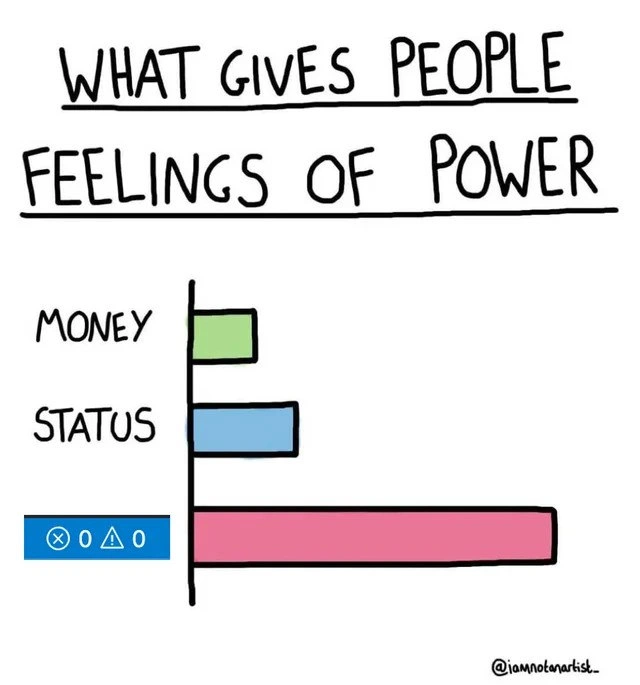
Let’s break down the meme in simpler terms. The image shows a bar chart titled "WHAT GIVES PEOPLE FEELINGS OF POWER", listing three things: Money, Status, and a special third item which is actually an IDE status indicator saying ✖ 0 ⚠ 0. The joke is that for developers, seeing that “0 errors, 0 warnings” message (the pink bar shooting way out to the right) makes us feel more powerful or accomplished than having lots of money (small green bar) or a high status title (medium blue bar). In other words, a perfectly successful code build is being humorously crowned the most empowering feeling a programmer can get.

So what exactly is happening when we talk about a "build" with 0 errors and 0 warnings? In programming, when you want to turn your code into a working app or program, you typically run a build process. This often involves a compiler, which is a tool that translates the code you wrote (in a high-level language like C++, Java, or Go) into low-level machine code that the computer can execute. The compiler is very strict: it has rules about the correct syntax and usage of the language. If your code breaks those rules, the compiler throws an error. Think of an error as a fatal problem – something so wrong that the compiler stops and says, “I can’t make this into a program until you fix this.” For example, if you forget a } brace or use a variable that wasn’t defined, that’s an error. The program won’t run at all until that’s resolved. You’ll usually see errors highlighted in red in your editor or listed in a log; they often come with messages like “Syntax error at line X” or “Undefined reference to Y.”

A warning, by contrast, is more like a cautionary flag. The code can still compile and run with a warning present, because technically it’s not breaking any fundamental rules, but the compiler or build tool is basically saying, “Hmm, this looks odd – it might be a bug or a bad practice.” Warnings are often shown in yellow (for example, a yellow triangle ⚠ icon) in many IDEs. For instance, if you wrote a piece of code like:

#include <stdio.h>
int main() {
    int x = 0;
    if (x = 5) { // warning: using assignment in a conditional (did you mean '=='?)
        printf("x is 5\n");
    }
    return 0;
}

In C, that if (x = 5) line probably isn’t what you intended – you used a single equals sign, which assigns 5 to x instead of comparing x to 5. The compiler will likely still compile this (because technically assigning a value in an if condition is allowed syntax), but it will emit a warning since this is a common mistake (you probably meant if (x == 5)). The program will run, but the logic isn’t what you expected, so the compiler is giving you a heads-up. That’s a warning. It doesn’t stop the build, but it’s saying “you might want to check this.” Another simple example: if you define a variable and never use it, many compilers will warn you that you have an “unused variable”. The code works, but it might be a sign of leftover or wrong code.

Now, 0 errors means the code obeyed all the must-follow rules of the language – yay! The program can successfully compile into an application. 0 warnings means that even the optional or best-practice checks found nothing to complain about – in other words, nothing looks suspicious to the compiler. This is the ideal scenario: the build or compile process completes and the compiler output essentially says “All good! No problems here.” In Visual Studio (a popular IDE, especially for C# or C++), after you build your project, you might see a summary in the corner or output window that shows something like a red ❌ icon with a number of errors, and a yellow ⚠ icon with number of warnings. For example, ✖ 5 ⚠ 2 would mean 5 errors and 2 warnings were encountered. The meme specifically shows ✖ 0 ⚠ 0 on a blue badge, which is exactly what you’d see if you had a completely clean build – zero errors, zero warnings. It’s essentially the IDE saying “Build succeeded with no issues.” The artist made that the label of the longest bar to really drive the point home visually. The pink bar is super long, far longer than the bars for Money or Status, implying that this is the ultimate source of a “powerful” feeling for those in the know (developers).

Let’s connect this to real experiences. If you’re new to coding, you might have already encountered the frustration of errors. Maybe you forgot a semicolon (;) in C++ or you had a typo in a variable name – the compiler probably spit out an error message and refused to run your program until you fixed it. The first time you successfully fix all the errors and see your program run is a great feeling. It’s like clearing all the red marks off your homework; suddenly the computer gives you a thumbs up. Many of us also start to pay attention to warnings as we progress. At first, you might ignore warnings (“meh, it's just yellow, it still ran”), but then you learn that fixing warnings can prevent future bugs and make your code better. Seasoned programmers often treat “no warnings” as a mark of quality. They even configure their build tools so that if any warning appears, it will stop the build (treating it like an error) – forcing themselves to keep things clean. So when you manage to build a project and the tool reports back 0 errors, 0 warnings, you know you haven’t overlooked even minor issues. It’s a bit like getting a test score of 100%. Even if 85% would technically pass, getting that perfect score feels extra rewarding.

We also have this thing called Continuous Integration (CI) in professional software development. Continuous Integration is basically an automated build and test system that runs every time code is changed or merged. Think of it as a robot continuously checking the health of the codebase. When the CI system runs your code through a build and all tests and checks pass, it often displays a green check mark or a green light on a dashboard (green means everything is good). If something fails (like an error in compilation or a failing test), you get a red X or red light. Developers are almost superstitious about keeping that build green. We say “the build is broken” if the CI is red, and teams will stop other work to fix it because no one wants to be the one who “broke the build”. Conversely, when you see the CI pipeline go green after your commit, you feel relief and a sense of accomplishment. It’s like getting an all-clear signal: your changes didn’t mess anything up. This contributes a lot to developer experience (DX) – a smooth CI that gives quick feedback (especially a successful result) makes for happy developers, whereas a clunky, failure-prone CI is a headache.

So in summary, this meme is explaining in a funny way that for developers, successfully compiling code (especially with a perfect, error-free, warning-free result) is a big deal emotionally. The bar chart is an exaggeration, of course – nobody is literally more powerful than a billionaire just because their code compiled 😅 – but it’s rooted in the real joy and pride programmers feel when their code finally works. It’s an instant validation: “I solved it! The computer understood my instructions with no complaints.” For a coder, that moment can totally outshine other feel-good moments like a pay raise or a fancy title, at least right when it happens. If you’ve ever spent a long afternoon fighting with build errors and at last see “Build succeeded”, you’ll know why that pink bar is off-the-charts in the meme. It’s a simple joy of coding: seeing everything green (no ❌, no ⚠) makes us feel like we have superpowers, even if just for a little while.

Level 3: Compile and Conquer

For seasoned developers, this meme hits home because it exaggerates a truth we all recognize: few things in a programmer’s daily grind are as empowering as finally getting a clean compile. The cartoon’s bar chart humorously elevates a successful build above traditional symbols of power like money and job status. Why is this so funny and true? Because in the trenches of development, power often means control over the code and environment – and nothing says you're in control like bending a stubborn codebase to your will until the compiler yields that coveted “Build succeeded.” In practice, we grapple with cryptic compiler errors (undefined reference, anyone?), missing dependencies, version mismatches, and flaky build scripts more often than we'd like to admit. So when all those hurdles are overcome and the build finally runs without a hitch, it genuinely feels like a personal triumph. It’s the developer’s equivalent of conquering a mountain.

Think about the last time the build was broken at work. Perhaps a teammate's commit introduced a nasty error, turning your Continuous Integration pipeline red and halting everyone’s progress. The pressure starts mounting – managers glancing over, people on Slack asking “Hey, why is the build failing?”. In that scenario, the person who fixes the build is a hero. When you’re the one who slays the last error dragon and gets the pipeline back to green, you do earn a bit of street cred among your peers (far more tangible in the moment than any fancy title). In fact, many engineering teams have unwritten rules around this: breaking the build (pushing code that doesn’t compile or fails tests) is a developer faux pas, while fixing a broken build (especially under a tight deadline) is commendable. It’s a shared relief and joy – everyone can pull the latest code again, deployments can run, and the project is back on track. No stock option vest or CV line can replicate that rush of shared achievement you get from restoring order in a chaotic build.

The meme’s huge pink bar labeled with the ✖ 0 ⚠ 0 badge captures a very real developer high. Senior devs joke about it precisely because we’ve all felt it: that subtle dopamine hit when an intractable error finally vanishes. You might spend hours wrestling with a compiler complaining about some template instantiation in C++ or a misconfigured path in your build script. After many failed attempts, you run the build one more time, mentally bracing for more red error text... but this time it completes with no errors. Suddenly you sit up straighter. You might fist-pump the air or let out a triumphant “Yes!” – it’s that empowering. In the hierarchy of needs for a programmer’s ego, a green build is immediate gratification. Sure, a big salary or a promotion (status) is validating, but those come infrequently and often with strings attached. A clean build, on the other hand, is an instant reward for your problem-solving efforts. It’s a sign that you fixed it, you navigated the maze of code and tools correctly. In that moment, you’re in control of a very complex system and everything is working in harmony because of you. It's addictive; some devs half-joke that they live for those green check-marks and successful Jenkins builds more than for the paycheck.

There’s also an element of communal understanding here – this meme format ("What gives people feelings of power") is repurposed for developer humor. Money and status are universal power symbols, but for developers, the in-joke is that even a billionaire CTO might grin like a kid if they compile a tricky project with zero issues. It speaks to developer culture: we value the craft and the daily wins. In meetings, nobody will say “I feel powerful when my code compiles”, but informally we all recognize the vibe. It’s the Developer Experience (DX) aspect: good tools and a smooth build process directly affect morale. A fast, automated build pipeline that flags errors immediately and shows green when everything is okay gives developers a sense of progress and stability. When your continuous integration lights up green across the board – all tests passed, no errors – it can honestly make your day. That’s why teams invest in Build Automation and robust CI/CD pipelines: not just for efficiency, but because a flaky, failing build system is demoralizing, whereas a reliable one that ends in green fosters confidence.

So the humor here is half jest, half truth. We laugh because, yes, it’s absurd to claim a compile success outranks a fat bank account – yet we also laugh because we relate to it. It’s poking fun at how emotionally invested developers can get in the act of building code. We’ve all caught ourselves feeling weirdly proud after fixing a build or squashing every compiler warning. For a brief moment, you feel like a 10x engineer genius – "Behold, I speak the language of machines and they obey!" 😄. Of course, reality might intrude 5 minutes later when a new bug or a code review suggestion comes in, deflating that ego. But that fleeting sense of power is very real and keeps us coming back. It’s a shared source of motivation: every developer knows the joy of a clean slate in the IDE. In fact, there’s a tongue-in-cheek saying, > "It compiles; let's ship it!" – implying that just getting the code to compile feels like the hard part is done. We know there’s more to do (runtime bugs, logic errors, etc.), but let us savor the compile victory for a moment! In summary, the meme humorously ranks a successful compile (with no errors/warnings) as the ultimate confidence boost for developers, and anyone who’s spent days wrestling with build issues is likely nodding and chuckling in agreement. It's funny because it's true: in the developer's world, conquering the compile is a daily triumph that can absolutely make you feel on top of the world.

Level 4: Clean Build Nirvana

At the highest technical tier, a 0-error, 0-warning compile represents a state of perfection in the world of static code analysis. When you hit "build" on a large project, your code is fed through a compiler–a complex pipeline involving lexical analysis, parsing into an AST (Abstract Syntax Tree), semantic checks against the language rules, optimization passes, and finally machine code generation or linking. An error means the code violated the language's strict rules (like a type mismatch or missing semicolon) at some stage, so the compiler refuses to produce an executable. A warning, on the other hand, signals something suspicious but not fatal: the code can still compile, but the compiler is politely saying, "Hey, you sure about this?". Achieving zero warnings means even those non-fatal question marks in the code have been addressed or deemed acceptable. In compiler design terms, your program has passed from lexing to codegen without a single hiccup or dubious construct flagged. This is incredibly satisfying because it implies that, according to all the compiler's built-in rules and heuristics, your source code is as clean as it gets.

Modern build processes and build systems (like Make, CMake, or MSBuild) integrate the compiler and other tools, performing tasks such as dependency resolution, code generation, and linking across potentially hundreds or thousands of source files. In a large project, getting a clean build (no errors, no warnings) can be challenging: one stray unused variable or an implicit type conversion can throw a warning. Many teams adopt strict compile settings (-Wall -Werror in GCC/Clang, for example) to treat all warnings as errors, effectively demanding 0 warnings or the build will fail. This enforces a kind of compile-time quality gate. Under the hood, the compiler is applying static analyses and rule-checking; treating warnings as errors raises the bar so that only code passing every check can enter the next stage of the pipeline. It's like turning the compiler into a merciless gatekeeper that only outputs a binary when the source code is squeaky clean.

The significance of that little blue badge ✖ 0 ⚠ 0 (no ❌ errors, no ⚠ warnings) is rooted in both engineering rigor and psychology. From a rigor standpoint, it means the code meets all the language's formal requirements and best-practice checks. It's technically a local optimum of correctness: the compiler verified type-safety and syntax, which for strong-typed languages is a *proof of at least some consistency (e.g. in Rust or Haskell, there's a saying: "If it compiles, it probably works." because the compiler's rules are so stringent). Of course, the compiler can't prove the program is bug-free (that would solve the Halting Problem and beyond), but it does guarantee a level of soundness – for instance, no function is called with wrong argument types, no variables used before declaration, etc. For a developer, seeing zero errors and warnings means they successfully navigated this gauntlet of rules and static analyses. It’s a moment where the entire compilation pipeline concludes with complete success. In a way, the machine (compiler) is granting its blessing to your code: "I found nothing wrong; here is your program." That green build status in a CI pipeline or IDE isn’t just an arbitrary thumbs-up – it’s the final product of thousands of logical checks passing quietly in the background. No wonder it feels like a zen state or nirvana: everything that could be checked at build-time was checked, and not a single check failed or even sneezed. The result is a flawless victory in the arena of compile-time correctness, something any developer can take pride in given how finicky compilers and build systems can be.

Description

This is a meme using the 'What Gives People Feelings of Power' bar chart format. The chart, hand-drawn on a white background, is titled 'WHAT GIVES PEOPLE FEELINGS OF POWER'. It displays three horizontal bars of increasing length. The first, a short green bar, is labeled 'MONEY'. The second, a medium light-blue bar, is labeled 'STATUS'. The third and longest bar, colored pink, is labeled with a blue rectangle containing icons typical of an IDE's status bar: a crossed-out circle (error icon), a triangle (warning icon), and a circle (info icon), each followed by the number '0'. A watermark in the bottom right corner reads '@iamnotanartist_'. The meme humorously suggests that for a developer, achieving a state of '0 errors, 0 warnings, 0 info messages' in their code provides a feeling of power far greater than wealth or social standing. This deeply resonates with experienced engineers who understand the immense satisfaction and rarity of having a perfectly clean, linted, and compiled project, especially in large or legacy codebases
Comments

15
Anonymous ★ Top Pick My IDE showing zero errors and warnings is the most beautiful lie I tell myself before the CI pipeline finds the one obscure dependency issue I forgot
  1. Anonymous ★ Top Pick

    My IDE showing zero errors and warnings is the most beautiful lie I tell myself before the CI pipeline finds the one obscure dependency issue I forgot

  2. Anonymous

    Stock grants and fancy titles are nice, but nothing matches the five-second god complex you get when the monolith says “Build succeeded - 0 errors, 0 warnings” before the integration tests remind you why we still have pagers

  3. Anonymous

    The fleeting high of zero errors and warnings, right before you realize it's because the linter config got accidentally deleted during the last "quick refactor" and nobody's noticed for three sprints

  4. Anonymous

    Every senior engineer knows that fleeting moment of pure euphoria when you refactor a legacy monolith and somehow achieve ✖ 0 ⚠ 0 on the first try - it's the closest we get to experiencing actual magic. Of course, it usually means you forgot to run the linter, but for those three seconds before you realize it, you're basically a deity

  5. Anonymous

    After two decades I’ve learned: money buys licenses, titles buy meetings, but “Problems: ×0 ⚠0” buys five reckless minutes to refactor the monolith

  6. Anonymous

    Architects design resilient systems; DNS admins design alternate realities with a single TTL bump

  7. Anonymous

    Money and status are nice, but VS Code showing x0 Δ0 is real power - right up until you realize it’s courtesy of /* eslint-disable */, tsconfig skipLibCheck, and CI continue-on-error

  8. @doorhinge 5y

    my hello world projects be like

  9. @NiKryukov 5y

    my empty projects be like

  10. @nohat01 5y

    My 4kb Linux empty directory project be like

  11. @ANeufeld 5y

    Only seen that in C.

    1. @bit69tream 5y

      what about asm?😏

      1. @ANeufeld 5y

        Never used it, so dunno. 😕

  12. @desrevereman 5y

    What is this, if it works it works.

  13. @nenten 5y

    just disable linter

Use J and K for navigation