The Future of Monetized NPM Dependencies
Why is this PackageManagement meme funny?
Level 1: Surprise Ad Inside
Imagine you’re building a big toy castle out of LEGO blocks, and you borrowed a bunch of LEGO pieces from different friends. You’re putting the castle together, and suddenly one of the LEGO pieces has a little hidden scroll inside. You open that scroll, and it’s not about the castle at all – it’s a giant, flashy advertisement for something totally weird and grown-up. You’d be confused and probably a bit upset, right? You just wanted to build your castle, and now you’re seeing this inappropriate, out-of-place ad.
That’s basically what happened in this meme, but with computer code. The developer was “building” their project using pieces of code from many sources (kind of like borrowing LEGO blocks). One of those pieces of code secretly carried along its own advertising gimmick – its side hustle. So when the developer was assembling everything (running the install), BOOM! a big surprise advertisement popped up on their screen about “Live camgirls” (which is something like an adult video chat, definitely not related to coding!).
It’s funny in the way finding a prank in your toolbox is funny – it’s unexpected and absurd. But it also makes you think, “Hey, that shouldn’t be there!” Just like you wouldn’t expect a cereal box toy to start selling you another product, a coding tool shouldn’t be showing unrelated ads. The meme exaggerates this to make us laugh. It’s showing the shock a developer would feel: “I was just trying to do my job, and this crazy ad appeared in my work screen!”
In really simple terms: it’s a joke about trusting something you borrowed and getting a weird surprise. You trusted that code piece to just quietly do its job, but it had a hidden agenda (like a person who helps you but then tries to sell you something on the side). The image of a terminal (the text screen) displaying “LIVE CAMGIRLS ONLINE NOW” is so out-of-place that it’s as if your homework notebook suddenly started showing TV commercials. It makes you laugh because it’s a ridiculous mismatch. And it also carries a tiny lesson: be careful what you bring into your project – you never know, there might be a silly (or not-so-silly) surprise inside!
Level 2: Terminal Surprise
So, what’s going on here? Let’s break it down in simpler terms. When developers create applications, they often rely on dependencies – which are like building blocks or libraries of code that someone else wrote. Instead of writing everything from scratch, we pull in these libraries to save time. On the Node.js platform (which is used for JavaScript outside the browser, like on servers or for command-line tools), the common way to get those libraries is through a package manager. Yarn (seen in the meme) and npm (Node Package Manager) are two popular tools for this. You typically run a command like npm install or yarn install in your project, and it automatically downloads all the needed packages (and their own dependencies, and so on) from the central repository (the npm registry).
Now, when you run yarn in a project, you’ll see output like:
$ yarn
yarn install v1.17.3
[1/4] Resolving packages...
[2/4] Fetching packages...
[3/4] Linking dependencies...
[4/4] Building fresh packages...
✨ Done in 5.23s.
These steps are telling you what Yarn is doing:
- Resolving packages: figuring out exactly which package versions it needs.
- Fetching packages: downloading those packages from the internet.
- Linking dependencies: placing the downloaded code into your project’s
node_modulesfolder so your project can use it. - Building fresh packages: running any setup scripts that some packages require (for example, if a package needs to compile some native code or do initial configuration).
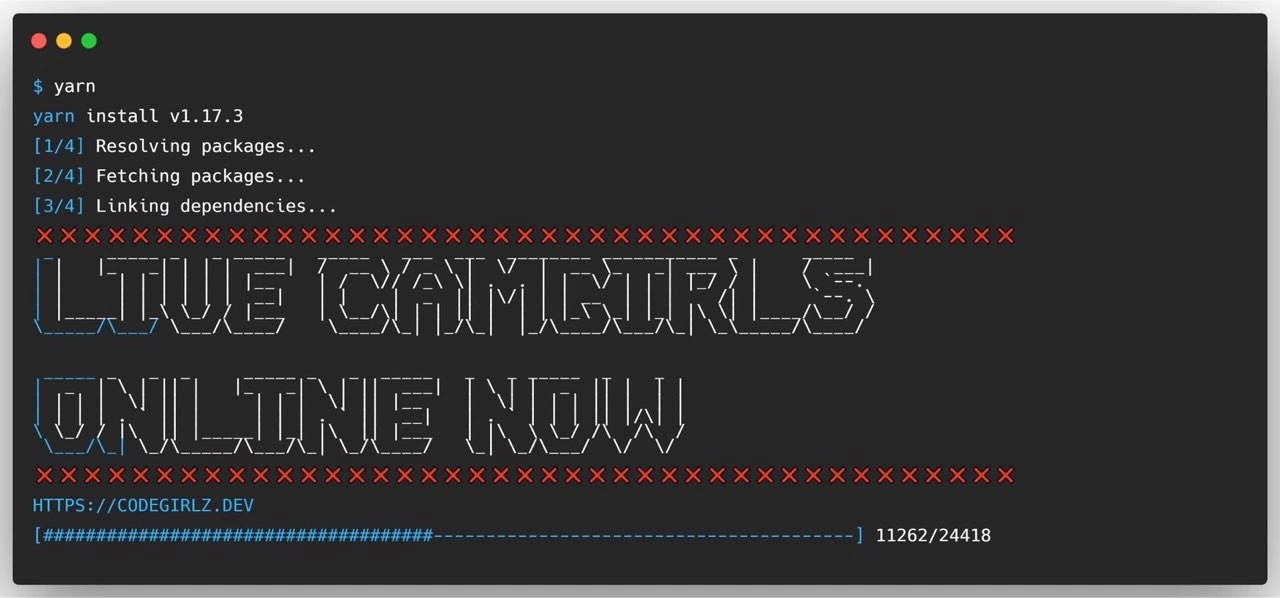
Most of the time, this goes by with a bunch of technical text and no drama. But the meme shows a scenario where during step [3/4] or presumably [4/4], something very unexpected happens: a huge ASCII art banner appears in the terminal saying “LIVE CAMGIRLS ONLINE NOW” surrounded by rows of red “x” characters, and it even prints a URL HTTPS://CODEGIRLZ.DEV. This is absolutely not normal for a package install! It looks more like old-school spam or a prank. ASCII art is when you draw pictures or words using text characters (like making large letters out of lots of smaller symbols). Here the dependency printed an ASCII advertisement for a (fictional) camgirl website. Camgirls are women who perform on camera (usually in an adult context), so it’s an ad for an adult live video service. In short, something you’d never expect to see popping up when you’re just installing code libraries for your project.
How could this even happen? Well, as mentioned, during that “[4/4] Building fresh packages” step, packages can have a special script (called a post-install script) that runs automatically. Normally, a post-install script might do things like:
- Build native add-ons (some packages include C/C++ code that needs to be compiled for your machine).
- Print a small note like “Thank you for using XYZ library” or inform about optional features.
- Set up some environment or config files.
But since it’s just code, there’s nothing stopping a package author from doing something wild in there. It could console.log a big message to the screen — which is what’s happening in the meme. In real life, it’s rare for someone to put something this ridiculous in a post-install, because it would immediately draw ire and get reported. But that’s exactly why the meme is funny: it’s taking the idea of a mischievous or malicious postinstall_script to a comical extreme. This is a prime example of Terminal humor – the joke relies on the idea of your command-line interface suddenly displaying something totally out-of-pocket.
For a junior developer or someone new to this, it’s important to understand a few terms:
- Dependency: A piece of software your project needs to function. In Node.js, these are often downloaded from npm and stored in
node_modules. Think of dependencies like ingredients in a recipe – except you often just grab them off the shelf without checking the whole ingredient list. - Package Manager: A tool like npm or Yarn that automates fetching and managing these dependencies. It’s like a super fast personal shopper for code; you list what you need, and it goes out and grabs everything (even the sub-ingredients those might need).
- Post-install script: A script that a package can specify to run right after it’s installed. It’s intended for setup steps. However, since it runs automatically, it can be abused if someone is sneaky or irresponsible.
- Security vulnerability: A weakness or loophole that can be exploited to make software do something unwanted or harmful. In this meme, the “vulnerability” isn’t a bug in code per se, but rather an open door in the process – we trust packages so much that one managed to run a script to print spam. Consider that a benign example of what could be a malicious act (like running a virus or stealing data). This falls under the category of Software Supply Chain Security concerns – meaning we worry about the security of all the components we pull into our software.
- Dependency hell: A term developers use when managing dependencies becomes a nightmare, usually because of version conflicts or too many layers of dependencies. Here the “hell” is more about the unexpected consequences of having so many dependencies. It’s the “oh no, what have we gotten ourselves into” aspect of pulling in code blindly.
So the meme’s story in plain terms: A developer runs yarn install to add a new library to their project. During the installation, one of the packages has a hidden script that prints a giant ad for an adult webcam service in the terminal. It’s like a prank or a piece of spam. The developer is presumably shocked (“I just wanted to install a charting library, and now my screen is yelling LIVE CAMGIRLS at me!”). It highlights how running code from the internet can lead to surprises. Most of the time it doesn’t, but the possibility is there.
This also pokes fun at NodeJS culture a bit – in Node, it’s super common to have lots of small packages, and it has had a few infamous incidents. One famously was when a tiny package called left-pad (used for padding text) was removed by its author and broke thousands of other projects. Another was when someone snuck bad code into a popular package. Now, those incidents didn’t involve ASCII art or open spam, but they set the stage for jokes like this. Developers sometimes joke, “we’re basically running curl https://random-website | bash” (meaning we might as well download random scripts and execute them, given how much trust we put in packages). This meme visualizes that joke literally: you got a random surprise from a dependency.
Summing it up: the meme is a humorous warning. It says, “Hey, imagine if one day installing a new NPM package turned your terminal into a billboard for something sketchy? Wouldn’t that be crazy? Well… given how things are, it might not be as impossible as it sounds!” It’s funny, a bit scary, and very relevant to package management in development. If you’re new to this, don’t worry — it’s not like every package is doing this. But it’s a push to be mindful: know that when you install packages, you’re trusting the authors not to pull something wild. And when something odd does appear in your terminal, you’re not hallucinating – sometimes packages really do print messages (hopefully not this kind of message though!).
Level 3: Ad-Supported Dependencies
From a seasoned developer’s perspective, this meme is hilariously on point about the state of modern JavaScript development. We’ve got so many third-party dependencies in our projects that it sometimes feels like half the code we ship wasn’t written by anyone we know. This image shows a terminal where a simple $ yarn install – something we run dozens of times – suddenly spews out a giant ASCII ad: “LIVE CAMGIRLS ONLINE NOW” complete with a shady URL (codegirlz.dev). The humor comes from the sheer absurdity and audacity of that output. It’s lampooning the idea that one of those thousands of Node packages you just downloaded has a hidden side hustle — as if the maintainer thought, “Sure, I’ll solve your left-pad problem for free, but I gotta pay rent, so let me just slip in a little advertising!”
This blends several real developer nightmares into one scene:
- Dependency Hell: The progress bar
[##################-------------] 11262/24418hints at a massive number of steps/files in the install. Modern Node.js projects often pull in tens of thousands of files (all those tiny NPM modules). It’s a running joke that even a “simple” app ends up withnode_modulesthe size of a small planet. The bigger that dependency tree, the more opportunities for something weird or bad to lurk within. - Unexpected post-install scripts: In practice, many of us have seen packages print messages during installation. Often it’s innocuous, like a deprecation notice or a thank-you from the author. Sometimes it’s a bit more cheeky: for example, the maintainer of
core-js(a popular polyfill library) once put a message asking for funding help in the post-install output. It was a benign plea. But it set a precedent that our CLI might output things we didn’t explicitly ask for. The meme takes that to an extreme. This isn’t just a polite note – it’s a full-blown terminal hijacking to show an ad that has zero relevance to coding. It’s the equivalent of adware, but in your developer tooling. Seasoned devs laugh (or groan) because it feels like a logical conclusion of a trend: today it’s funding messages, tomorrow it’s Times Square ads in your console. - Security Vulnerabilities & Supply-Chain Attacks: There’s a darker aspect to this laughter. In recent memory, there have been actual incidents: the event-stream NPM package was compromised in 2018 and injected malicious code aiming to steal cryptocurrency from certain apps. Another incident involved a package where the author’s account was hacked and the attacker published a new minor version that exfiltrated environment variables (which could include secrets). These were stealthy – no loud ASCII banners – but they proved the point: a dependency can go rogue and do nasty stuff under the hood. So the meme’s scenario of a dependency suddenly behaving badly resonates with devs who know the history. It’s funny because it’s exaggerated (the package blatantly prints a camgirl ad, of all things), yet it’s also uncomfortably close to plausible, given what we’ve seen.
- Blind Trust in the CLI: We developers tend to trust the output of our build tools and package managers. We run
npm installoryarn installalmost reflexively when setting up projects. If it prints a wall of text, we might skim for errors, but otherwise we ignore most of it. The meme plays on that complacency: imagine running install and suddenly that wall of text includes adult content advertising. It’s like a jump-scare for a developer. If you had this happen on your screen at work, you’d do a double-take (and swiftly Alt-Tab if your boss was walking by!). This highlights why blindly running stuff from the internet (which is what package managers do) can be risky. The Terminal humor aspect – showing something so inappropriate in the sterile context of an install log – is what gives the meme comedic shock value. - Monetization of Open Source (or lack thereof): There’s an in-joke here about how open-source maintainers often struggle to monetize their work. The phrase “dependency’s hidden camgirl side hustle” anthropomorphizes the dependency as if it’s taken a sketchy second job. Senior devs read that and smirk: many critical open source packages are maintained for free; if they were cheeky, could they slip in ads to earn a buck? Of course it’d be scandalous if someone actually did that, but the joke lands because it touches on the absurd lengths one might imagine if things got dire. It’s commentary on both the open source sustainability problem and the unregulated nature of what a package can do.
- Shared trauma and coping with humor: Pretty much every experienced developer has a “WTF dependency” story — whether it’s discovering an entire copy of lodash nested in
node_modules10 levels deep, or a package that prints weird warnings, or just the famousleft-padincident (where removing one 11-line package broke half the JavaScript ecosystem). Those incidents are cautionary tales. Here, the meme exaggerates a hypothetical incident that hasn’t literally happened (as far as we know, no one’s actually seen a CAMGIRLS ad from npm… yet 😅), but it’s a stand-in for all those real incidents. We laugh because we’ve felt that mix of surprise, annoyance, and “of course this would happen” before. It’s a form of catharsis – laughing so we don’t cry about how fragile the ecosystem can be.
In practical terms, a senior dev looks at this and nods: Yep, this is why we pin our versions and use npm audit and still sleep with one eye open. We know that fixing this isn’t trivial. You can’t realistically audit every one of those 24k files in your project’s dependencies. Organizations try approaches like:
- Using lockfiles and checksum verifications (to ensure you’re at least getting the exact code you reviewed previously, not a sneaky update).
- Relying on community-vetted packages (popular ones with many eyes on them, hoping someone else catches issues).
- Running automated security scanners (which might flag known malicious patterns or dependencies with reported vulnerabilities).
- In extreme cases, curating an internal registry of approved packages or forking dependencies to have more control.
But none of these are foolproof. The incentive structures are such that developers prioritize quick progress (by pulling in libraries) over theoretical security risks – until something blows up. So we collectively cross our fingers and joke about “what’s the worst that could happen?” This meme answers that with dark humor: the worst might be your build tool turning into a late-night spam channel.
In essence, the meme is calling out the absurd reality: “We install random code from the internet as part of our daily job and act surprised when it misbehaves.” It’s a senior-level reality check delivered with a punchline. And ironically, if this exact scenario did happen tomorrow, most of us would first laugh... and then go revoke some API keys and run a malware scan, just in case.
Level 4: Reflections on Trusting NPM
At the most granular level, this meme exposes a fundamental software supply chain weakness: we blindly run other people’s code on our machines whenever we do a yarn install (or npm install). In theory, package managers are meant to fetch and integrate dependencies (reusable code libraries) so we don’t reinvent the wheel. But by design, Node’s package management allows those libraries to execute arbitrary code during installation via lifecycle hooks like postinstall scripts. This is essentially a built-in Trojan horse mechanism, intended for benign tasks (compiling native add-ons, printing helpful messages), but it can be exploited to run anything — from silly ASCII ads to serious malware.
Under the hood, Yarn (here yarn install v1.17.3) and npm treat a package’s package.json as a recipe, which can include lines like:
{
"name": "innocent-package",
"version": "1.0.0",
"scripts": {
"postinstall": "node postinstall.js"
}
}
When the installer hits the “Building fresh packages” step (step [4/4] that follows “Linking dependencies…”), it will execute postinstall.js. At that moment, anything the package author wrote in that script will run on your system with your user’s privileges. It’s not running in a sandbox or container — it’s literally just running Node.js code on your machine. This is by design for flexibility, but it’s also a glaring security vulnerability: a careless or malicious maintainer can inject unexpected behavior. In academic terms, this is a supply chain compromise of the development process. The meme’s shock-value ASCII banner "LIVE CAMGIRLS ONLINE NOW" is a parody of what a malicious payload might do (in this case, brazenly advertising a site). Real attackers might be stealthier, perhaps exfiltrating secrets or installing backdoors, but the principle is identical.
Why is this such a hard problem? It boils down to trust. Modern development is built on hundreds of transitive NPMPackages – an average node_modules folder might pull in code from thousands of files (note the progress bar 11262/24418 in the meme, hinting at a huge number of files or operations). Verifying each one manually is practically impossible. Statically analyzing those packages for malicious intent is akin to solving the Halting Problem – theoretically undecidable in the general case. There’s no automated proof that a given package’s install script is “safe” that doesn’t risk false negatives or positives. We rely on community vetting, reputation, and increasingly some automated package security audits, but those often only catch known bad patterns or compare against databases of reported malicious packages. A brand new bad actor with a creative exploit can slip through until someone notices odd behavior – like a terminal turning into a late-night spam billboard.
Cryptographically signing packages (which some ecosystems attempt) can ensure the code isn’t tampered with in transit, but it doesn’t help if the trusted author themselves includes a side-hustle script intentionally. As Ken Thompson famously pointed out in “Reflections on Trusting Trust,” when you trust software you also implicitly trust all the tools and code that built it. Here, trusting npm/yarn means trusting every single package maintainer in your dependency tree and their judgment (or opsec practices). If one of them goes rogue, gets hacked, or sells their package to someone unscrupulous, the chain of trust is broken. Dependency Hell traditionally refers to the pain of managing complex interdependent packages, but now we see a new hellish layer: dependency betrayal, where the very code meant to help you might be harboring a surprise. The meme humorously envisages a worst-case absurdity – a dependency that literally starts pimping adult services in your console – but it’s grounded in a real fear.
In summary, the joke underscores a deep technical truth: running code from strangers inherently carries risk. It’s a reminder that our toolchains have this open door where convenience and potential compromise coexist. You could say this is a black-comedy take on Software Supply Chain Security, highlighting how one unchecked package can turn your trusted CLI into Times Square at midnight. The veteran engineers among us chuckle darkly because we recognize how feasible this scenario is: today it’s an ASCII art ad, tomorrow it could be a data-stealing script – and the only thing that alerted you might be the gaudy banner. In a sense, “LIVE CAMGIRLS ONLINE NOW” is the punchline and the red flag. It’s a caricature of a malicious dependency warning that in reality might not be so obvious.
Description
A screenshot of a command-line interface with a dark theme, showing the output of the 'yarn' command. The initial lines show the standard process: 'yarn install v1.17.3', '[1/4] Resolving packages...', '[2/4] Fetching packages...', and '[3/4] Linking dependencies...'. After the linking step, a large, stylized ASCII art advertisement appears, spanning the width of the terminal. The ad, formed with white and blue characters, reads 'LIVE CAMGIRLS ONLINE NOW'. Below the ASCII art, a URL is provided: 'HTTPS://CODEGIRLZ.DEV'. A progress bar at the bottom indicates the installation is ongoing. The meme is a satirical commentary on the state of the JavaScript ecosystem, particularly the massive dependency trees associated with npm and Yarn. It humorously projects a future where package authors might embed intrusive advertising directly into the installation process, playing on developers' anxieties about package bloat and supply chain security
Comments
7Comment deleted
I'm not saying the `node_modules` directory is bloated, but my last `npm install` asked for my credit card details and promised to make me a partner in an exciting new venture
I miss when left-pad merely broke prod; now a transitive dependency pitches “LIVE CAMGIRLS” mid-yarn install - apparently our supply-chain threat model forgot the marketing funnel
After 15 years of npm audit warnings, we've finally achieved peak dependency management: our build tools now come with built-in monetization strategies and a direct pipeline to OnlyFans. At least it's more honest than most open source sustainability models
Ah yes, the daily ritual of 'yarn install' - where we casually pull 24,418 packages from strangers on the internet, each with their own transitive dependency tree deeper than the Mariana Trench, and trust that none of them are cryptominers or supply chain attacks. The ASCII art perfectly captures that adrenaline rush when you realize your entire production build depends on 'is-odd' depending on 'is-number' depending on someone's weekend project from 2014. Living dangerously indeed - at least until the next left-pad incident reminds us that our entire tech stack is held together by the digital equivalent of duct tape and the goodwill of unpaid maintainers
Transitive dependencies: turning 'yarn install' into a gateway drug for cam site traffic
yarn install: the only time an enterprise dev willingly executes 24k strangers' postinstall scripts - ship lockfiles, --ignore-scripts, and an SBOM before your terminal starts selling ad inventory
Yarn install: when a transitive postinstall starts serving ads, you realize your dependency tree is actually a browser and your supply chain is the ad network