Skip to content
DevMeme
2333 of 7435
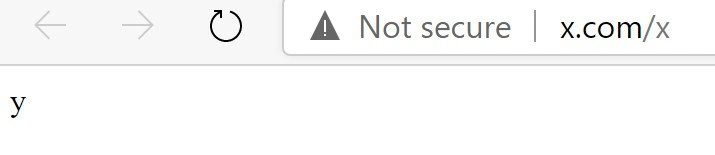
When x slash x returns y - and your browser screams "Not secure"
WebDev Post #2594, on Jan 12, 2021 in TG

When x slash x returns y - and your browser screams "Not secure"

Why is this WebDev meme funny?

Level 1: Shouting in Class

Imagine you’re in a classroom and you want to know the answer to a simple question. You stand up and ask, "What letter comes after X?" Your friend across the room hears you and shouts back, "Y!" at the top of his lungs. The answer is correct – X is followed by Y – but suddenly the teacher turns around and holds up a sign that says "Not secure!" with a stern look.

Why is the teacher upset? Because your friend blurted out the answer for everyone to hear. It’s not like it was a big secret (just like the letter "y" on that webpage isn’t secret at all), but the teacher has a rule: always share information the safe, quiet way. The safer way would’ve been for your friend to walk over and whisper the answer in your ear, or pass you a little note, so only you get the message. By shouting across the room, your friend basically let the whole class listen in.

On the internet, shouting the answer is like using HTTP – it’s loud and open for anyone to catch. Whispering or passing a secret note is like using HTTPS – it’s private and only meant for the right receiver. In our story, the teacher raising the "Not secure!" sign is like the web browser giving a warning. It might seem funny or silly that the teacher is so serious about something as small as one letter, but it’s a reminder: better safe than sorry. Even if you’re just sharing a tiny bit of information (like a single letter "y"), it’s good to do it in a secure way so no one else can overhear or mess with it. That’s exactly why the browser in the meme is complaining – it wants every "shout" on the web to really be a "whisper."

Level 2: HTTP vs HTTPS 101

So what’s going on here? The image shows a web browser with the URL x.com/x and a big "Not secure" warning in the address bar. In the page itself, there’s nothing but the letter "y" displayed. This is a lighthearted reference to a math notion (where a function f applied to x gives y), but let’s break down the web basics and security part:

HTTP vs HTTPS: When you browse a website, your browser uses either HTTP or HTTPS to fetch data. HTTP stands for HyperText Transfer Protocol. It’s the standard way web browsers and servers communicate. However, HTTP by itself is not encrypted – it’s like sending a message in plain text. HTTPS stands for HTTP Secure (technically HTTP over TLS, which is Transport Layer Security). HTTPS is the secure version that encrypts the information between your browser and the website. It’s like a secret coded language that only you and the site can understand. The key difference is that HTTPS keeps prying eyes from reading or tampering with the data you exchange with a site.

"Not secure" Browser Warning: Modern browsers (like Chrome, Firefox, Edge) will display a "Not secure" label (often with a little warning icon 🔺) if a page is loaded over plain HTTP. In our meme, x.com/x was loaded via HTTP, so the browser throws up that warning right in the address bar. This is a part of built-in browser security features designed to alert users. It doesn’t mean the site is hacked or dangerous per se; it means the connection isn’t protected. Any information you see or send on an HTTP page could potentially be seen or changed by others on the network. For example, if there were a password field on an HTTP page, someone could steal what you type. Even though here it’s just the letter "y", the browser is teaching a general lesson: "Always use HTTPS when possible."

Why "x.com/x" and the letter "y"? x.com is just a domain name (like example.com, but using the letter X as a quirky choice). The /x part is the path on the website, often used to specify a particular page or resource. In this case, the joke is that visiting the path /x on domain x.com returns the content "y". It’s like a super simple website feature: you go to X and you get Y. The page showing only "y" means the server literally responded with a minimal piece of content – no images, no styling, just that character. That’s why we say it’s a plain text response (nothing fancy, just text). It’s also essentially a minimal HTML page (maybe not even full HTML, just a single letter, but the browser displays it anyway).

Web security basics: In web development, one of the first things you learn now is to serve your site over HTTPS. This requires something called an SSL/TLS certificate. A certificate is like an ID card for the website that a trusted company (a Certificate Authority) issues. It verifies "This site really is who it says it is" and also helps set up the encrypted link. When a valid certificate is in place and the site is accessed via HTTPS, the browser will show a padlock icon 🔒 (meaning the connection is secure). If something’s wrong – like the site is only using HTTP or the certificate isn’t present/valid – the browser will warn you as we see in the meme. Not using HTTPS today is generally considered a security misconfiguration or just outdated practice. It’s easily fixed by obtaining a certificate (often for free) and updating the site links to https://.

To put it simply:

  • HTTP = data is sent in the clear (visible to anyone watching the traffic). Browsers mark this “Not secure”.
  • HTTPS = data is encrypted (scrambled so that only the right recipient can read it). Browsers indicate this with a lock icon or just no warning (which implies everything is okay).

Here's a quick comparison:

HTTP (http://) HTTPS (https://)
Encryption ❌ No – data is in plain text ✅ Yes – data is encrypted
Address Bar "Not secure" warning (no lock) Padlock icon (secure connection)
Port (default) 80 (uses port 80 by default) 443 (uses port 443 by default)
Identity Check No certificate used (no verified identity) Has a valid certificate to verify site identity
Safety Vulnerable to eavesdropping or tampering Protects against spying or data alteration

In our scenario, the site used HTTP, so all the browser knows is "this connection isn’t secure." That’s why it plastered the warning. The actual content (y) might not be sensitive at all, but the browser wants you to develop good habits (and it wants site owners to secure everything). For a new developer, the takeaway joke is also a lesson: even if your function f(x) returns y correctly, you should still deliver that result over HTTPS!

Level 3: Functional Insecurity

To an experienced web developer, this meme lands on multiple levels. First, there’s the nerdy developer humor of treating a web endpoint like a math function: the URL path /x returns the value 'y'. It’s a playful nod to the notation f(x) = y from math class – a classic function mapping gag turned into a web request. Seeing x.com/x → y immediately evokes that f(x) = y imagery. It's as if someone coded a function f at domain x.com where f(x) literally outputs y. This kind of inside-joke (combining math and code) gets a chuckle from programmers who remember writing trivial functions in tutorials or messing around in math class.

But the punchline isn’t just the algebra joke – it’s the browser’s reaction. The browser’s address bar shows a warning triangle and the words "Not secure" next to the URL. In modern WebDevelopment, seeing that security warning is a big no-no. It immediately tells us the page was served over HTTP without encryption. In a professional environment, shipping a site that triggers a "Not secure" label is almost unthinkable today – it screams configuration oversight. Here the humor comes from the contrast: the developer delivered the correct output (y from /x, like a function returning the expected result), but forgot to deliver it securely. It’s a bit like acing the math problem but failing the security quiz. From a security standpoint, deploying a public page on plain HTTP in 2021 is seen as a serious oversight (basically a SecurityMisconfiguration).

Every seasoned dev has encountered this in some form. Maybe you spun up a quick test server or an internal tool and didn’t bother with HTTPS, only to have your browser constantly remind you "This site is not secure." We’ve all seen that grey warning icon and thought, "Yeah yeah, I know, it’s just local/testing." In fact, a lot of us recall the days before browsers got this strict: a few years back, if a site was plain HTTP, the browser would quietly show a neutral icon or nothing at all. Now they conspicuously shame you with a "Not secure" label to nudge everyone towards encryption. By 2021, Chrome, Firefox, and others made it standard to flag any non-HTTPS site, even a simple one-character page, as potentially unsafe. This shows how far WebSecurity best practices have come — encryption everywhere, no exceptions.

The meme also hints at real-world developer headaches: setting up TLS for every little thing can be a hassle. Getting a certificate used to involve cost and manual steps (though thankfully, services like Let’s Encrypt have automated and free certificates now). An old-timer might chuckle remembering when we’d say, "Eh, it's just a demo or a static page, does it really need HTTPS?" – this was the classic HTTP vs HTTPS dilemma years ago – and then a security-conscious colleague (or nowadays the browser itself) would insist, "Yes, absolutely, it does!" Today, even serving a single letter over HTTP will trigger warnings because browsers treat any non-encrypted connection as a risk. It's a bit of overkill, and also exactly the intended effect – to scare developers straight into using HTTPS by default.

Another layer of humor is that the content here is ridiculously minimal. The page isn’t some high-stakes login or confidential document; it’s literally just the letter "y" on a blank page (talk about a minimal HTML response!). Yet the browser reacts with the same stern warning it would give a banking login over HTTP. That absurd overreaction makes it funny. It’s like deploying "Hello World" as your entire website, and Chrome flashes a caution sign as if you’re handling nuclear launch codes. Developers find this relatable because we’ve seen harmless pages trigger security scanners or browser warnings – the rules are blind to context or content.

We can imagine the code behind this gag, and it’s humorously simple. In a Node.js/Express server, it might look like:

// Tiny Express.js example:
app.get('/x', (req, res) => {
  res.send('y'); // returns the letter 'y' for the path /x
});
app.listen(80);  // listen on port 80 (HTTP) — no HTTPS

It doesn’t get more bare-bones than that: an endpoint /x that always responds with 'y'. The developer achieved a clever function-like behavior in code, but notice the app.listen(80) – it’s running on port 80 with no TLS configuration. No app.listen(443) with certificates, meaning no HTTPS at all. Any senior dev reading this can almost hear the collective facepalm: "You wrote a cute function service... now please add SSL!" We know that adding that one little letter “s” (i.e. switching to https://x.com/x) would make the browser happy and turn the warning into a comforting padlock icon. The difference between an A+ deployment and a glaring browser warning can literally be one character in the URL.

There's even an implicit pun here: the page shows "y", which reads as "why". A sharp observer could joke that the site itself is asking "why am I not secure?" The answer is obvious: because you didn’t use HTTPS, of course. 😅 It’s a tongue-in-cheek reminder that no matter how trivial your site’s functionality – even a joke math function – you can’t escape the modern mandate for encryption. The meme combines a bit of programming wit (math in a URL) with a jab at anyone still serving content over HTTP. For veteran developers, it brings back memories of hastily deploying test pages or initial APIs, then scrambling to put them behind HTTPS once that Not secure badge started haunting your project manager. In sum, “x slash x returns y” is the setup, and the browser screaming "Not secure" is the punchline that nails both the humor and the lesson: even the simplest websites need to mind their security nowadays.

Level 4: Padlock Protocols

At the deepest technical layer, this meme highlights the absence of TLS (Transport Layer Security) – the cryptographic handshake that normally puts the little padlock icon in your browser. When a browser flags "Not secure," it's essentially warning that no secure protocol was in use (no HTTPS, only plain HTTP). In concrete terms, that means your browser spoke to the web server without encryption – likely over port 80 (HTTP’s default) instead of port 443 (HTTPS’s default). With no TLS handshake, there was no certificate exchange, no key negotiation, and no encrypted channel established. All data is traveling as plaintext. This is a big deal in WebSecurity: without encryption, any data sent between your browser and the website can be intercepted or altered by a third party (a classic man-in-the-middle attack scenario).

Under the hood, a secure HTTPS connection uses public-key cryptography and a flurry of math to protect your data. The server presents an X.509 certificate (basically a public key plus proof of identity signed by a trusted Certificate Authority). Your browser, as part of its BrowserSecurity model, checks that this certificate is legitimate (signed by a CA it trusts). If everything checks out, the browser and server perform a TLS handshake – agreeing on a shared secret key using algorithms like Diffie-Hellman, or exchanging encrypted secrets with RSA. Once this handshake succeeds, all further communication is symmetrically encrypted (turned into ciphertext that only the browser and server can decipher). This ensures confidentiality (no eavesdropping) and integrity (no tampering) of the data in transit.

In our meme’s case, none of that happened. The page x.com/x was loaded over plain old HTTP, so the browser is loudly complaining with an insecure HTTP warning. It's saying: "Hey, I didn’t get to do my cryptographic handshake, so I can’t vouch for this connection!" Ironically, the content of the page is just the letter "y" – trivial from a data sensitivity standpoint. But web browsers don’t care how simple or small the data is; they care about the channel. No encryption means no trust. The humor here is that a mathematically simple result (f(x) = y) is being delivered without the mathematically complex protections modern websites are expected to have. It’s a bit like building a tiny door (the /x endpoint returning 'y') but neglecting to put a lock on it, and the security system (browser) immediately blares an alarm.

Fundamentally, this highlights the rigid demands of modern web protocols: even the most minimal HTTP response triggers security alerts if not delivered over TLS. The browser’s "Not secure" badge is essentially the flashing sign of a missing safety net – the absence of those padlock protocols that rely on heavy-duty math (large prime numbers, elliptic curves, hash functions) to keep internet communications safe. In short, the meme comically exposes that behind a simple output "y", there is a missing layer of trust and encryption — the very layer that normally uses advanced cryptography to defend even the simplest web interactions.

Description

Screenshot of a minimalist browser window: at the top left are disabled back/forward arrows and a circular reload icon. The address bar shows a gray warning triangle followed by the text "Not secure" and the URL “x.com/x”. The page body beneath is stark white with a single lowercase letter "y" aligned to the far left. Visually it jokes that requesting /x on the domain ‘x.com’ yields the literal response ‘y’, echoing a math-class f(x)=y gag. Technically it highlights an HTTP (non-TLS) connection triggering the browser’s insecure-site banner, a reminder of modern web-security expectations and the perils of serving plaintext over port 80
Comments

6
Anonymous ★ Top Pick Our endpoint proudly maps GET /x → y with mathematic purity - right up until you ship it over plain HTTP and the network helpfully refactors y into alert(“pwned”)
  1. Anonymous ★ Top Pick

    Our endpoint proudly maps GET /x → y with mathematic purity - right up until you ship it over plain HTTP and the network helpfully refactors y into alert(“pwned”)

  2. Anonymous

    When you spend $44 billion on a platform but forget to budget $50 for the SSL cert renewal

  3. Anonymous

    Ah yes, the scarlet letter of modern web development: 'Not secure' - because nothing says 'I'm a legacy system maintained by someone who retired in 2008' quite like serving traffic over plain HTTP in 2024. At least the warning triangle gives users a fighting chance before they enter their credit card details into what's essentially a digital postcard anyone can read. Remember when HTTPS was 'too expensive' and 'unnecessary for non-commerce sites'? Let's Encrypt really called that bluff, and now we're all just one cert renewal away from this badge of shame

  4. Anonymous

    x.com/x returning 'y' with a Not secure badge - when your URL rewrite has an off-by-one and your TLS rollout believes in eventual consistency

  5. Anonymous

    Math: x/x=1. Chrome: 'Not secure' - because webdev fractions always need that extra S

  6. Anonymous

    MVP math: f(x)=y; HSTS is left as an exercise for the reader

Use J and K for navigation