Skip to content
DevMeme
7366 of 7435
Archaeologists Excavate Ancient PS/2 Keyboard and Mouse Ports
TechHistory Post #8072, on Jun 7, 2026 in TG

Archaeologists Excavate Ancient PS/2 Keyboard and Mouse Ports

Why is this TechHistory meme funny?

Level 1: Grandma's Rotary Phone in the Sandbox

Imagine kids digging in a sandbox and gasping as they brush sand off an old rotary telephone — the kind with the spinning dial — treating it like dinosaur bones, while Grandma watches and mutters, "I used that last Tuesday." The joke is that something perfectly ordinary to one generation looks like a museum piece to the next, and computers age so fast that the "ancient treasure" being dug up here was on every office desk about twenty years ago. It's funny because it's a little bit true, and a little bit insulting to everyone who remembers plugging in the purple one.

Level 2: What You're Looking At

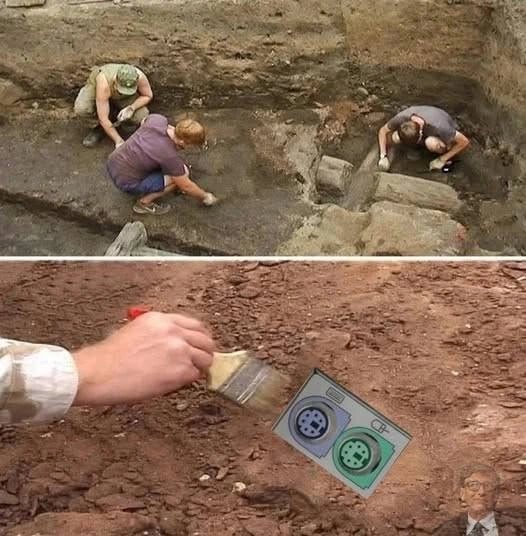
The top panel shows a real archaeological excavation — people kneeling in a dirt pit, scraping centuries of soil off stone foundations. The bottom panel replaces the expected pottery shard with a chunk of an old PC's rear I/O panel:

  • PS/2 ports are the round, 6-pin sockets that keyboards and mice used before USB. One port per device, each a fixed shape and color: purple = keyboard, green = mouse.
  • USB replaced them because one rectangular port could handle any device, could be plugged in while the computer was running ("hot-plugging"), and didn't care which socket you chose.
  • The icons next to each port — a tiny keyboard and a tiny mouse — existed because before the color standard, plugging into the wrong port meant the device simply didn't work until you rebooted.

If you started computing after roughly 2010, you may never have seen these outside a server room. That's the joke's engine: technology you merely stopped seeing gets reclassified, emotionally, as ancient — even though the gap between "everywhere" and "excavation site" was barely fifteen years. Working in tech does this constantly: the build tool you mastered last year is somebody's punchline next year, and the dirt accumulates fast.

Level 3: Stratigraphy of the Beige Era

The bottom panel's photoshopped "artifact" — a purple PS/2 keyboard port and green PS/2 mouse port, complete with their tiny embossed icons, being lovingly brushed free of red dirt — is funnier the more you actually know about the thing being excavated. The PS/2 connector arrived with IBM's Personal System/2 line in 1987, which is also where the name comes from (no, not Sony's console — a fact that has confused at least one generation of juniors). It's a 6-pin mini-DIN carrying a simple synchronous serial protocol, and it ruled desktop input for nearly two decades before USB finished it off.

The color coding itself is a small archaeology lesson. Early PS/2 ports were identical metal rings, and plugging the keyboard into the mouse port — electrically similar, logically incompatible on most boards — produced a machine that booted into silence. The purple/green scheme was standardized in the late-90s PC 97/PC 99 specifications, an initiative pushed by Microsoft to make beige boxes less hostile to humans. Which is precisely why the tiny Bill Gates cameo pasted in the corner of the dig photo is such a good touch: he's the pharaoh whose dynasty's seal is stamped on the artifact. Tutankhamun gets a golden mask; we get color-coded mini-DIN.

The deeper irony the meme trips over — accidentally or not — is that PS/2 isn't entirely dead, and the reasons it survives are deliciously technical. PS/2 keyboards are interrupt-driven rather than polled like USB HID devices, and the interface imposes no rollover limit, so true N-key rollover comes free. No drivers, no USB stack, which is why server boards, BIOS recovery scenarios, and a certain breed of competitive-gaming keyboard purist kept the port alive years past its funeral. The "ancient relic" in the pit would, if wired up, still outperform a cheap USB keyboard in at least one measurable way. Plenty of legacy tech persists like this: not from nostalgia, but because the replacement quietly traded away something the old thing did perfectly.

And of course, the trauma tax: PS/2 was not hot-pluggable. Yank the mouse mid-session and you rebooted, full stop — on some boards you risked a fried keyboard controller fuse. An entire generation learned cable discipline from that single design constraint, the same way archaeologists learn to brush instead of shovel.

Description

A two-panel meme in archaeology-documentary style. Top panel: three archaeologists kneel in a dirt excavation pit, brushing and scraping soil from stone remains. Bottom panel: a close-up of a hand delicately brushing red dirt away to reveal a 'discovered artifact' - a photoshopped panel with the classic purple PS/2 keyboard port and green PS/2 mouse port, each with its tiny icon. A small Bill Gates image is pasted in the bottom-right corner. The joke treats the once-ubiquitous pre-USB PS/2 connectors as ancient relics worthy of an archaeological dig, a nostalgia hit for anyone who remembers color-coded ports and the reboot required when you hot-plugged one

Comments

8
Anonymous ★ Top Pick Carbon dating inconclusive - but the artifact clearly predates hot-plugging, so handle it only after a full reboot
  1. Anonymous ★ Top Pick

    Carbon dating inconclusive - but the artifact clearly predates hot-plugging, so handle it only after a full reboot

  2. dev_meme 4w

    These connectors have some advantages over USB, for example hardware interrupts (the signal is sent to the processor instantly, not through cyclic polling like in USB) and unlimited simultaneous key presses (n-key rollover).

    1. @H3R3T1C 4w

      only some???

  3. @tema3210 4w

    This thing... It can interrupt CPU... Can we use it to bypass vanguard?

  4. @H3R3T1C 4w

    USB is a pulling, of course the chip is who pull, but PS/2 for mouse and keyboard has lower latency in theory

    1. @TarasPushkar24 4w

      main reason im using it today

  5. @Triolo 4w

    Пися пополам

  6. @mohamed_023 4w

    This thing was nasty

Use J and K for navigation