Mission Critical Systems vs. Forced Windows Update
Why is this Microsoft meme funny?
Level 1: The Worst Time to Pause
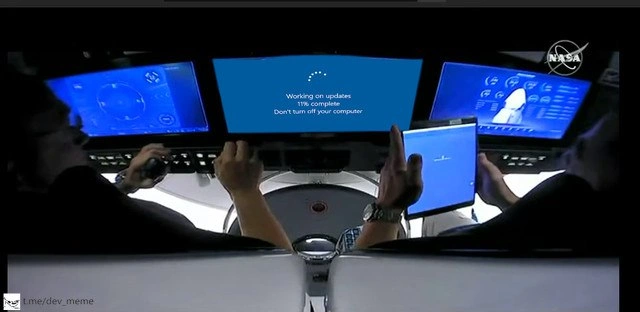
Imagine you’re playing your favorite video game, and you’re just about to beat the final boss after trying so hard. Suddenly, your game console pops up a message: “Installing update, 11% done. Please wait,” and it restarts right at that critical moment. You’d feel shocked and helpless, right? This meme is funny for the same kind of reason, but instead of a video game it’s astronauts in a spaceship. They’re in the middle of something super important—like flying a rocket—and their main screen stops everything to update, showing a loading bar at 11%. It’s like the computer saying, “Hold on, I know you’re busy, but I’m going to take a break to do this update.” The astronauts can’t do anything but wait, and they look pretty worried.
In simple terms, it’s a joke about bad timing. We laugh because it’s obviously a terrible time for a computer to decide to update itself. It’s as if in the middle of a race, the car’s engine decided to stop so it could get a tune-up! Or imagine watching the climax of a movie and the TV suddenly says, “Updating, please wait…” It’s frustrating and absurd. By putting something as mundane as a Windows update in a high-stakes situation like a spacecraft cockpit, the meme makes us think, “Oh no, not now!” and that mix of surprise and recognition is what makes it funny. Even if you don’t know much about computers, you know things shouldn’t just pause when you’re doing something really important. The astronauts’ faces and the big frozen progress bar tell the whole story: sometimes our machines pick the worst possible time to take a break, and all we can do is nervously watch that little percentage number go up.
Level 2: Windows Update Woes
Let’s break down what’s happening in this meme in simpler terms. We have a picture of a spacecraft cockpit – think of it like the front interior of a high-tech airplane where the pilots (astronauts, in this case) have screens showing important information. In the image, there are two astronauts sitting there ready to control the vehicle. Normally, those big screens would show critical data: how the ship is oriented, its speed, navigation info, maybe a video feed, etc. That’s often called telemetry – data about the vehicle’s state. But instead, the center screen (and humorously, even the tablet one astronaut is holding) is showing a bright blue screen with a Windows update message: “Working on updates: 11% complete. Don’t turn off your computer.” In other words, that display has been taken over by the computer’s operating system because it’s installing software updates right now.
Windows is an operating system (OS) – the main software that runs on many PCs, controlling hardware and providing a platform for applications. Windows has a feature called Windows Update that regularly downloads fixes and improvements (especially security patches) from Microsoft and installs them. These updates often require restarting the computer to take effect. In everyday life, you might have seen your laptop or desktop suddenly insist on rebooting to finish installing updates. It usually shows a percentage progress like “11% complete” and warns you not to turn it off. That’s normally a good thing (it keeps the system secure and up-to-date), but it can be very annoying if it happens at an inconvenient time – say, when you really need to use the computer for a presentation, a meeting, or some important work. A lot of people have stories of being in the middle of something important and then, bam, the computer restarts for an update. On a personal device, it’s a frustration. In a business server or production environment, it can cause real downtime (meaning the service is unavailable to users for a period).
Now, imagine that scenario, but in a mission-critical system like a spacecraft. Mission-critical means it’s essential for the mission’s success and safety. A real spacecraft’s computers should not randomly decide to update during a flight! They typically run with carefully tested software versions, and any changes to that software (updates) would be done very deliberately, often only when the craft is on the ground or in a safe state. The joke here is that someone treated the spaceship’s interface like a regular PC that got automatic updates turned on. So mid-flight (perhaps during a launch or docking maneuver), the operating system says “Hold on, I need to update now.” The result shown is the astronauts looking at a useless progress bar instead of flight data. That’s a nightmare scenario: the pilots temporarily lose their primary instrument readouts because the system is busy updating itself.
This meme falls into the category of OnCall_ProductionIssues and ProductionIncidents humor, which is common in IT and developer circles. Those terms refer to real-life situations where a live system (production system) breaks or has issues, and someone on-call (responsible for fixing issues at any time) has to respond. A classic cause of outages (downtime in production) can indeed be a bad update or a reboot at a wrong time. In companies, updates are usually scheduled in maintenance windows (like late at night on weekends) to avoid this exact problem. There’s also a tag FridayDeployments hinting at a related joke: the idea that doing deployments or updates on a Friday is asking for trouble, because if something goes wrong you’ll be working late or on the weekend. Here, the “update” is happening at the worst possible time (the middle of a space mission), which is a bit like doing an update on a Friday evening – it’s when you absolutely don’t want an issue.
Some technical terms explained:
- OperatingSystems (OS): The core software (like Windows, Linux, macOS) that manages the computer’s basic functions and runs other programs. In the meme, Windows is the OS in question.
- Windows Update: A service in Windows OS that updates the system by downloading patches. It often automatically runs unless set otherwise.
- Production: Refers to systems that are live and used in real situations (not just in testing or development). In production, reliability is crucial.
- Downtime: When a system is unavailable or not operational. Here, the spaceship’s main display being down for an update is downtime for the pilots’ interface.
- Mission-critical systems: Systems that have to work correctly for a mission or operation to succeed without disaster. A rocket’s controls are mission-critical (failure is not an option).
- Real-time systems: Computers that must process information and respond within a strict time constraint. Spacecraft controls are usually real-time – they can’t pause for a few minutes and catch up later; they have to keep running continuously to control the vehicle.
The astronauts’ anxious look at that 11% progress bar mirrors how developers or system admins feel when their server is restarting slowly while users are waiting. It’s both funny and horrifying to picture because astronauts are supposed to be dealing with complex space maneuvers, not waiting on a software progress bar! The rightmost screen still shows some NASA application interface (with the NASA logo and data), and the left screen shows some gauges – so it seems only the Windows-based parts hit the update. It suggests that perhaps the central display and the tablet are running a general-purpose OS (like a Windows-based system), while other instruments are separate. In any case, the meme exaggerates reality to make a point: unexpected OS updates can interrupt even the most important operations if you’re not careful. It resonates with any IT professional who has scrambled to stop an update or faced the fallout of one happening at a bad time.
Level 3: Auto-Update Anxiety
For seasoned developers and operations engineers, this image triggers a very specific sense of dread. It combines two familiar worlds: high-stakes production incidents and the infamously ill-timed Windows Update. The centerpiece is that big blue screen proclaiming “Working on updates 11% complete. Don’t turn off your computer.” If you’ve ever been on-call, you might involuntarily shudder: it’s the same vibe as a critical server rebooting for patches in the middle of peak traffic. The meme exaggerates this to a literal life-or-death scenario with astronauts watching their cockpit displays get hijacked by an OS update progress bar. It’s funny because it’s an exaggerated worst-case scenario, but it’s also funny because it taps into real experiences of inconvenient updates and downtime.
Think of the astronauts here as the unlucky operators caught off-guard. They’re in the middle of a mission-critical operation – possibly launch or docking (judging by the intense focus) – and suddenly the primary display they rely on for telemetry and guidance is proclaiming it’ll be out of commission to install patches. It’s absurd, yet every senior engineer knows a version of this story. Maybe it wasn’t a spaceship, but perhaps a production database or a critical web server that decided to auto-restart at 2 PM because someone misconfigured the maintenance window. Maybe it was that conference room PC doing a vital demo that suddenly said “updating…” while everyone waited. These scenarios stick with you. On-call veterans have learned (sometimes the hard way) to disable auto-updates on production machines or carefully schedule them, the same way astronauts meticulously plan every aspect of a mission. The meme hilariously visualizes what happens when that precaution is overlooked: even a multi-million dollar NASA/SpaceX spaceship could be rendered a very expensive brick for a few minutes because “Update Tuesday” came at the wrong time.
The image likely references the real-world SpaceX Crew Dragon cockpit (it has those slick touch screens and the NASA logo). In reality, SpaceX wouldn’t be running consumer Windows 10 on those flight displays – they almost certainly use custom software and would never allow spontaneous updates during flight. But that’s the joke: what if they did? Senior folks recognize the layers of failure implied: lack of an update policy, no failsafe override, and total dependency on a system that can go down for unscheduled maintenance. It’s a satirical worst practice. We jokingly imagine some poor IT admin back at mission control forgetting to check a box that says “Defer updates,” leading to a terrifying production incident at 40,000 feet. It’s akin to deploying new code to a live system during the busiest hour without testing – only here the “system” is a spacecraft and the consequence of downtime is a bit more dire than an angry customer email.
There’s a lot of shared trauma being poked at:
- Downtime at the worst moment: Every engineer has experienced or fears an outage happening exactly when it’s most damaging (Friday nights, during big demos, Black Friday for e-commerce, etc.). The meme ups the ante: during a space launch.
- Systems outside our control: With cloud and OS vendors auto-patching, sometimes your own system decides to reboot on its own. That loss of control terrifies ops folks. In the meme, even the astronaut’s tablet is stuck on the update screen – meaning every interface they had went down in sync. It’s the ultimate “not like this…” moment.
- The progress bar anxiety: That 11% progress bar with “don’t turn off” is comically slow and non-negotiable. It captures that helpless feeling: you can’t do anything but watch and pray it boots back up. In a real production outage, this is like waiting for a critical server to come back online while every second feels like an eternity. The astronauts’ body language (hands on controls but effectively idle) says it all.
For those who manage systems, the meme is a sly reminder: always configure your critical systems with maintenance in mind. It nudges us with gallows humor—imagine losing a spaceship because of a forced update! Senior devs know to use tools and settings to prevent this: setting up Active Hours in Windows, using the Pro/Enterprise editions that allow scheduling reboots, or on servers, maybe using a WSUS (Windows Server Update Services) to push patches only in approved time slots. The astronauts’ plight is basically the nightmare version of a dev’s Friday deployment gone wrong or an on-call engineer’s 3 AM emergency: downtime you can’t easily end. So, while we laugh, we also nod knowingly and double-check that our own “cockpit screens” (servers) aren’t going to surprise us at a critical moment. It’s humorous validation of why best practices (like planned maintenance windows and redundant systems) exist. After all, nobody wants to be the person explaining, “Sorry, our service/rocket was down because an update decided to kick in.”
Level 4: Preempting Mission Control
At the deepest technical level, this meme underscores a clash between real-time system requirements and a general-purpose operating system’s update mechanism. In a spacecraft, critical control software usually runs on a specialized real-time operating system (RTOS) or highly deterministic code. Such systems guarantee that tasks like reading sensor data or adjusting engine thrust happen on a strict schedule (say, every 10ms) with minimal jitter. They are designed to preempt or postpone any non-essential work during mission-critical operations. The humor here is that Windows, a general-purpose OS, doesn’t provide hard real-time guarantees—especially not when its Windows Update process decides it’s time to patch the system.
In a mission-critical context (like a rocket’s guidance computer or a cockpit display), an unexpected interruption of even a few seconds can break control loops, causing anything from minor telemetry gaps to catastrophic failures. Real spacecraft flight software is tested and locked down before launch; updates (if absolutely needed) are applied in carefully planned maintenance windows or not until the mission is over. By contrast, consumer OS updates follow policies oblivious to external events—they might queue up and suddenly start installing whenever the system deems it’s been too long since the last patch, unless an administrator has configured deferrals.
Under the hood, Windows Update is essentially a scheduler of its own—it runs a service that downloads patches and sets a timer for a reboot. It’s a preemptive multitasking OS, meaning the scheduler can interrupt running processes to give each their share of CPU time. However, when installing updates or rebooting, Windows isn’t politely time-slicing your mission-critical task; it’s literally taking over the machine for maintenance. This works as intended on a normal PC (security updates are important, after all), but it’s the antithesis of what’s acceptable in a life-critical system. A hard real-time system would treat an impromptu reboot as a unacceptable failure mode. In theoretical terms, imagine modeling the spacecraft’s control loop as a real-time task with a deadline. A surprise OS update violates the deadline, something akin to a critical section being interrupted by a higher-priority thread (here, the updater) that never yielded. It’s a textbook example of what not to allow in safety-critical software design.
NASA and space industry engineers mitigate such risks by using redundant computers and specialized OS kernels. For instance, spacecraft commonly have multiple flight computers running in parallel; if one reboots or hangs, others can take over (usually via voting algorithms to decide which one is faulty). They don’t rely on a single commercial OS to run the whole show without oversight. In fact, historically NASA’s crew vehicles and rovers run on systems like VxWorks, QNX, or custom in-house software — all environments where updates are manually vetted and timed, not pushed automatically from the internet. The image of a Windows “Working on updates… 11% complete” screen in a cockpit is funny because it’s a theoretical absurdity: it visualizes a fundamental design failure (allowing an unplanned OS service interruption) that real aerospace software avoids by design. It’s the kind of scenario that gives systems engineers nightmares and PhD students fodder for research on formal verification of scheduling. Essentially, the meme is a dark joke about how a non-real-time, consumer-grade OS would be horrendously out-of-place in a domain requiring absolute predictability. It’s a reminder (in hyperbolic form) that systems fail if one doesn’t account for low-level behavior like OS updates. The laws of computer science (and Murphy’s Law) dictate that if an update process can preempt your critical task, it will do so at the worst possible moment — even T-minus 10 seconds to liftoff.
Description
This is a photoshopped meme showing the interior cockpit of what appears to be a modern spacecraft, likely the SpaceX Crew Dragon, with two astronauts at the controls. The main central display, which should be showing critical flight information, is instead displaying a classic blue Windows update screen. The screen reads: 'Working on updates 11% complete Don't turn off your computer', complete with the circular progress indicator. The NASA logo is visible in the upper right corner. The humor comes from the juxtaposition of a highly advanced, mission-critical environment like a NASA space mission with the mundane, frustrating, and often poorly-timed reality of a forced Windows update, a common pain point for millions of computer users. It satirizes the idea of using consumer-grade operating systems for critical infrastructure where uptime and control are paramount

Comments
7Comment deleted
They say in space, no one can hear you scream. They've clearly never been in a cockpit during a forced update when you're trying to dock with the ISS
Years of deterministic avionics and formal verification, and the single point of failure is WSUS deciding it’s Patch Tuesday at 28,000 km/h
After 20 years in tech, I've learned that Windows Update has the same timing algorithm as a production incident - it waits for maximum criticality. At least in space, no one can hear you scream at Group Policy
When your Windows Update Group Policy is configured by someone who's never heard of maintenance windows, and now you're explaining to Houston why the ISS telemetry went dark at 19% complete. This is why mission-critical systems run on hardened Linux distros with kernel updates scheduled during crew sleep cycles - not consumer OSes that treat 'Don't turn off your computer' as a suggestion during orbital maneuvers. The real joke? Somewhere, a sysadmin is frantically trying to explain why WSUS wasn't configured to defer feature updates on the spacecraft control systems
Zero-downtime deployment? Try rolling updates at Mach 25 with no eject button
When CAB marks the OS patch “low risk” and WSUS misses the maintenance window, your launch checklist turns into a progress bar - SLOs breached at 11% complete
“Zero-downtime rollout,” they promised - then the flight deck popped “Working on updates (17%).” Cool, our canary release now wears a spacesuit